 KitGuru KitGuru.net – Tech News | Hardware News | Hardware Reviews | IOS | Mobile | Gaming | Graphics Cards


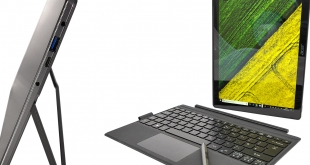
If you’re reading KitGuru, chances are you’re familiar with the Microsoft Surface Pro. While it was by no means the first tablet/laptop hybrid to run the Redmond company’s own OS, one might go so far as to say that it has done for the Windows convertible what the iPhone did for mobile phones. As such, it has spawned a host of imitators which have emulated the tablet, keyboard cover and pen formula with varying degrees of success. Acer enters this fray with its snazzily-named Switch 5, which sits below the yet-to-be-launched Switch 7 flagship in both specs and price but matches up quite nicely to the reigning Surface Pro 2017.
At first glance the Acer Switch 5 (in our case UK model number SW512-52-58Q4) is a very interesting proposition. Like most Surface Pro competitors, the tablet comes bundled with both its backlit keyboard cover and metal active stylus in the box, whereas Microsoft’s hybrid charges you a considerable additional chunk of change for each.
Base specs are also pretty decent with a 12in 2160 x 1440 IPS touch display, passively-cooled – look Ma, no fans! – dual-core seventh-gen Core i5 CPU plus integrated Intel graphics, 8GB of RAM, and a 256GB SSD, which makes many rivals’ 128GB standard storage offerings seem a tad stingy in comparison.
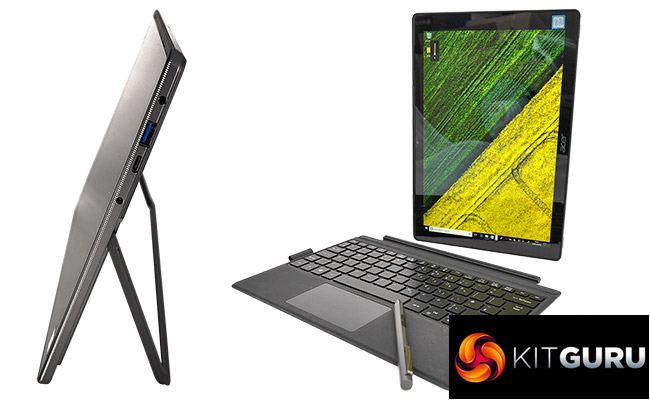
Even connectivity is decent and arguably superior to Microsoft’s premium Windows tablet, as the USB-C 3.1 port found next to the Switch 5’s standard USB-A 3.0 connector is a tad more flexible than the DisplayPort video output adorning the Surface Pro. All of this is crammed into a neat metal and plastic package that remains below 1kg in weight, though adding the keyboard and power supply does take that closer to 1.5kg than we would like.
However, considering the whole bundle can be yours for under £900, compared to around £1,200 for an equivalently-specced Surface 2017 tablet (not forgetting the extra £240 for its pen and keyboard) and with this Switch’s fanless nature meaning there’s no hot air blowing around and no distracting operating noise, we’re willing to forgive a little more strain on the wrist or shoulder.
The question, of course, is whether Acer’s weighty little contestant has what it takes to compete in every other department despite its modest price tag.
Acer Switch 5 Specs
- OS: Windows 10 Home 64-bit
- CPU: Intel Core i5 7200U (7th gen), dual-core (quad-core with HT), 2.5-3.1GHz, 3MB cache, 15W TDP, socket 1356
- Memory (installed / supported): 8GB / 8GB DDR4
- Storage (main): 256GB SSD (Intel)
- Storage (secondary): N/A
- Graphics card (integrated): Intel HD 620
- Graphics card (dedicated): N/A
- Display (size, resolution, Hz, Type): 12.0″, 2160 x 1440 (3:2), 60Hz, IPS
- Touch support: yes
- Stylus support: yes
- Keyboard type, design, backlit: membrane, chiclet, backlit
- Connectivity (wireless): Wi-Fi 802.11 AC, Bluetooth V4.1
- Connectivity (physical)
- Audio: 1 x headphone/microphone 3.5mm jack
- Data: 1 x USB 3.1 (Gen 1) Type-C, 1 x USB-A 3.0
- Network: N/A (through USB adapter, not supplied)
- Video: 1 x mini DP 1.2 over USB 3.1 (Gen 1) Type-C
- Card: MicroSD
- Optical drive: no
- Webcam: yes, HD
- Rear Camera: yes, 8MP
- Speakers: 2x 1W
- Dimensions (WxDxH): 292 x 201 x 9.7 (with keyboard cover 16) mm
- Weight: 929g (tablet), 391g (keyboard), 1.32kg (both), 1.46kg (both with PSU)
- Battery: integrated, 39Wh
- Warranty: 24 months (EU)
Price: £898 inc. VAT at time of review
Acer Switch 5 Packaging
Acer has presented its Switch 5 quite nicely with a stylish photo on the box that compliments the device and keyboard’s gunmetal and grey finishes against a brooding background combining storm clouds and cement. However, on the inside its plain brown cardboard packaging cannot live up to the kind of elegance we’ve become used to from the likes of Apple, Samsung or Microsoft.
At the same time it’s worth pointing out that the device itself is packaged securely and, when all’s said and done, that’s all that really matters. We would rather that more budget is spent on the hardware than its wrappings any day, or that even a small saving can be passed on to the consumer.
Acer Switch 5 Build, Design and Ergonomics
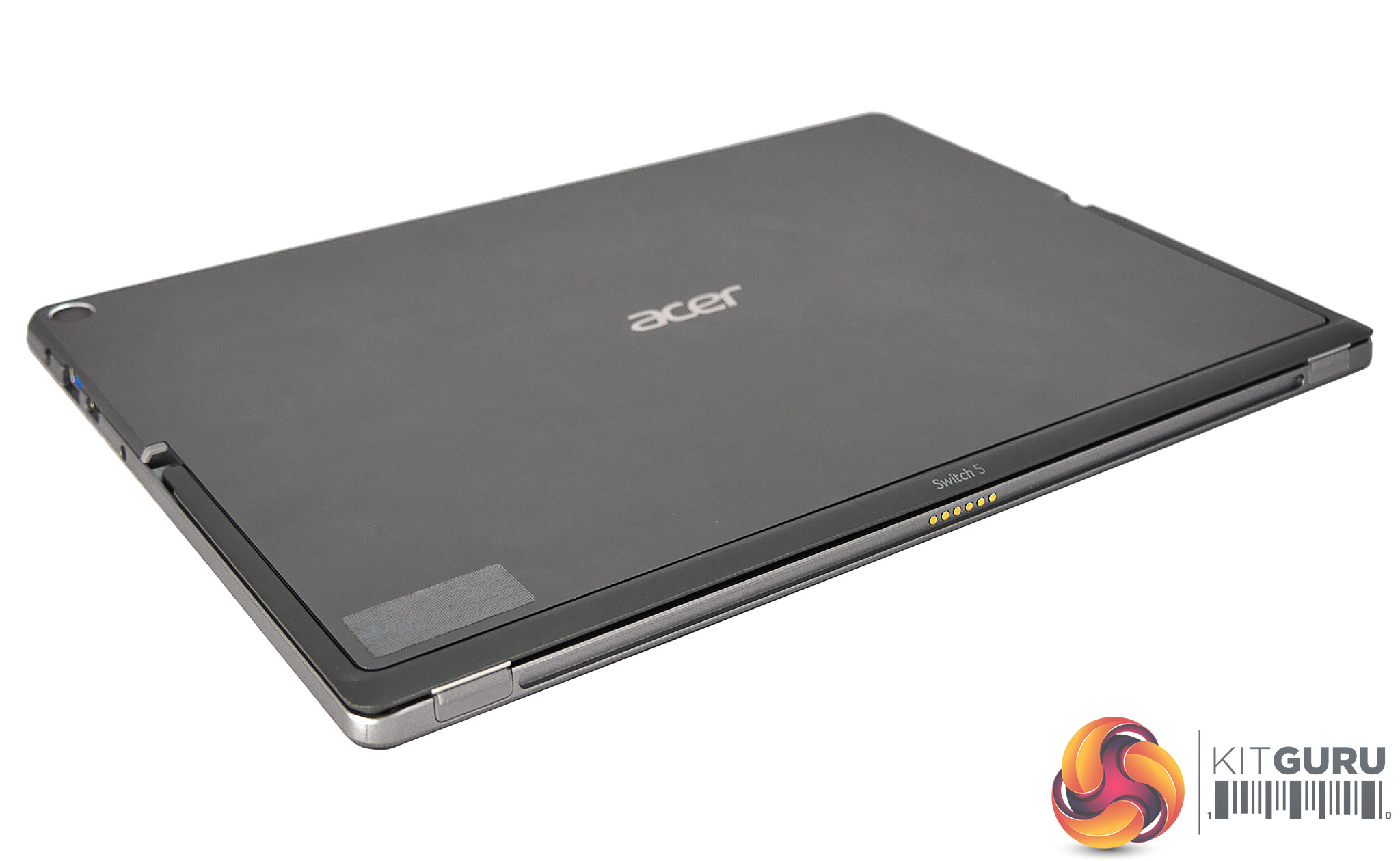
As with most tablets these days, the front of the Acer Switch 5 is mostly glass, with a very narrow outer bezel that somewhat disguises the front-facing stereo speakers. Around its sides this Swift has a section of unusual serrated frame, which may provide a little extra grip in some scenarios but visually is very much a matter of taste; we’re not the biggest fans.
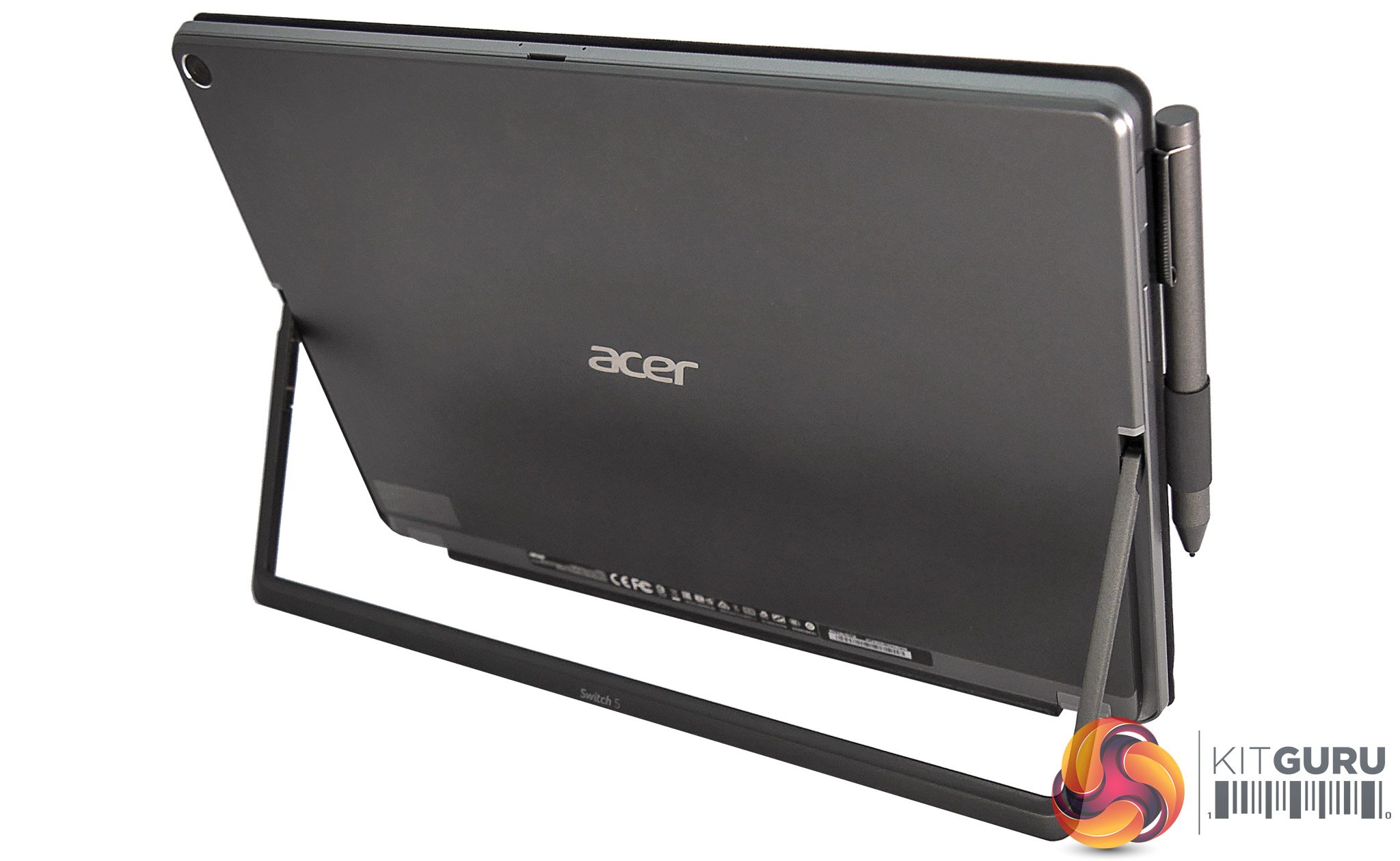
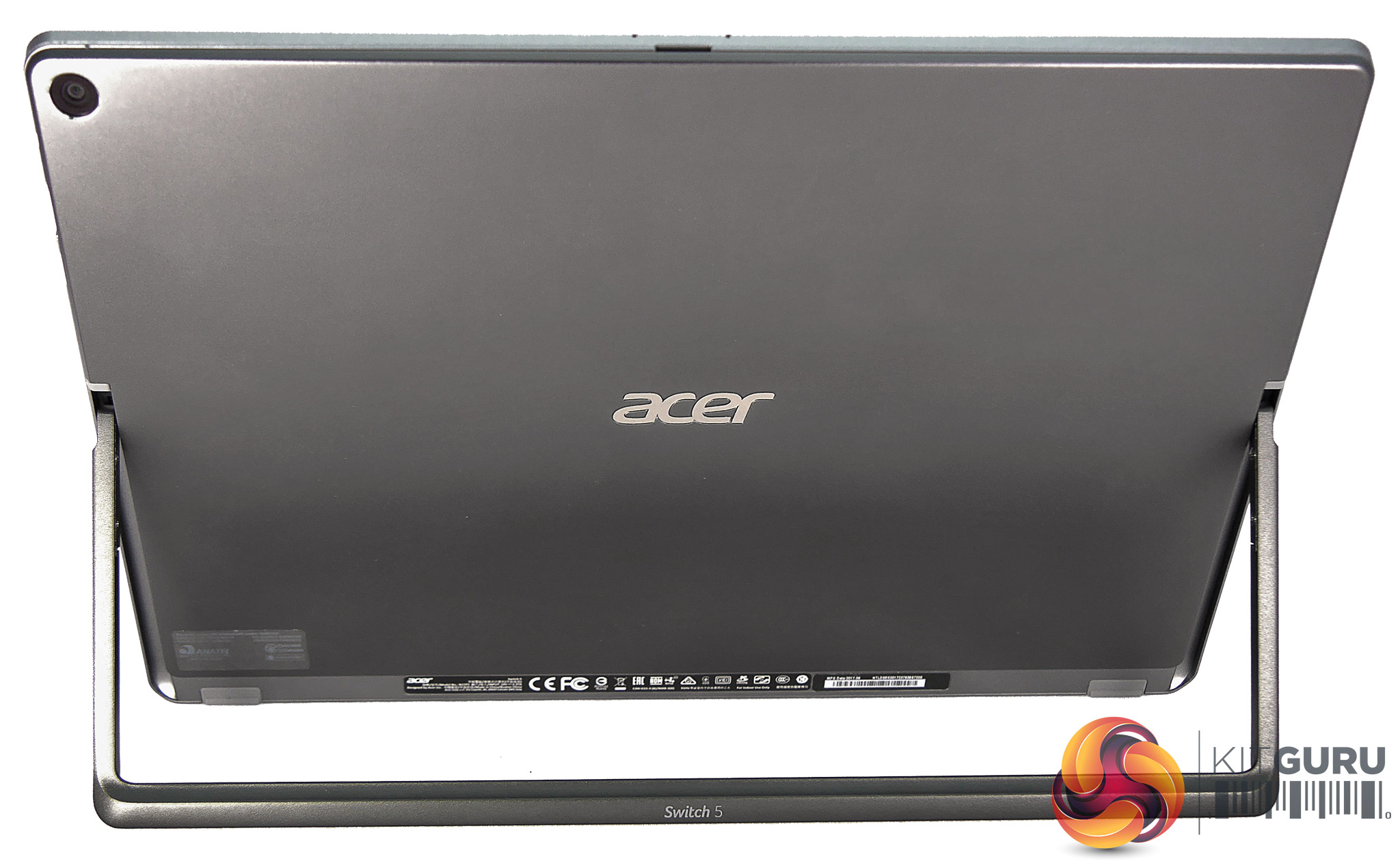
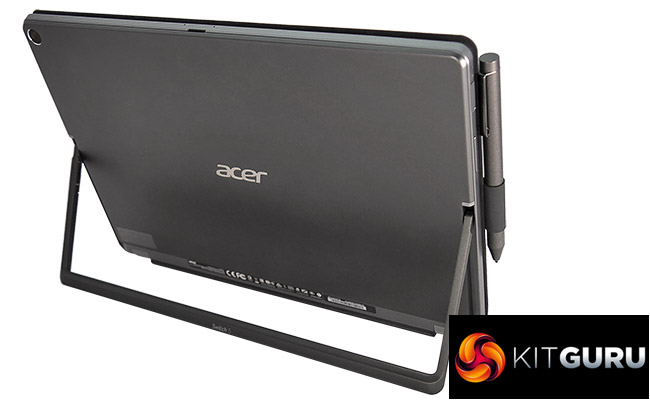
The sides and the rear are mostly covered with what appears to be a relatively soft aluminium, but the impressively solid kickstand suggests Acer has used more durable materials where it counts. Overall the Switch 5 feels very solid too, with no flex or creak whatsoever. The gunmetal-coloured rear is unbroken save by that kickstand, the silver Acer logo and the recessed rear webcam, with most of the unsightly labels and model information nicely hidden under the stand itself.
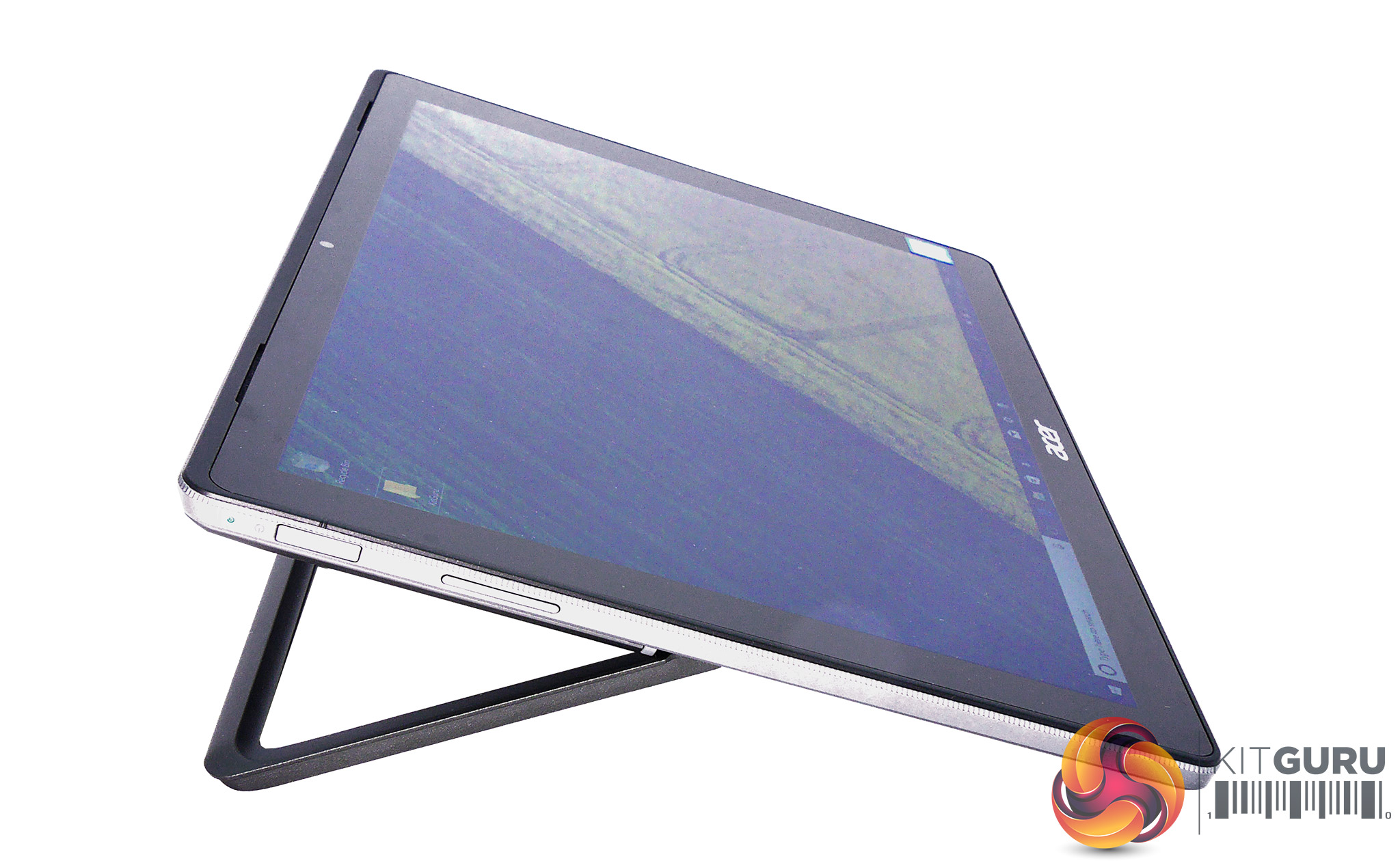
The Switch 5 tablet measures 29.2cm long by 20.1cm high, with an average width of 9.7mm thickening to 12.5mm at its base due to the kickstand. At 929g it’s also slightly heavier than most, while its keyboard cover adds 391g for a considerable overall weight of 1.32kg (1.46kg if you also include the power brick).
When it comes to ergonomics the rounded edges of the Switch make it generally comfortable to hold, though with its kickstand extended there appear some uncomfortably sharp edges on both the tablet’s lower half and inside of the Switch 5’s stand. Admittedly you’re unlikely to grip there in most scenarios, but the devil’s in the details after all.

Generous rubber ‘feet’ at the tablet’s bottom edge mean it’s unlikely to damage any surface you use it on with its stand in; however, the same can’t be said for the ‘feet’ on the stand itself, and we would have liked to have seen that stand’s rubberized sections extend to cover its whole base area for better protection of work surfaces and increased comfort on the lap, as again it can be a tad edgy (and we don’t mean in a cool way).
When initially extended, the stand snaps into its default position to angle the screen to around 70°, which is enough to provide a stable viewing experience on a steady, flat surface. If you desire a greater incline or wish to use the device on your lap, the sprung kickstand extends a lot further, similar to a Surface Pro. It just doesn’t go quite as flat, with a maximum of 20° which is nonetheless a nice angle for some digital artwork.
Overall then Acer’s system works well most of the time, but do note that the stand doesn’t stay in position when adjusting on the lap and instead attempts to spring back into default, which can be a minor inconvenience.
Acer Switch 5 Connectivity
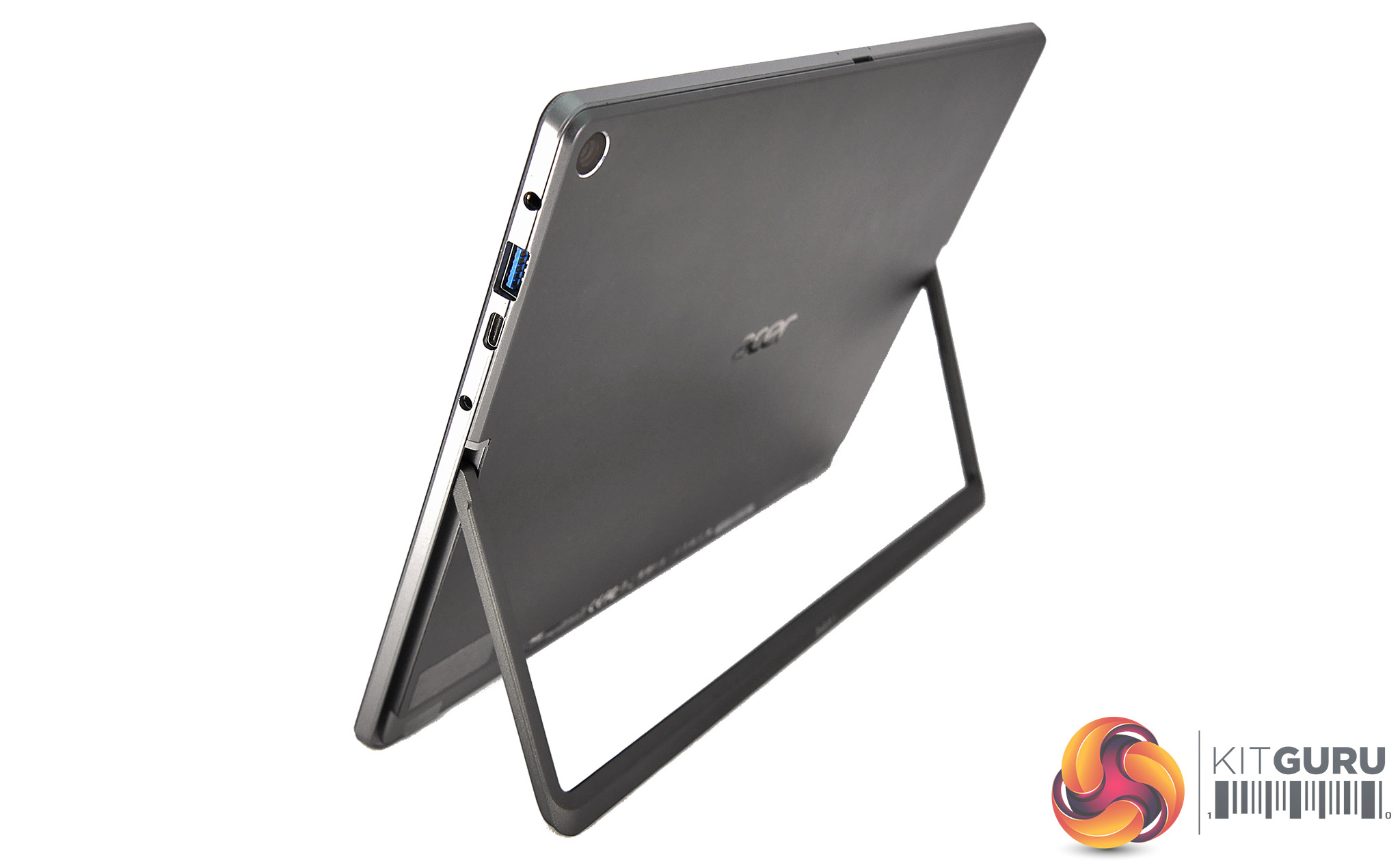
Unfortunately, many Surface Pro competitors follow its lead in providing an absolute minimum of connectivity, a casualty of the relentless drive for thinner and sleeker designs. The Acer Switch 5 doesn’t deviate from this template too much, and crams its few ports onto the right-hand side of the tablet.
From top to bottom, here you’ll find a 3.5mm headphone/microphone jack, full-size USB 3.0 port, USB Type-C 3.1 connector, and circular charging port. We would have preferred a little more space between the data ports, as you won’t be able to fit ‘fatter’ memory sticks in both simultaneously.
A lone MicroSD card slot can be found at the tablet’s top. While this does make it very easy to access it’s always exposed, meaning dirt and grime could potentially get into the slot. Pro tip: get a small-capacity placeholder card for a few quid if you don’t use this slot too often, as this will keep the dust out and look better too.
If we have any more serious complaints of the Switch 5’s connectivity, it’s that the USB Type-C port doesn’t support Thunderbolt 3. Mind you, Acer is hardly alone in this failing, and even Microsoft’s far more expensive and recent Surface Book 2 does not support this option. However, we cannot emphasize enough how important it is for all laptops and Windows tablets to support full charging, Alt Mode DisplayPort and Thunderbolt 3 over USB Type-C. Not only does this allow for universal charging plugs and cool accessories like an external GPU box, but it will also cut down considerably on potential customer confusion.
At least Acer has added support for the former two bits of this triumvirate, meaning the Type-C port doubles as a DisplayPort video output and, or so the company tells us, can also be used to charge the tablet. We’re qualifying this because, in our testing with two different USB Type-C charger and cable combos, we could not get the Switch 5’s battery to charge at all.
Acer Switch 5 Keyboard Cover and Touchpad
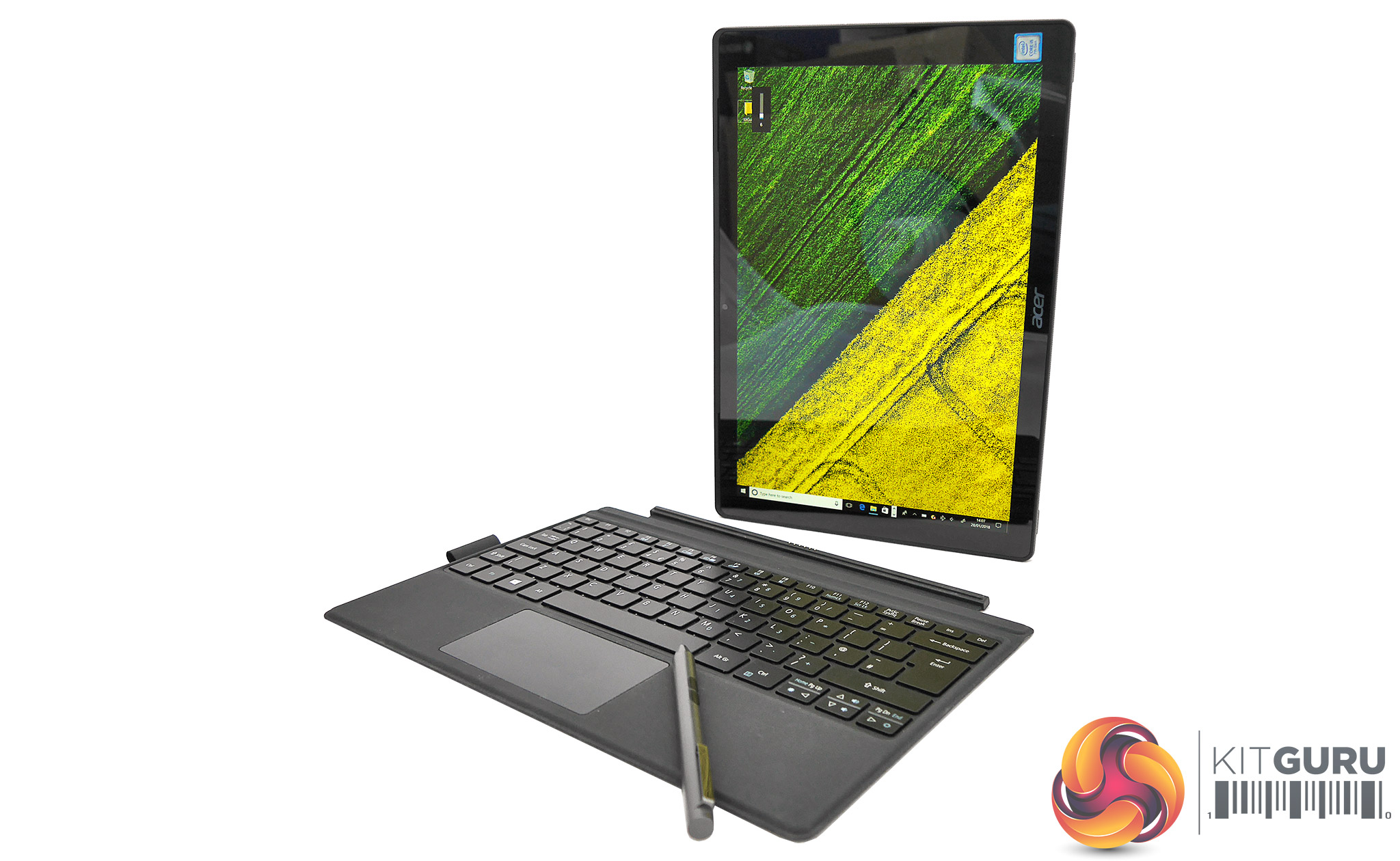
We applaud Acer for providing a keyboard cover in the box, which really should be standard on every Windows convertible tablet (hear that, Microsoft? At least do a discounted bundle for every Surface Pro model. Pretty please?). Speaking of Surface, if you’re familiar with its keyboard then Acer’s solution works in a similar fashion, with the cover simply clicking into a magnetic smart connection on the Switch 5’s base.
This connection is easily strong enough to lift the keyboard securely using the tablet – and even vice versa as long as you don’t shake it, though that’s obviously not something we would ever recommend.
Like most keyboard covers for Windows convertible tablets these days, Acer’s offering can either be used in its ‘default’ flat position, or can be raised and magnetically attached to the Switch 5’s bottom bezel for angled, supposedly more comfortable typing. We say supposedly because a proper ergonomic keyboard should actually be raised at the front rather than the rear giving a negative incline.
Unfortunately, most manufacturers (including Microsoft, which with its Natural Ergonomic Keyboard 4000 was one of the few to get it so very right on the desktop) seem to have decided on the opposite, which is not healthy for your wrists at all. So our advice if you’re a touch typist? Leave it flat where possible.
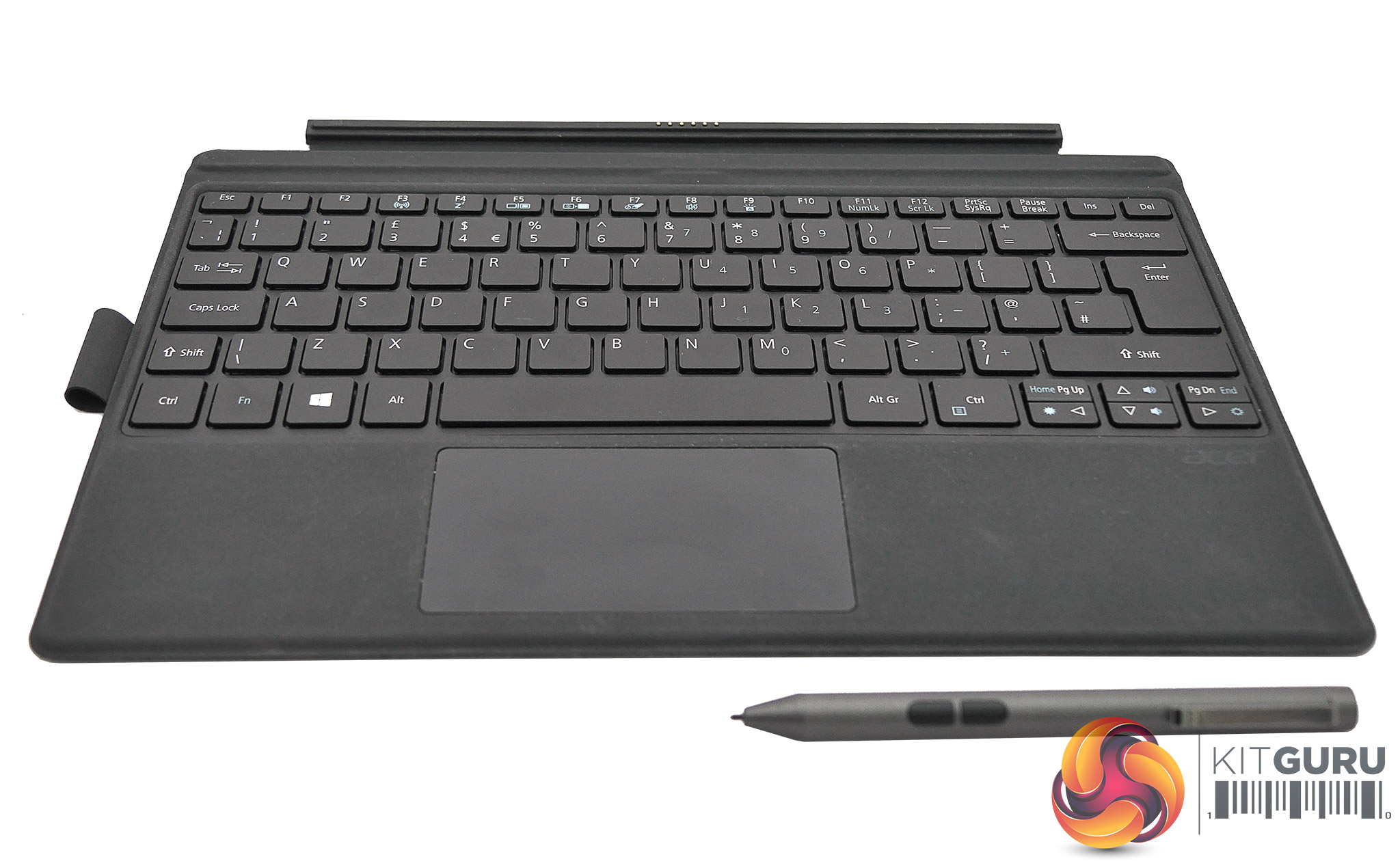
The Switch 5’s keyboard has a good layout, with a full-size UK-style Enter key and extended-length right-shift key, and truly excellent arrangement of secondary functions which are mapped logically. Keys are full-size with adequate spacing and a decent amount of travel as these kinds of covers go, with the bonus of being quite quiet so you won’t annoy your fellow commuters when working on the bus, train or aeroplane.
Acer has also added some nice white backlighting which is by no means a given for these kinds of products, and makes hunting for keys in the dark superfluous. Yay. The wrist-rest areas, meanwhile, are finished in a soft-touch material that supports your palms very pleasantly.
Typing on the lap is perfectly possible, with the cover providing adequate rigidity so that there’s usually not too much flex to distract you. However, when typing at a less than ideal angle the keys’ finish did feel a little slippery, and we wish there was a slight concave shape to them – à la Lenovo’s keys on its ThinkPad convertibles.
The only other potential issue we encountered with the keyboard was that the pen-loop had been pre-attached on our sample, and it raised the cover slightly on one side which led to an unstable typing experience on any flat surface. It’s a bit of an oversight on Acer’s part to not provide an indent for this.
So if the loop doesn’t come pre-installed, be careful not to attach it in a way that can compromise your nice keyboard cover – or better yet attach the loop to the tablet, so that you can carry the stylus without requiring the cover at all.
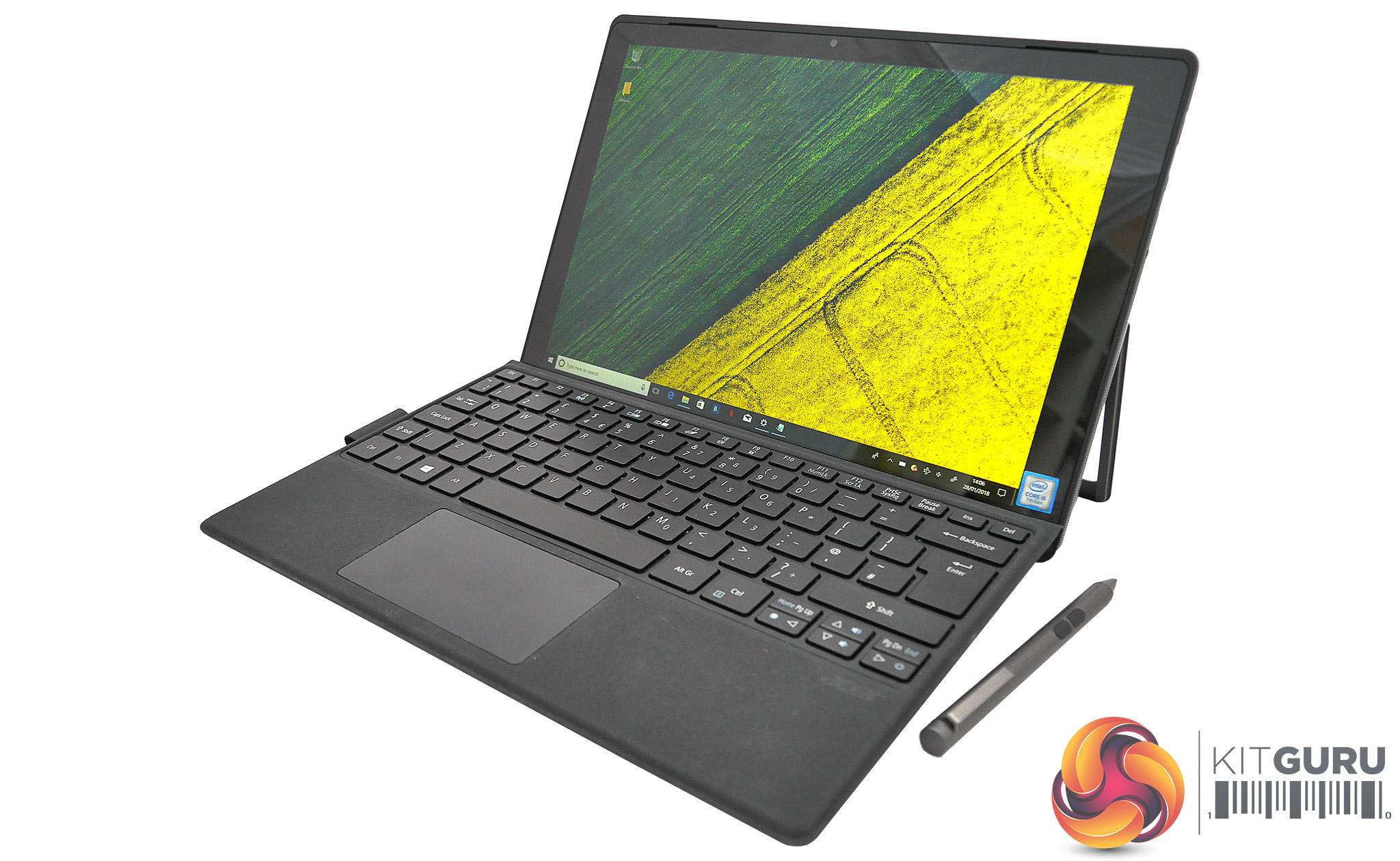
Getting to the cover’s touchpad, it’s a slightly inset affair with a smooth surface of around 9.5 x 5.5cm that lets your fingers glide where they want to go very nicely. It also offers a well-defined – if slightly noisy – right and left click, and works pretty well. While it’s solidly beaten by the glass-covered premium pads on the latest and greatest Surface Pro Signature Type Covers, keep in mind that these alone will set you back around £150.
Acer Switch 5 Stylus
The Acer Stylus ASA630, to give it its full name, is an active pen that runs off a single AAAA battery. Obviously that’s a disadvantage when compared to passive styli like Wacom’s Intuos models or Samsung’s S Pen, both of which are based on Wacom’s EMR (electromagnetic resonance) tech and thus never need charging.
But to be fair most digital stylus alternatives these days are of the active variety and a fresh battery generally tends to last a year or more depending on usage. It’s also worth noting that, while a few years ago rechargeable AAAA batteries were like hen’s teeth, they’re now starting to become widely available. So active styli don’t have to be so environmentally unfriendly anymore.
According to Acer its ASA630 will work with most of the company’s recent convertible models, including the Switch 3 and Spin 5. Incidentally it also works just fine on a Surface, suggesting that Acer has opted for the same N-Trig tech powering Microsoft’s devices.
That’s a good step up for Acer, which previously used ‘lesser’ pen technologies from the likes of Synaptics. The ASA630 is made of metal meaning there’s a reassuring weight to it in the hand and build quality is superb. While its shape is cylindrical, the metal clip at the top prevents it rolling off slanted surfaces too easily (yes we’re looking at you, Apple Pencil).
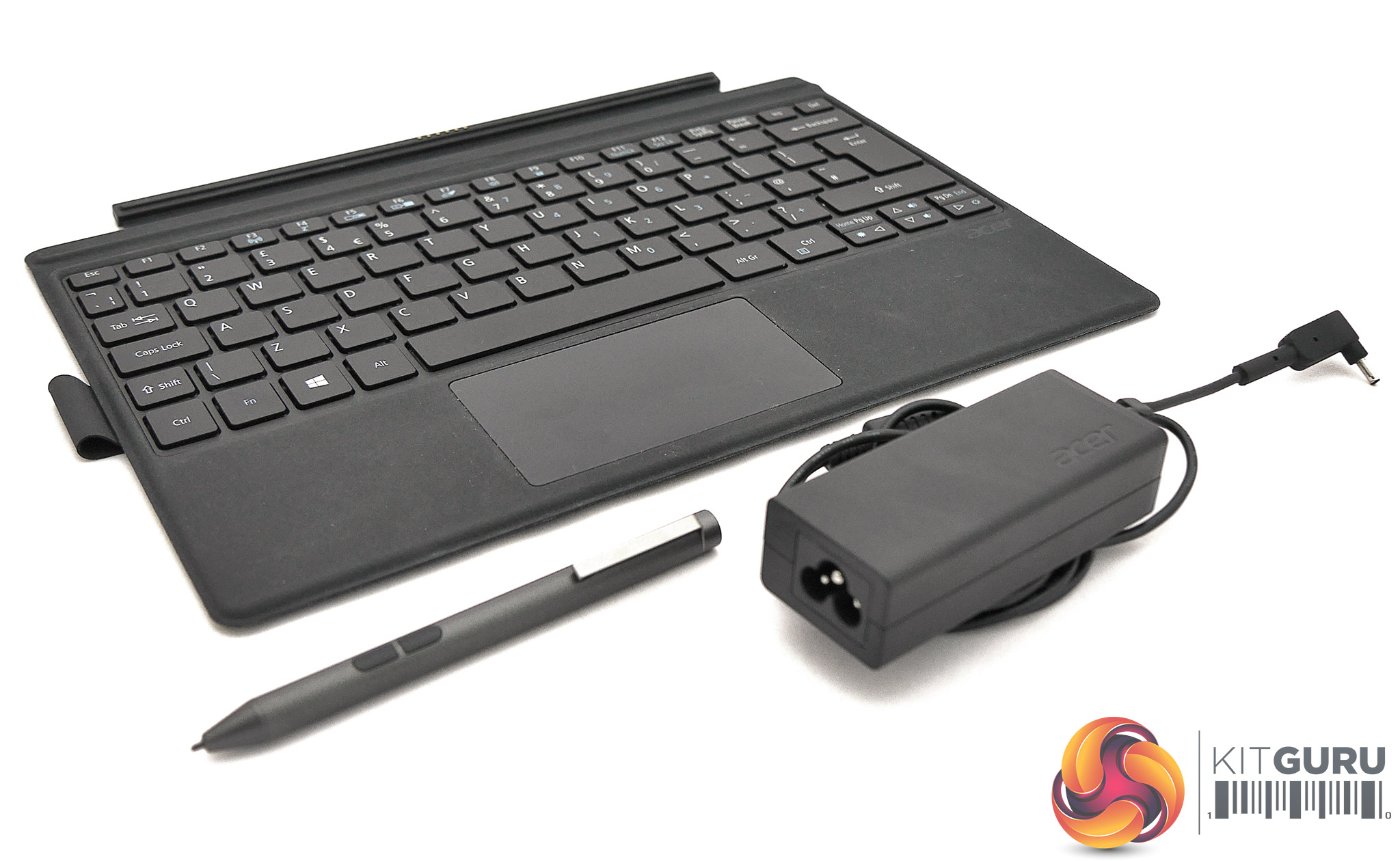
In terms of measurements, Acer’s stylus is around 13cm long with a barrel diameter of 10mm and a weight of 18g. Compared to a Microsoft Surface Pen it’s a little thicker but shorter. The nib looks and feels pretty much identical on both of these styli (again suggesting they share N-Trig heritage), and has a diameter of around 1.6mm. One spare nib is included. Acer’s pen doesn’t have an eraser on top, but does offer two buttons which are clearly visible and don’t get in the way too often.
The two areas where the ASA630 lags notably behind many recent competitors is its relatively sparse 1,024 levels of pressure sensitivity, compared to for example 4,096 on the latest Surface Pen, and the lack of any tilt recognition. While note takers are unlikely to miss either feature, these limitations are worth keeping in mind for more artistic types. On the topic of art, pen lag is present but not to a bothersome level, and there’s a little of the jitter on slow lines that seems to be endemic to N-Trig’s pen tech.
One last niggle is that There’s no magnetic attachment to the Switch 5 tablet, and the only provided storage is the aforementioned fabric pen loop that’s presumably designed to be stuck permanently to the base of the keyboard cover. This obviously means keeping the stylus with the tablet when you’re not carrying the keyboard can be a bit challenging (ah for the days when devices all had integrated stylus silos!).
Acer Switch 5 Power Delivery and Consumption
It’s a pity that in this day and age most convertible Windows tablets still come with big chunky power bricks, but until USB Type-C charging becomes the universal default, we’re stuck with them for a while longer. At least this particular example is on the modest side, measuring 10 x 3.8 x 3 cm, and weighing in at 140g. Its own cable is fairly generous at 1.5m, and this can be extended as the PSU takes a standard clover-type power cable.
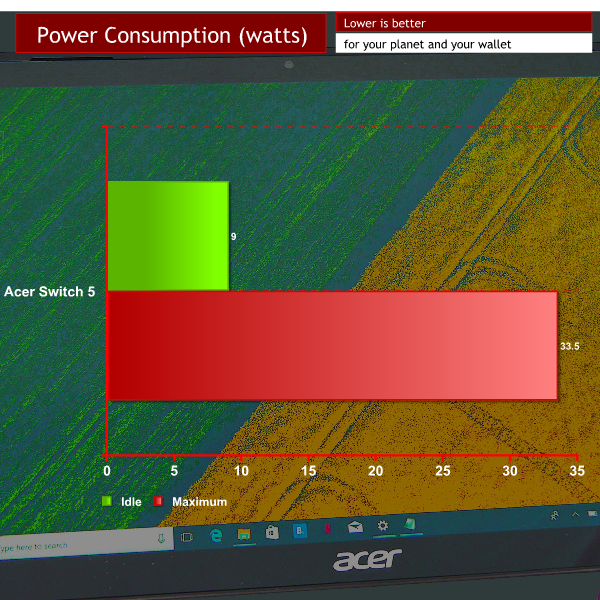
At idle Acer’s little beast sips only around 9W, while maxing out the screen brightness and processing load pumps this up to a still very frugal 33.5W. That means both your wallet and the environment will get along fine with this tablet.
Acer Switch 5 Screen
Thankfully, wide viewing angle and high-DPI displays have become the norm among premium Windows convertibles, and Acer’s Switch 5 is no exception. As mentioned, it’s a 12.0in IPS (In-Plane switching) panel with a resolution of 2,160 x 1,440, 3:2 aspect ratio and standard 60Hz refresh – which incidentally is identical in specs to the screen found on the Surface Pro 3, but falls short of the slightly larger and higher-res Surface Pro 4 and SP 2017 screens.
When it comes to assessing and measuring the performance of any display – and especially LCD-backlit types – please do keep in mind that the results should only be used as a guideline: not only is every panel different to some extent, but a number of other factors can affect measurements too.
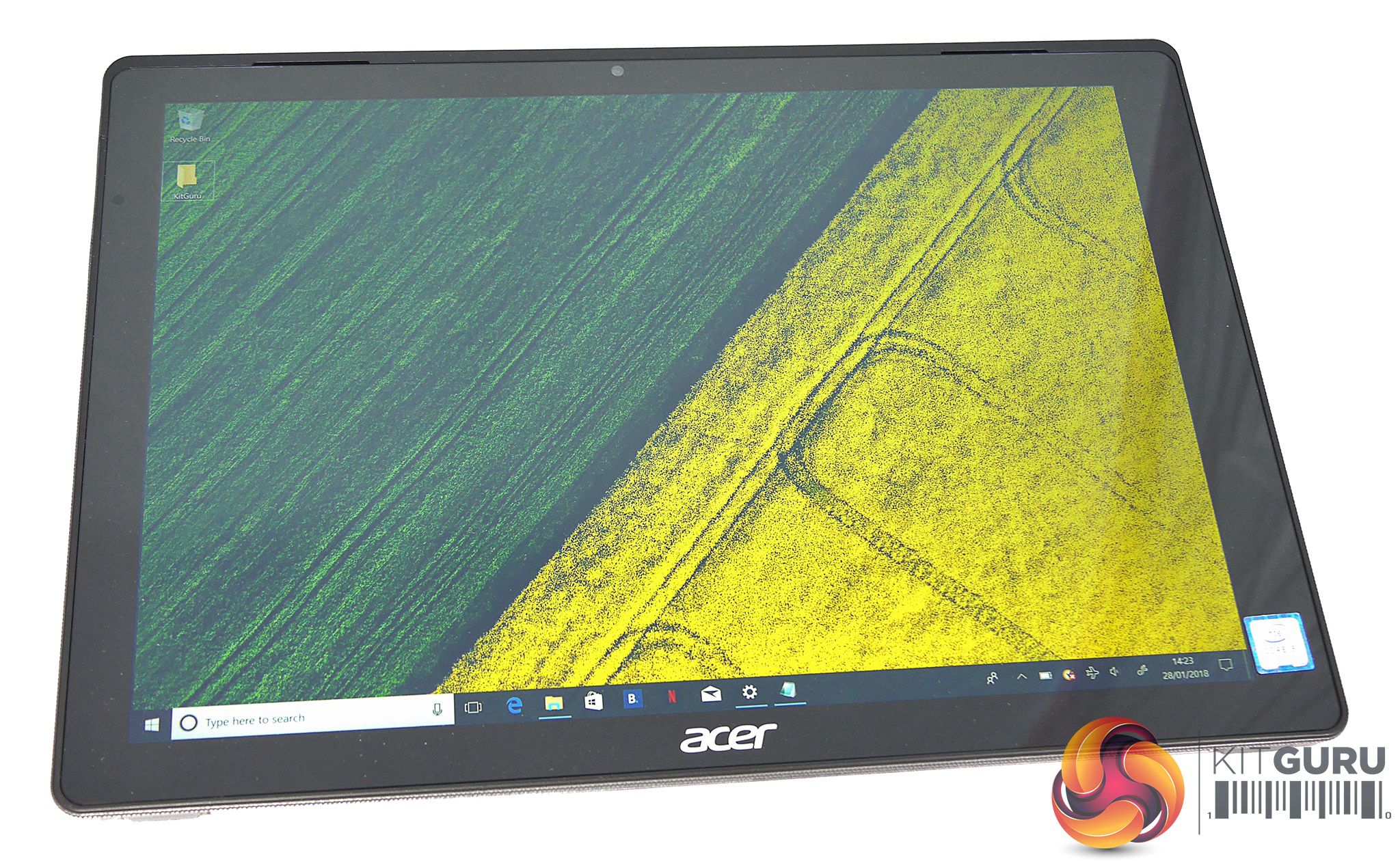
Subjective impressions are good overall, though this screen doesn’t seem to be top of its class. Viewing angles are pretty decent as you would expect from an IPS panel, with limited contrast shift and noticeable colour shift only at extreme angles. The glass finish helps lend colours that extra bit of pop but is also highly reflective. Combined with relatively low maximum brightness of 345cd/m2 (a measure of brightness also known as nits), this can make the Acer Switch 5 a less than ideal candidate for working outdoors on sunny days.
At the same time, we appreciate the Acer Switch 5 display’s low minimum luminance level of 0.025cd/m2(giving a maximum luminance of around 21 nits), which should make for fairly strain-free viewing in dimly lit or dark environments. And while backlighting was not perfectly even, at least there was only the barest whisper of backlight bleed which shouldn’t prove too distracting for movies, and no other artefacts or defective pixels. Last on this Acer’s good point list, gamma was only a bit off from the 2.2 ideal at 1.9.
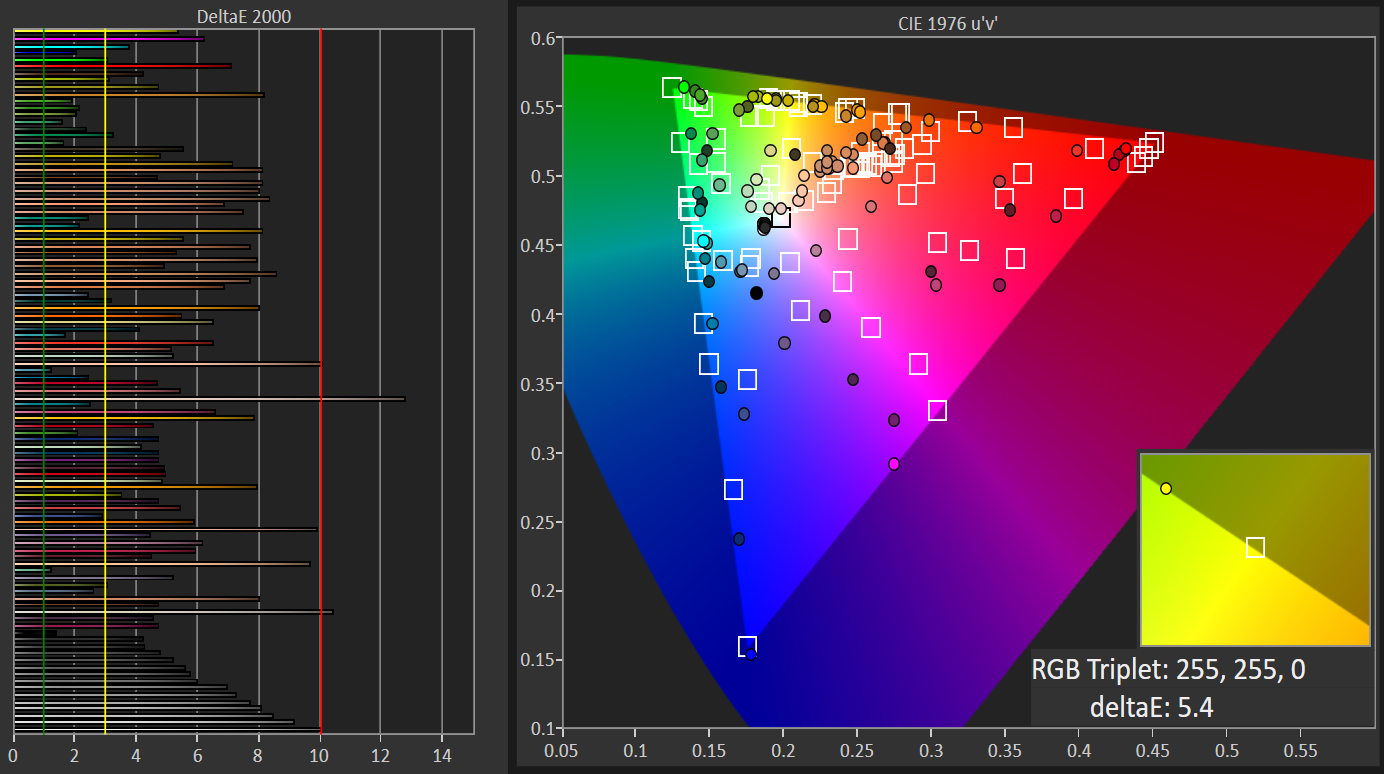
Unfortunately, after that this panel’s performance failed to make for an enticing proposition for the graphically inclined. Contrast was a somewhat low 889:1, especially comparing to figures well over 1100:1 for Microsoft’s latest entrants, which left blacks a little greyish at any decent brightness setting. We measured colour temperature at around 7679k, alarmingly far from the 6500k ‘daylight’ ideal.
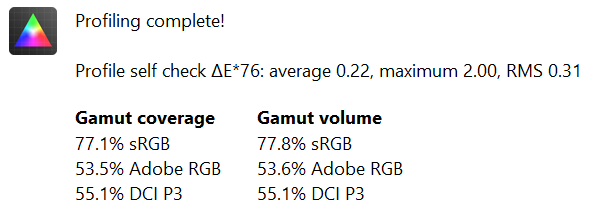
sRGB coverage also fell well short of the kind of numbers we’re used to seeing from premium technology devices these days (usually close to 90 percent or above), with a mere 77.1 percent coverage. And last but by no means least, colour accuracy was nothing to write home about, with a dE2000 average of 5.5 and maximum of 12.8 (dE79 equivalents were 0.22 and 2.00). In other words, artists, photographers and HDR junkies should probably look elsewhere, though it’s still a pretty nice screen for casual use or productivity.
Acer Switch 5 Speakers and Acoustic Performance
We were pleasantly surprised by the front-facing stereo speakers on the Switch 5, if only because we can’t quite figure out how Acer managed to get such a volume level out of the tiny little grilles tucked above the screen. We measured around 77dB at keyboard height, meaning you should get a little under 70dB depending on your sitting position.
As you might imagine though, audio quality is not as impressive. There isn’t much sense of dimensionality to the sound produced, and even within the narrow soundstage driving these little guys at maximum volume will give you noticeable distortion. Turning things down does allow some halfway decent trebles to emerge, but as with most mobile devices, things get tinnier when you move down the register. Overall we would be happy to use these for a bit of YouTube or an undemanding track or two, but for proper enjoyment of movies, music or gaming we would still strongly recommend switching to headphones.
Noise guide:
10dBA – Normal Breathing/Rustling Leaves
20-25dBA – Whisper
30dBA – High Quality Computer fan
40dBA – A Bubbling Brook, or a Refrigerator
50dBA – Normal Conversation
60dBA – Laughter
70dBA – Vacuum Cleaner or Hairdryer
80dBA – City Traffic or a Garbage Disposal
90dBA – Motorcycle or Lawnmower
100dBA – MP3 player at maximum output
110dBA – Orchestra
120dBA – Front row rock concert/Jet Engine
130dBA – Threshold of Pain
140dBA – Military Jet takeoff/Gunshot (close range)
160dBA – Instant Perforation of eardrum
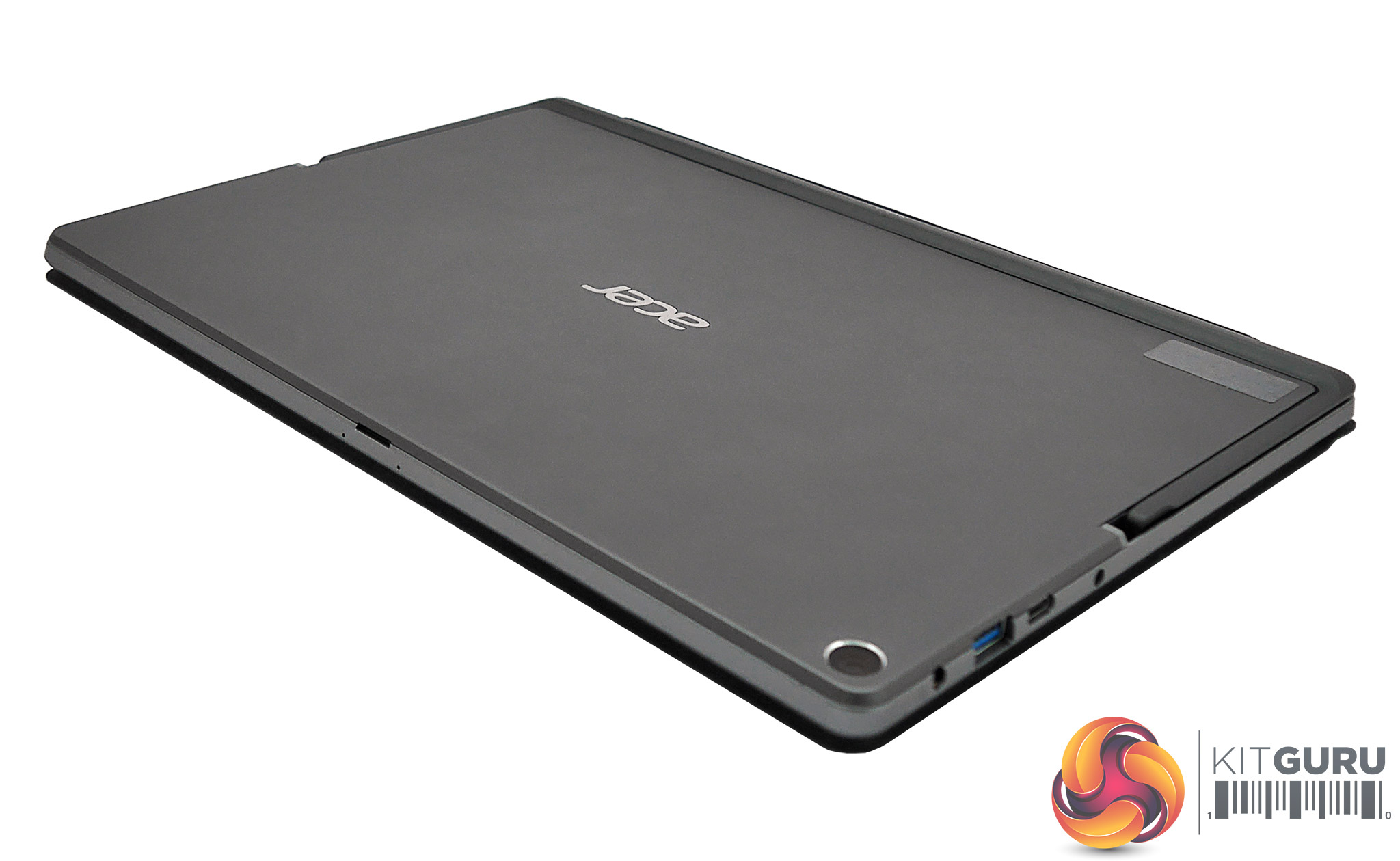
Getting to how noisy the Switch 5’s cooling runs, it doesn’t. We usually give you some nice measurements here but Acer’s has made our jobs much easier by providing passive liquid cooling for its tablet, a system it calls LiquidLoop. Crucially, no fans means no noise; only blessed silence whether you’re browsing the web or crunching through Prime 95. This is definitely an advantage over many competitors, though keep in mind that Microsoft also offers passive solutions on its two lowest-spec Surface Pro 2017 models.
Acer Switch 5 Thermal Performance
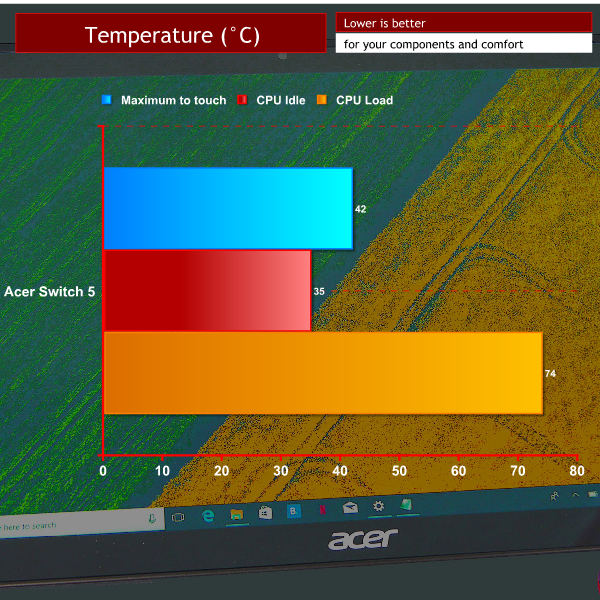
Naturally, passive cooling tends to less efficient at dissipating heat, so we were really looking forward to seeing how well Acer’s LiquidLoop deals with the Switch 5’s hot bits. And thankfully, the answer is very well indeed. After running Prime 95 and FurMark simultaneously for a while, the Core i5 CPU’s temps went from 35°C average to a maximum of 74°, which is well within thermal limits.
All the while, the hottest the tablet got on its outside was 43°C, admittedly a little on the toasty side but far from causing any real discomfort – and keep in mind this is a worst-case scenario. In a nutshell, Acer’s fanless solution left us quite impressed.
Temperature guide:
- <30°C – Comfortable for long periods
- <40°C – Noticeable heat but comfortable depending on other factors
- <50°C – Uncomfortable, prolonged exposure may be painful
- >50°C – Likely be highly uncomfortable or painful
Acer Switch 5 Battery Life
Acer has gifted its Switch 5 tablet with a non-removable 39Wh lithium ion battery sporting a chargeable capacity of around 37370mWh. We managed to get around 454 minutes out of a light load with screen brightness set as close as possible to 120cd/m2, meaning the Switch 5 will last just enough to get through the average work day if you’re not too demanding.
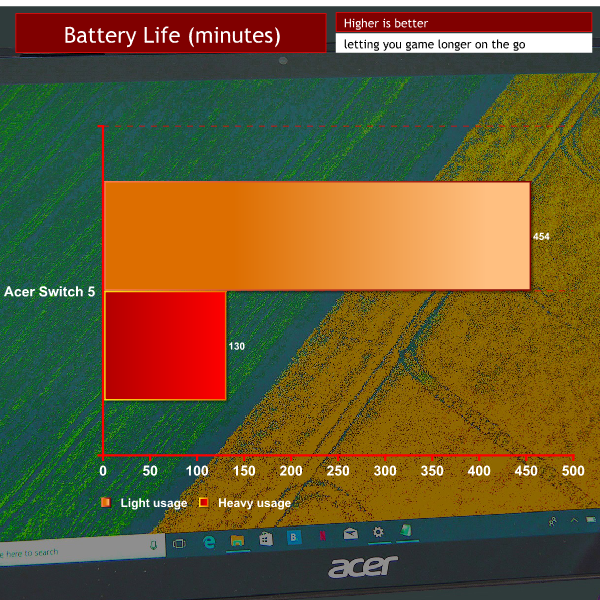
Running a heavier load to simulate (very) casual 3D gaming, battery life dropped to around 130 minutes, which again is slightly lower than some of its more expensive competitors. Overall we would say this little Acer’s stamina is pretty average.
Acer Switch 5 System Performance – 3DMark and Cinebench R15
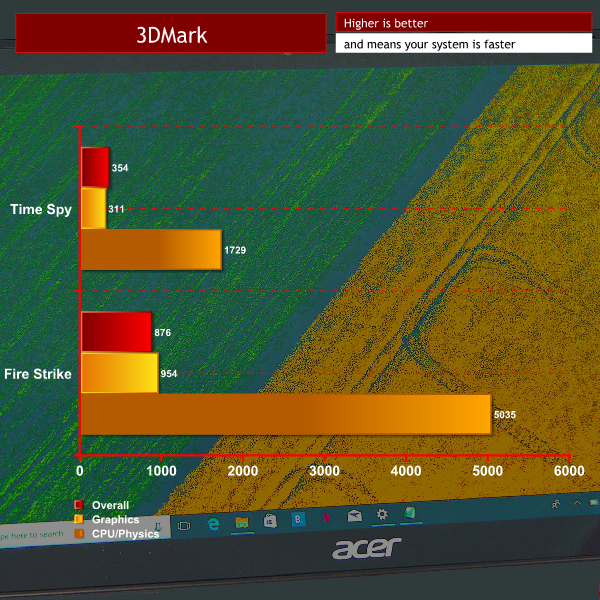
As you would expect, the graphics scores from the integrated Intel HD 620 chip drag down the overall score.
Acer Switch 5 Gaming – Rise of the Tomb Raider
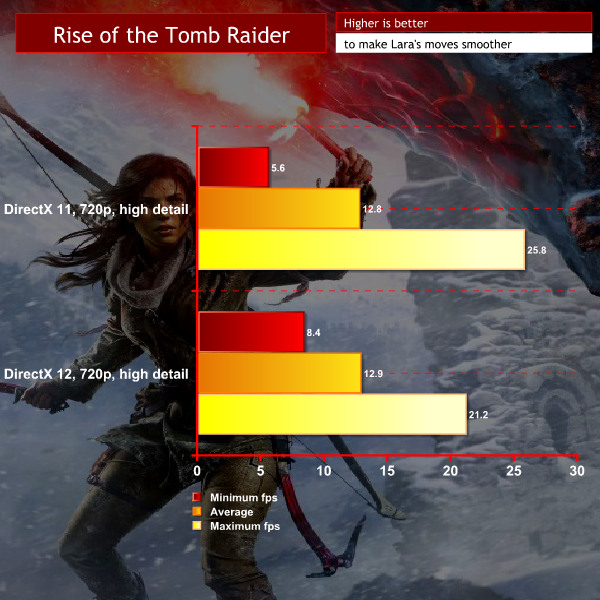
That goes double for gaming, where even at low resolutions the HD 620 simply cannot provide a playable experience in remotely demanding titles – not that a convertible tablet like the Switch 5 usually excels at this kind of thing. Bring on the Intel CPUs with integrated Radeon graphics, we say!
Acer Switch 5 Storage Benchmarks – ASSD and Crystaldiskmark
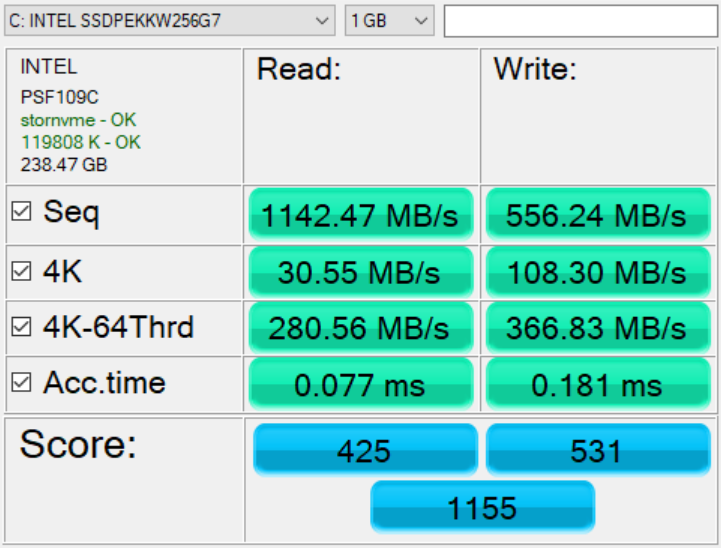
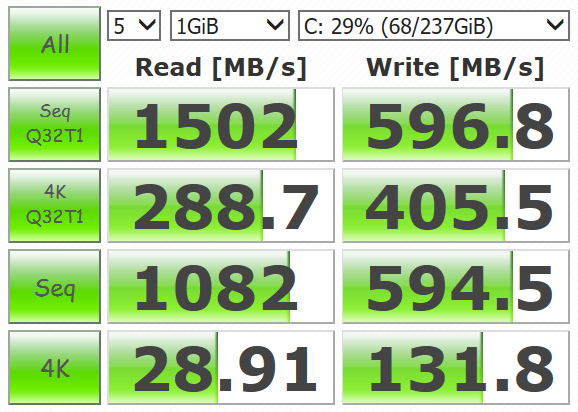
Pretty decent performance from the 256GB SSD (especially on the writes), as expected from the Intel brand.
So has Acer created a worthy Microsoft Surface Pro rival? The answer is mostly yes but, alas, with a few caveats. On the plus side, you’ve got a very affordable Windows convertible tablet that bundles everything you would want. Design is functional and not generally too unattractive, while build quality is good overall. The base spec also offers a nice balance of components with generous solid state storage.
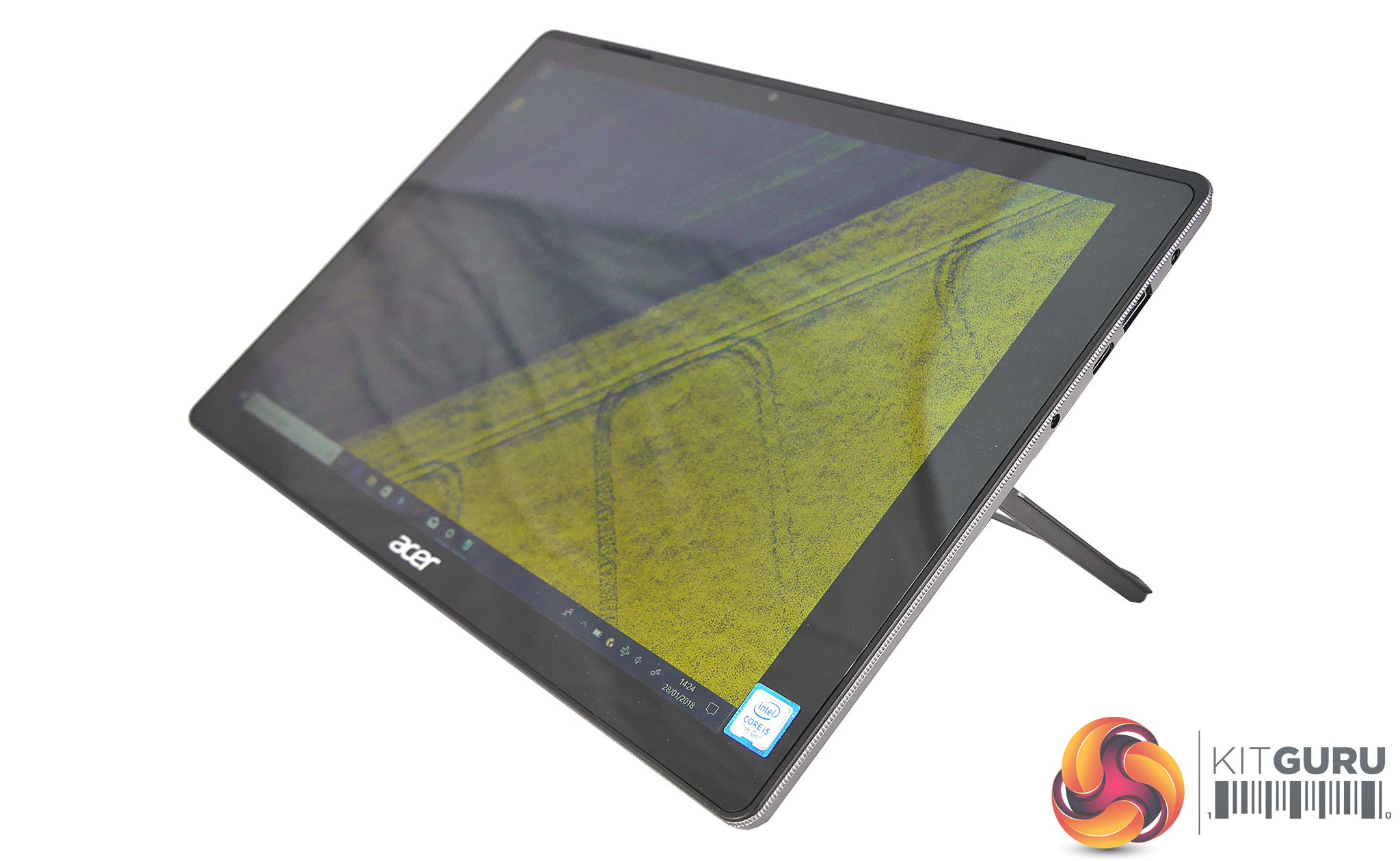
Connectivity is on the good side of average, the IPS display is nice for work and play if you’re willing to miss out on high brightness or accurate colours, and you get a decent stylus and keyboard cover out of the box. Perhaps best of all – and a feature not often found in this segment – is the Switch 5’s passive liquid cooling, which works well and ensures the only noise produced by this tablet will come from its speakers.
In the minus column, there is a sense that you get what you pay for, as everything from the display resolution to the pen is just a step below Microsoft’s trend-setting Surface Pro 2017. Minor niggles like the Switch’s sharp edges with the kickstand extended and tinny speakers aside, our main concerns are with the above-average weight and below-average screen, which despite its good viewing angles fails to meet expectations for contrast, brightness or colour. Battery life is also not exactly best-in-class.
The Acer Switch 5 as reviewed is available from LaptopsDirect for £870 here.
Discuss on our Facebook page, over HERE.
Pros:
- Decent design.
- IPS screen offers good viewing angles and resolution.
- Well built.
- Comes with good stylus and keyboard cover.
- Completely silent liquid cooling.
- Fair connectivity for its class.
- Excellent value compared to rival products.
Cons:
- IPS display is somewhat sub-par compared to rivals.
- Sharp edges when kickstand is extended.
- Speakers are tinny and distort at maximum volume.
- A little on the weighty side for its spec.
- Battery life only average.
- Stylus loop may slightly destabilize keyboard cover.
KitGuru says: Acer has not created the perfect convertible Windows tablet but, despite its somewhat mediocre IPS screen and some other niggles, the Switch 5 presents a very capable and good-value machine. It offers a complete overall package with highlights like passive cooling and a very competent bundled keyboard and stylus.


Why would any tech company release a new product in 2018 with the name “Switch”? Especially if it’s a tablet.
“I just got a new tablet!”
“oh right, what kind?”
“It’s called the Switch.”
“Oh, that new Nintendo thing?”
“No it’s a computer.”
“Pretty sure it’s a Nintendo”
Repeat the above for every person who buys one of these.
i have one question are you going to make a rewiew about acer switch 7?