 KitGuru KitGuru.net – Tech News | Hardware News | Hardware Reviews | IOS | Mobile | Gaming | Graphics Cards
We have examined the Core i7-1165G7 Tiger Lake processor in many different laptops, but in this review, we are taking a look at a Core i7-1195G7-powered 14” portable laptop from Gigabyte – the U4 UD. A 1080p IPS display, 16GB of DDR4 memory, and a 512GB NVMe SSD all for the modest price of £699.97; how will this wallet-friendly machine perform?
Timestamps:
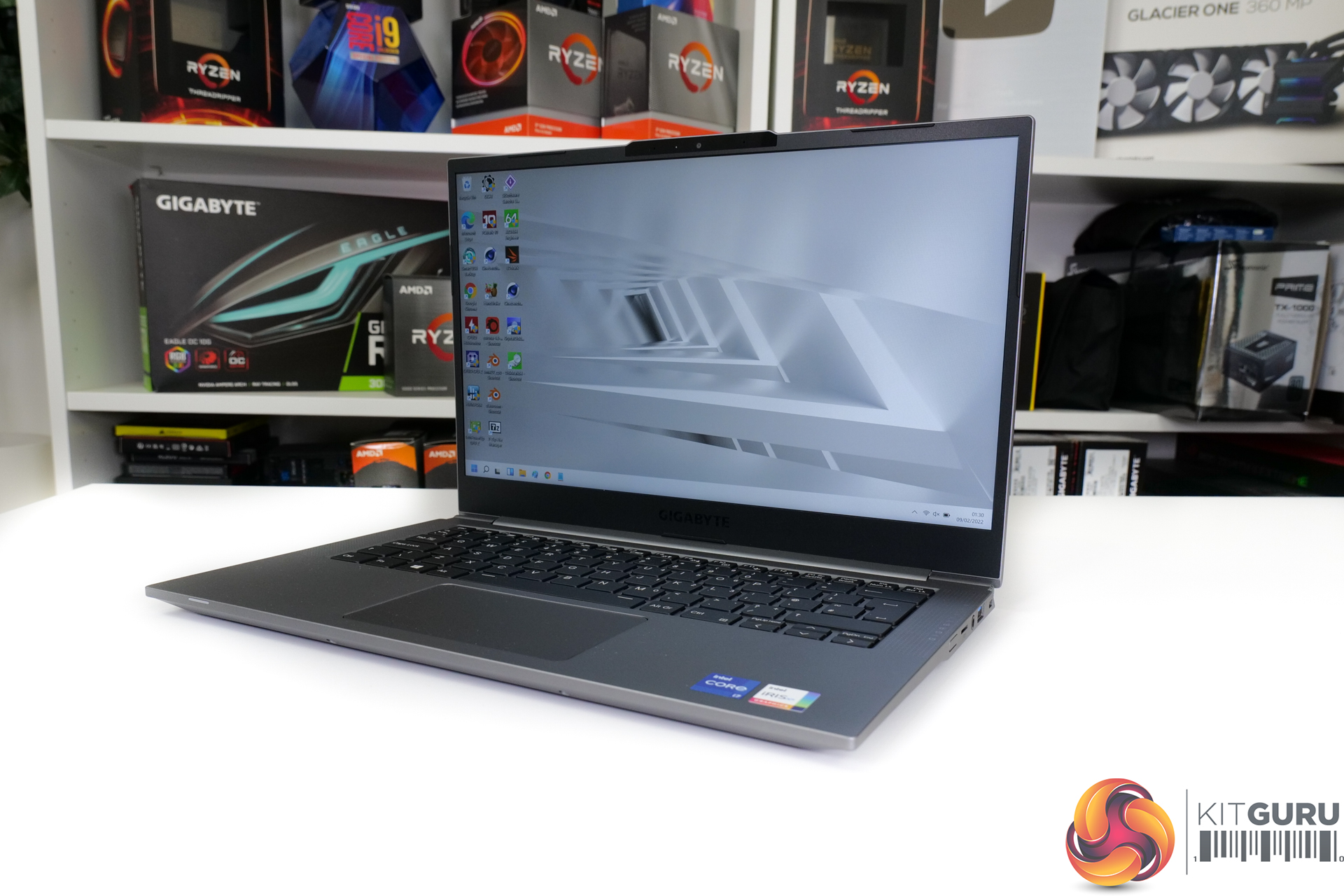
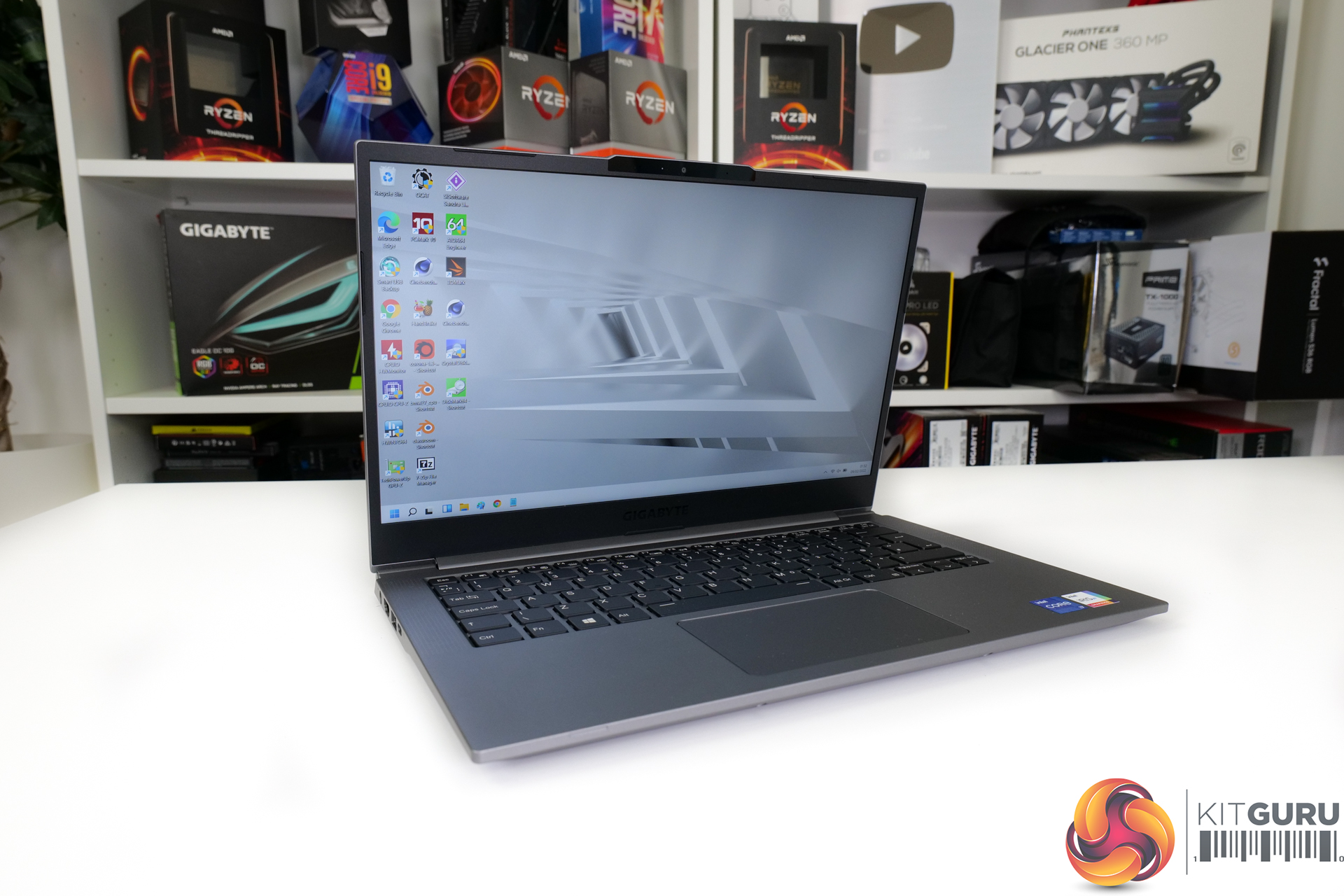
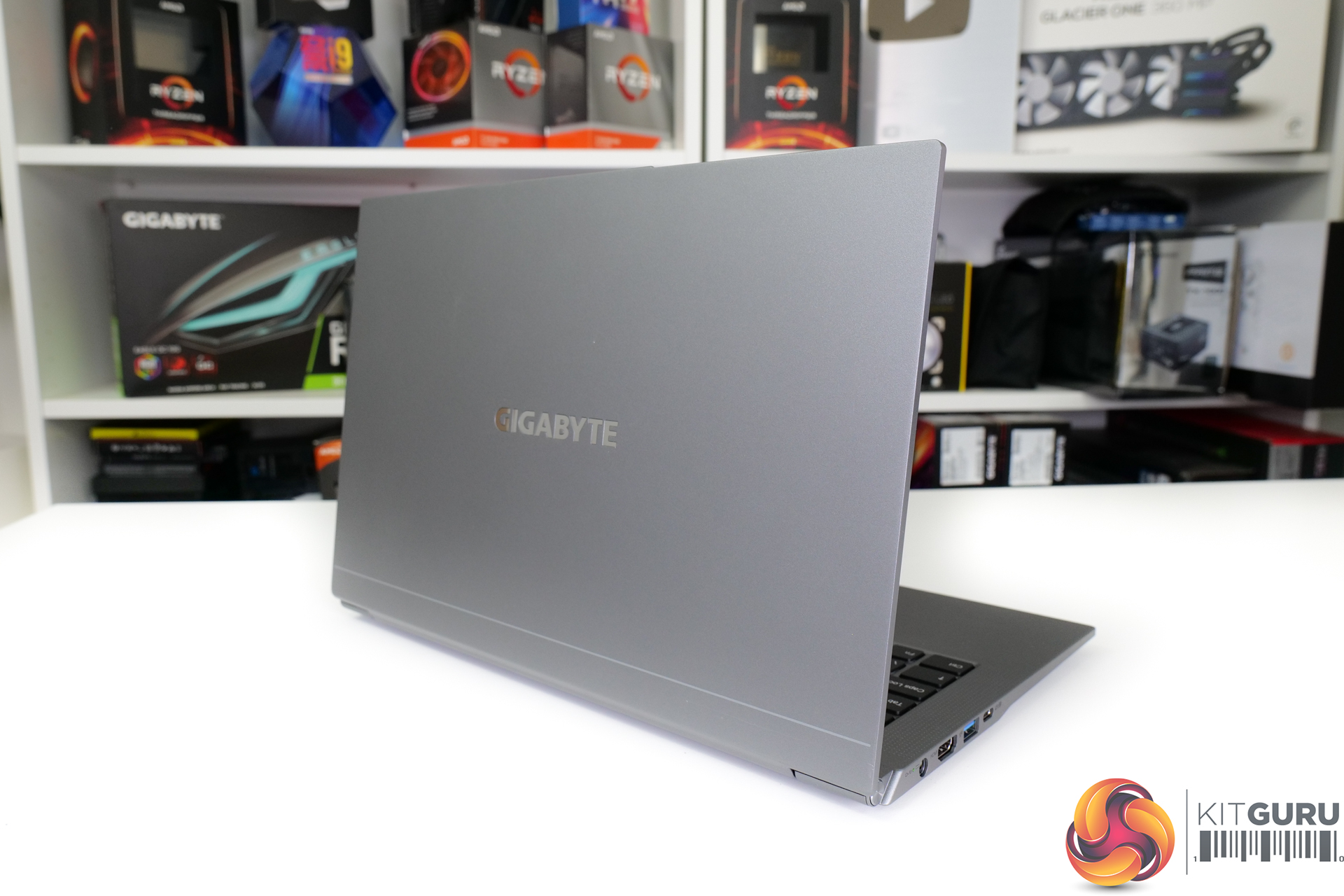
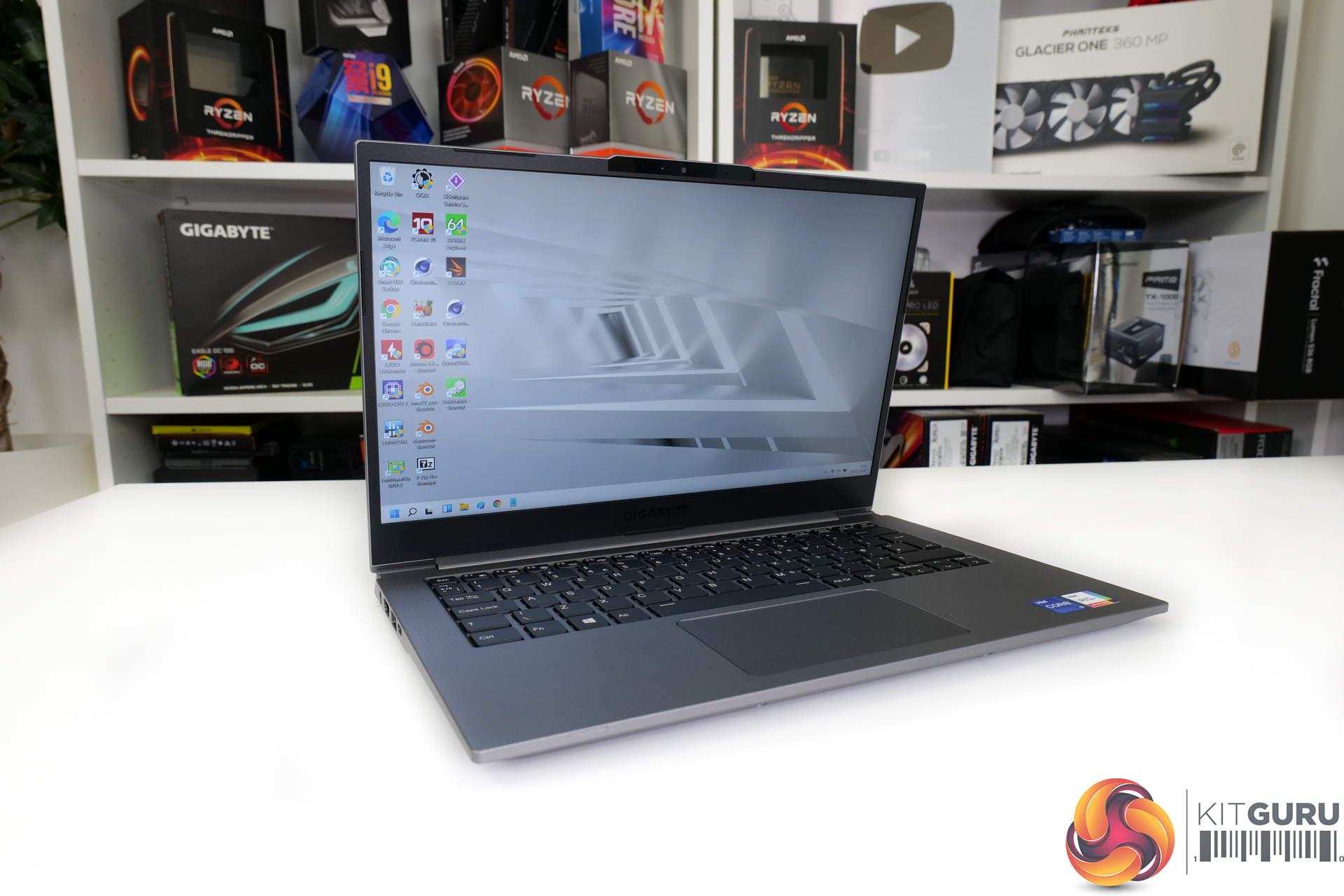
Starting off with a look at the design of Gigabyte’s U4 UD laptop, we see what I would consider to be a conventional – mid-range – 14” form factor. Bezels are modestly sized at 4.5mm but certainly not slim and this gives the laptop an 83% screen-to-body ratio. The unit’s thickness is 16.5mm which is absolutely fine – but once again, not the skinniest option on the market.
So, all of those design points are absolutely OK – if not particularly inspiring compared to some of the sleek, slim, high-end units we often see. But when viewed through the lens of a £700 price point though, I don’t have many complaints.
The construction is MIL-STD 810G rated according to Gigabyte. But I must say that this is one of the more plasticky-feeling aluminium-magnesium alloy body laptops that I have personally felt. I can live happily with the undeniable plasticky feel of the laptop, though, and that’s because Gigabyte has done an absolutely superb job to make this unit a little under 990g weight.
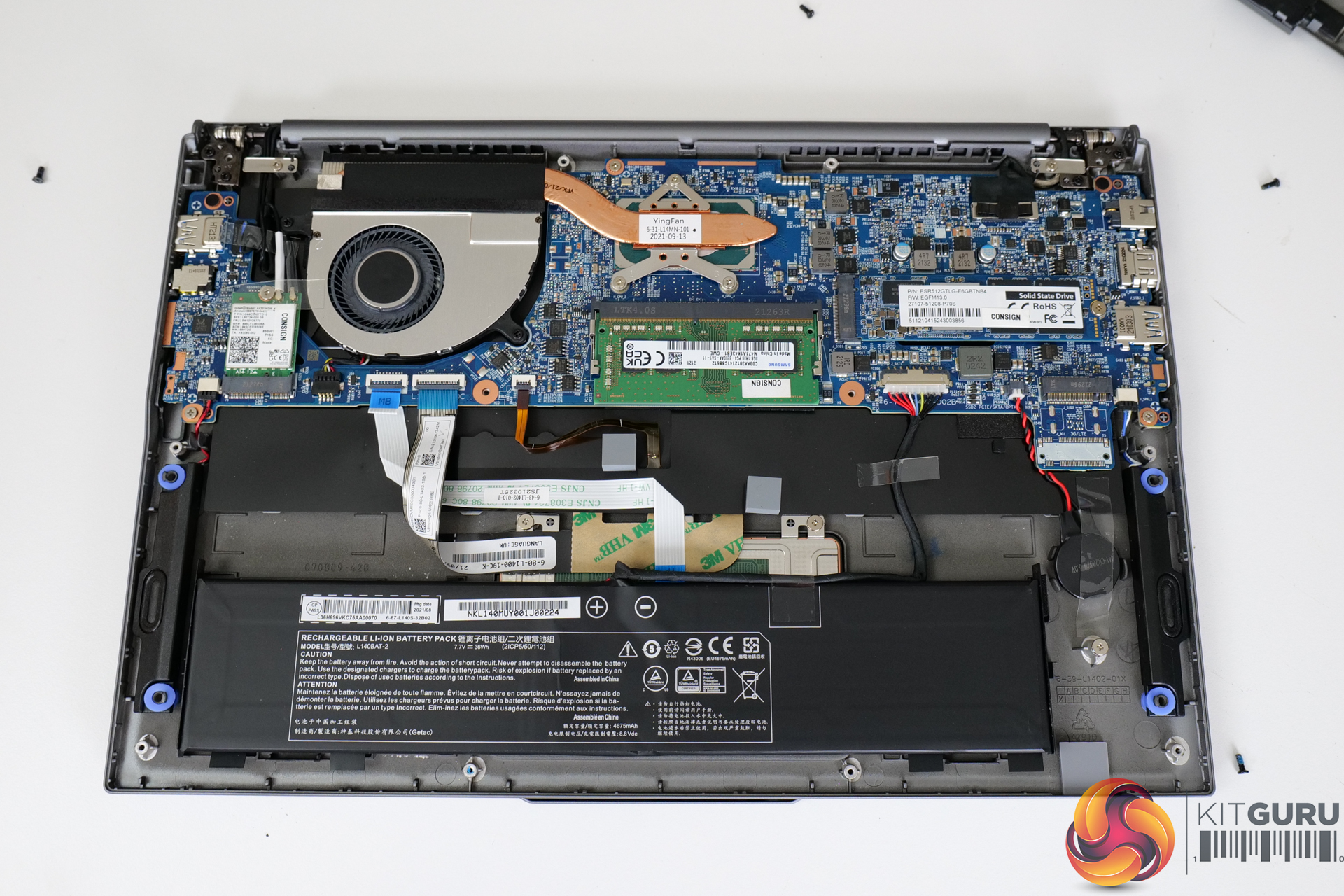
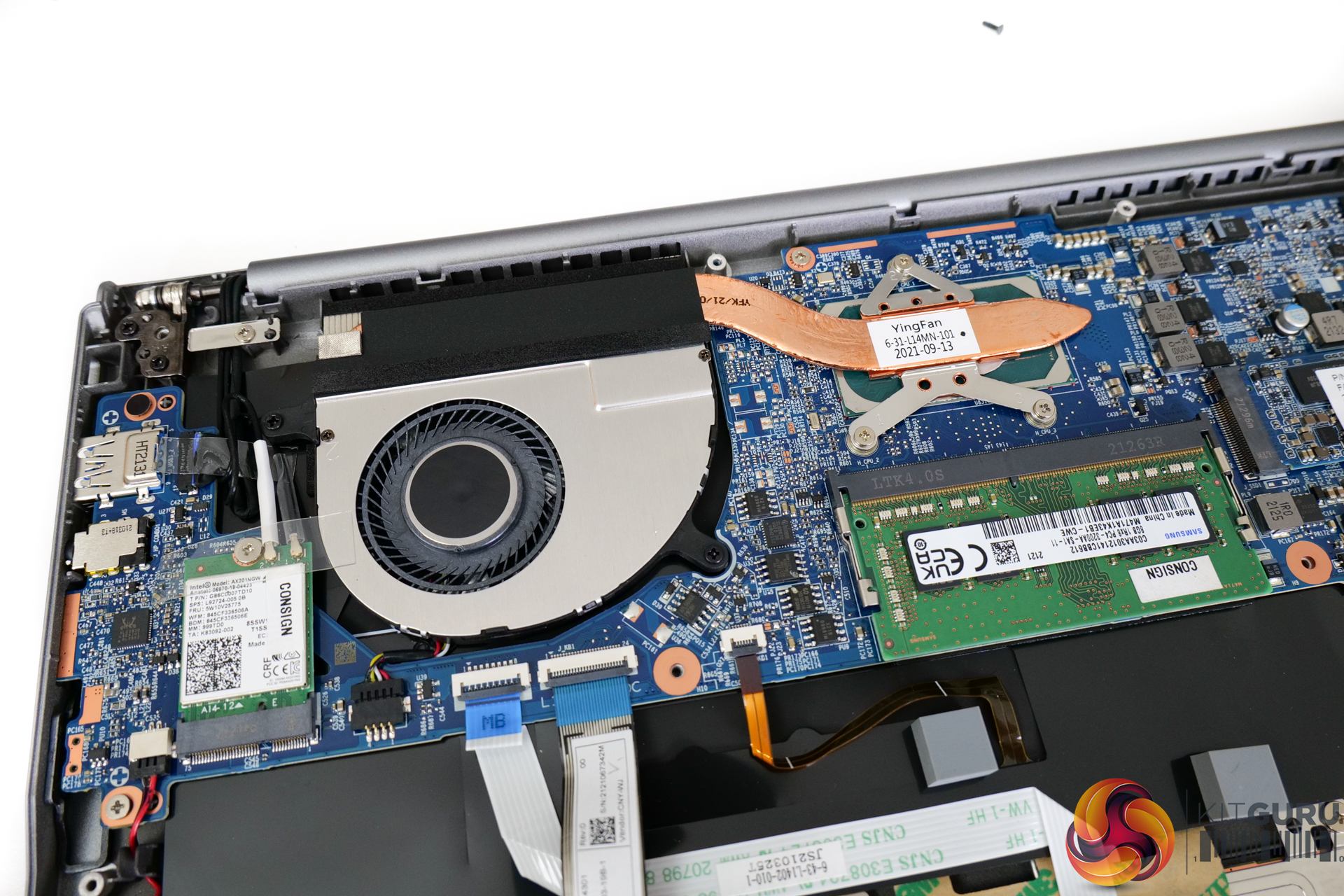
If we take a look at the core the under-the-hood hardware, Gigabyte delivers what we would consider to be a strong offering at the price point. The processor is a four-core, 10nm Intel Tiger Lake-U ‘Refresh’ Core i7-1195G7. This has the Iris Xe integrated graphics with 96 Execution Units and it’s a little bit higher-clocked than the older, non-refresh, Tiger Lake-U Core i7-1165G7 that has proven very popular in the 13” and 14” world.
You get 16GB of DDR4-3200 memory, 8GB of which is soldered onboard, and the other 8GB in an upgradable SODIMM format. This is a little unusual versus the LPDDR4x-4266MHz memory we are used to on slightly higher-end Tiger Lake laptops.
A 512GB PCIe Gen 4 x4 M.2 NVMe SSD is included by default, the model code for which is ESR512GTLG-E6GBTNB4. There is very limited information on this drive, so it may well be an OEM Gigabyte device that is made for the company’s own laptops. And there’s a spare PCIe Gen 3 or SATA M.2 slot so that one can add a secondary drive.
Cooling is handled by a single blower style fan that uses a flattened copper heatpipe to transfer energy from the processor. The system looks to be reasonably basic – there is clearly room for Gigabyte to deploy additional cooling capacity if they so desired. But this would also add cost to the laptop, so we’ll have to see how the modest design performs.
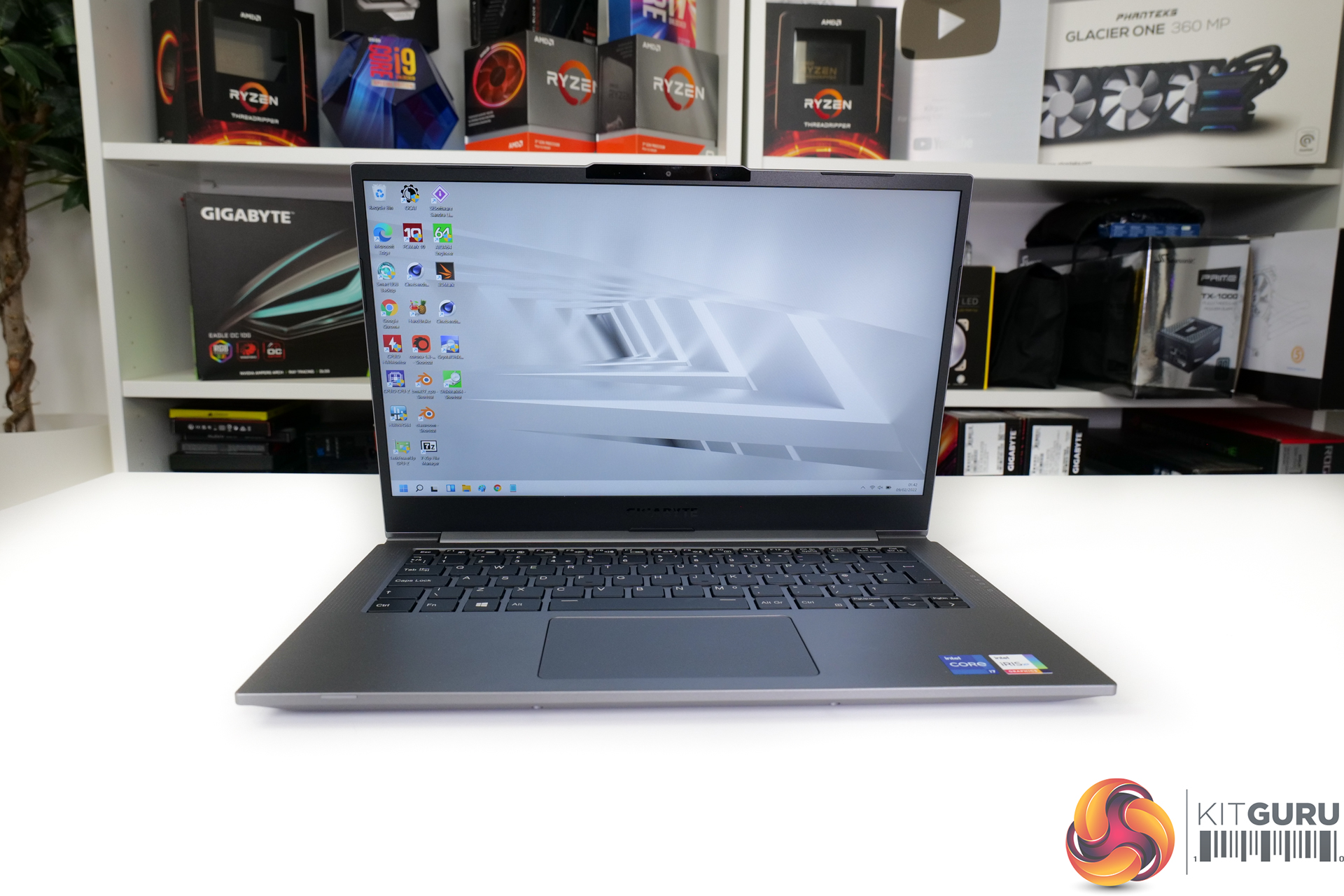
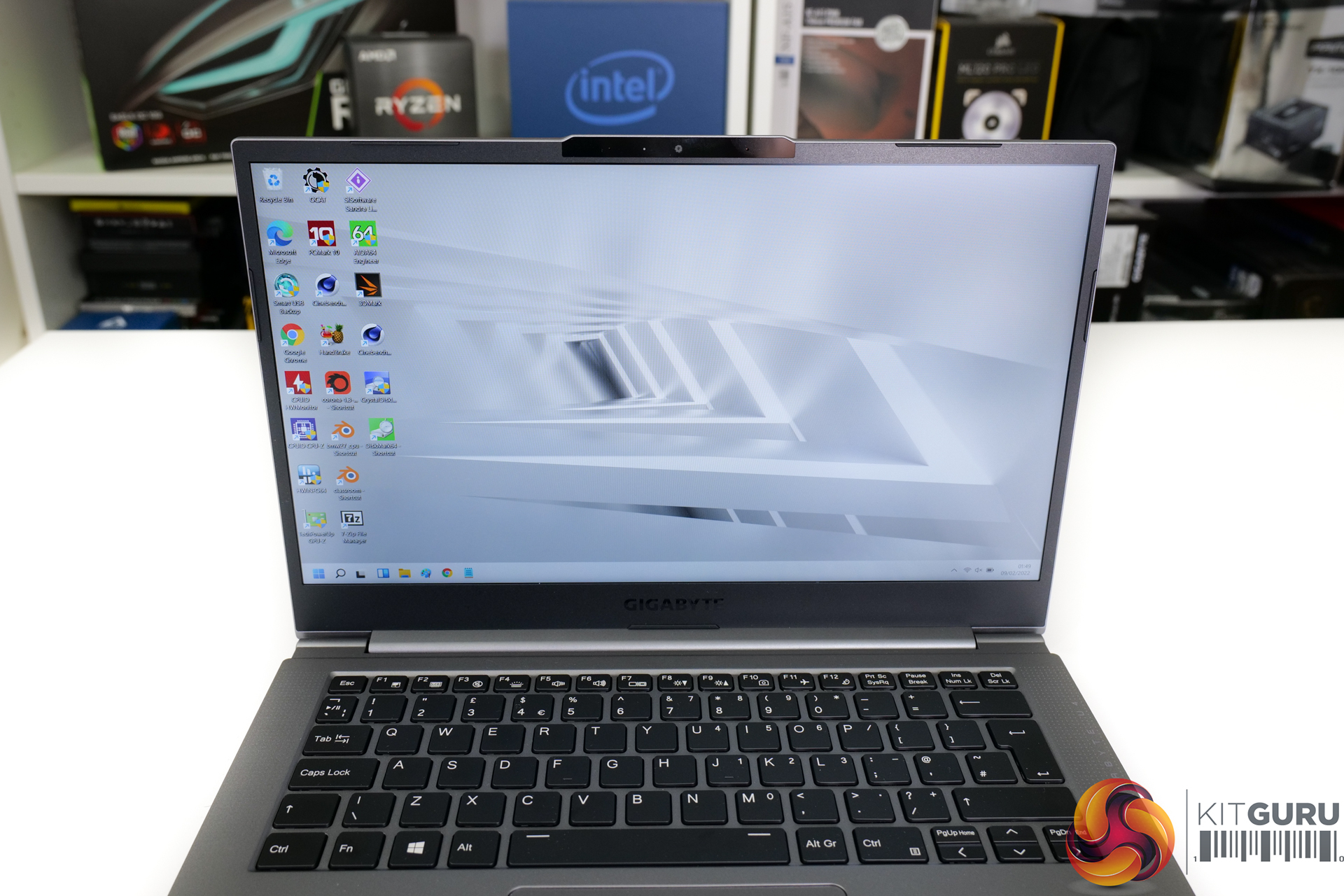
The 14-inch screen runs at 1920×1080 resolution using an IPS panel. You get 400-nits brightness according to Gigabyte, as well as 100% sRGB colour coverage. The anti-glare coating worked proficiently in my well-lit indoors test environment.
Clearly, this is not a display intended for gaming usage; the refresh rate is 60Hz and the IPS panel is not going to win response time awards. But the viewing angles are excellent, the brightness had me satisfied, and the colour quality was as good as I would expect from a non-OLED panel at this price point and size.
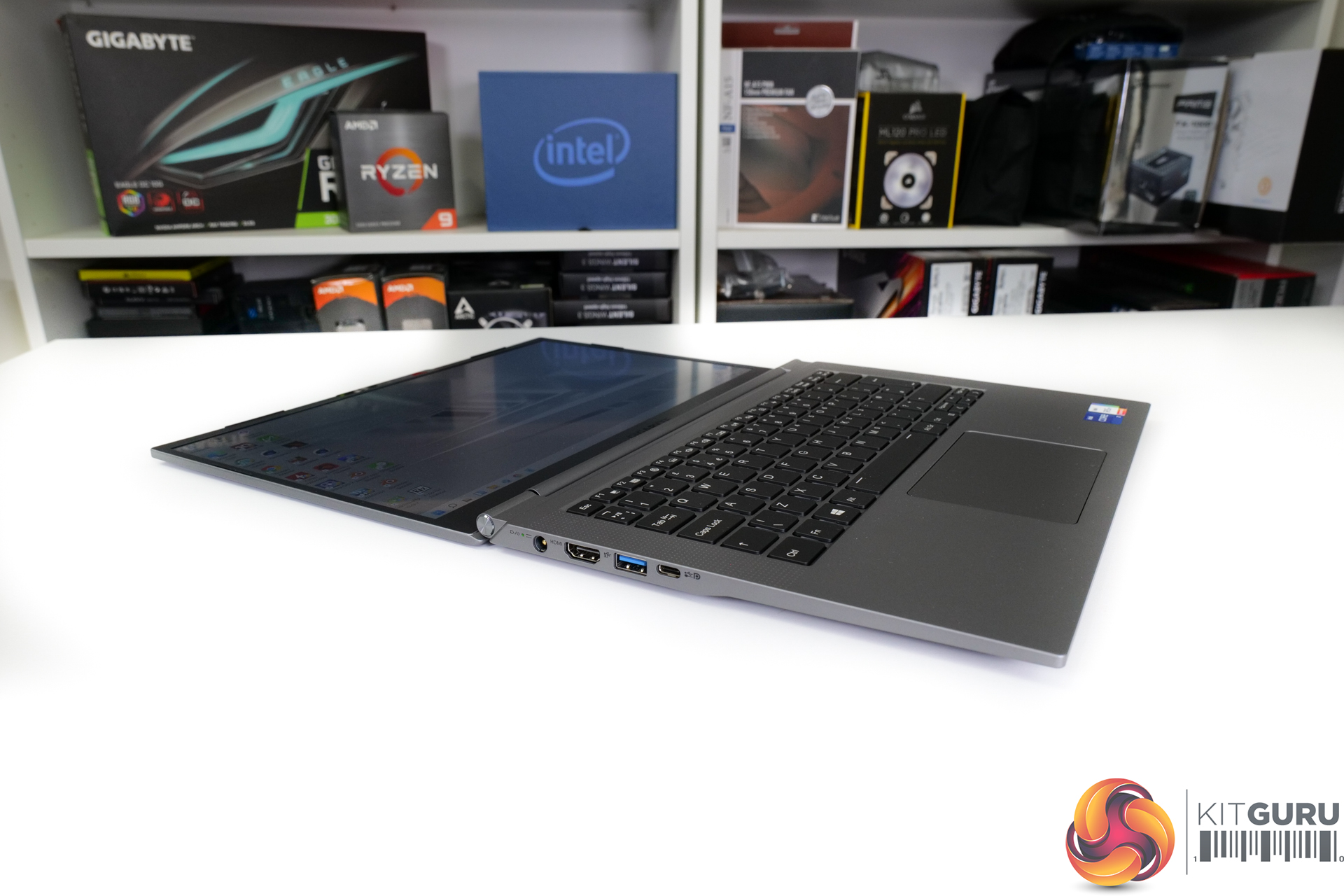
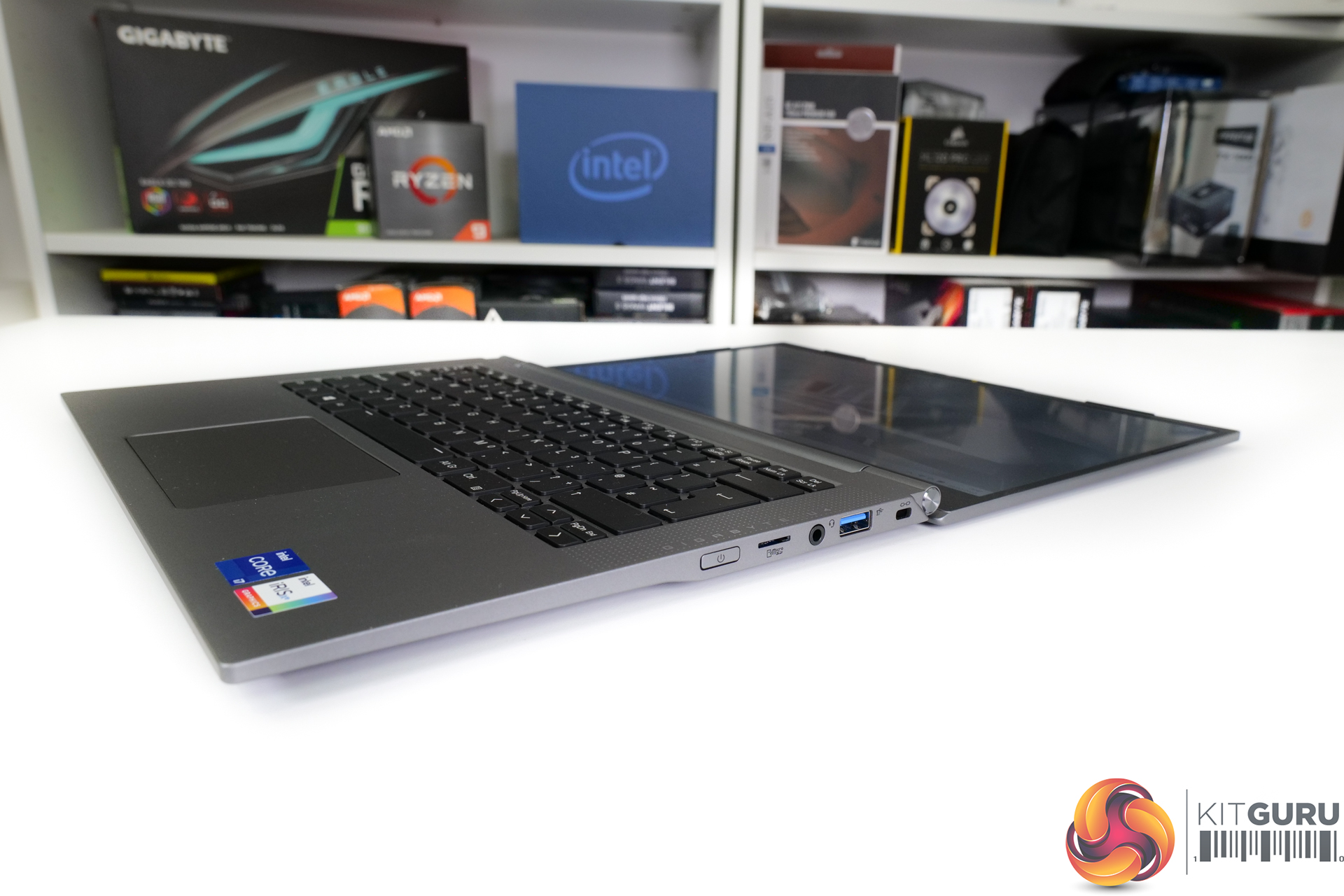
To be perfectly honest, connectivity is a mixed bag for the Gigabyte U4 UD. Thunderbolt 4 / USB4 in its Type-C format is obviously the star of the show. I absolutely love the Thunderbolt ecosystem and version 4 is impressive from a speed and capability perspective.
You get two USB Type-A ports – one 3.2 Gen 1 and one 3.2 Gen 2, there’s an HDMI 2.0 connector, and a micro-SD card reader is a smart inclusion alongside the 3.5mm audio combo jack and Kensington lock.
My issue with the connectivity is that it is very light in terms of Type-C offerings. There’s only really the Thunderbolt port that doubles up as a USB-C option. But this is not ideal if you actually want to leverage the TB port for high-speed connectivity. I’d have preferred one of the USB Type-A to be switched out for one USB Type-C.
With that said, the simple inclusion of Thunderbolt 4 gives users ample options for docks when using this laptop at a desk or with external monitors. And the fast Intel AX201 WiFi-6 and Bluetooth 5.2 adapter reduces the necessity for wired Ethernet.
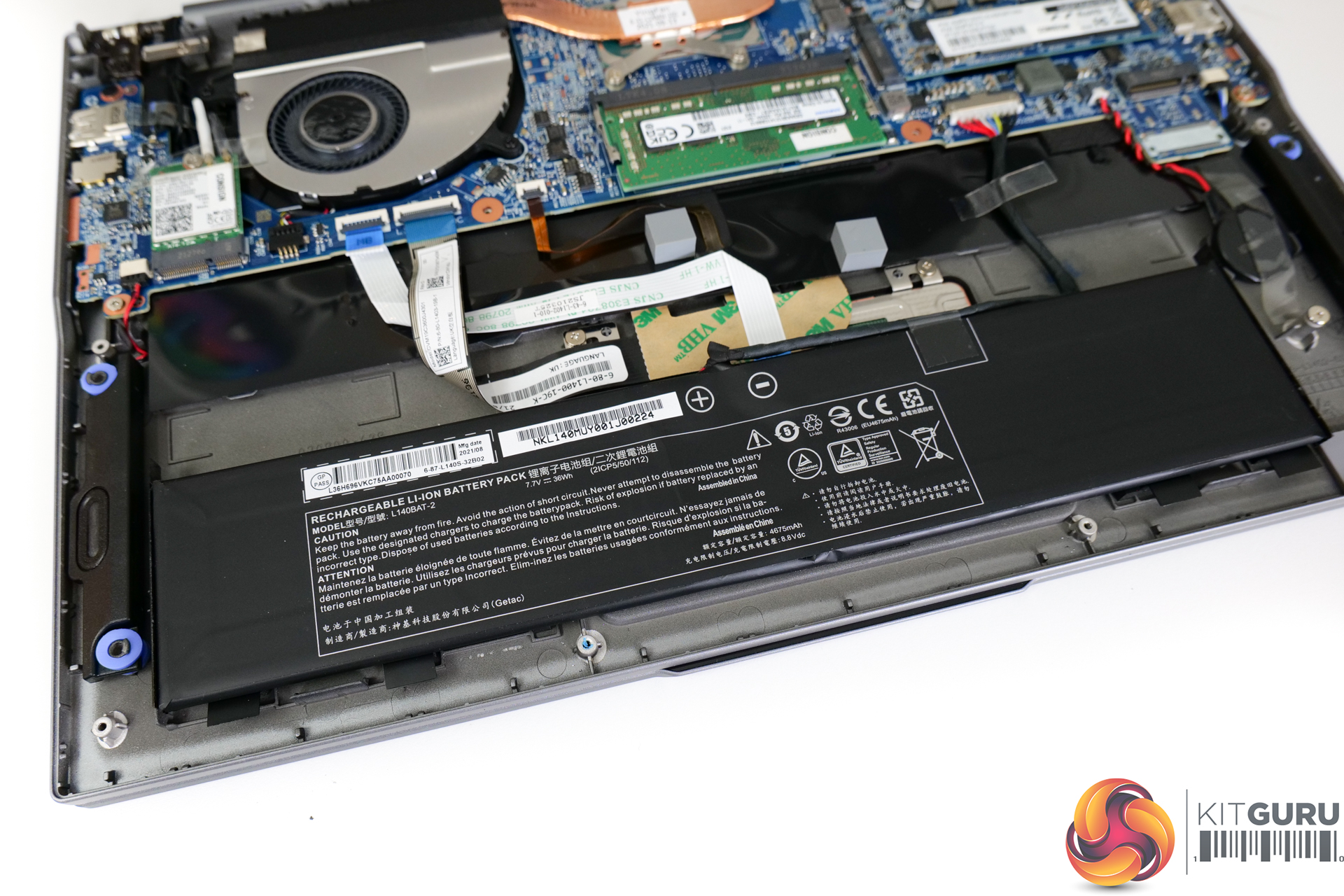
A 36Whr battery is deployed in the U4 UD. This is pretty meagre, even by budget laptop standards, but it does help to keep weight at a minimum versus some higher capacity battery units, I guess.
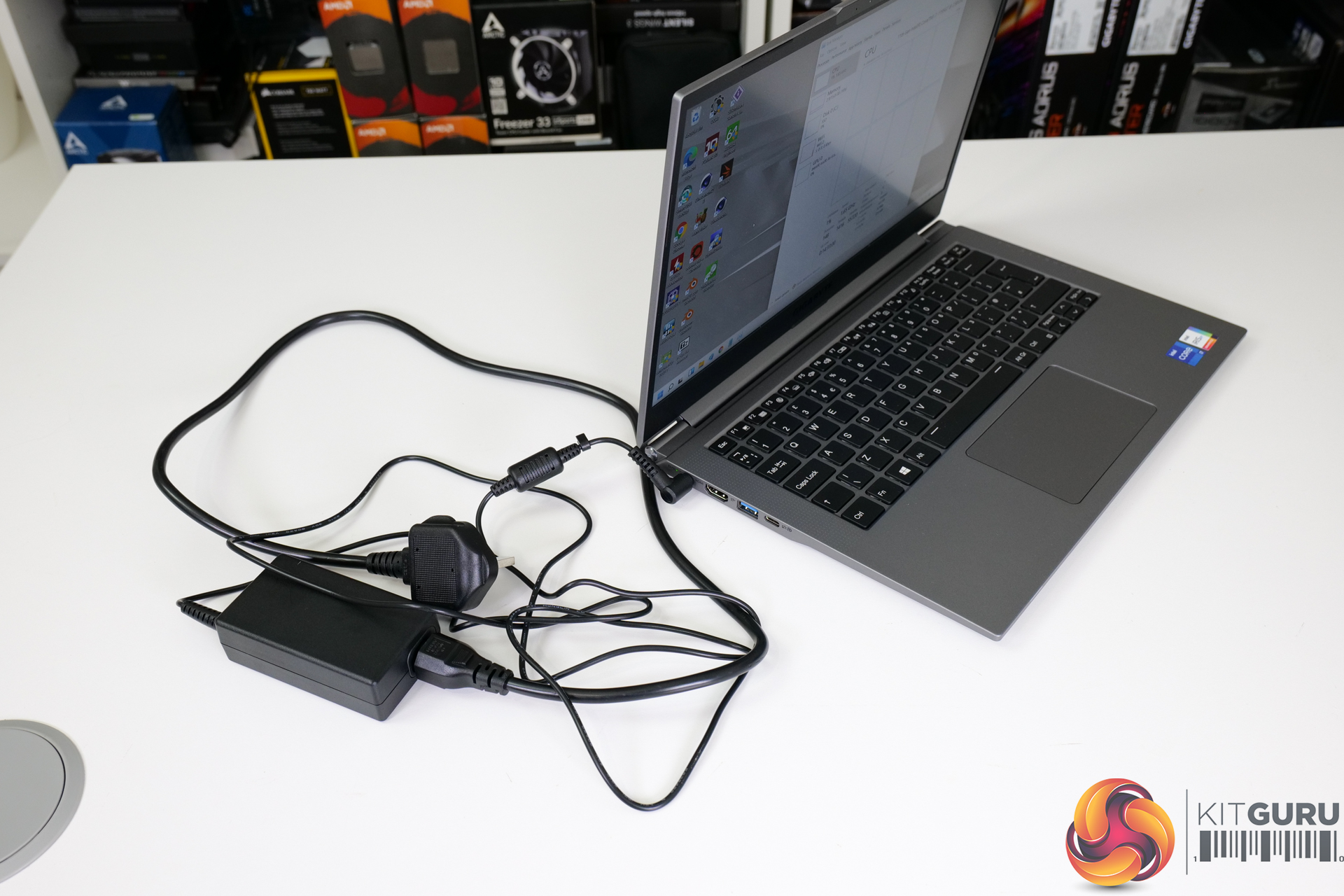
Where I do not appreciate Gigabyte’s design decisions are in terms of the charging infrastructure. Instead of using the now commonplace USB-C charging approach, Gigabyte instead opts for a barrel-style connection for its 65W power brick. Of course, the Thunderbolt 4 Type-C port supports power delivery and can be used for device charging. But this is limited to 35W so it is not a true charging brick replacement option.
Even at this price point, I simply would have liked to see 65W USB-C charging as the main approach, rather than the barrel connection. This would have had the secondary benefit of additional USB-C connectivity, if deployed correctly.
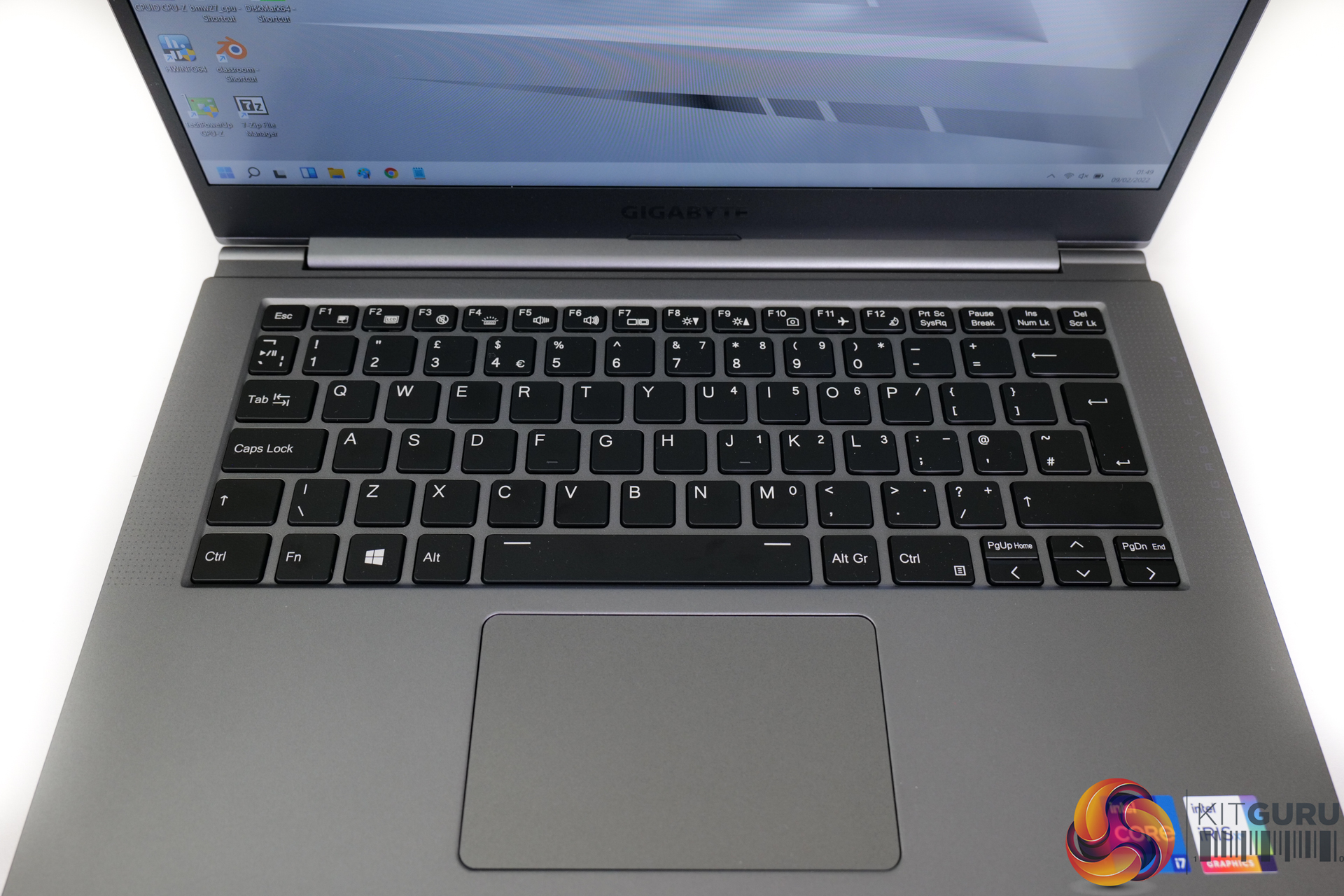
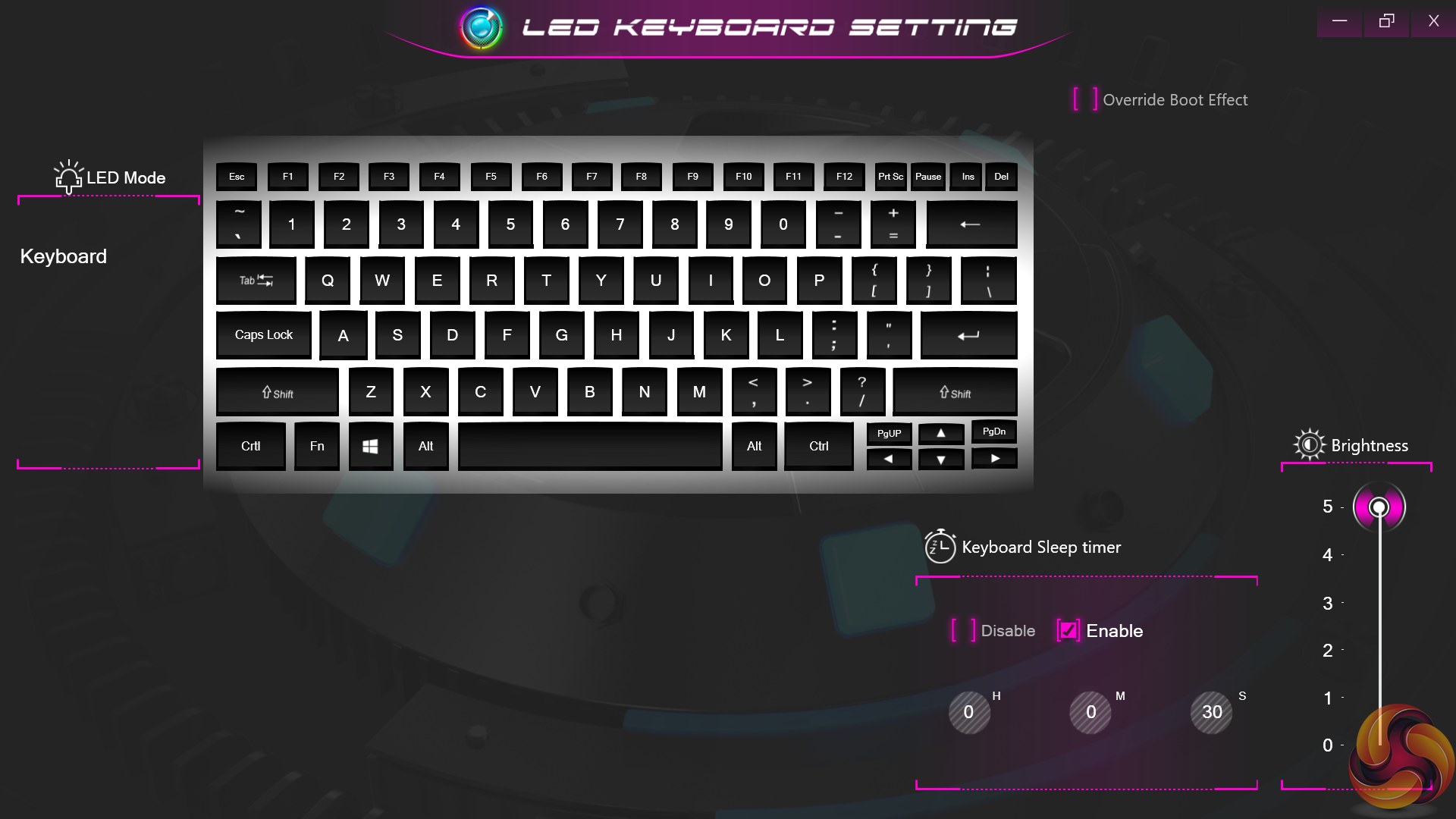
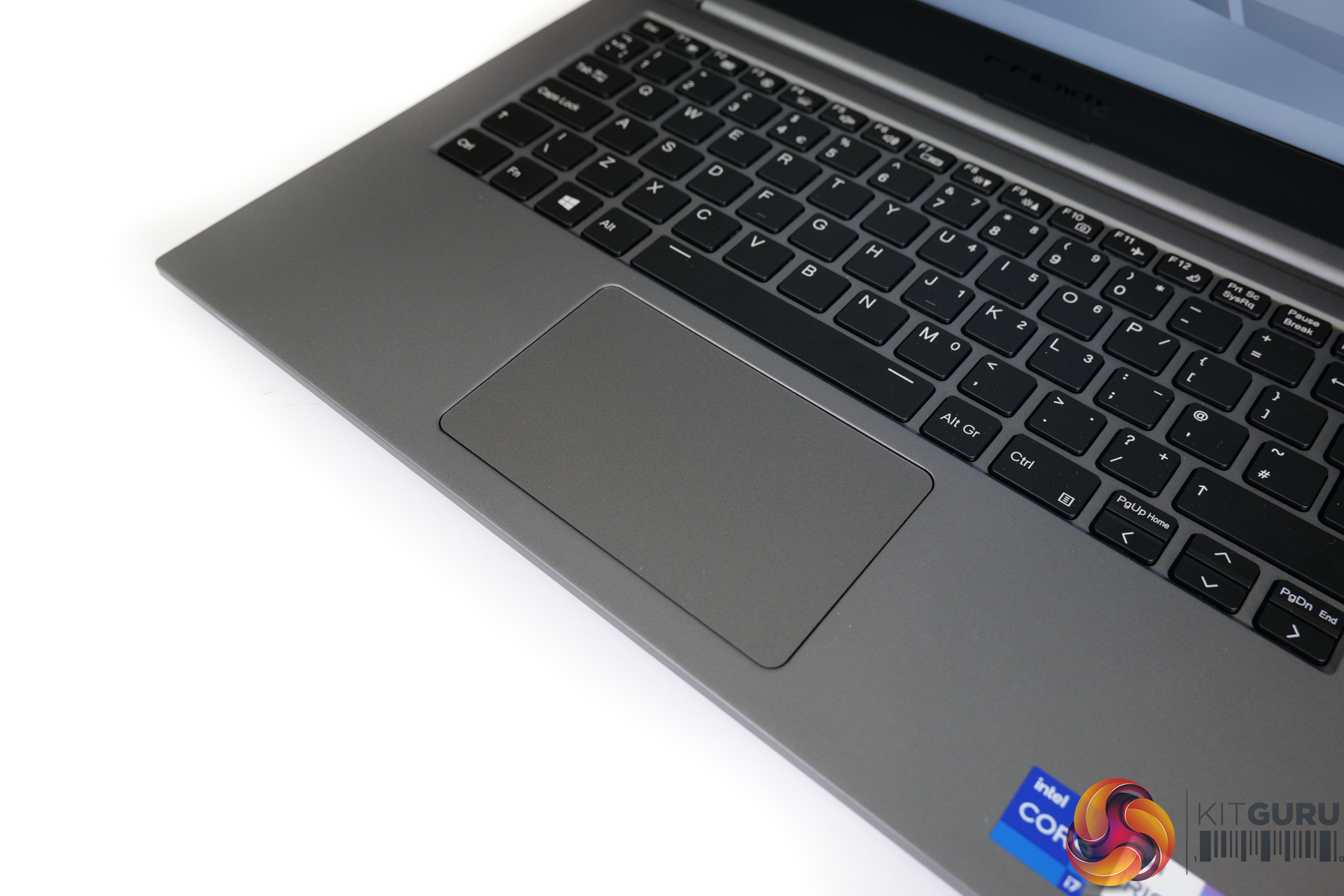
Despite the slim form factor, Gigabyte does a good job at fitting a competent keyboard into the U4 UD. Actuation travel is tolerable and spacing of the keys is very good even for my large hands. There’s no awkwardness like weird positioning or half-height keys, which is great. And the white backlight works well with its five steps of brightness adjustment.
I’d extend my positive input praise to the trackpad, too. The unit certainly isn’t the biggest. But it is low friction, my finger glides well, and there is a tactile button click for the left and right sides. Plus, the chassis stiffness means that there is minimal flex when pressing either the keyboard or the trackpad; that’s very good for a sub-1kg offering.
The dual 1.5W speakers are mediocre at best. Higher volume levels will see speech clarity washed out pretty quickly and there is an obvious inherent lack of bass. Compared to something like a Razer Blade 13 (which is a typically higher-priced laptop), Gigabyte’s audio quality is noticeably lower. I’m confident the speakers will be fine for basic audio listening and Zoom calls, though.
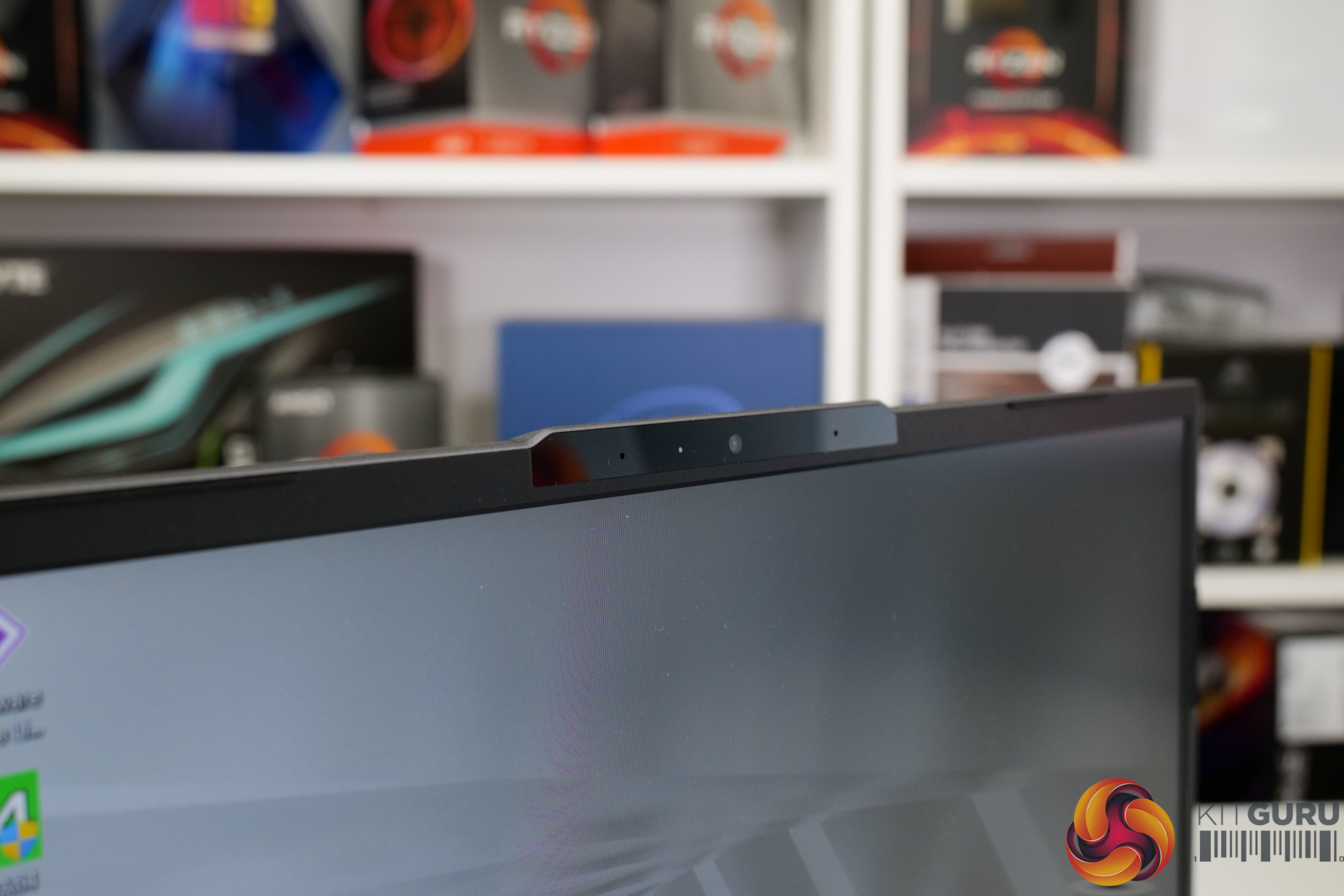
Don’t expect any fancy security inputs for logging in; Gigabyte does not provide a fingerprint reader and the webcam is not Windows Hello compatible according to the Windows 11 settings. So, you’ll be left with just password or pin, which is pretty basic for 2022.
Webcam quality is OK and motion tracking works well. There is inherent grain in the image, even in a well-lit room but the overall quality is passable and the actual webcam positioning is fine. Check out our video review for sample webcam and mic footage.
We test in the out-of-the-box state with minimal adjustments made to the laptop, other than installing our test software and Windows updates. This is relatively easy because Gigabyte gives us a reasonably clean Windows 11 install with no McAfee or other junk on here.
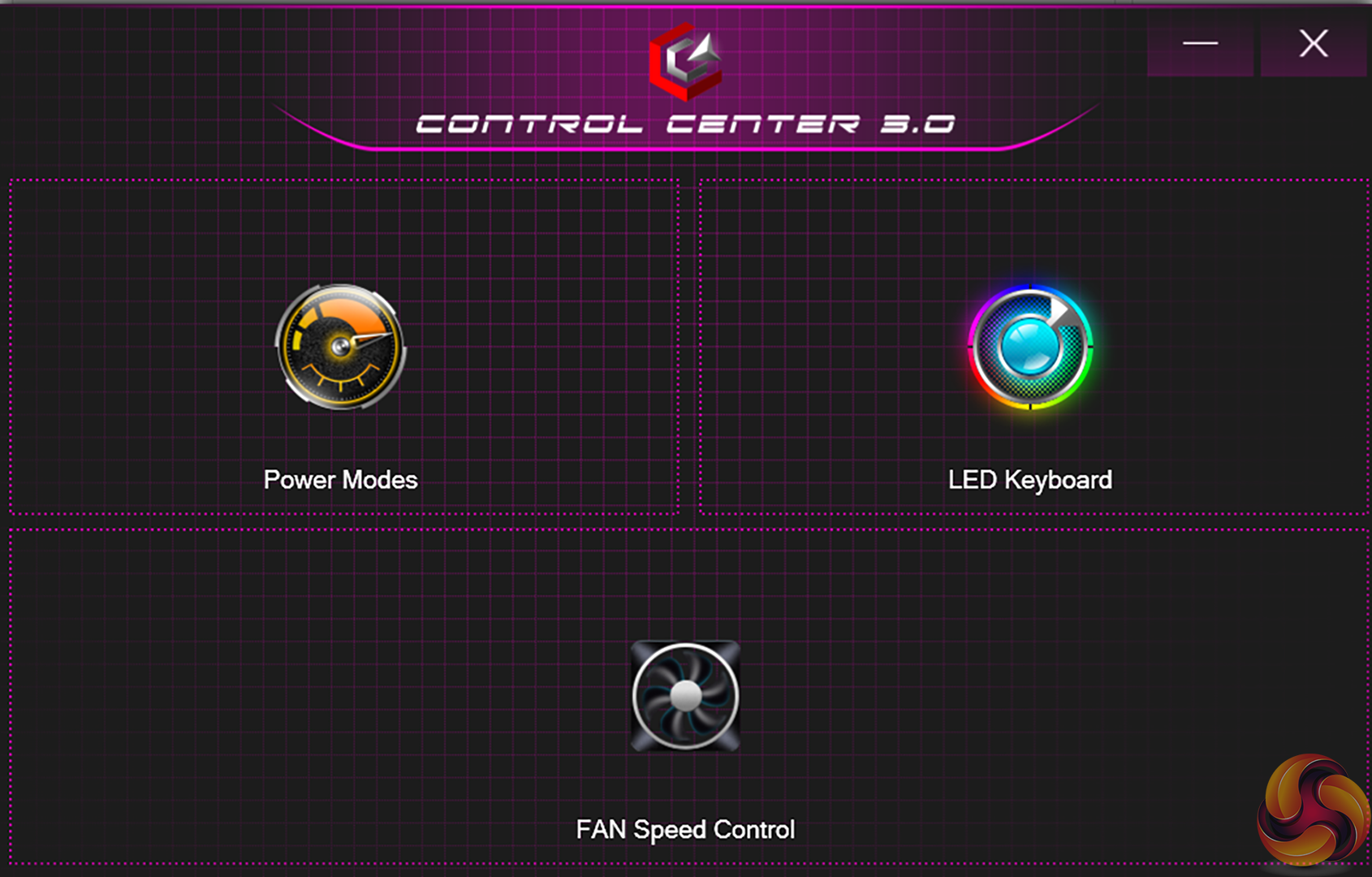
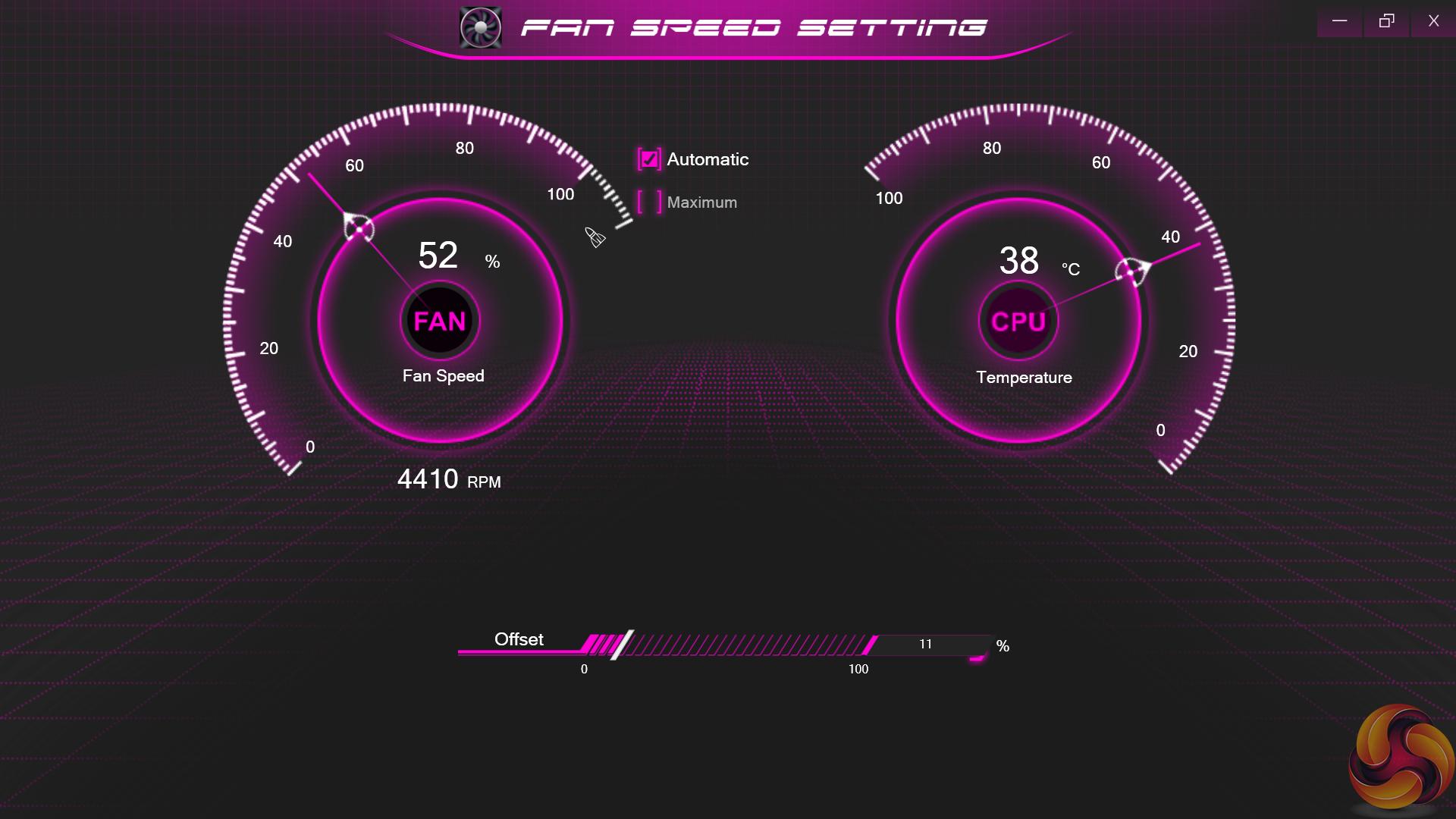
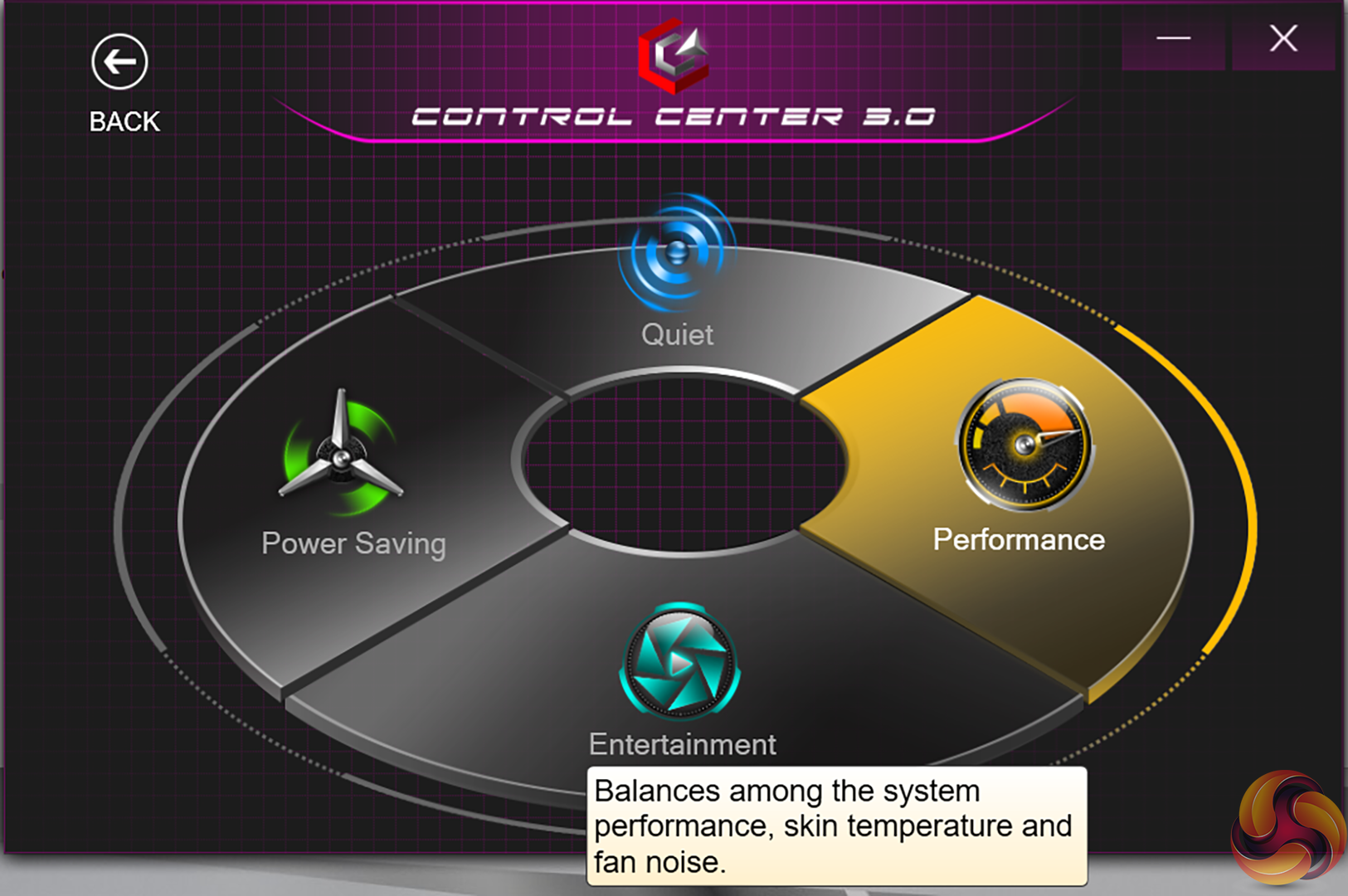
Under Gigabyte’s control software, we set the laptop to run in its ‘Performance’ mode so that we can see its true horsepower available. There are other power modes available that are probably more sensible for daily usage, though.
Under the ‘Performance’ mode, the Core i7-1195G7 is set as 20W PL1 value, with 51W as the PL2 value. We did not, however, see the chip surpass 45W package power delivered in our heavy all-core check.
The ‘Performance’ mode runs the chip at a package power decreasing towards 26W for around 3.5 minutes. The steady-state package power delivered to the Core i7-1195G7 processor is then 20W.
We include some comparison data from relevant laptops that we have tested recently. Notably, they include a couple of ASUS 13” ZenBooks featuring Ryzen 7 5800U and Core i7-1165G7 processors. So, those two are notable competitors in terms of raw hardware performance data. Even if their form factor and design makes them more expensive and more premium.
Gigabyte U4 UD-70UK823SO Laptop Test Configuration:
- Processor: Intel Core i7-1195G7 (4C/8T, 2.9GHz Base, 28W Rated TDP-up Mode)
- Memory: 16GB DDR4 3200MHz (8GB onboard, 8GB SODIMM)
- Graphics Card: Integrated Intel Iris Xe iGPU (96 EUs)
- Display: 14” 16:9 FHD 1920×1080 60Hz IPS
- System Drive: 512GB ESR512GTLG-E6GBTNB4 PCIe Gen4x4 NVMe SSD
- Battery: 36 Whr battery with 65W barrel-style Power Adapter
- Design: Slightly below 990g weight with 16.5mm chassis thickness
- Operating System: Windows 11
Comparison Systems:
- Razer Blade Stealth 13 OLED (Core i7-1165G7 ‘Tiger Lake’ System)
- Intel Core i7-1165G7 (4C8T, 28W Rated TDP)
- 16GB LPDDR4 4266MHz
- Nvidia GTX 1650 Ti Max-Q
- 13.3″ OLED Full HD Touch 60Hz
- 512GB Samsung NVMe SSD
- 53.1 Whr battery with 100W USB-C Power Adapter
- 1.41kg weight with 15.3mm thickness
- ASUS ZenBook Flip S OLED UX371 (Core i7-1195G7 ‘Tiger Lake-U’ System):
- Intel Core i7-1165G7 (4C/8T, 1.2GHz Base, 12W Rated TDP-down Mode)
- 16GB LPDDR4X 4266MHz
- Integrated Intel Iris Xe iGPU (96 EUs up to 1.3GHz)
- 13.3” 16:9 UHD 3840×2160 60Hz OLED Touch Display
- 1TB WD SN730 NVMe SSD
- 67 Whr battery with 65W USB-C Power Adapter
- 1.2kg weight with 11.9-13.9mm chassis thickness
- ASUS ZenBook 13 UM325S (Ryzen 7 5800U ‘Cezanne' System):
- AMD Ryzen 7 5800U (8C/16T, 1.9GHz Base, up to 4.4GHz Boost, 15W Rated TDP)
- 16GB LPDDR4X 3733MHz
- Integrated Radeon Vega 8 APU (up to 2GHz)
- 13.3” 16:9 FHD 1920×1080 60Hz OLED Display
- 1TB SK Hynix (HFM001TD3JX013N) NVMe SSD
- 67 Whr battery with 65W USB-C Power Adapter
- 1.12kg weight with 13.9mm chassis thickness
Tests
- Cinebench R20 – All-core & single-core CPU benchmark (CPU Compute), Stress test (Temperatures & Power Consumption)
- Cinebench R23 – All-core & single-core CPU benchmark (CPU Compute), Stress test (Temperatures & Power Consumption)
- Blender 2.91.2 – All-core rendering of the Classroom and BMW scenes (CPU/GPU Compute), Stress test (Temperatures & Power Consumption)
- HandBrake H264 – Convert 1440p60 H264 video to 1080p60 H264 using the YouTube HQ 1080p60 preset (CPU)
- HandBrake H265 – Convert 4K30 100Mbps H264 video to 1080p30 40Mbps H265 using the H.265 MKV 1080p30 preset (CPU & Memory)
- 7-Zip – Built-in 7-Zip benchmark test (CPU & Memory)
- SiSoft Sandra – Memory bandwidth and Cache & Memory Latency Test (Memory)
- AIDA64 – Memory bandwidth & memory latency (Memory)
- PCMark 10 – Modern Office & Battery Life Test (System Performance & Battery Life)
- 3DMark – Time Spy (1440p) test, Night Raid (1080p) test (Gaming)
Temperatures, Clocks, and Power
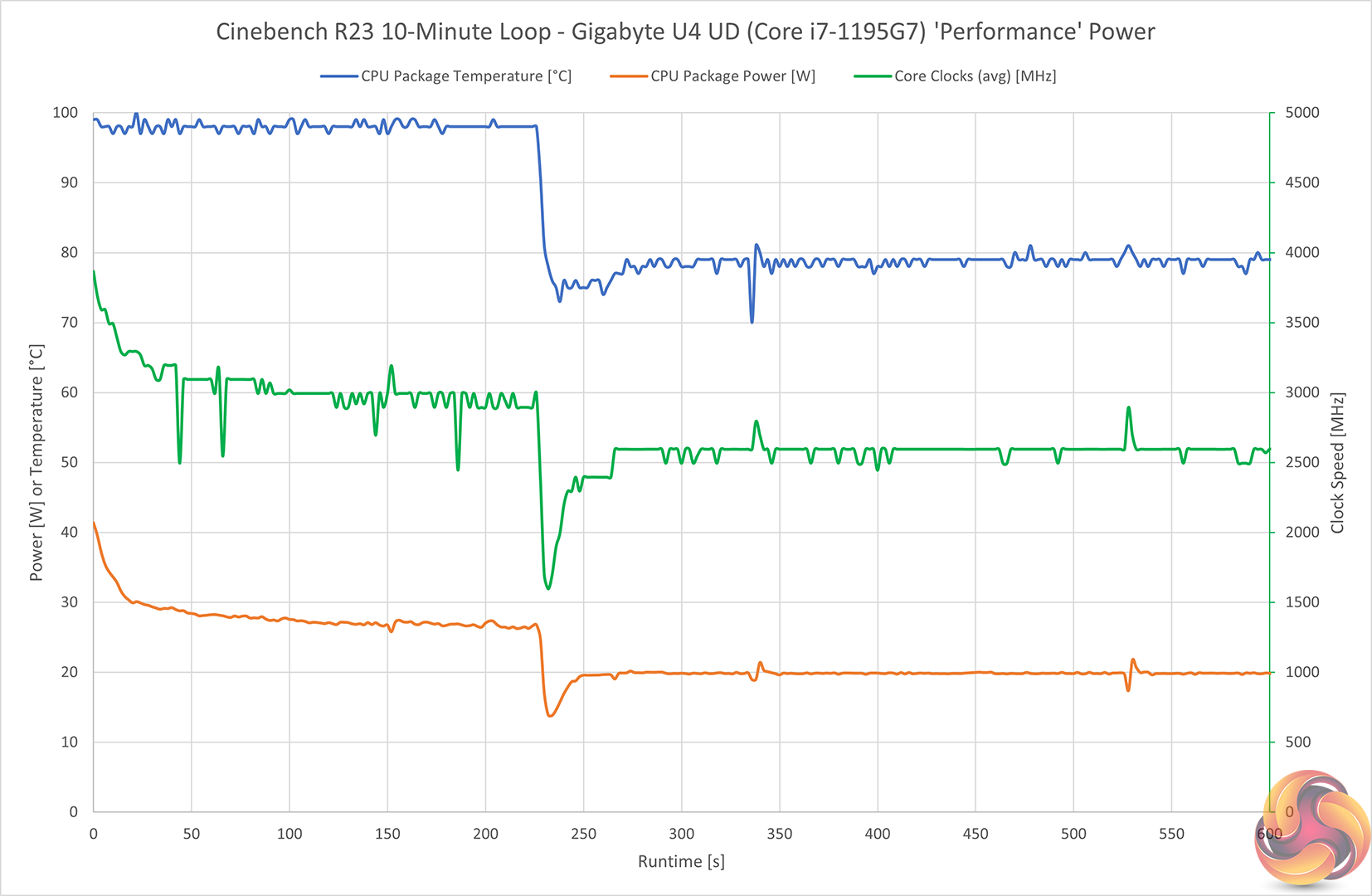
Looking at the chart for temps, power, and clocks gives us a good overview of how the Core i7-1195G7 CPU operates in Gigabyte’s U4 UD under the Performance power mode.
We see the processor start off at around 40W package power and a little over 3.5GHz. But this translates into a package temperature bouncing against the 100°C throttling point. As such, the processor power draw and frequency drop to around 26-27W and 3GHz, respectively, where the chip holds stable at higher fan speeds and just about manageable temperatures.
Once the PL2 duration is surpassed at around 220 seconds, the chip drops down to 20W sustained package power which translates into 2.6GHz average core clock. The temperature then sits at a much more manageable 80C where it stays for the remainder of our 10-minute Cinebench run.
Do remember that the Core i7-1195G7 can be configured to run at 28W sustained in its TDP-up configuration. So, Gigabyte is clearly making a distinct choice to leave around 8W worth of power delivery on the table. This is presumably to avoid higher power delivery requirements, greater system power consumption, and higher temps and fan speed inside the U4 UD chassis.
That's probably a fair choice for a 14” ultraportable of this ilk. But it is clear that at least around 400MHz of clock speed from the processor is left on the table.
Noise
You can see an example of our noise testing result in the video review.
In our testing, the fan ran at 52dBA whilst under sustained Cinebench loading. That was when measured by a sound meter at the trackpad.
The fan also often ramps under idle or low-load conditions, which can be annoying. So, I don’t think that the Gigabyte fan curves are very well tuned or noise efficient currently. It would be good for this to be looked into and possibly fixed via a firmware update in my opinion.
SSD
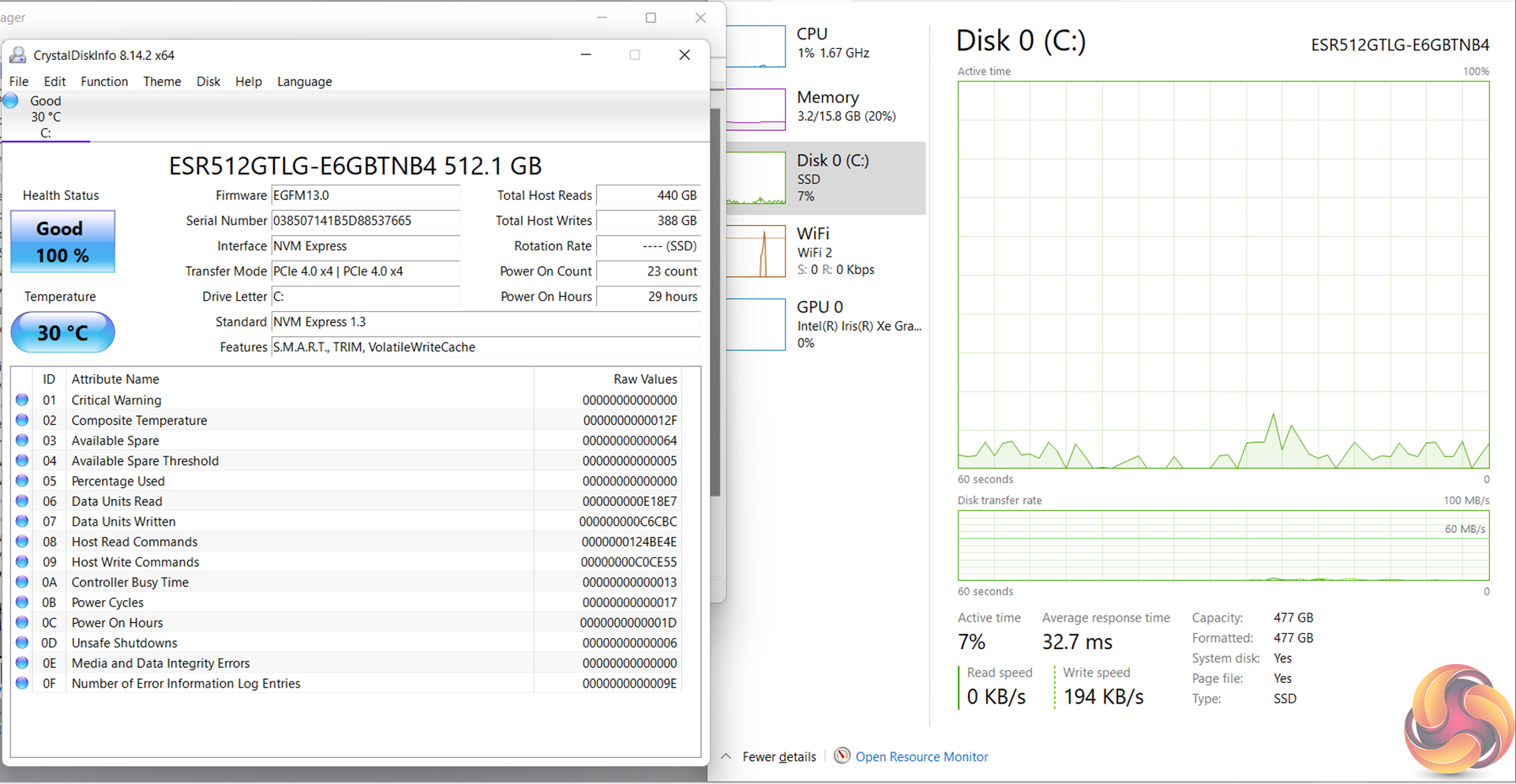
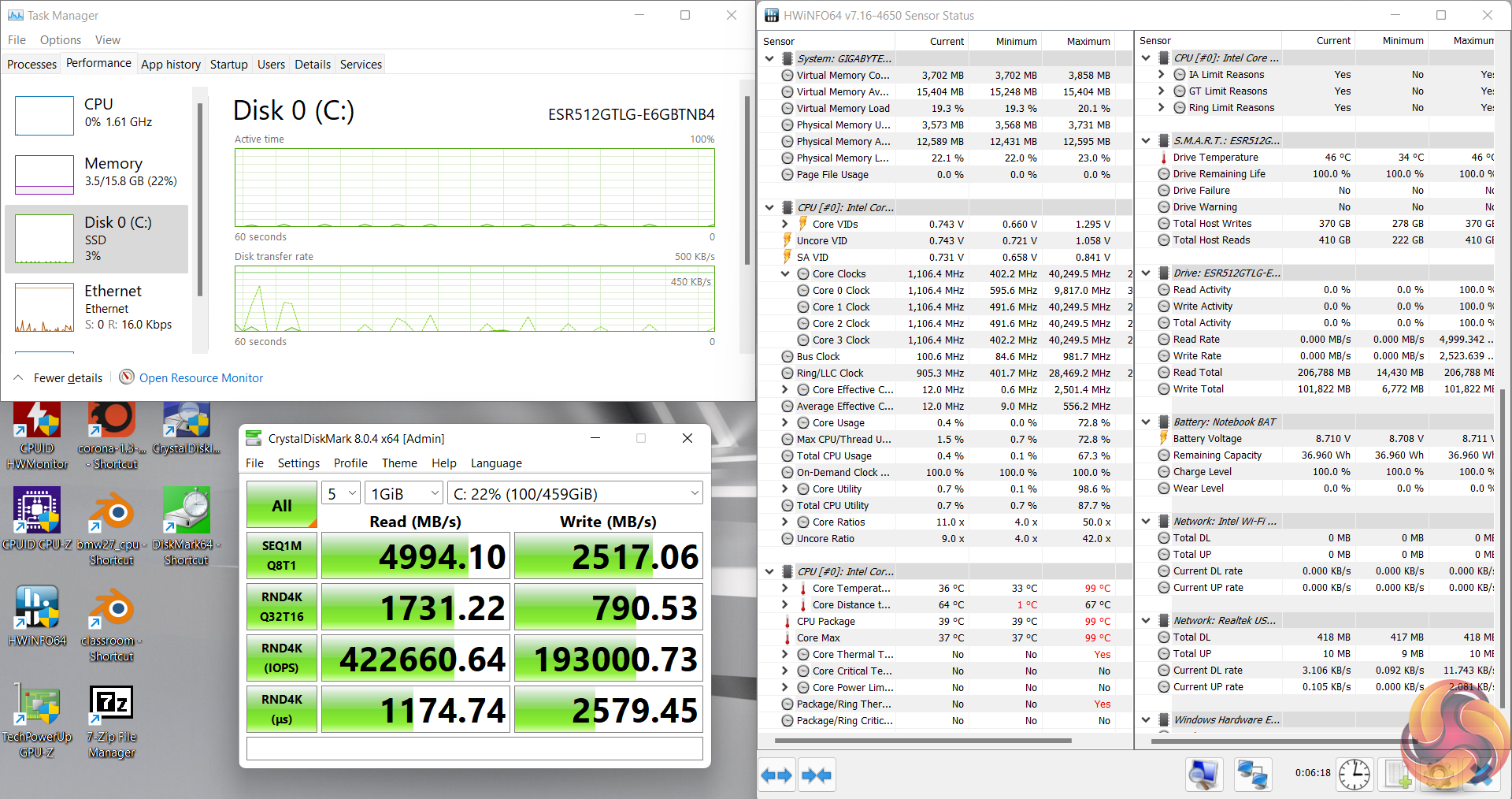
No issues with the thermals of the 512GB PCIe Gen 4×4 NVMe SSD. Speed results were pretty good, too, with the sequential read speeds actually reaching 5GBps and making good use of that Gen 4 interface.
Battery
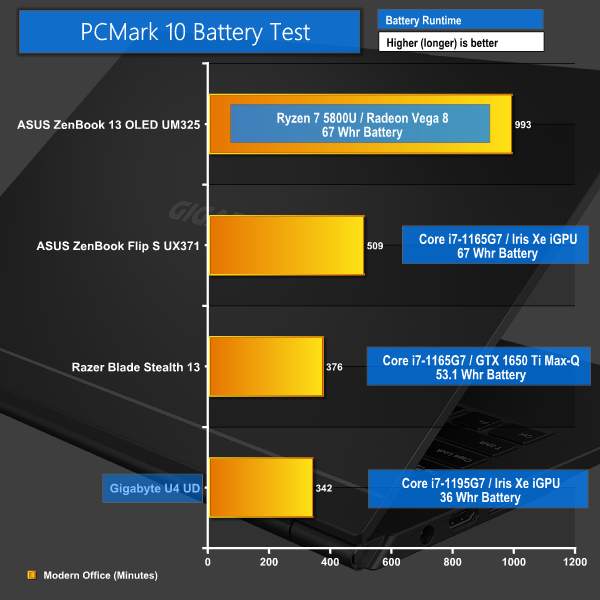

Battery life with the laptop in its Entertainment power mode is pretty uninspiring at well below six hours in the PCMark 10 Modern Office test. This means that a solid workday of usage from the U4 UD is unlikely. And that is quite disappointing for this sort of laptop with Tiger Lake-U-series hardware and a 1080p display.
It looks like Gigabyte’s decision to cheap out on the 36Whr battery hasn’t done many favours in terms of system runtime.
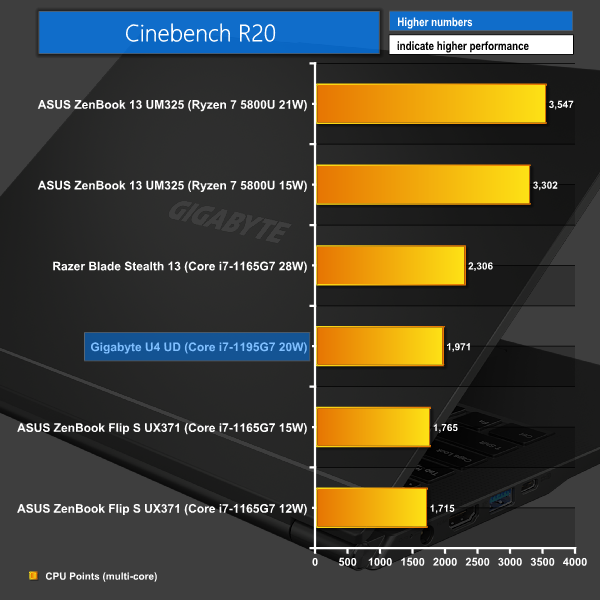
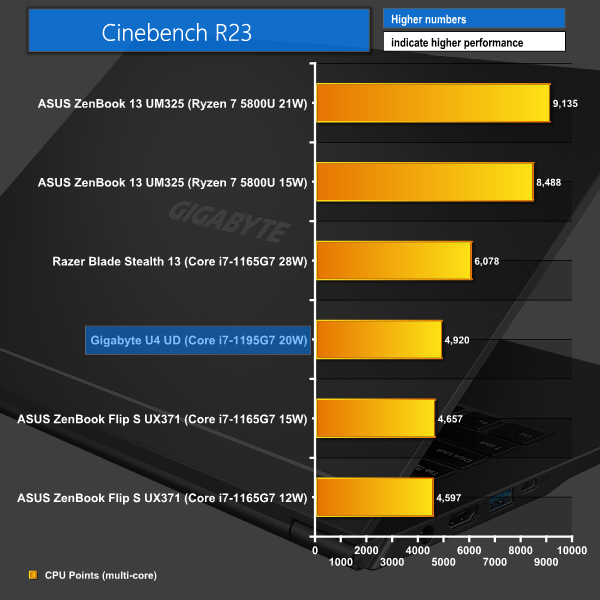
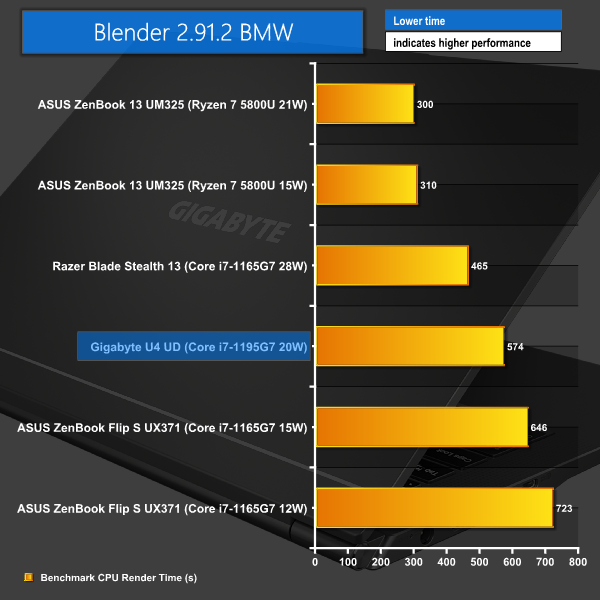
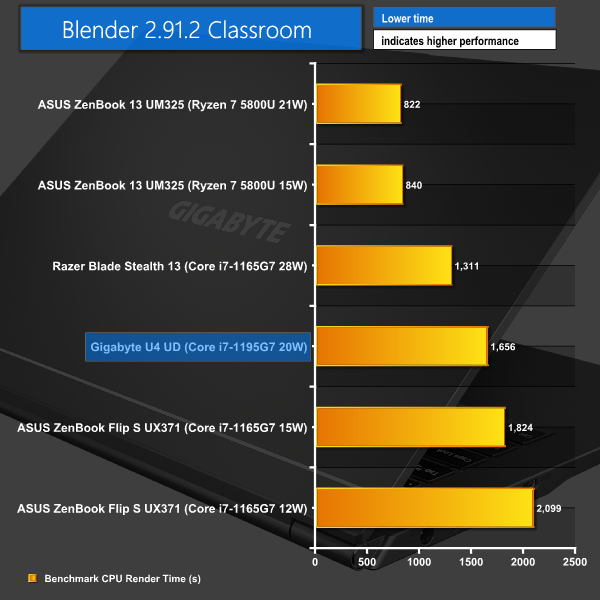
Heavily multi-threaded performance is, in essence, a showcase of the power budget that Gigabyte allocated to the U4 UD laptop’s Core i7-1195G7. The 20W long duration chip sits between the 15W and 28W Core i7-1165G7 processors in typical scenarios from the competitors.
So, despite the 1195G7 being a refreshed version over the 1165G7, it is still clear that power budget and the frequency that comes from it is the most important factor for long-duration multi-threaded workloads.
In isolation, though, the Gigabyte laptop’s performance is reasonable enough for the form factor. And it is indeed good for the price point of this U4 UD model.
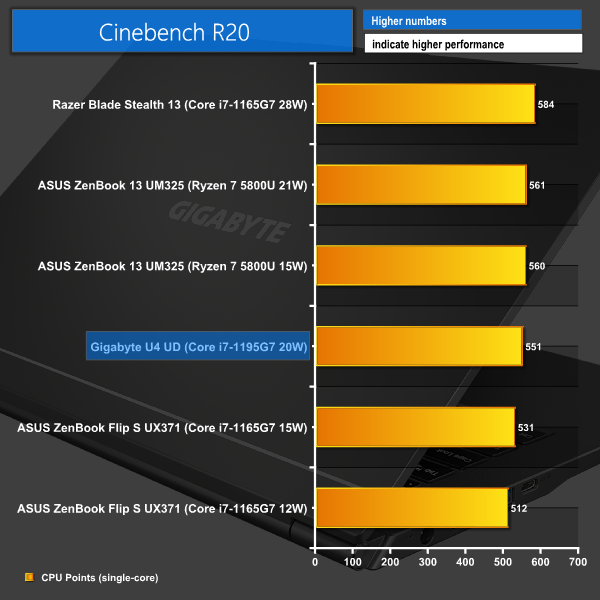
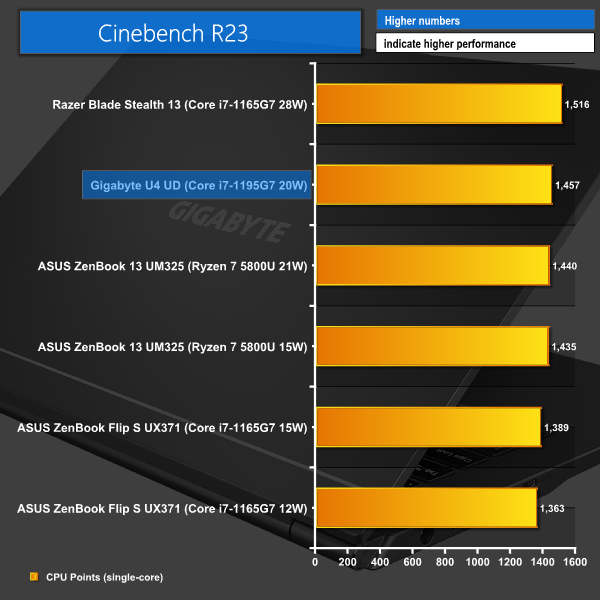
Looking at some single-threaded numbers, this is where the Core i7-1195G7 and its high maximum Turbo frequency can really shine.
In Cinebench R20, we see performance that is very close to that of the Ryzen 7 5800U – an eight-core processor that has wiped the floor with the Tiger Lake-based chips in heavy workloads thus far. But Gigabyte’s chosen 20W PL1 and 51W PL2 values prevent the U4 UD from taking top spot in the Cinebench R23 benchmark.
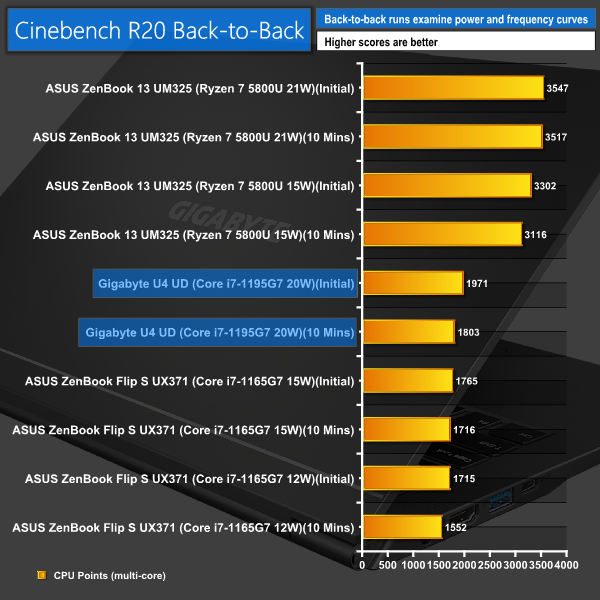
Performance consistency from the U4 UD is very much indicative of the power curve that the processor follows. A single Cinebench R20 nT run will keep the processor in a turbo power state beyond 26W. Whereas consecutive runs totalling at least 10 minutes sees the 1195G7 locked to its 20W sustained power level.
The performance drop-off is certainly noticeable, so once again Gigabyte has left some performance on the table to manage power and thermals in this slim and light chassis.
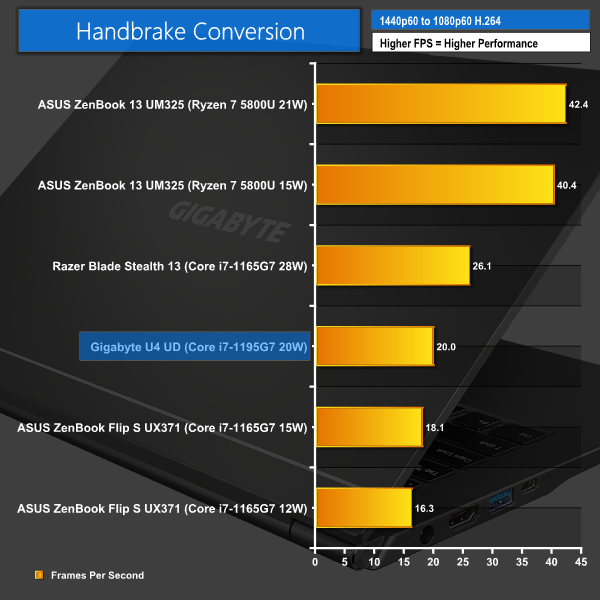
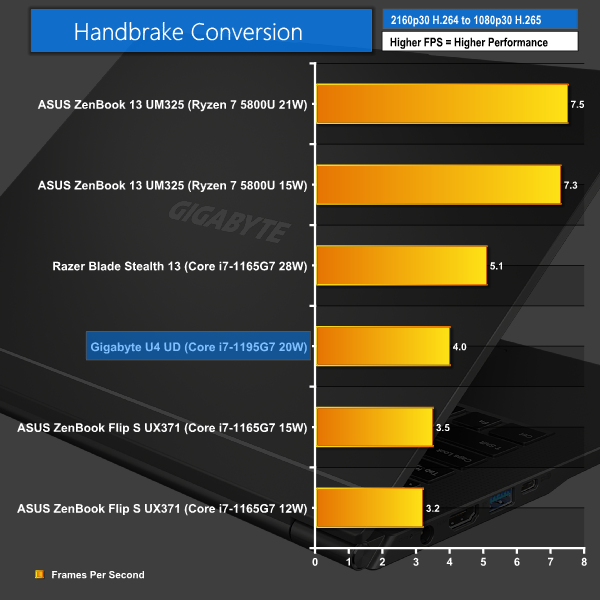
Handbrake video conversions on these lower power processors effectively acts as a long-duration multi-threaded test once again. In the lengthy Handbrake runs, it is unsurprising that the Gigabyte U4 UD and its 20W sustained Core i7-1195G7 sits above the 15W 1165G7 in the ASUS ZenBook and below the 28W version of the 1165G7 in the Razer Blade Stealth 13.
Nevertheless, you’re getting solid media conversion performance from a cost-effective laptop, even if Ryzen 5000U chips are significantly faster.
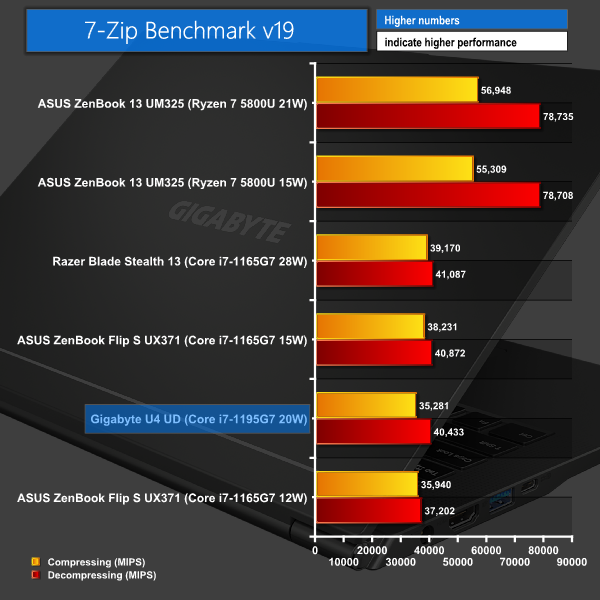
7-Zip places considerable emphasis on memory performance – particularly bandwidth. This is why Gigabyte’s 1195G7-equipped U4 UD slips to just above bottom place, despite its strong processor.
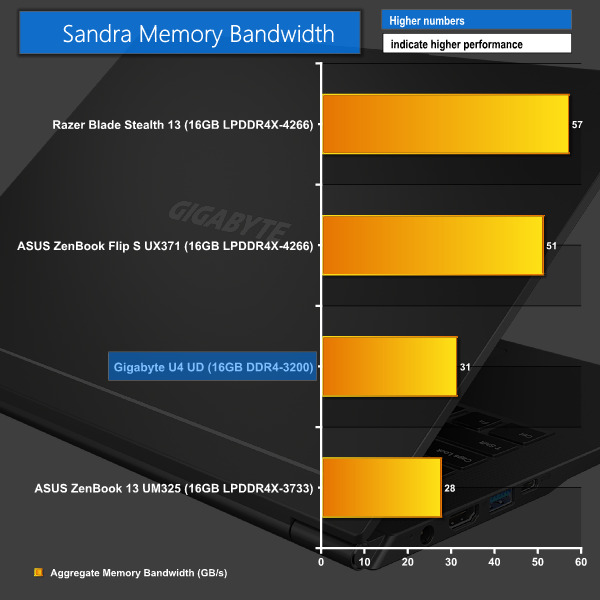
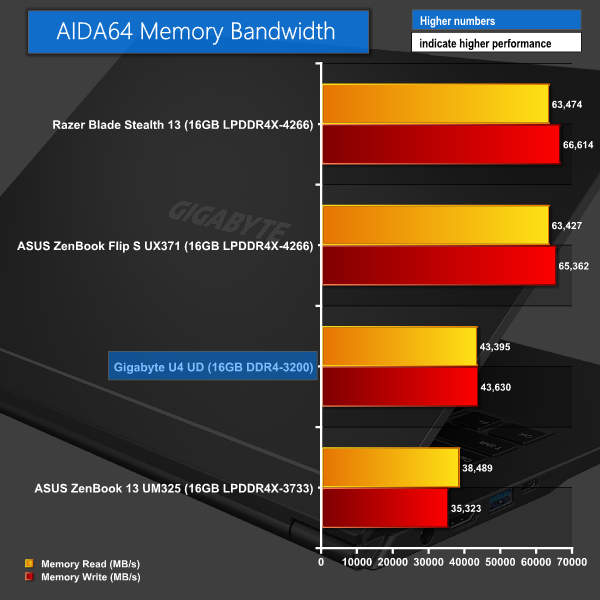
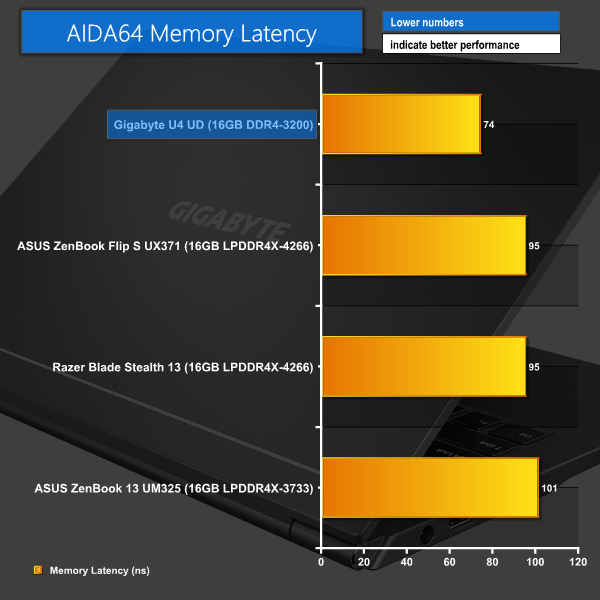
The 16GB of 3200MHz DDR4 is no match for high-speed LPDDR4X memory when it comes to bandwidth-heavy tasks. This is an area where Gigabyte’s cost cutting has had a notable impact on performance.
But that may be a worthy compromise to many cash-strapped buyers, especially those who may also value the SODIMM upgradability or latency benefits.
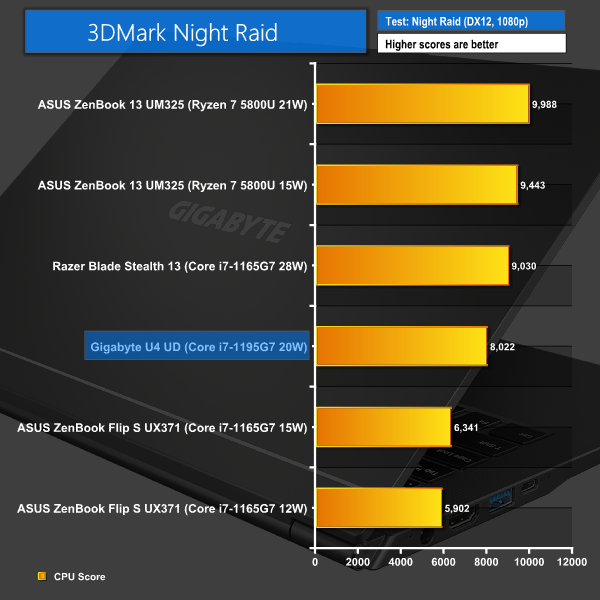
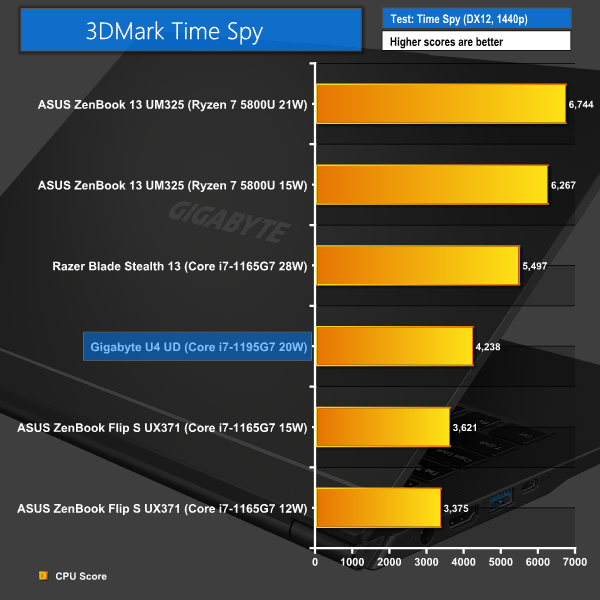
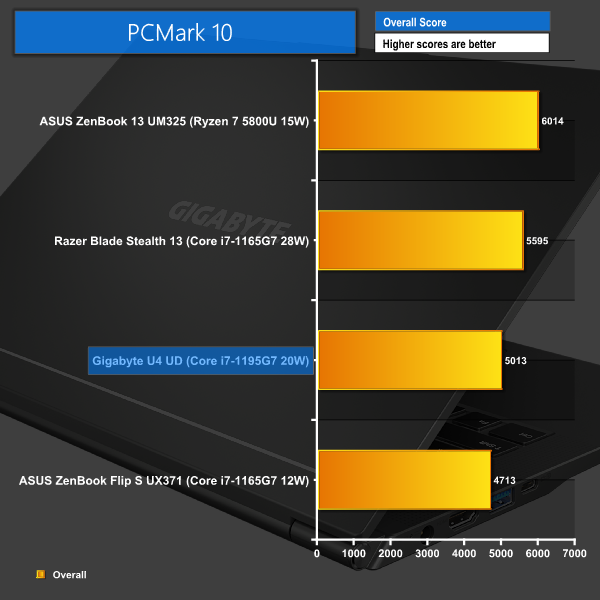
Whilst not a gaming laptop, 3DMark Night Raid indicates that the Gigabyte U4 UD with its Iris Xe iGPU will likely be fine for some basic gaming. The numbers here are closer to the Razer Blade Stealth 13 than usual. This is likely related to the refreshed 1195G7’s ability to boost to lofty clock speeds. Though the tougher workload of 3DMark Time Spy puts an end to that trend.
And PCMark 10 resumes normal order of the U4 UD sitting between the 15W and 28W Core i7-1165G7 laptops in terms of performance hierarchy.
It is difficult to not be happy with the Gigabyte U4 UD laptop. This highly-affordable 14-inch offering delivers solid performance, strong build quality, and an array of sensible design choices.
The Intel Core i7-1195G7 Tiger Lake-U Refresh processor performs reasonably well in lightly-threaded tasks where the high boost frequency can be leveraged. But it is clearly no match for some of the AMD competition when it comes to heavily multi-threaded tasks.
I liked Tiger Lake-U for its purpose, and I like Tiger Lake-U Refresh in this laptop. But it is quite clear that the Intel 11th Gen U-series is ready for an upgrade to Intel 12th Gen spec very soon. Four cores with limited frequency is fine in today’s market, but it’s hardly exciting.
Gigabyte’s operation of the 28W-capable chip at 20W long duration even in the ‘Performance’ mode certainly leaves considerable performance on the table. But this is realistically a constraint of the cooling and power delivery capacity of this sub-1kg unit.
No complaints when it comes to the screen. 14-inches of 400-nits IPS goodness with 100% sRGB coverage is a strong formula for a budget notebook. The bezels are mediocre if you’re really concerned about sleekness. But the screen was enjoyable to use and had ample quality and sturdiness, despite this laptop’s affordable price point and lightweight design.
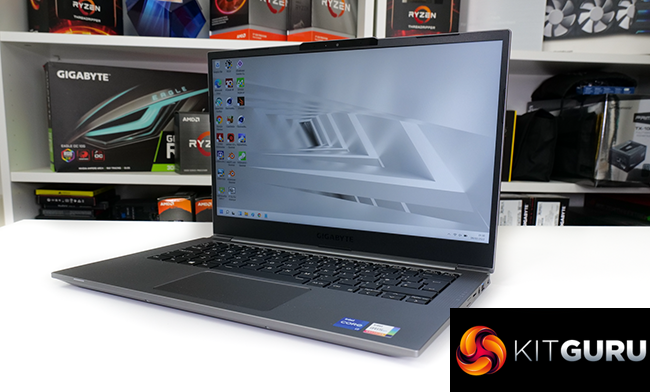
Thunderbolt 4 is great to see. However, some extra USB-C connectivity would have been appreciated. And I’d have preferred Type-C charging from the 65W adapter.
The 36Whr battery is uninspiring. But that shouldn’t be too much of an issue if you’re happy with not really being able to get a workday’s worth of lightweight general usage on a single charge. And one other point is that the cooling performance should be adjusted to make the noise output less annoying or sporadic.
Overall, I am reasonably happy with what Gigabyte has done with the U4 UD. At the current availability price of just under £700, this is a good option on the market.
There are clear downsides, as we have highlighted – particularly the mediocre battery life, louder-than-necessary fan behaviour, and processor performance left on the table. But less than £700 for a sub-1kg notebook with a competent 14-inch IPS screen and solid under-the-hood hardware – that’s pretty difficult to argue against!
You can buy the U4 UD for £669.99 from Box HERE.
Discuss on our Facebook page HERE.
Pros:
- Very good hardware configuration for the cost.
- Upgradable SODIMM RAM is positive.
- Excellent design and manufacturing choices at this price point.
- Pleasant 14” IPS display.
- Lightweight, compact form factor with strong build quality.
- Thunderbolt 4/USB4 connectivity.
Cons:
- Core i7-1195G7 doesn’t show its full horsepower and 11th Gen is looking aged.
- Battery life is mediocre, at best.
- Fan noise can often be irritating.
KitGuru says: The Gigabyte U4 UD is a smartly-designed, well-built laptop that offers strong value at £700. There are some notable compromises, but the overall package provides a lot to like.

