KitGuru KitGuru.net – Tech News | Hardware News | Hardware Reviews | IOS | Mobile | Gaming | Graphics Cards


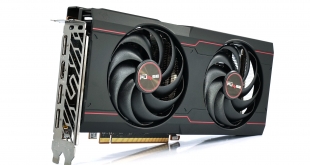
Following on from our first RX 6600 XT review yesterday, today we are back with a look at the Sapphire RX 6600 XT Pulse. Having reviewed plenty of Sapphire's Nitro+ cards this generation, this is our first look at a Pulse model since the launch of the RX 5600 XT. With just a $20 price premium over AMD's baseline MSRP, what does the Pulse have to offer potential customers?
The Sapphire Pulse series has garnered a lot of praise over the years, with the cards designed to offer a ‘no frills' experience, for those who just want solid build quality, strong cooling performance and a capable VRM. If you like a few extra features, such as on-board ARGB headers, dual-BIOS and quick connect fans – Sapphire will point you towards its more expensive Nitro+ series.
With the RX 6600 XT Pulse, Sapphire is offering a factory-overclocked core, an emphasis on low noise levels and a clean design aesthetic. Let's see if they have got it right.
| RX 6900 XT | RX 6800 XT | RX 6800 | RX 6700 XT | RX 6600 XT | |
| Architecture | RDNA 2 | RDNA 2 | RDNA 2 | RDNA 2 | RDNA 2 |
| Manufacturing Process | 7nm | 7nm | 7nm | 7nm | 7nm |
| Transistor Count | 26.8 billion | 26.8 billion | 26.8 billion | 17.2 billion | 11.1 billion |
| Die Size | 519 mm² | 519 mm² | 519 mm² | 336 mm² | 237 mm² |
| Ray Accelerators | 80 | 72 | 60 | 40 | 32 |
| Compute Units | 80 | 72 | 60 | 40 | 32 |
| Stream Processors | 5120 | 4608 | 3840 | 2560 | 2048 |
| Game GPU Clock | Up to 2015MHz | Up to 2015MHz | Up to 1815MHz | Up to 2424MHz | Up to 2359MHz |
| Boost GPU Clock | Up to 2250MHz | Up to 2250MHz | Up to 2105MHz | Up to 2581MHz | Up to 2589MHz |
| Peak SP Performance | Up to 23.04 TFLOPS | Up to 20.74 TFLOPS | Up to 16.17 TFLOPS | Up to 13.21 TFLOPS | Up to 10.6 TFLOPS |
| Peak Half Precision Performance | Up to 46.08 TFLOPS | Up to 41.47 TFLOPS | Up to 32.33 TFLOPS | Up to 26.43 TFLOPS | Up to 21.21 TFLOPS |
| Peak Texture Fill-Rate | Up to 720 GT/s | Up to 648.0 GT/s | Up to 505.2 GT/s | Up to 413.0 GT/s | Up to 331.4 GT/s |
| ROPs | 128 | 128 | 96 | 64 | 64 |
| Peak Pixel Fill-Rate | Up to 288.0 GP/s | Up to 288.0 GP/s | Up to 202.1 GP/s | Up to 165.2 GP/s | Up to 165.7 GP/s |
| AMD Infinity Cache | 128MB | 128MB | 128MB | 96MB | 32MB |
| Memory | 16GB GDDR6 | 16GB GDDR6 | 16GB GDDR6 | 12GB GDDR6 | 8GB GDDR6 |
| Memory Bandwidth | 512 GB/s | 512 GB/s | 512 GB/s | 384 GB/s | 256 GB/s |
| Memory Interface | 256-bit | 256-bit | 256-bit | 192-bit | 128-bit |
| Board Power | 300W | 300W | 250W | 230W | 160W |
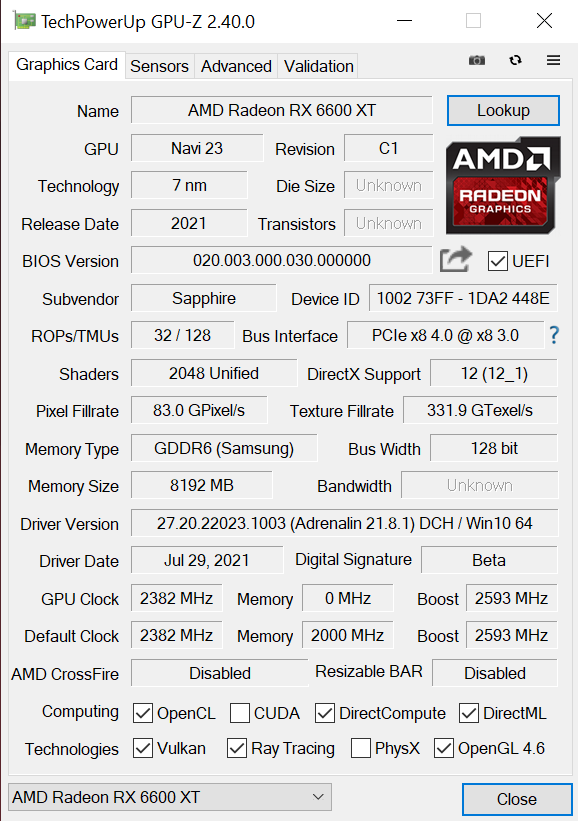
As a spec recap, RX 6700 XT is built using the new Navi 23 GPU, a physically small die, measuring just 237 mm². It houses 32 Compute Units (CUs), with 64 stream processors per CU, giving a total of 2048. RX 6600 XT features a fully populated Navi 23 GPU, but we can expect a cut-down version to appear with the rumoured RX 6600.
RDNA 2 houses one ray accelerator per CU, so there’s a total of 32 with the RX 6600 XT. Four texture units per CU gives a total of 128, while there’s also 64 ROPs. Clock speed remains at the lofty heights that we saw from the RX 6700 XT, as the 6600 XT's rated game clock of 2589MHz is 8MHz above that of the RX 6700 XT. Sapphire has added a factory overclock, but the boost clock is only 2593MHz, so it's not much of an increase over reference spec.
As for the memory configuration, AMD has opted to use a 128-bit memory interface paired with 8GB of GDDR6 memory. Using 16Gbps modules, total memory bandwidth hits 256 GB/s, lower than even the last-generation RX 5600 XT . RDNA 2 GPUs, however, have the benefit of AMD’s Infinity Cache, but even that is reduced, with just a 32MB cache used here.
Lastly, total board power (TBP) is rated at 160W, a reduction of 70W, or almost 30%, compared to the RX 6700 XT.

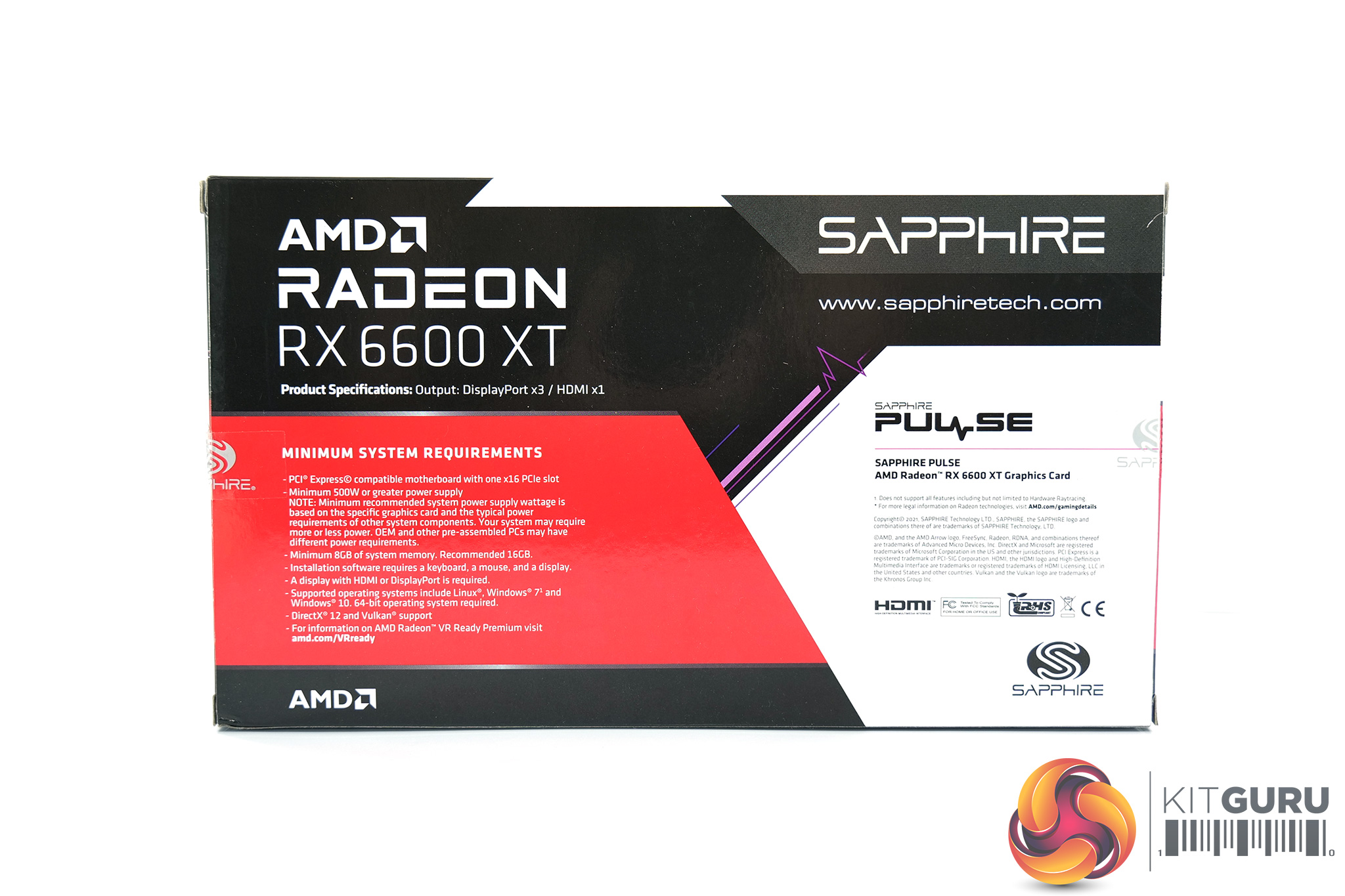
The Sapphire RX 6600 XT Pulse ships in a multi-coloured box. There's no image of the graphics card visible on the front, but we can see the ECG graph – hence the name ‘Pulse.'
On the back, various key specs of the RX 6600 XT are highlighted.
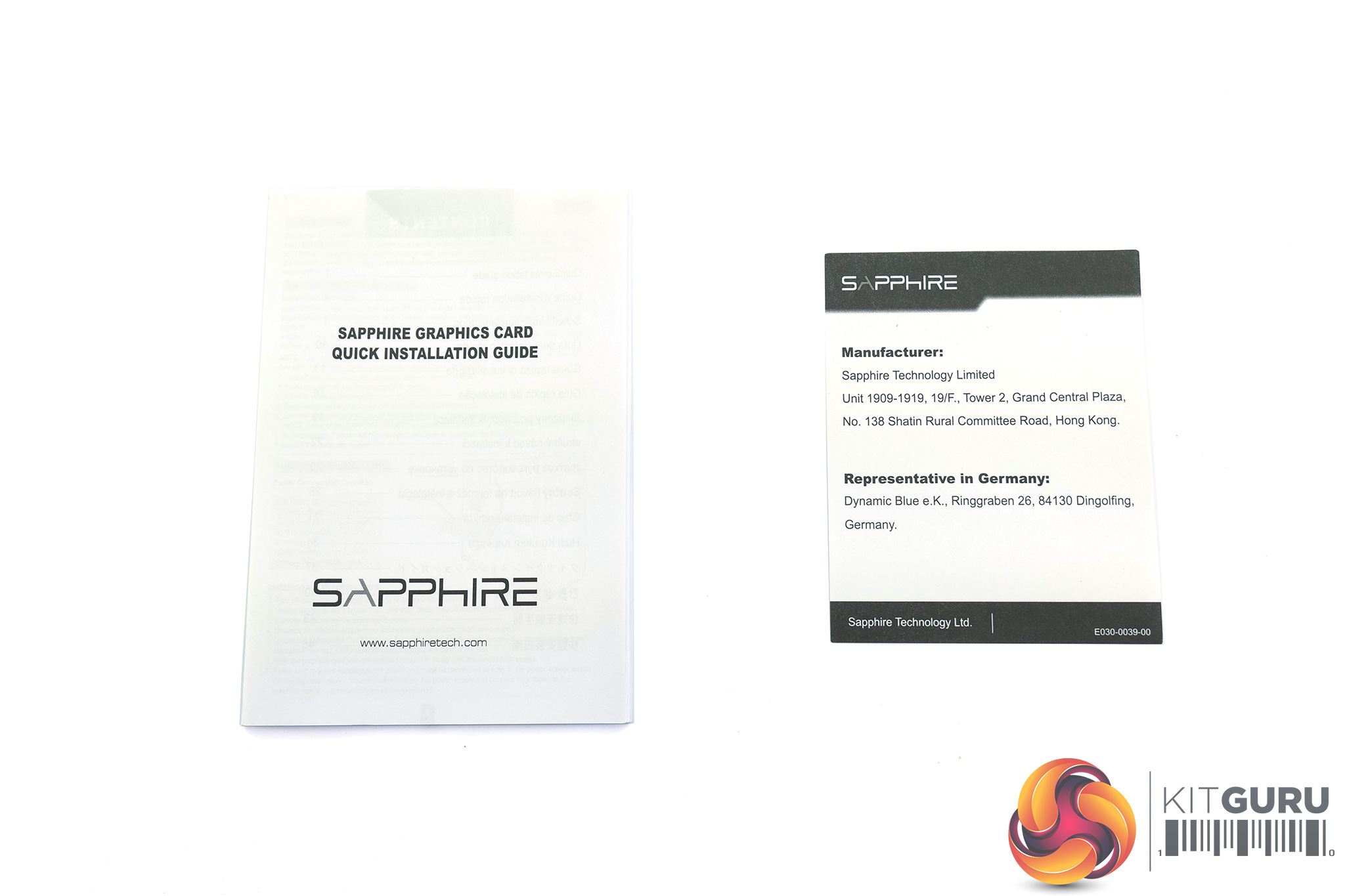
Inside, we find two pieces of documentation – a quick start guide and a manufacturer's note.
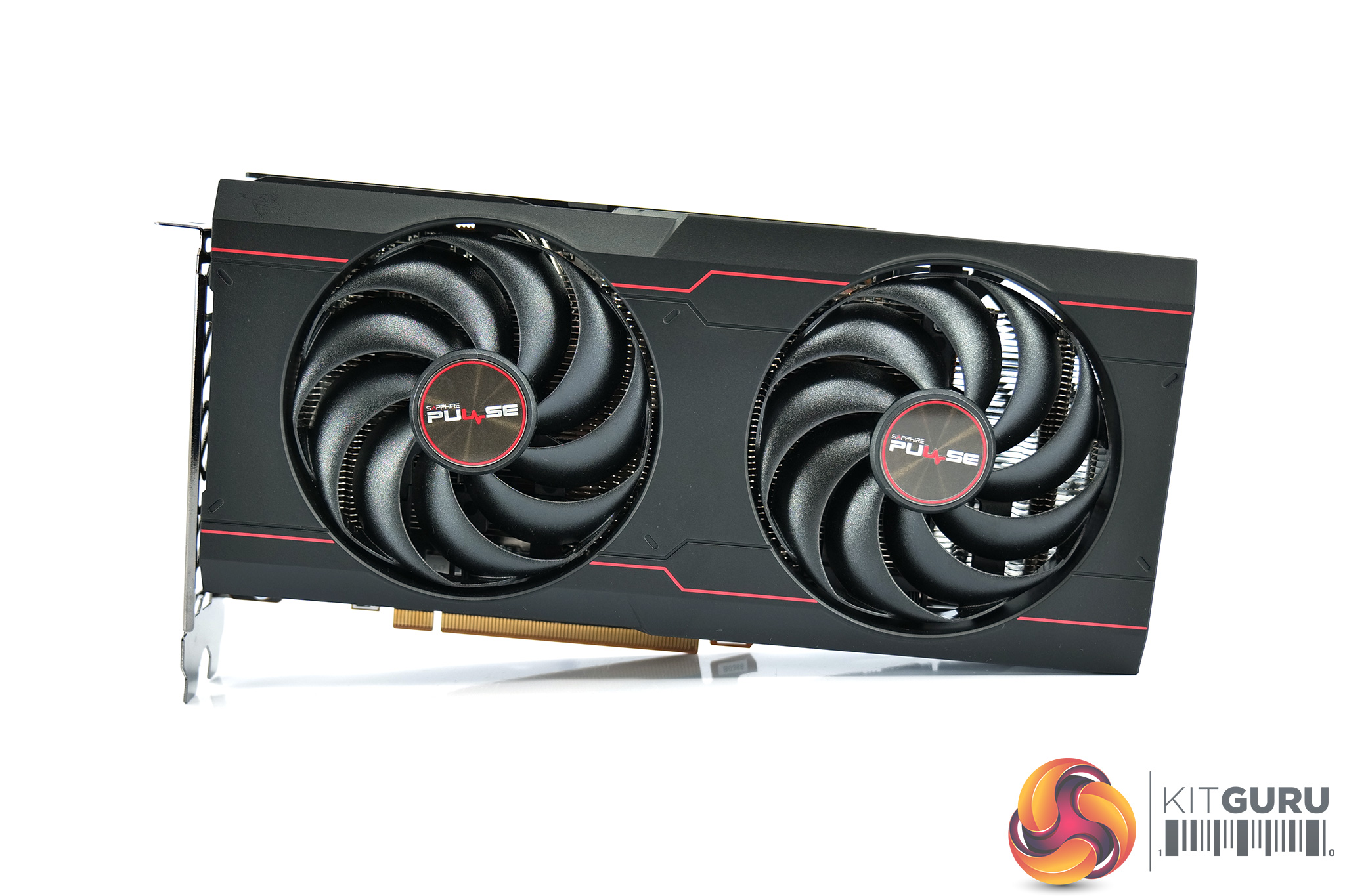
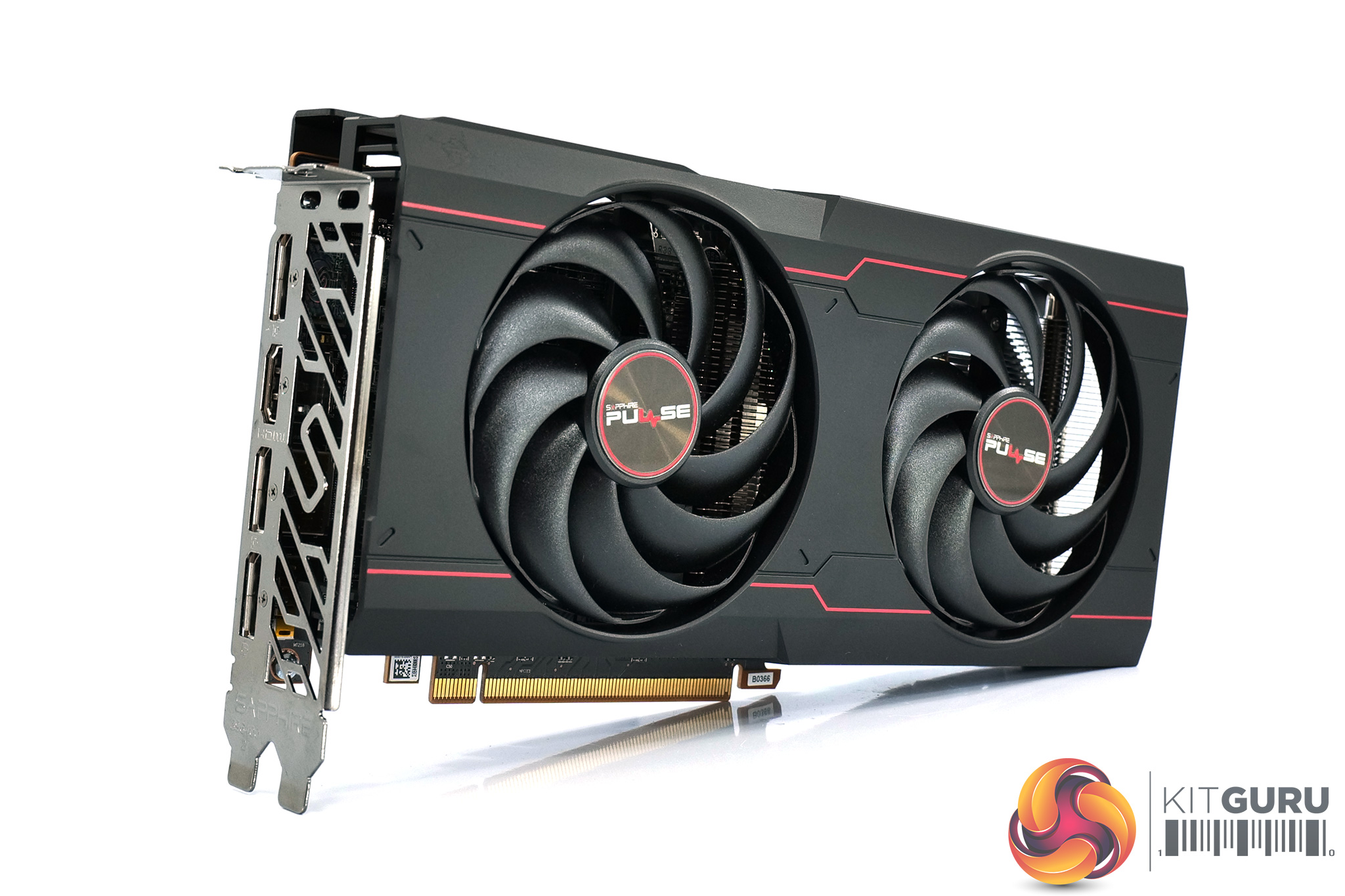
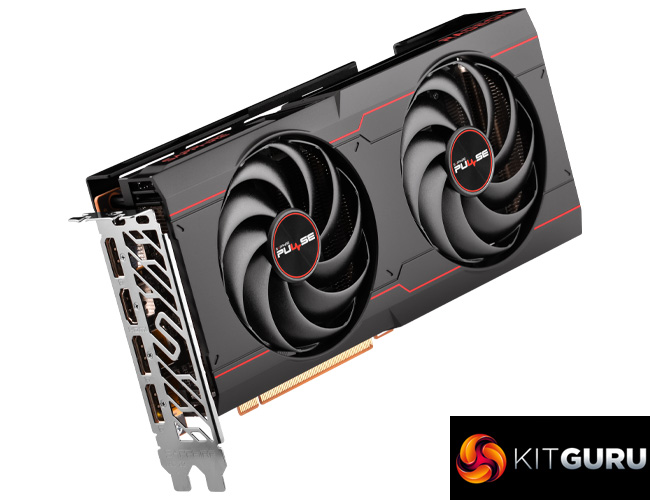
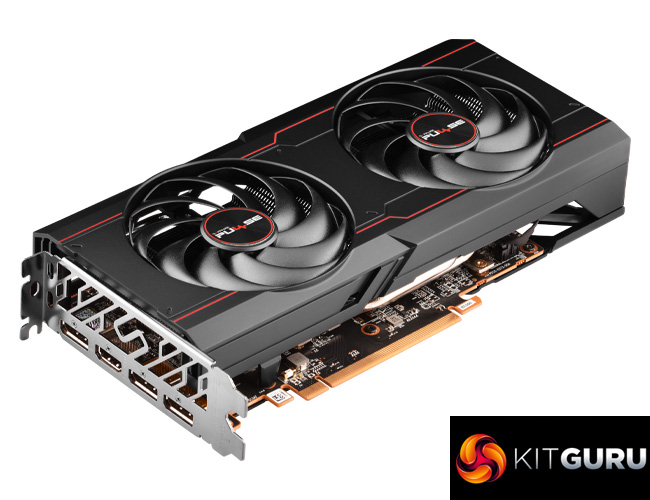
Looking at the graphics card itself, we can immediately see a slight update to the design compared to the RX 5600 XT Pulse. Gone are the silver sections, and the card is now almost entirely black, with just two slim red lines running along the length of the card. It's overall very stealthy, and I have to say I do quite like it.
We can also note the Dual-X cooler, meaning there's two fans, each of which measure 90mm across. These use Sapphire's Hybrid Fan Blade design, with each of the fan blades connected to one another via a ring running around the outer edge of the blades. Sapphire says this offers the ‘quietness of a traditional axial fan design… alongside the strong air pressure of a blower fan', with the company claiming a 5.5% improvement in downward air pressure – presumably compared to the previous Pulse fan design.
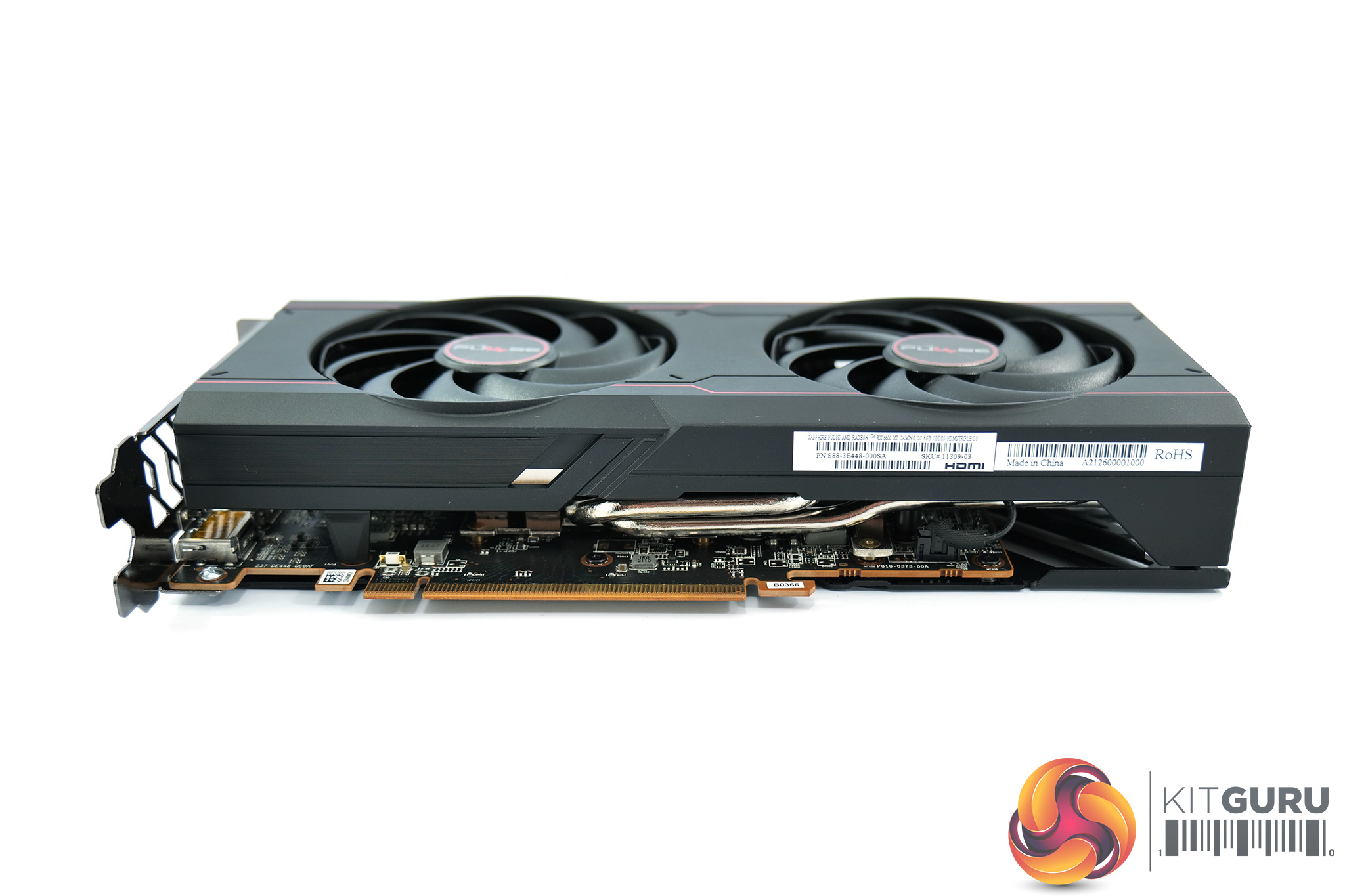
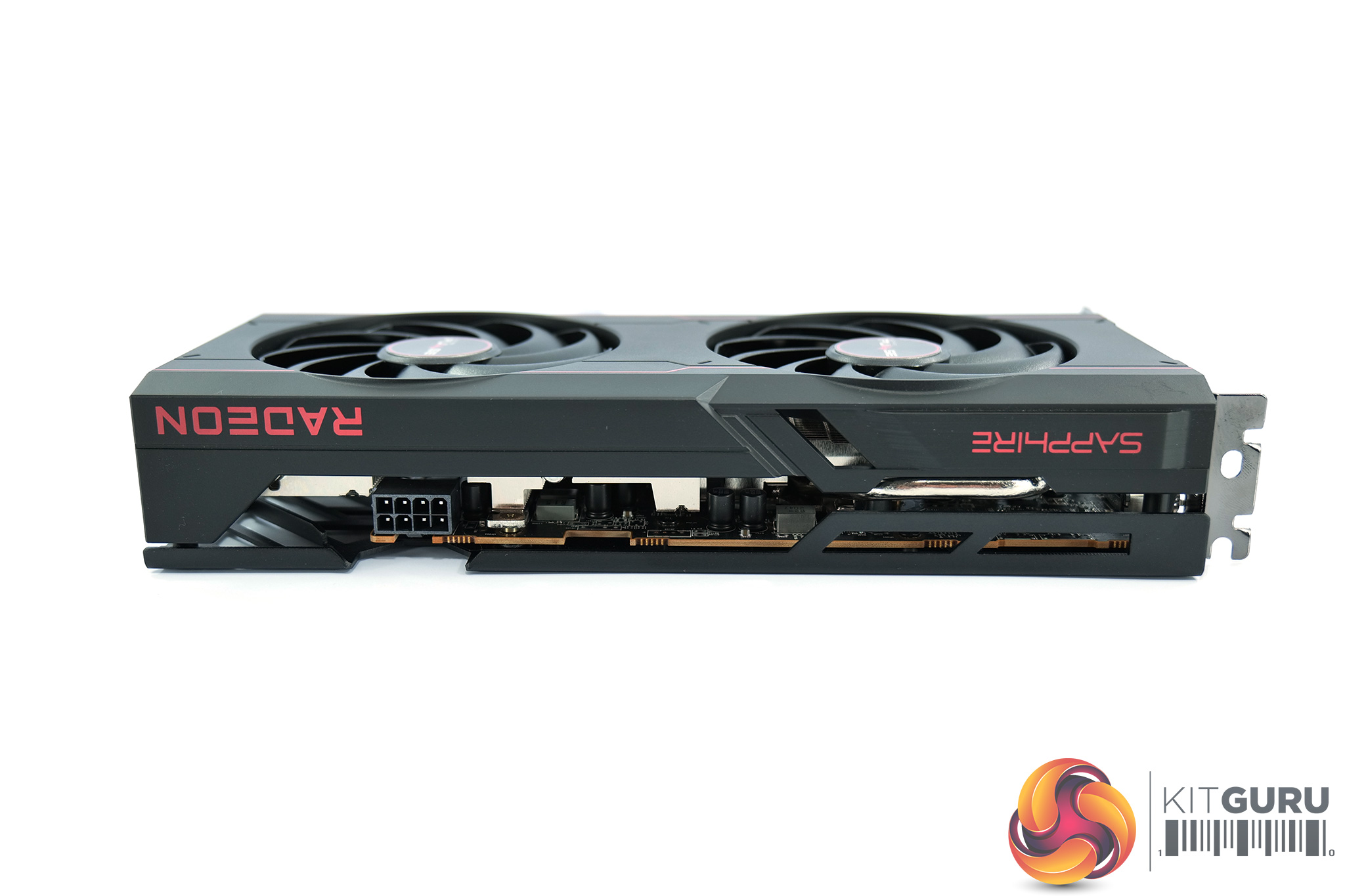
It's good to see the Pulse is a relatively compact card, too. It measures 240 x 119.85 x 44.75 mm, so it's only just thicker than a standard dual-slot card.
Tipping the scales at 614g, it is also pretty lightweight – for reference, the Gigabyte Gaming OC Pro we reviewed yesterday weighs 895g.
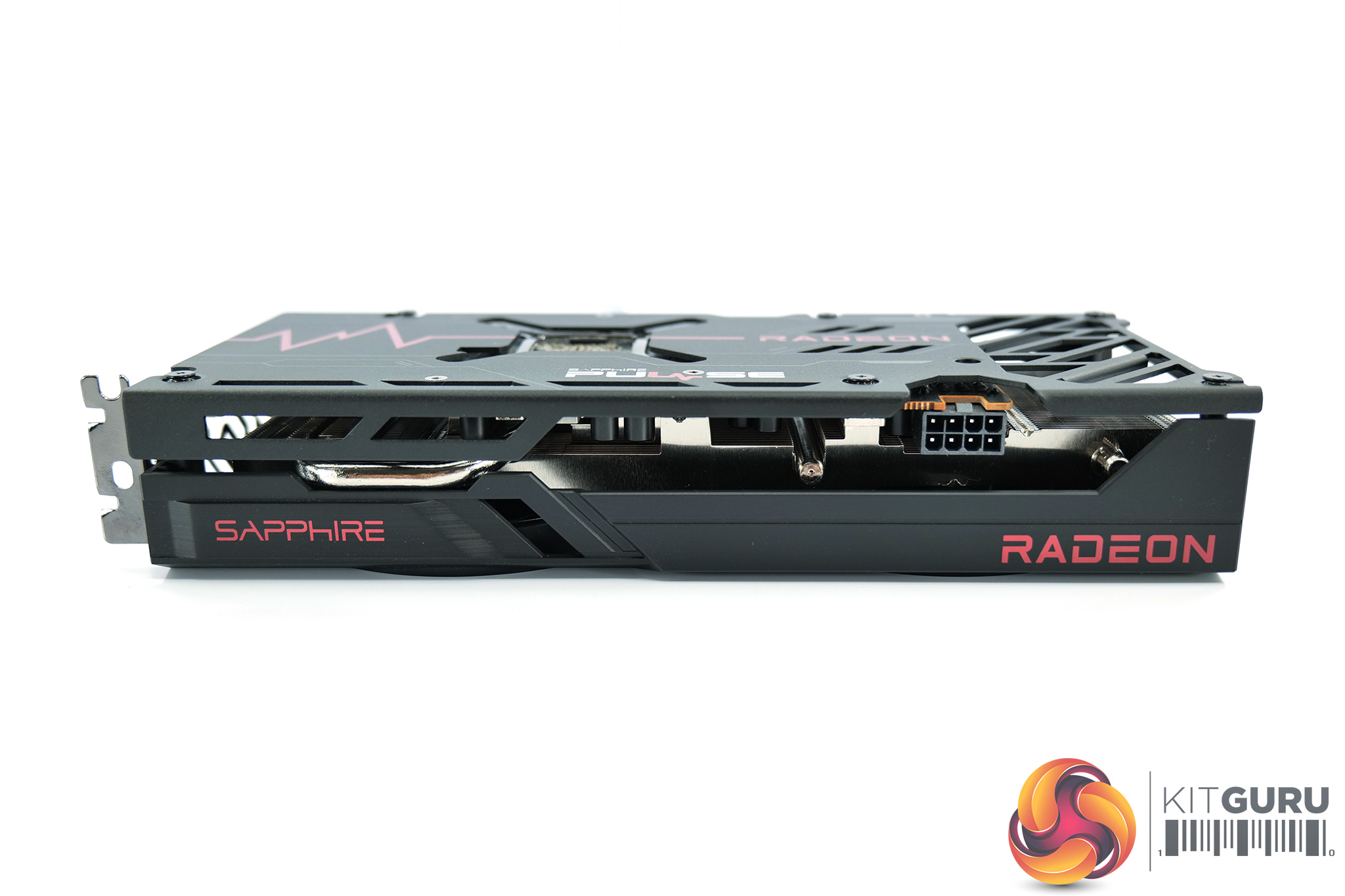
The top side of the card is home to the Sapphire and Radeon logos printed in red, but it's important to note there's no RGB anywhere on the card. Whether that is a good or bad thing is entirely dependent on your personal view of RGB.
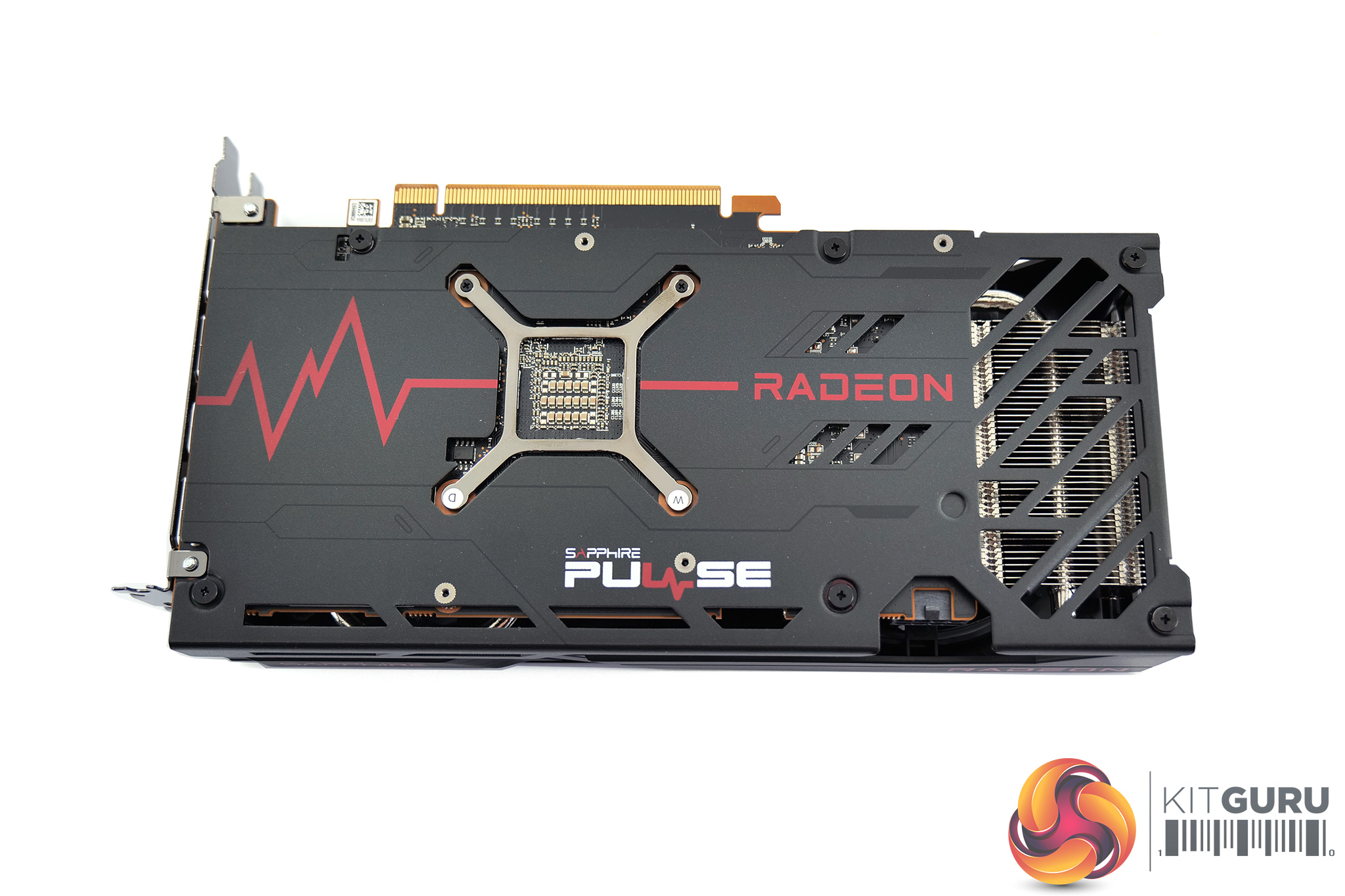
As for the backplate, it's a full-length metal design, with just a splash of colour from the red ECG graph. We can note a cut-out behind the back of the GPU die, while there's also a cut-out towards the end of the card, to allow airflow to pass directly through the heatsink.
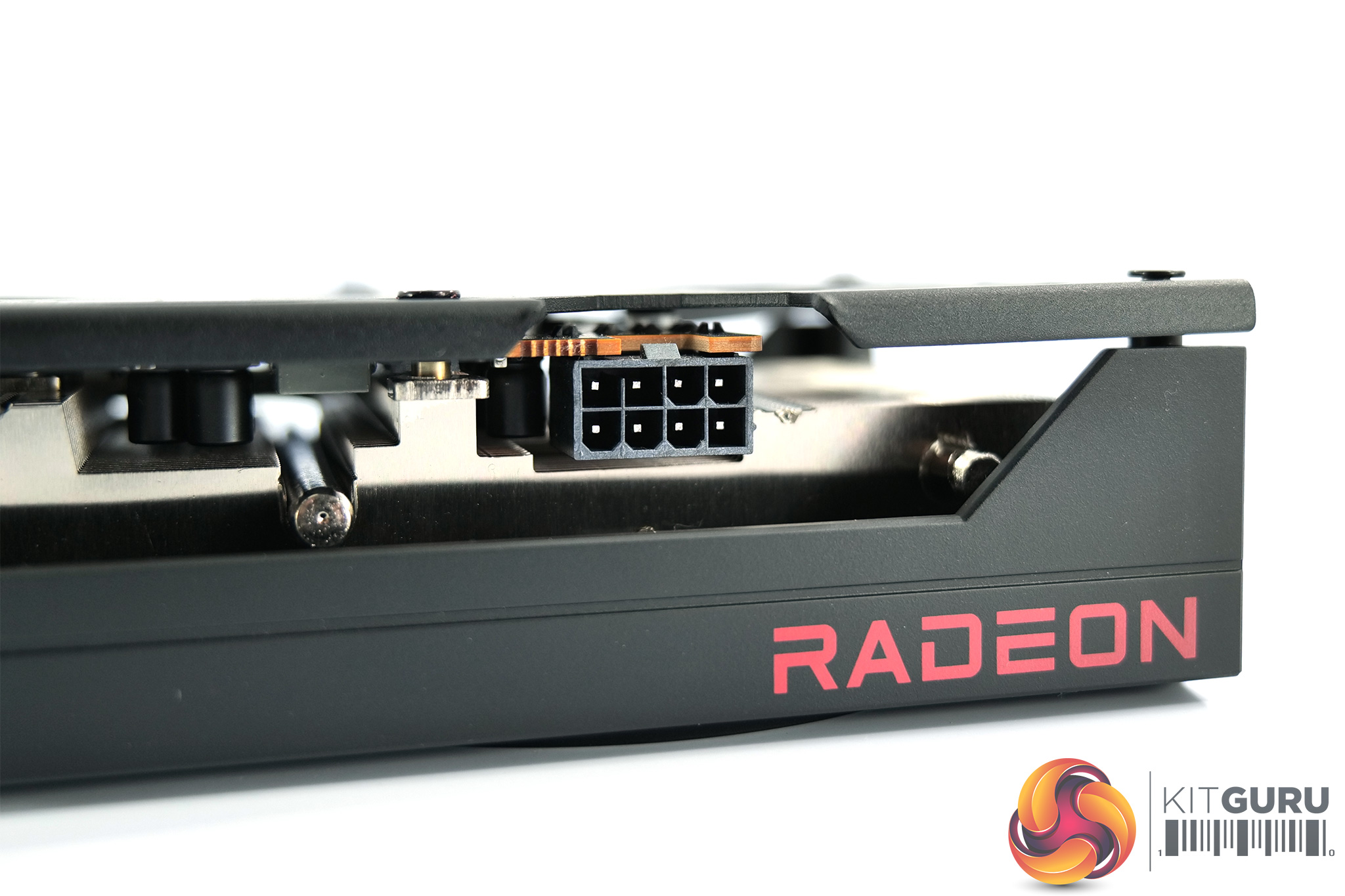
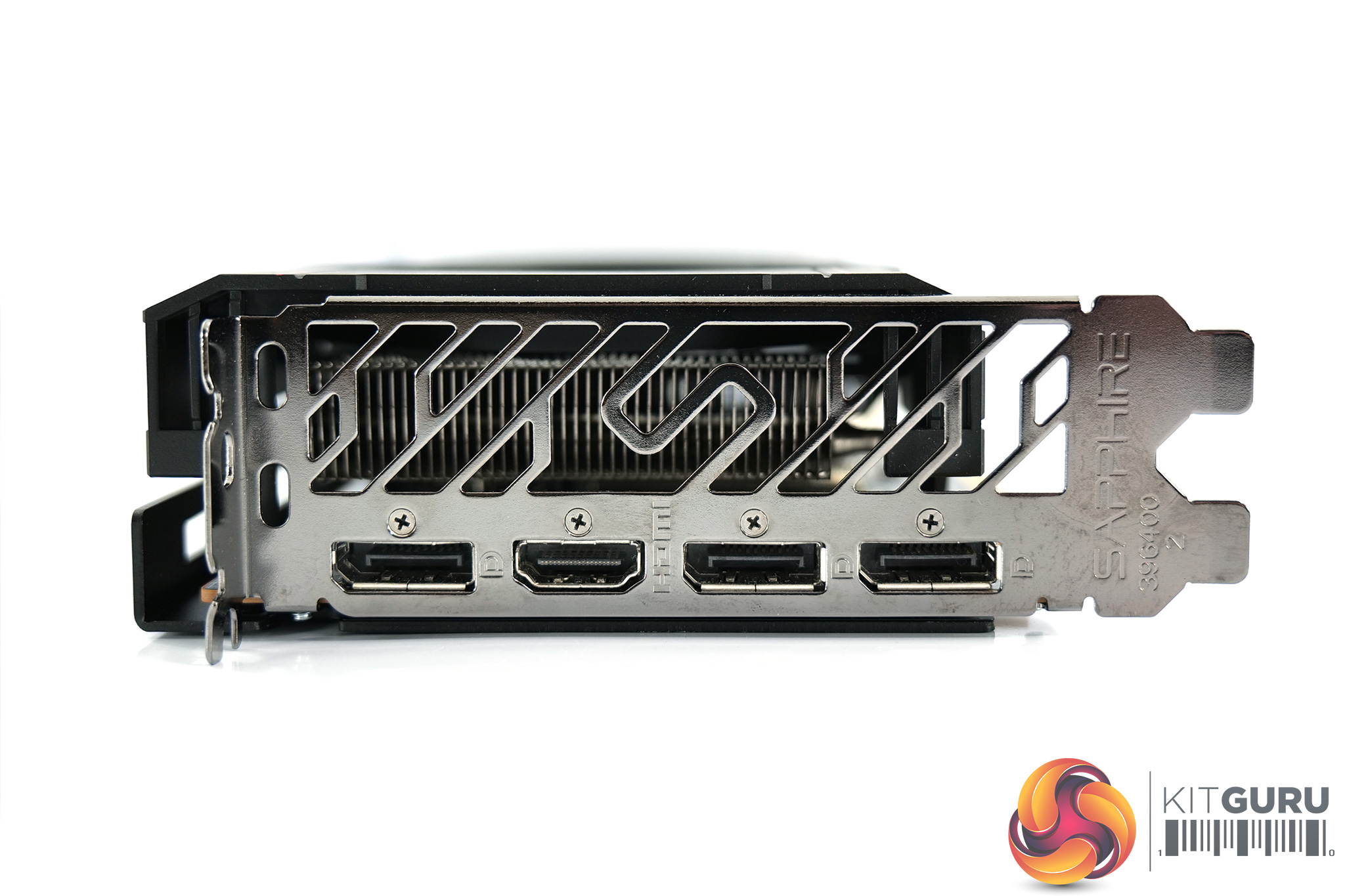
As expected, power requirements consist of a single 8-pin PCIe connector. Display outputs are also standard, with 3x DisplayPort 1.4 and 1x HDMI 2.1.
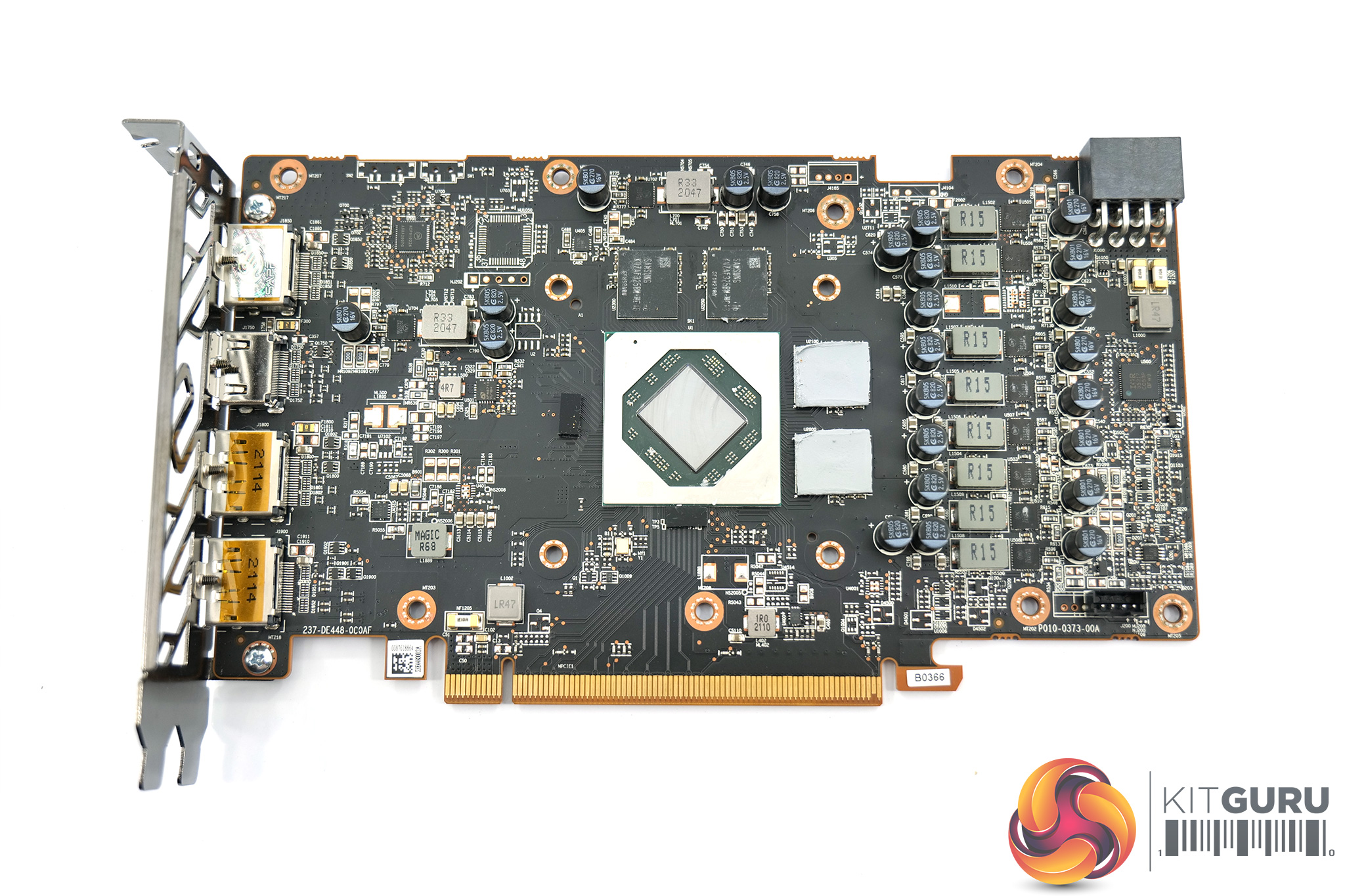
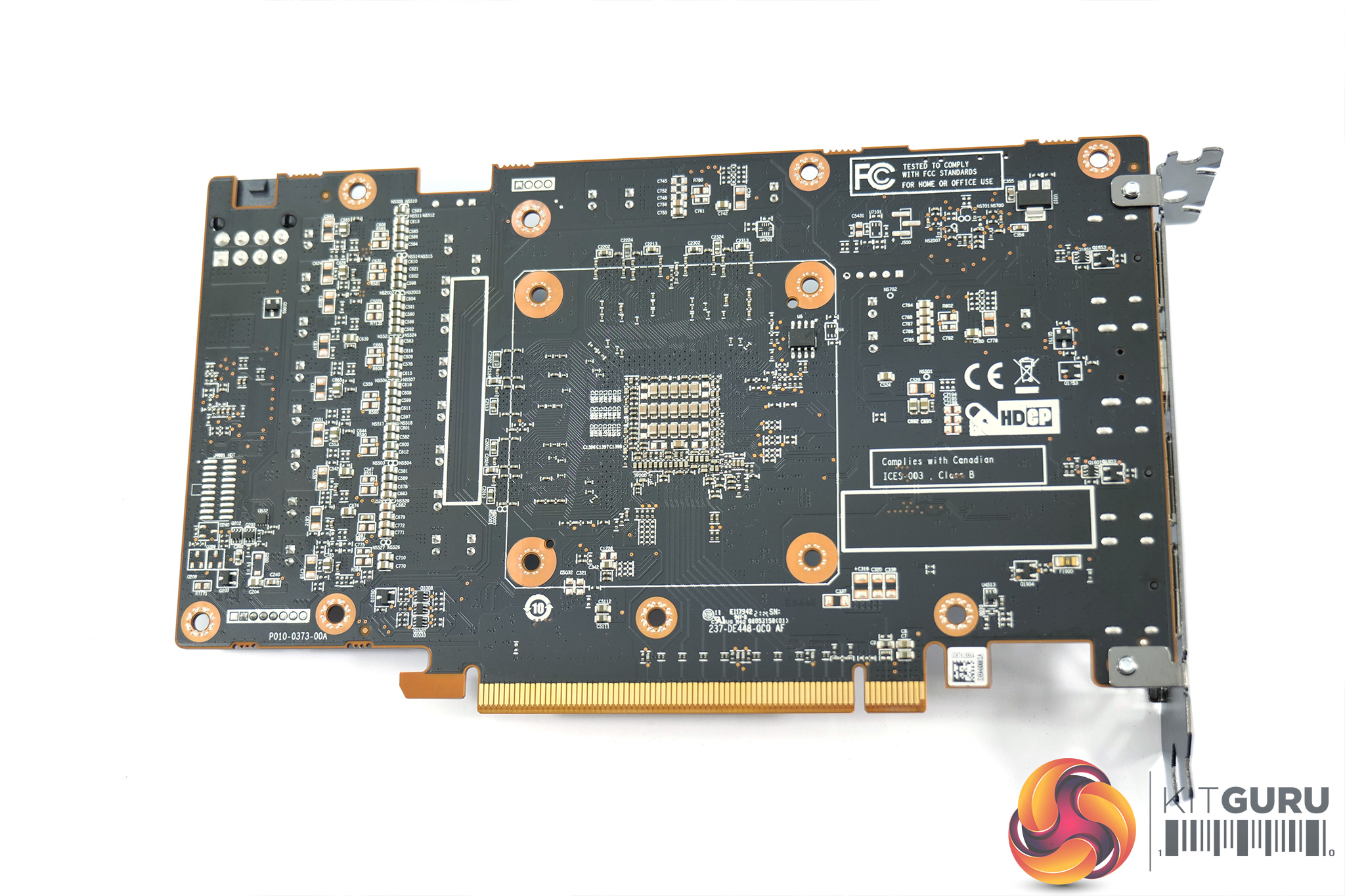
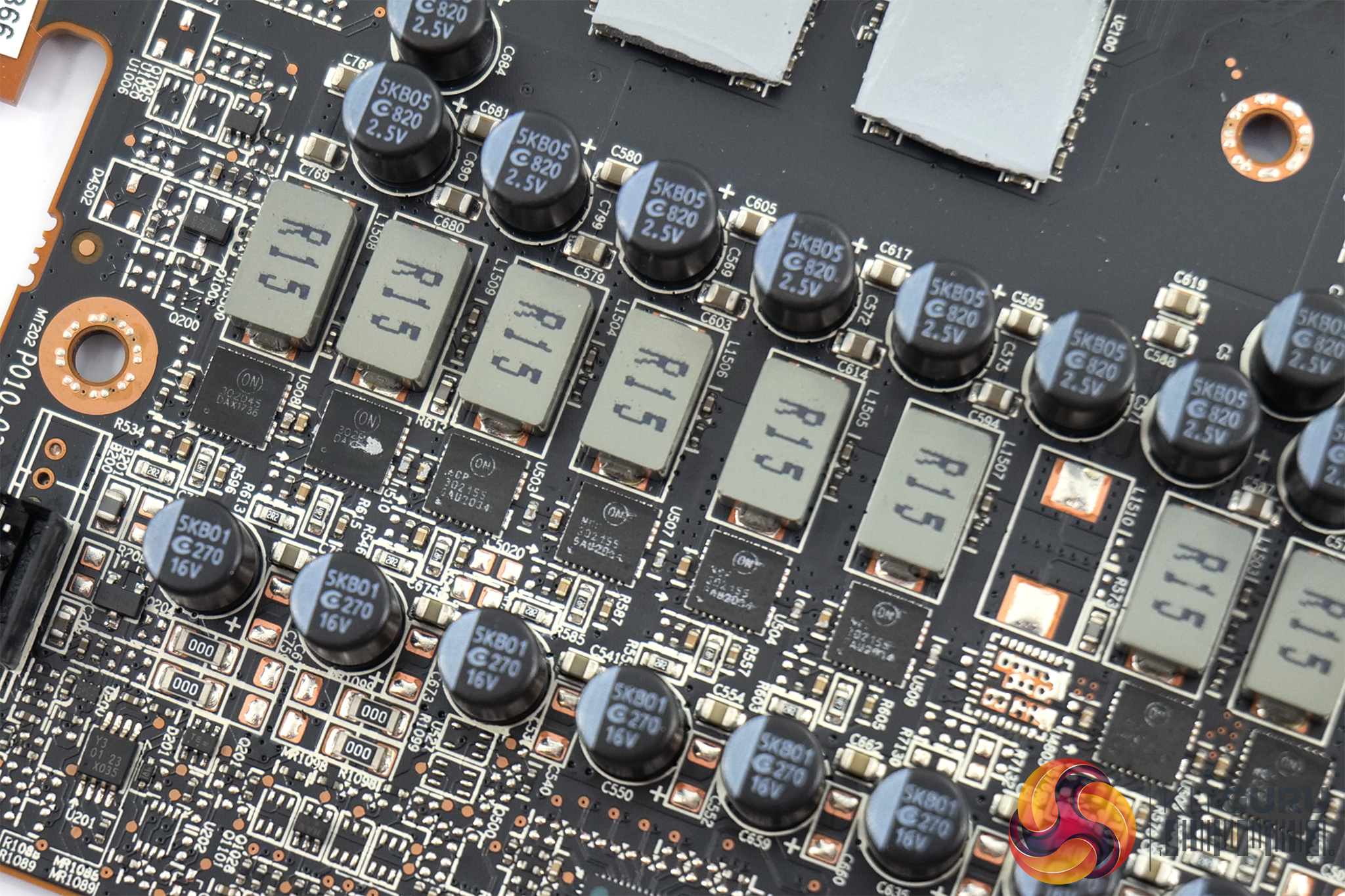
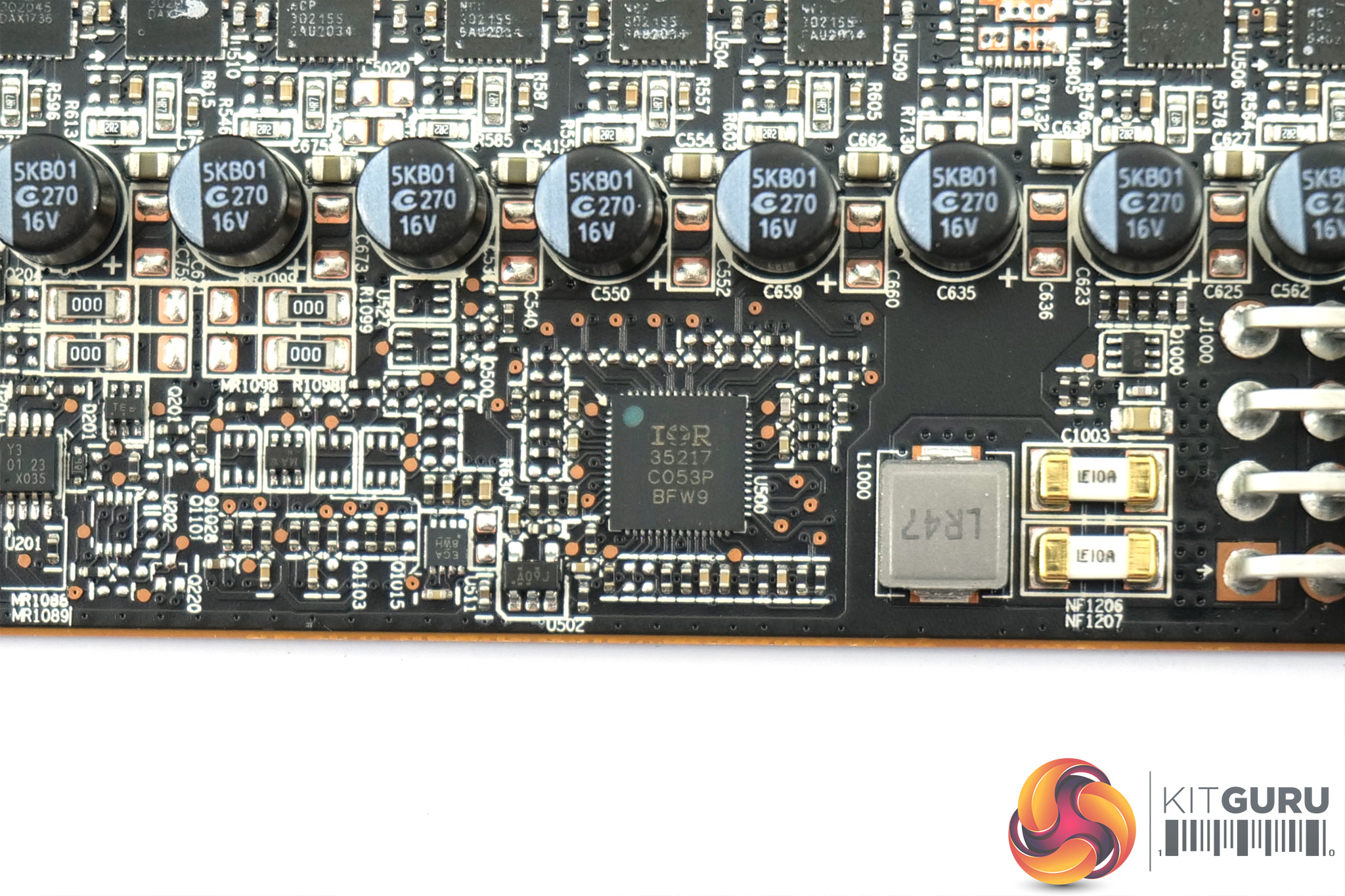
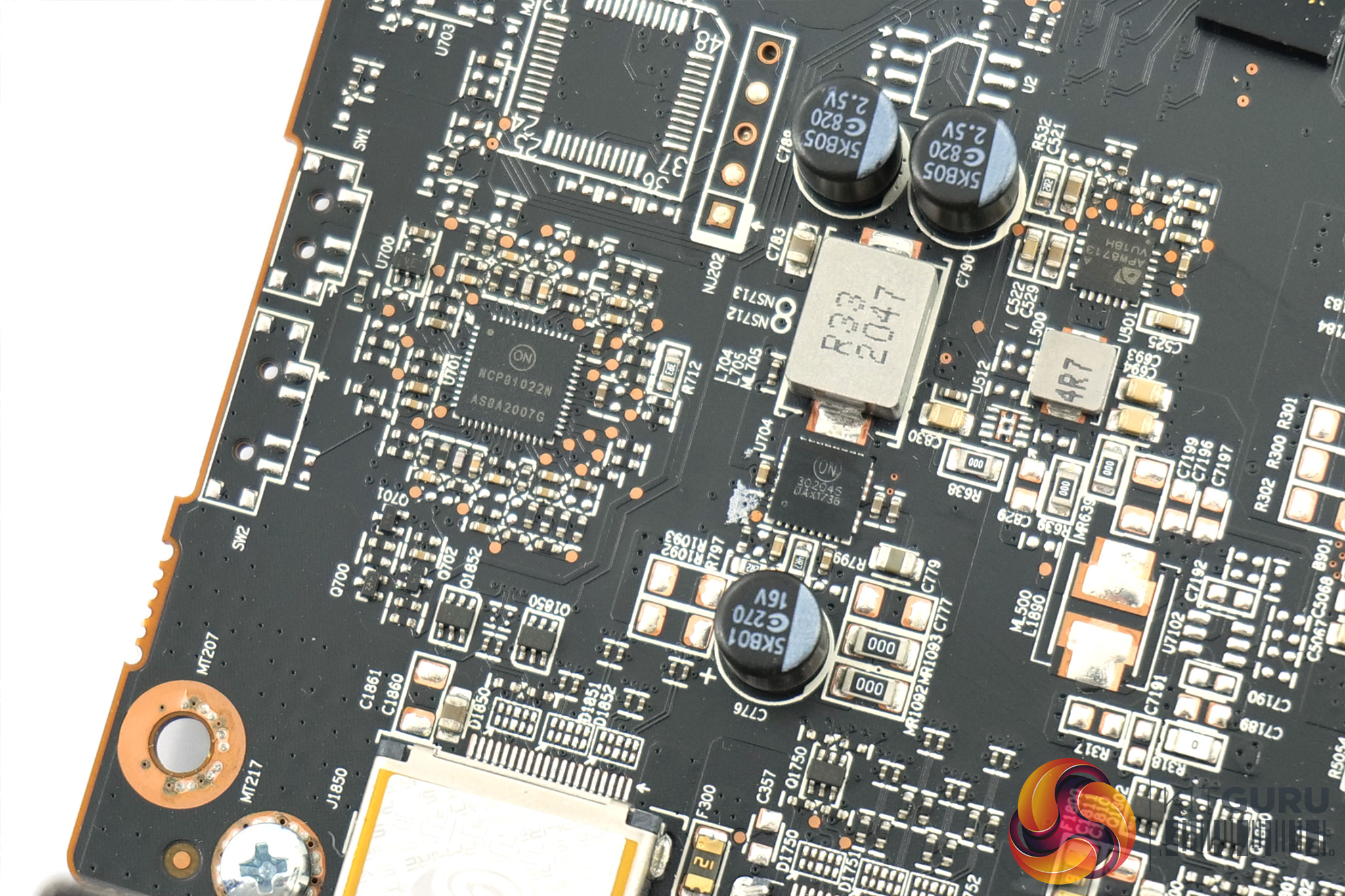
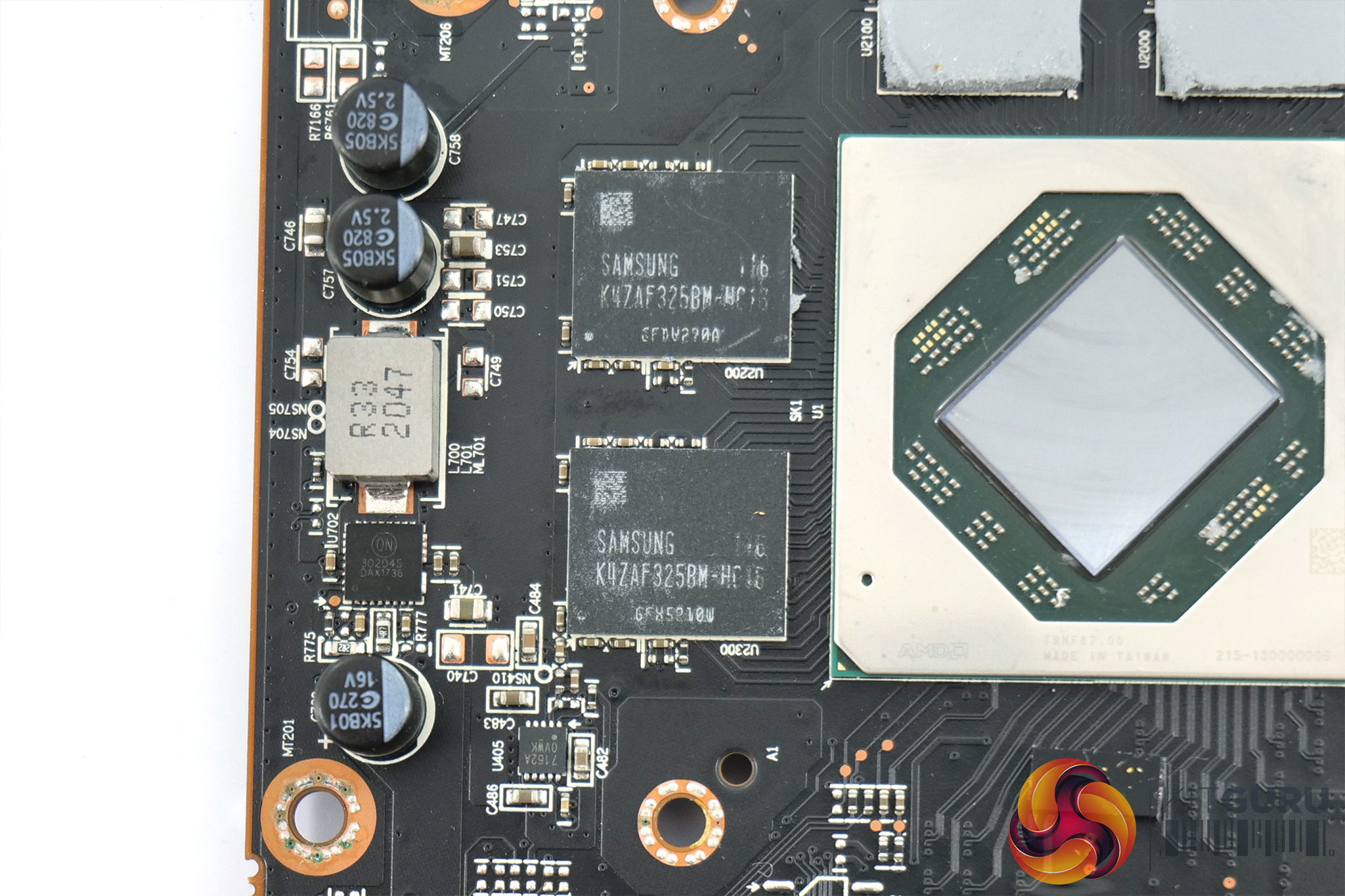
Opening up the card to look at the PCB, we can see the design is broadly similar to that of the Gigabyte Gaming OC Pro we looked at yesterday, so it's likely both cards are using slightly tweaked versions of AMD's reference design.
That means we have an 8+2 phase VRM, with the GPU VRM controlled by International Rectifier’s IR35217. Sapphire is using OnSemi's 302045 and 302155 MOSFETs for the GPU VRM. As for the memory, here we can see OnSemi's 302045 MOSFETs used, as well as OnSemi’s NCP81022N controller.
The memory modules themselves are Samsung GDDR6 K4ZAF325BM-HC16 chips.
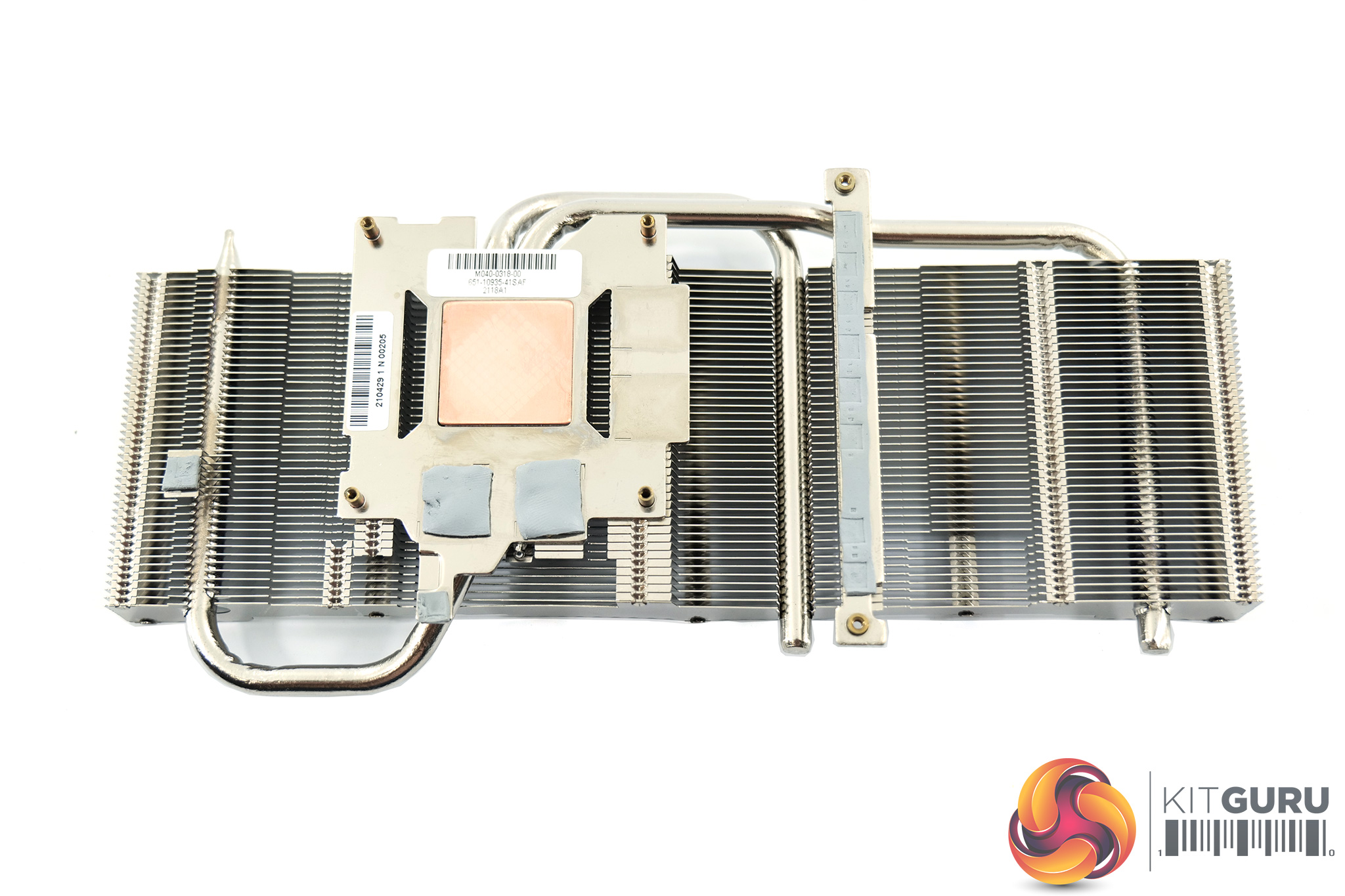
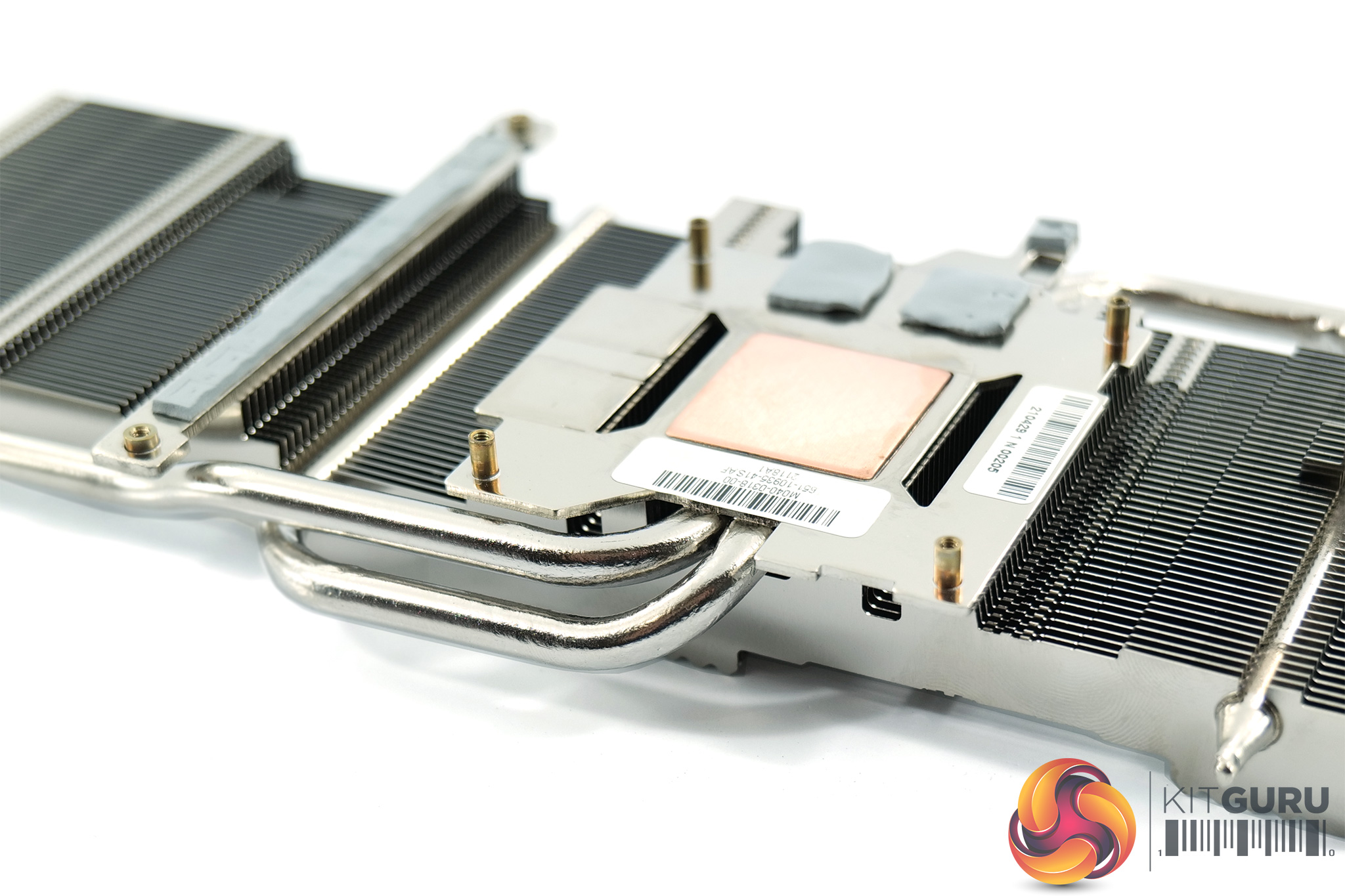
As for the heatsink, this is a pretty simple design, using a single finstack and just two heatpipes. The GPU die contacts with a small copper slug, while the memory contacts with a secondary baseplate. There's also another baseplate used to contract the GPU VRM, and a tiny contact point for one of the memory MOSFETs too.
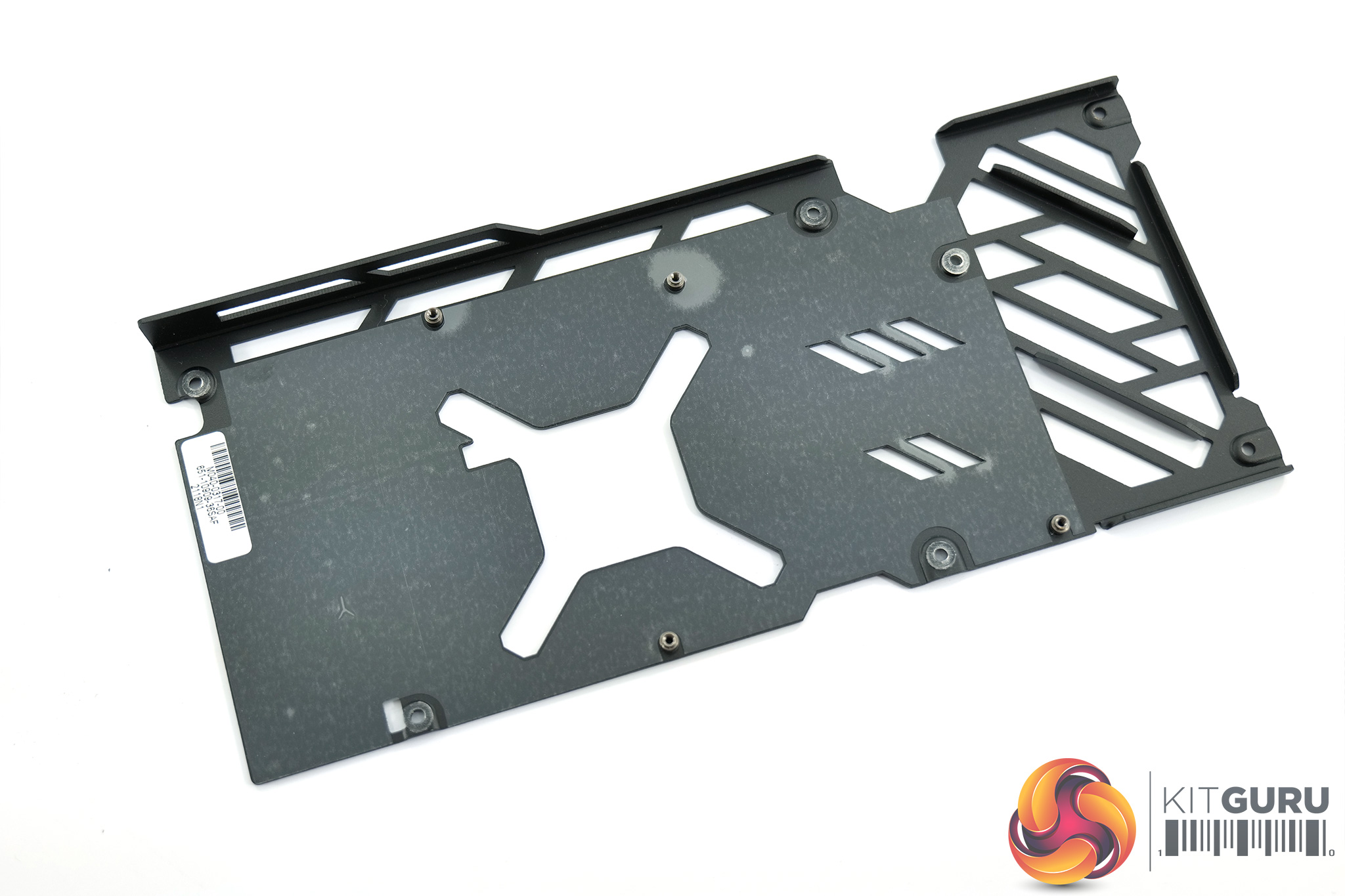
Lastly, there are no thermal pads on the underside of the backplate, something which doesn't make a massive difference but it is something I always like to see.
Driver Notes
- All Nvidia GPUs were benchmarked with the 471.41 driver.
- All AMD GPUs (except RX 6600 XT) were benchmarked with the Adrenalin 21.7.2 driver.
- RX 6600 XT was benchmarked with the Adrenalin 21.8.1 driver supplied to press.
Test System
We test using the a custom built system from PCSpecialist, based on Intel's Comet Lake-S platform. You can read more about it over HERE, and configure your own system from PCSpecialist HERE.
| CPU |
Intel Core i9-10900K
Overclocked to 5.1GHz on all cores |
| Motherboard |
ASUS ROG Maximus XII Hero Wi-Fi
|
| Memory |
Corsair Vengeance DDR4 3600MHz (4 X 8GB)
CL 18-22-22-42
|
| Graphics Card |
Varies
|
| System Drive |
500GB Samsung 970 Evo Plus M.2
|
| Games Drive | 2TB Samsung 860 QVO 2.5″ SSD |
| Chassis | Fractal Meshify S2 Blackout Tempered Glass |
| CPU Cooler |
Corsair H115i RGB Platinum Hydro Series
|
| Power Supply |
Corsair 1200W HX Series Modular 80 Plus Platinum
|
| Operating System |
Windows 10 2004
|
Comparison Graphics Cards List
- Nvidia RTX 3060 Ti FE 8GB
- Palit RTX 3060 StormX 12GB
- Nvidia RTX 2070 Super FE 8GB
- Nvidia RTX 2060 Super FE 8GB
- Nvidia RTX 2060 FE 7GB
- AMD RX 6700 XT 12GB
- Gigabyte RX 6600 XT Gaming OC Pro 8GB
- AMD RX 5700 XT 8GB
- AMD RX 5700 8GB
- Sapphire RX 5600 XT Pulse 6GB
- AMD RX Vega 64 8GB
Software and Games List
- 3DMark Fire Strike & Fire Strike Ultra (DX11 Synthetic)
- 3DMark Time Spy (DX12 Synthetic)
- 3DMark Raytracing Feature Test (DXR Synthetic)
- Cyberpunk 2077 (DX12)
- Days Gone (DX11)
- Gears 5 (DX12)
- Hitman 3 (DX12)
- Resident Evil Village (DX12)
We run each benchmark/game three times, and present mean averages in our graphs. We use FrameView to measure average frame rates as well as 1% low values across our three runs.
Fire Strike is a showcase DirectX 11 benchmark for modern gaming PCs. Its ambitious real-time graphics are rendered with detail and complexity far beyond other DirectX 11 benchmarks and games. Fire Strike includes two graphics tests, a physics test and a combined test that stresses the CPU and GPU. (UL).
3DMark Time Spy is a DirectX 12 benchmark test for Windows 10 gaming PCs. Time Spy is one of the first DirectX 12 apps to be built the right way from the ground up to fully realize the performance gains that the new API offers. With its pure DirectX 12 engine, which supports new API features like asynchronous compute, explicit multi-adapter, and multi-threading, Time Spy is the ideal test for benchmarking the latest graphics cards. (UL).
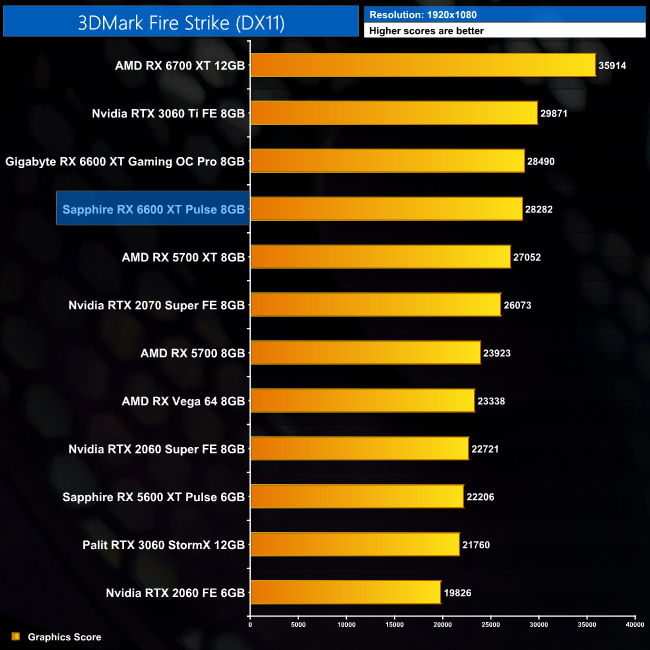
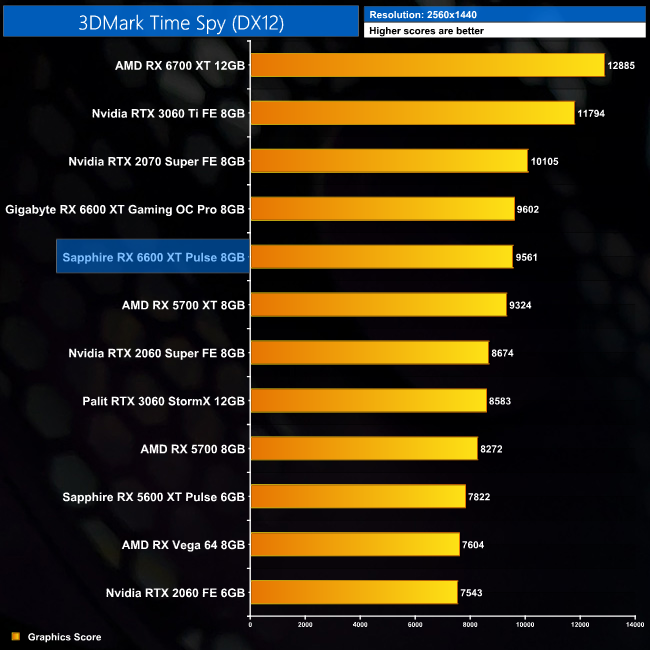
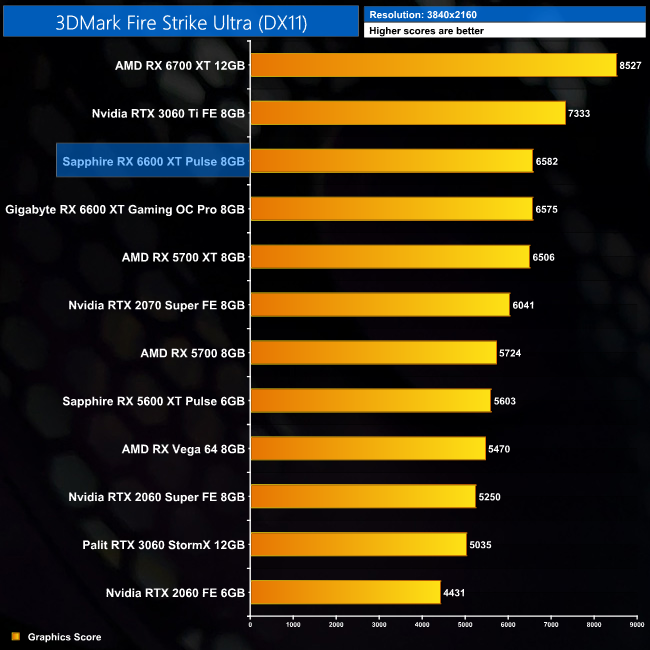
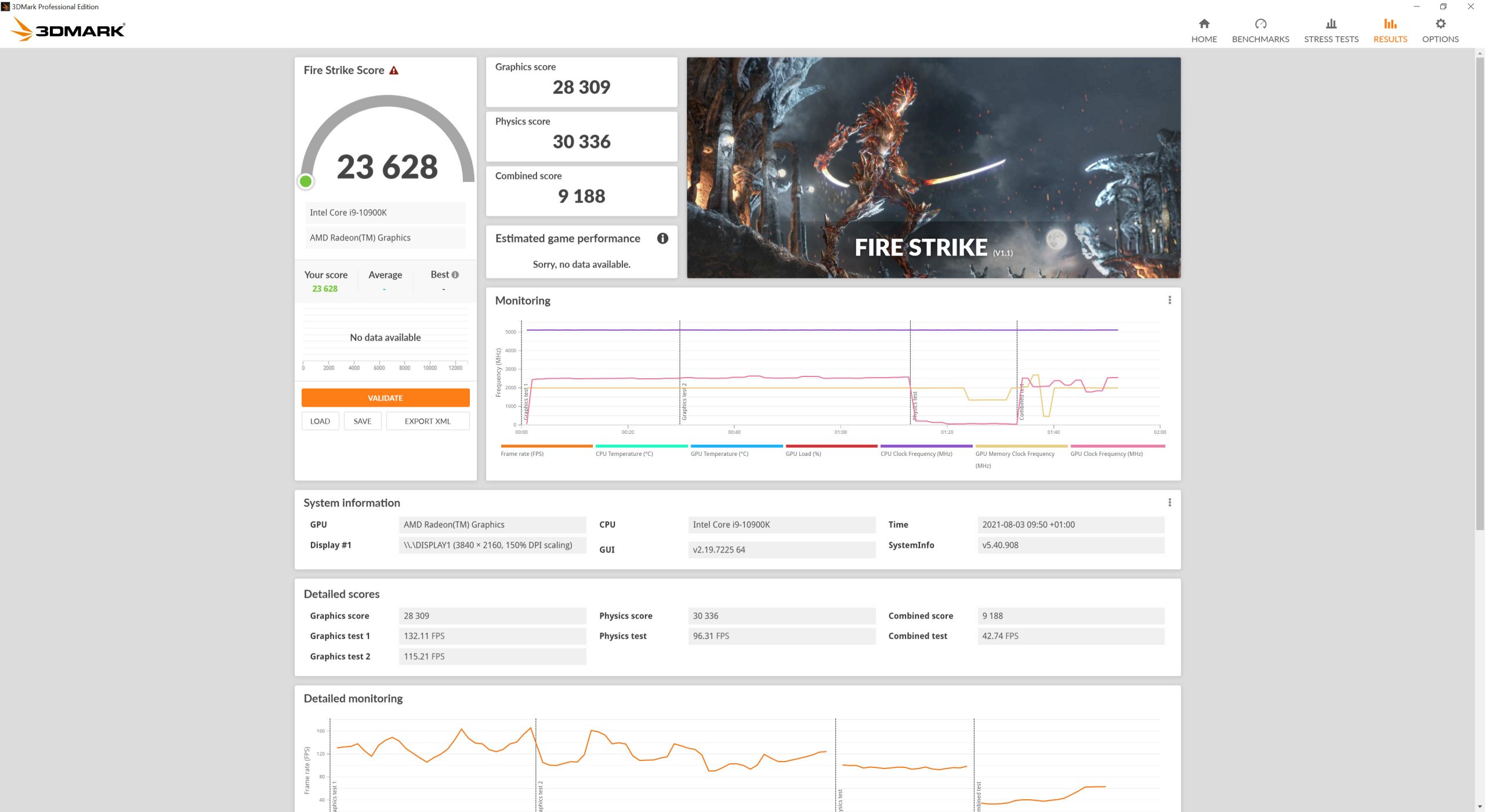
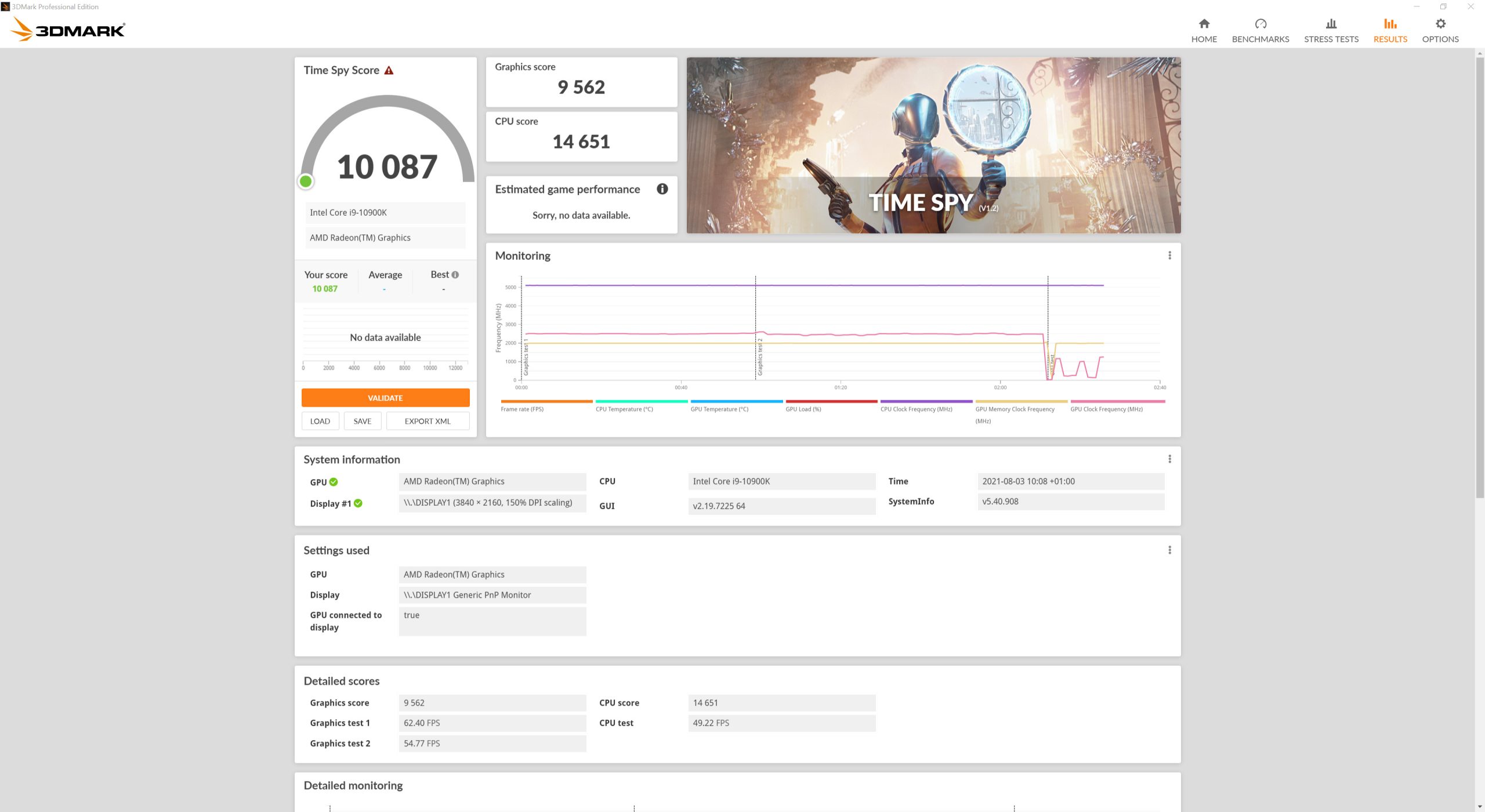
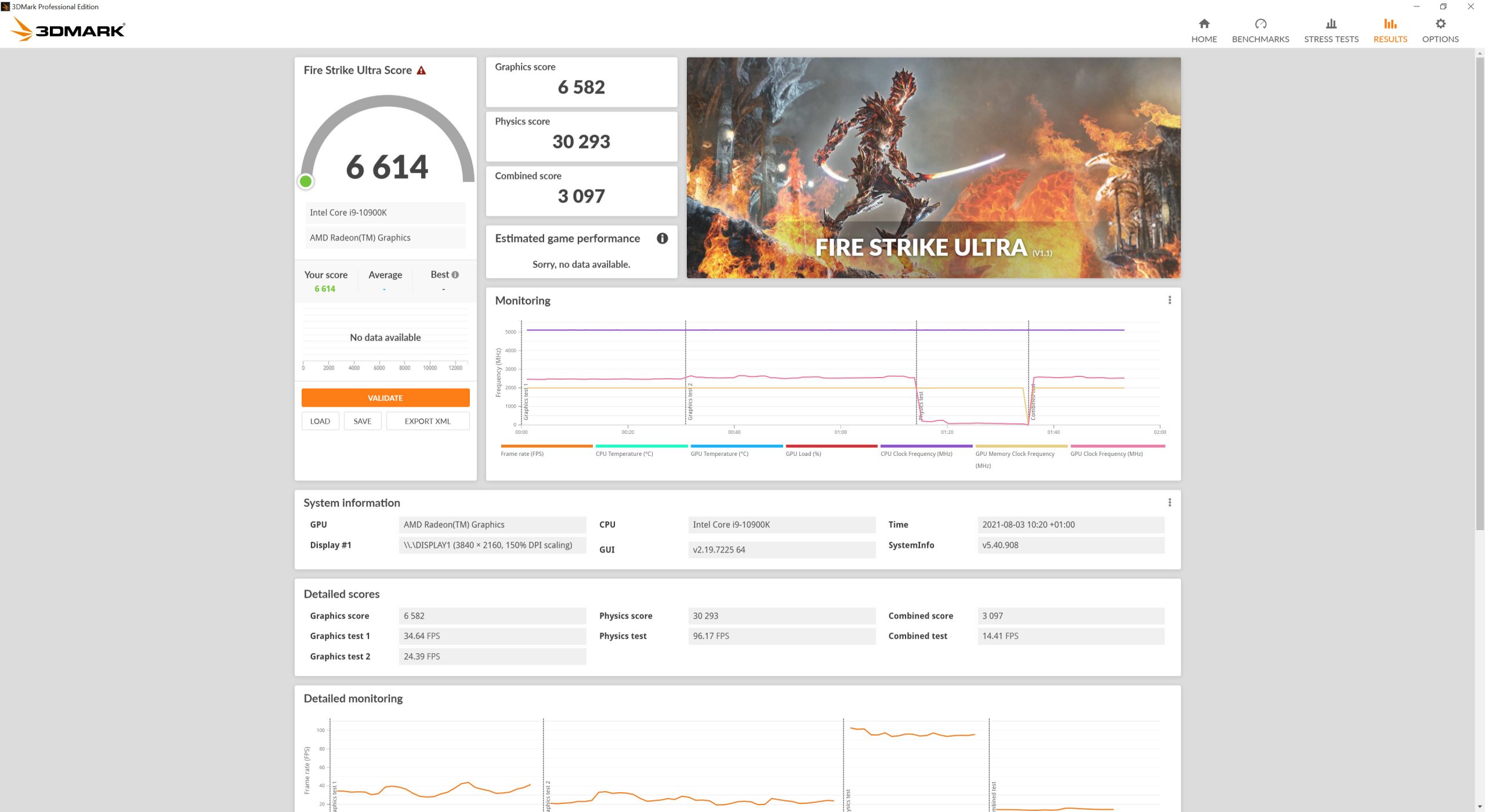
Kicking off with our 3DMark benchmarks, there's really nothing between either the Sapphire Pulse or Gigabyte Gaming OC Pro cards in these benchmarks. The Gaming OC Pro does score fractionally higher in Fire Strike and Time Spy, but we're talking differences of less than 1%. Meanwhile, in Fire Strike Ultra, the Pulse is just 0.1% ahead of the Gaming OC Pro.
Real-time ray tracing is incredibly demanding. The latest graphics cards have dedicated hardware that’s optimized for ray-tracing. The 3DMark DirectX Raytracing feature test measures the performance of this dedicated hardware. Instead of using traditional rendering techniques, the whole scene is ray-traced and drawn in one pass. The result of the test depends entirely on ray-tracing performance. (UL).
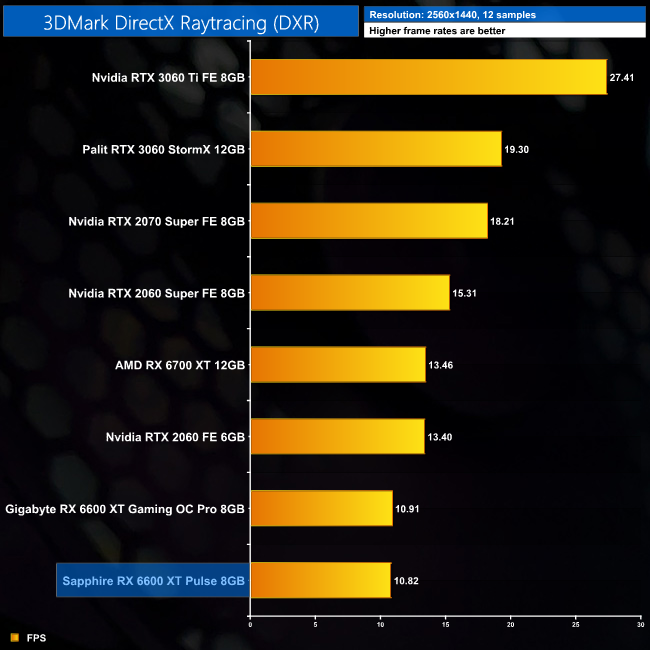
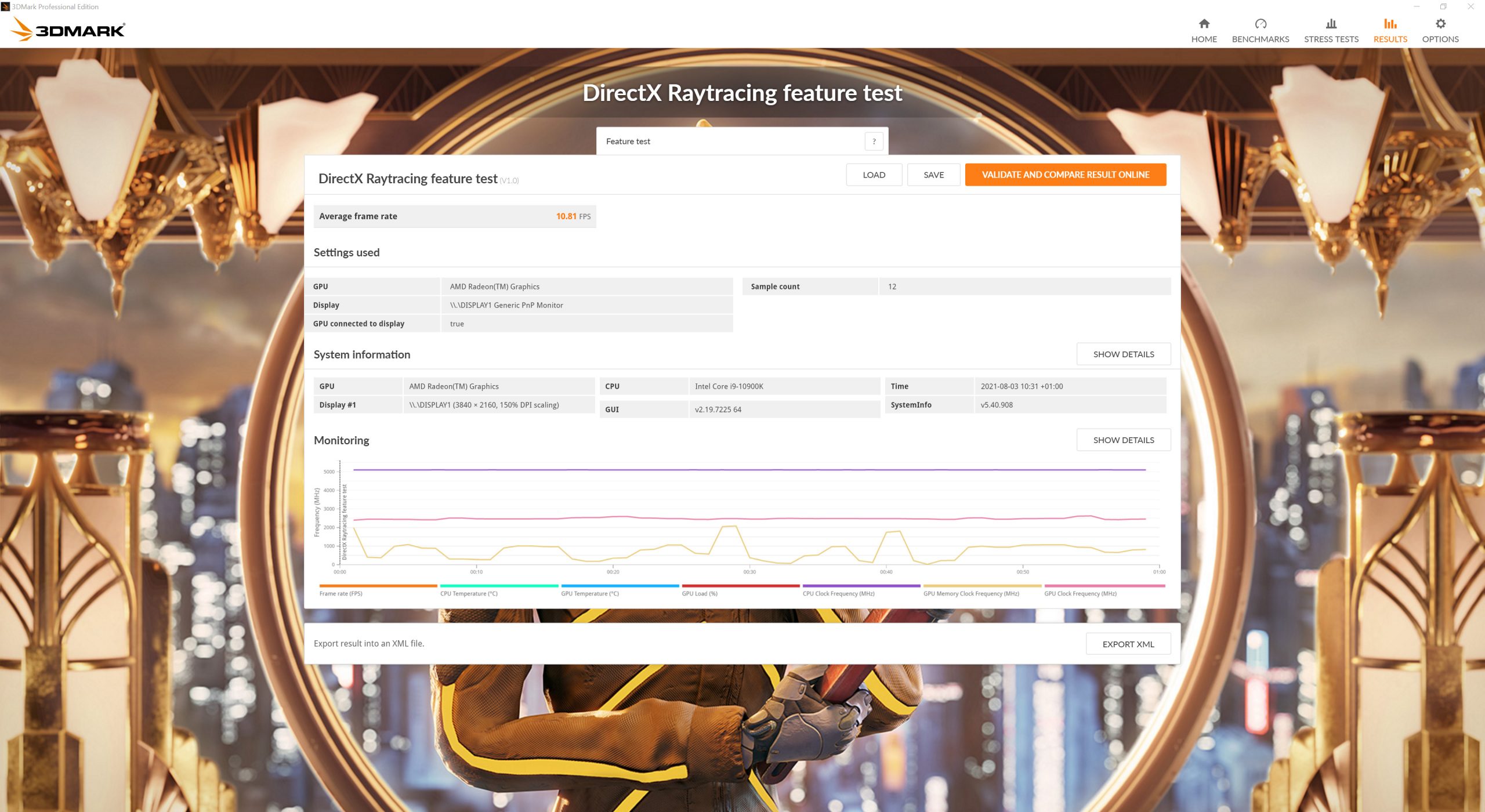
The RX 6600 XT doesn't do so well in the 3DMark DXR Featuretest, but once more we're only looking at minimal differences between the Pulse and Gaming Pro OC. It is the latter card which comes in just about the fastest of the two, but a difference of 0.09FPS is all there is.
Here we test five games, all at 1920×1080 resolution using maximum image quality settings.
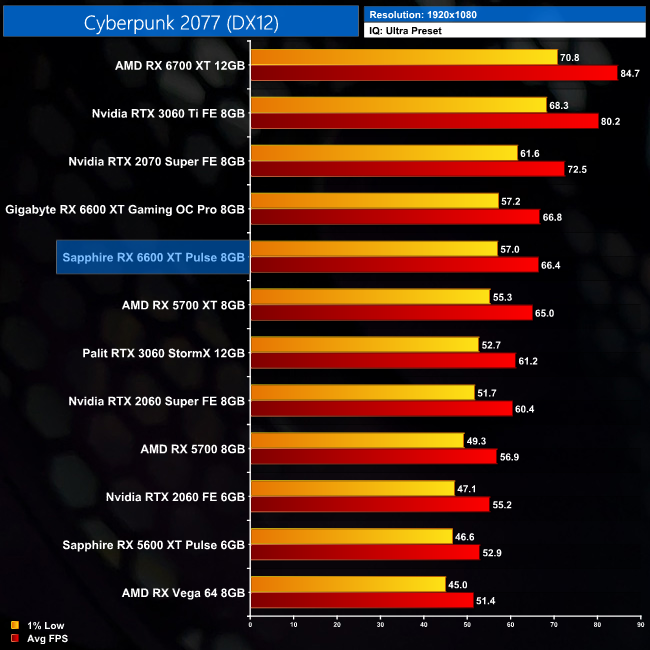
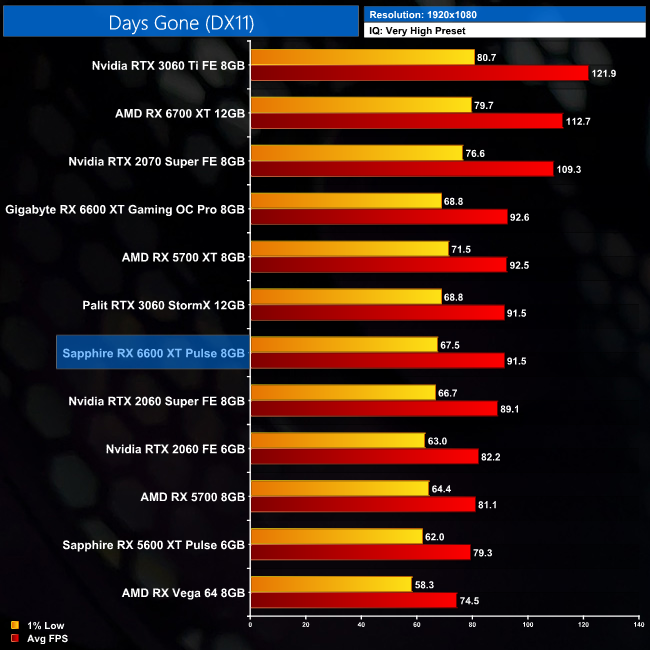
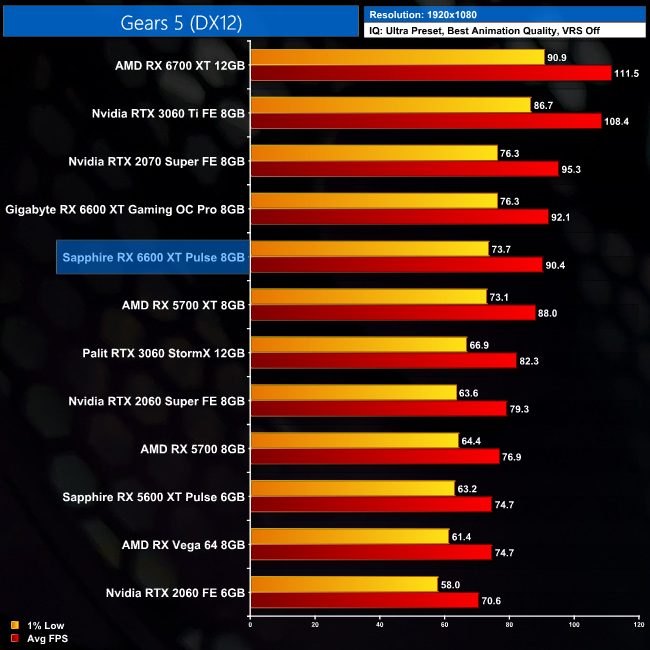
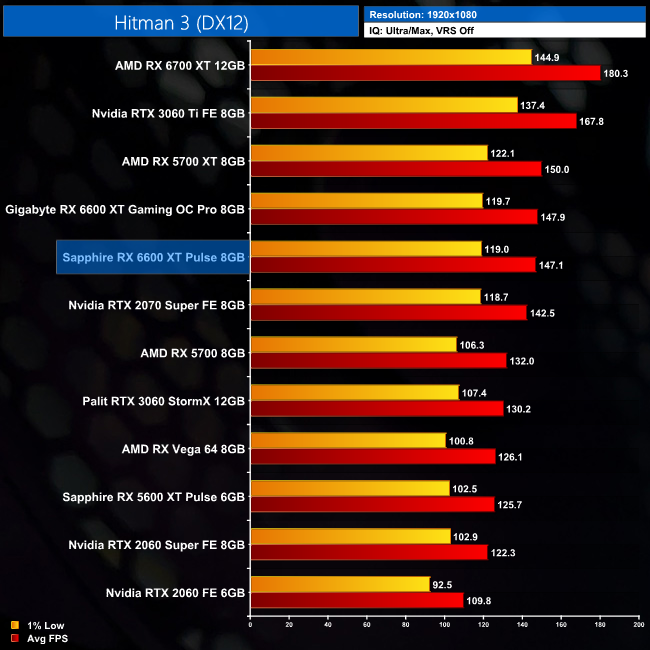
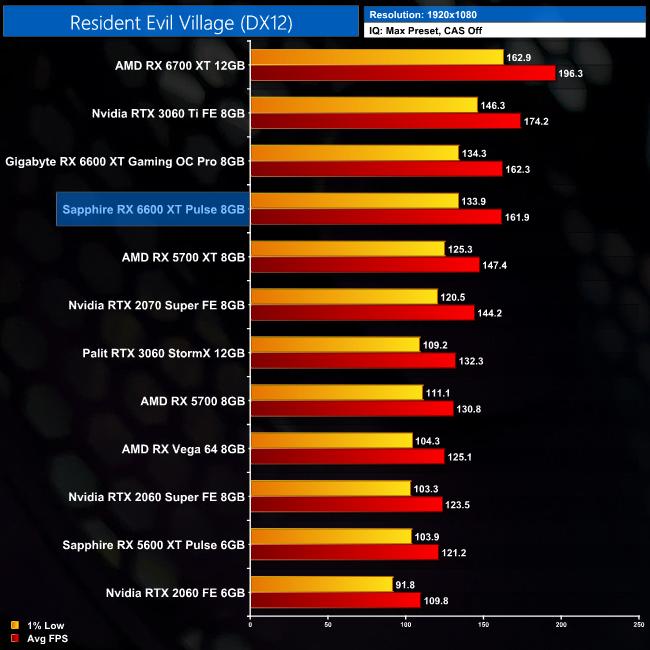
It's not a surprise to see the margins between the Sapphire Pulse and Gigabyte Gaming OC Pro are essentially non-existent in our 1080p game benchmarks. Both are factory overclocked models and are essentially as fast as each other. In fact, the single biggest difference between the two came in Gears 5, and that was a margin of 1.8%. In Cyberpunk 2077, Hitman 3 and Resident Evil Village, the average frame rates fell within 1% of each other.
Here we present the average clock speed for each graphics card while running Cyberpunk 2077 for 30 minutes. We use GPU-Z to record the GPU core frequency during gameplay. We calculate the average core frequency during the 30 minute run to present here.
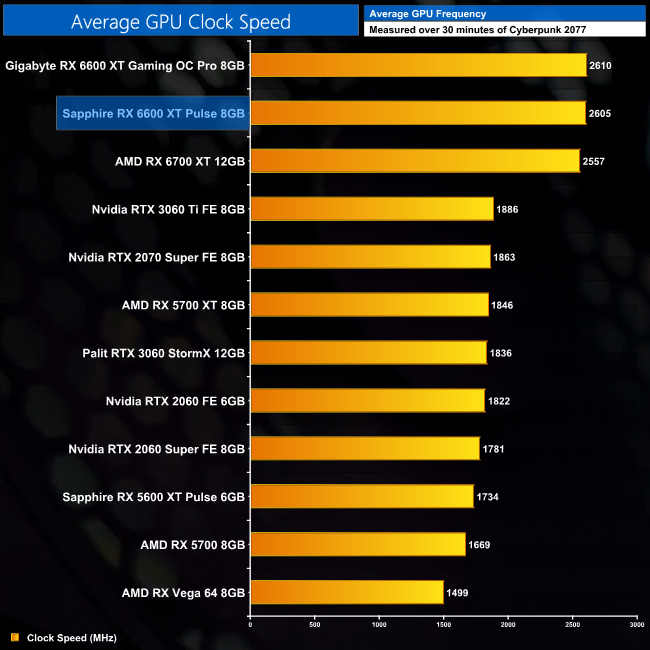
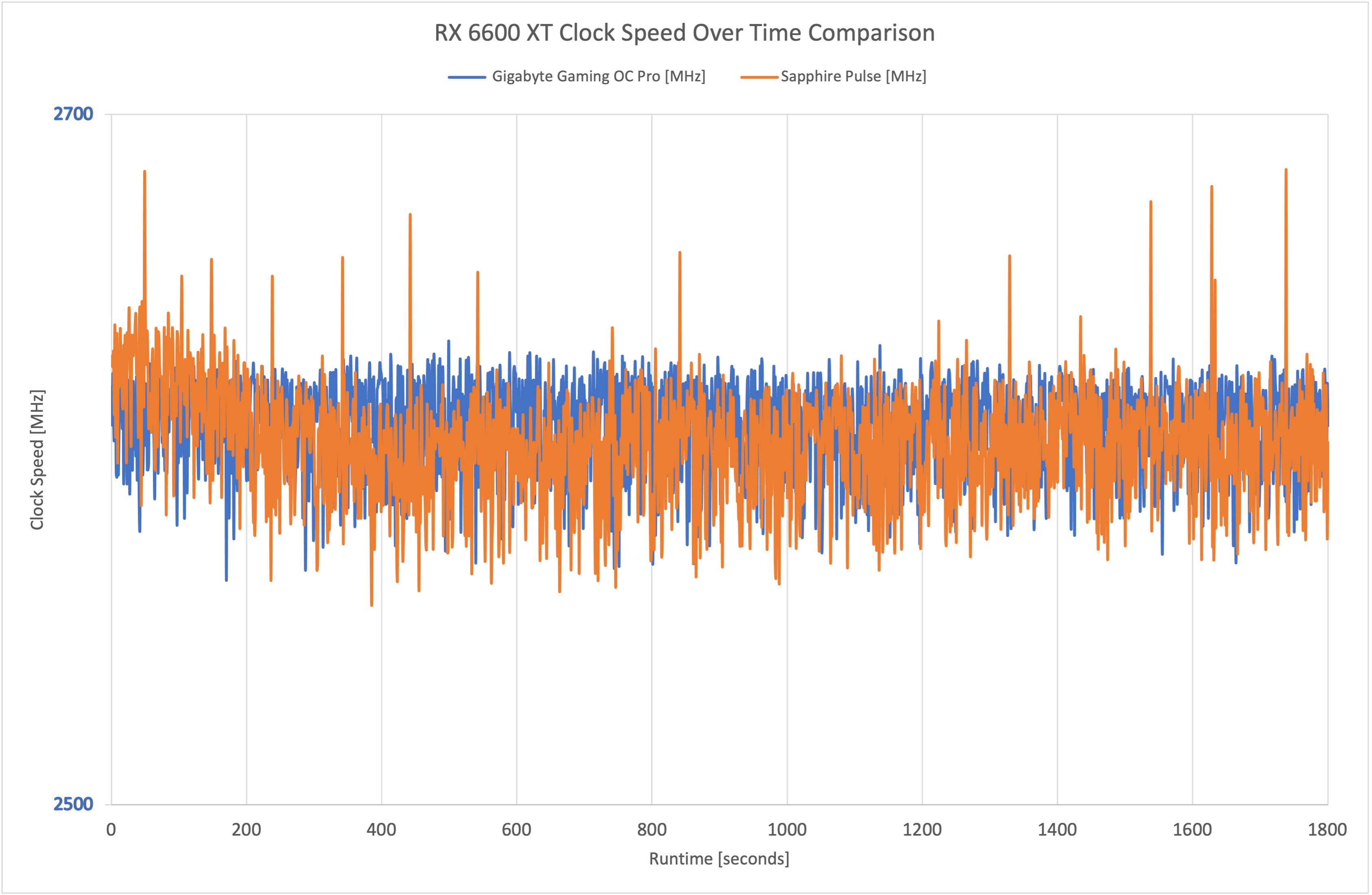
The reason we saw such similar gaming performance from both RX 6600 XTs is because the operating clock speeds are almost identical. Over our 30 minute stress test, the Gaming OC Pro averaged 2610MHz, compared to 2605MHz for the Sapphire Pulse.
We can see how similar the clock speed behaviour is in the above scatter chart. We've deliberately truncated this, so the range shows between just 2500-2700MHz, to give you a better look at how closely the frequency plots overlap.
For our temperature testing, we measure the peak GPU core temperature under load. A reading under load comes from running Cyberpunk 2077 for 30 minutes.
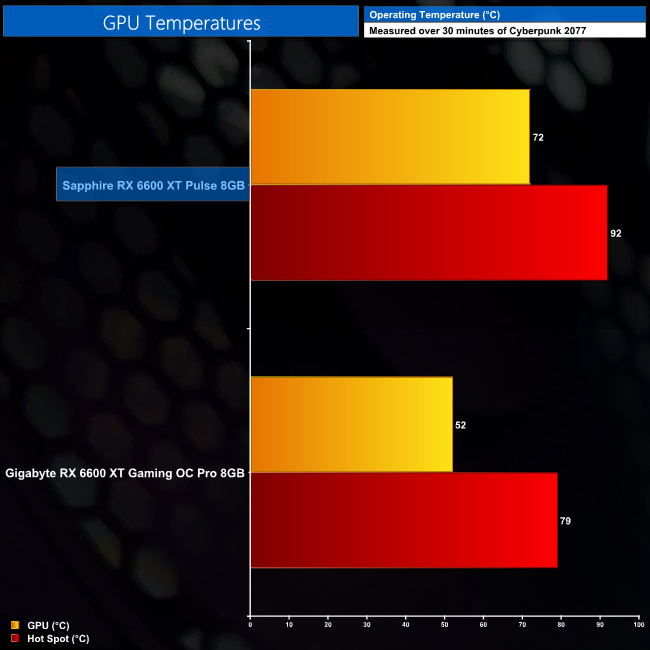
Moving onto thermal performance, it's not a surprise to see the Sapphire Pulse running hotter than the Gaming OC Pro. It is, after all, a smaller and lighter card, with three fewer heatpipes used as well. Still, the peak GPU temperature of 72C is very respectable and the hot spot temperature of 92C is well within AMD's limits.
In fact, we can see the delta between the GPU and hot spot temperatures is lower for the Pulse (20C) versus the Gaming OC Pro (27C), which could be a result of Sapphire using a flat copper baseplate, as opposed to Gigabyte's direct heatpipe contact approach.
We take our noise measurements with the sound meter positioned 1 foot from the graphics card. I measured the noise floor to be 32 dBA, thus anything above this level can be attributed to the graphics cards. The power supply is passive for the entire power output range we tested all graphics cards in, while all CPU and system fans were disabled. A reading under load comes from running Cyberpunk 2077 for 30 minutes.
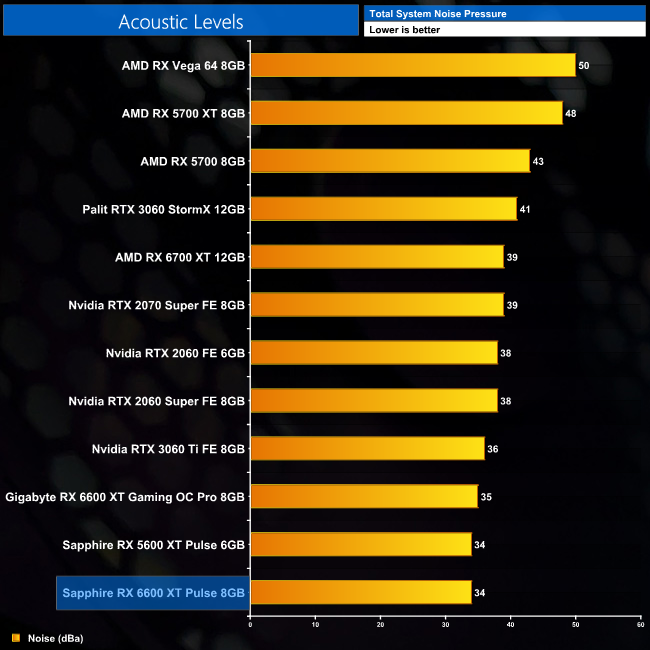
Noise levels are second to none for the Pulse. In fact, the fans barely spin – under load we saw them ramp up to just 34%, or 1230rpm, creating a near-silent graphics card. You simply would not be able to hear the fans spin unless you got your ear right up against the card itself, it is very impressive stuff.
Following on from our stock thermal and acoustic testing, here we re-test the operating temperature of the GPU, but with noise levels normalised to 40dBa. This allows us to measure the efficiency of the overall cooling solution as varying noise levels as a result of more aggressive fan curves are no longer a factor.
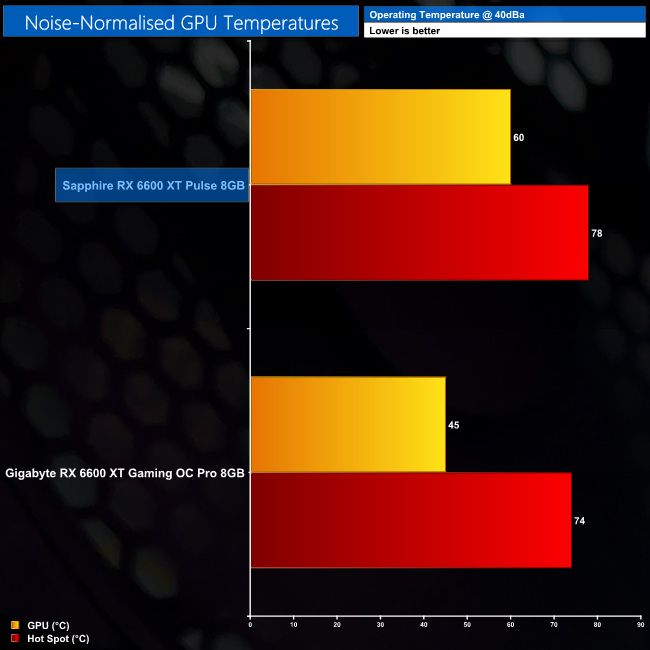
For our noise-normalised testing, we had to increase the Pulse's fan speed to 56%, or 2040rpm, generating a significant amount of extra cooling power. That resulted in the GPU temperature falling by 12C compared to stock, with a 60C peak, while the hot spot also fell to 78C.
This is still a bit warmer than the Gaming OC Pro, but again we would expect that due to the size difference and level of sophistication between the coolers.
We measure system-wide power draw from the wall while running Cyberpunk 2077 for 30 minutes.
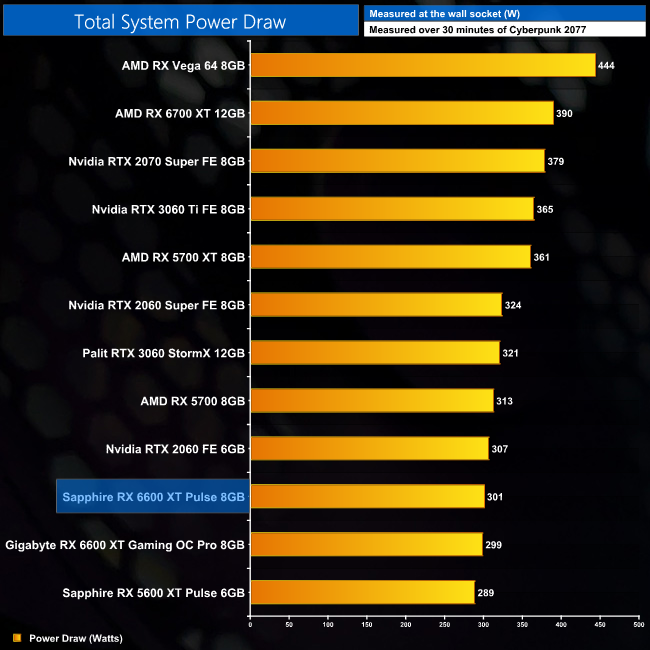
Total system power draw comes in at 301W with the Pulse installed in our i9-10900K test system. There's basically no difference between the Pulse or the Gaming OC Pro.
We also use Nvidia PCAT to measure power draw of the graphics card only, with readings from both the PCIe slot and the PCIe power cables combined into a single figure. This provides us with significantly more accurate data to work with as it is measuring only the GPU power, and not total system power which is a fundamentally imprecise measurement.
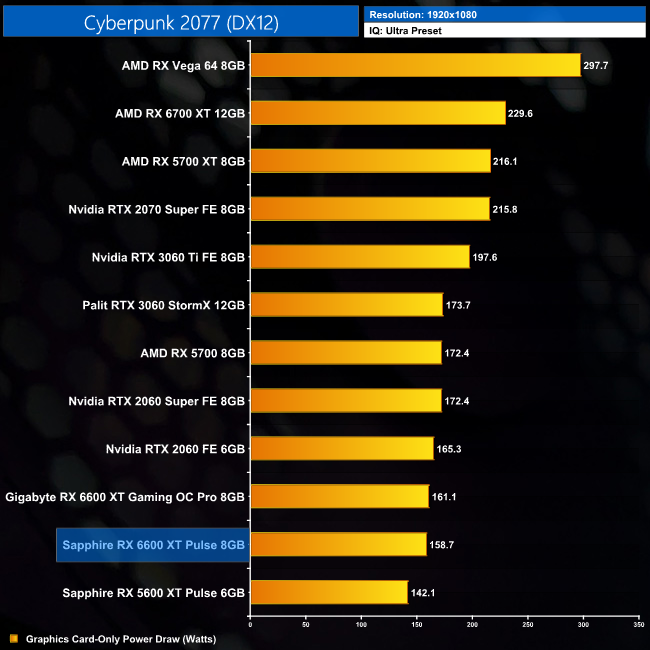
In terms of graphics card only-power daw, again we are looking at a very minimal difference between both RX 6600 XTs. The Pulse drew 158.7W at 1080p, compared to 161.1W for the Gaming OC Pro. Both are highly efficient designs and you can't really quibble about 2.4W either way.
For our manual overclocking tests, we used AMD's built-in tuning tool. Our best results are as below.
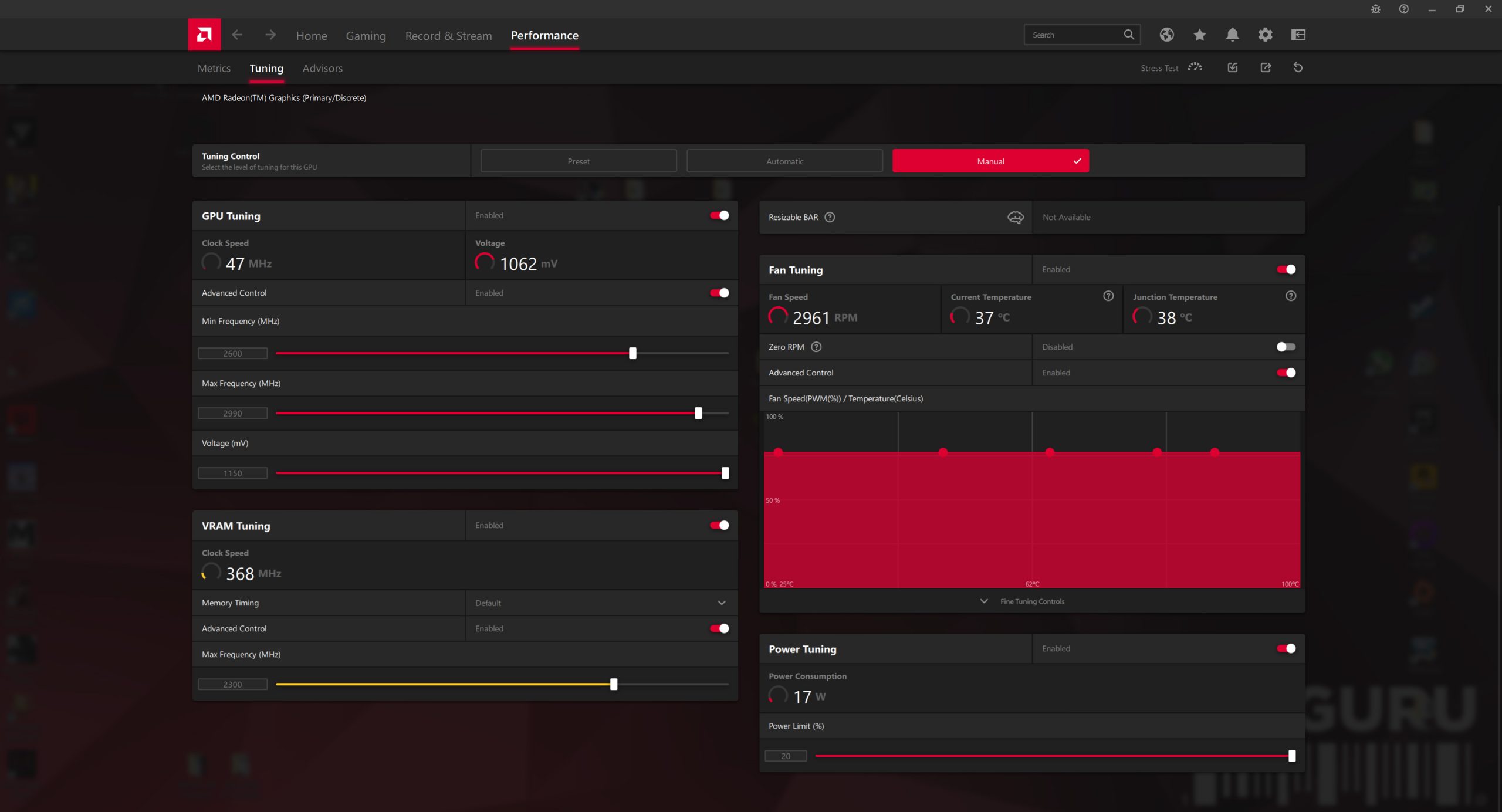
Overclocking the Sapphire Pulse gave slightly better results than the Gaming OC Pro. We were able to push the GPU core up to 2990MHz (!), with the memory set to 2300MHz.
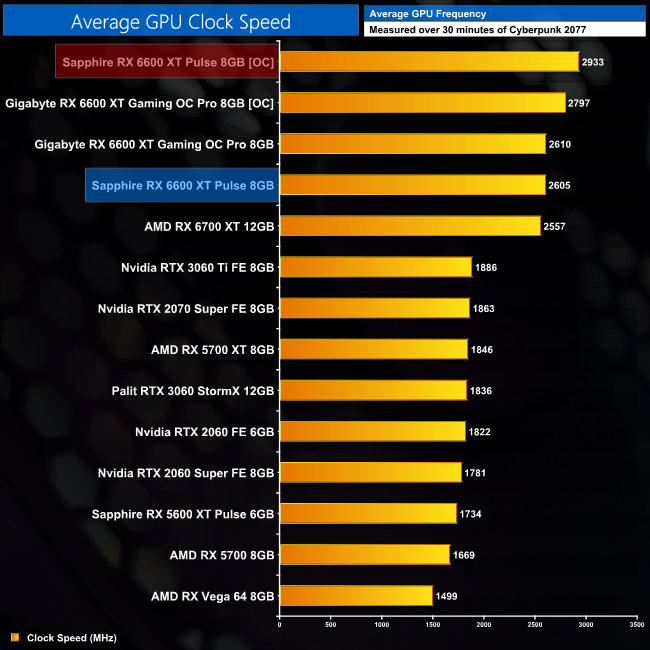
That resulted in a real-world operating frequency of 2933MHz, about 130MHz better than what we could manage with the Gaming OC Pro.
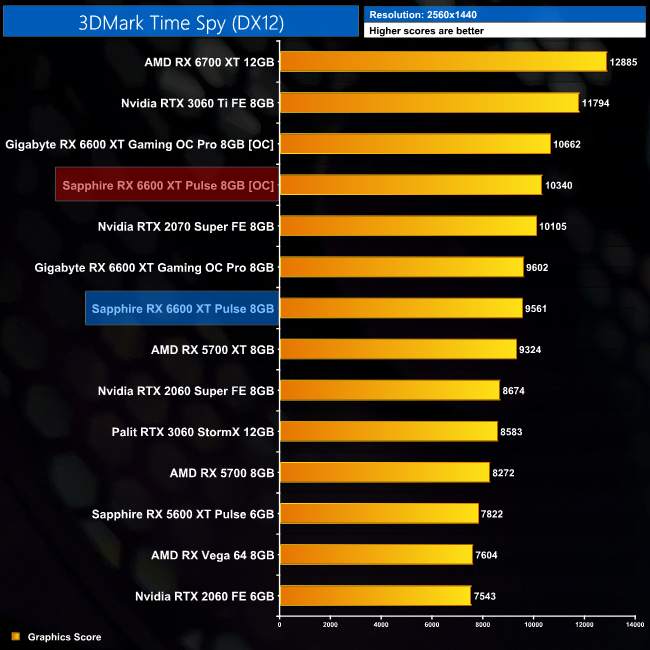
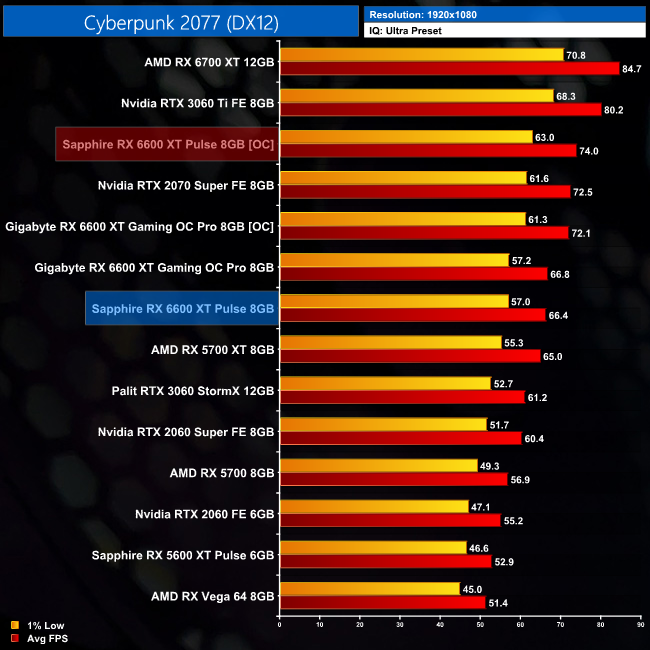
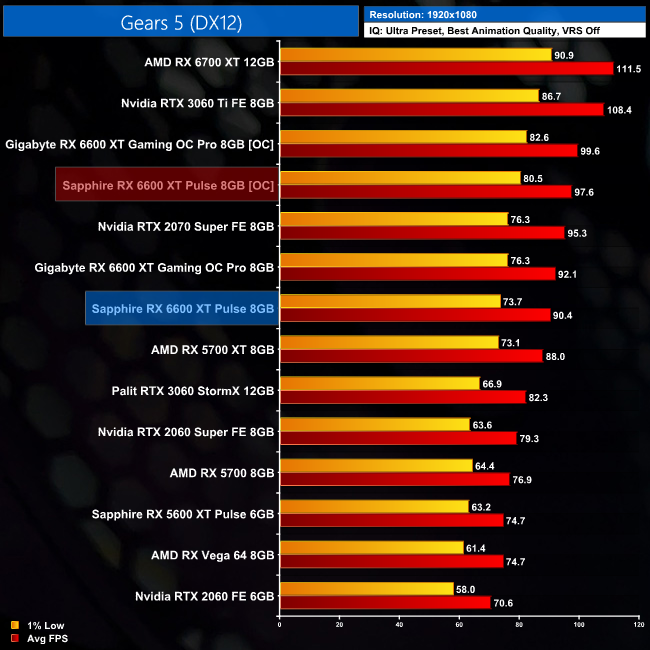
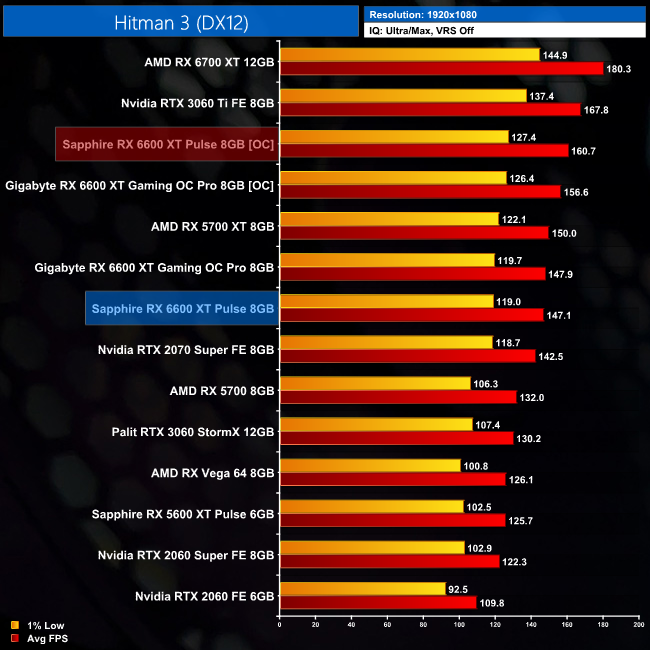
This overclock resulted in gains of between 9-11%, so that is a slightly better relative gain compared to the Gaming Pro OC, but we do also have to stress this can vary from sample to sample. Still, it is good to see you can squeeze a bit more out of this chip, even if the days of an extra 20% boost to your frame rates are long gone.
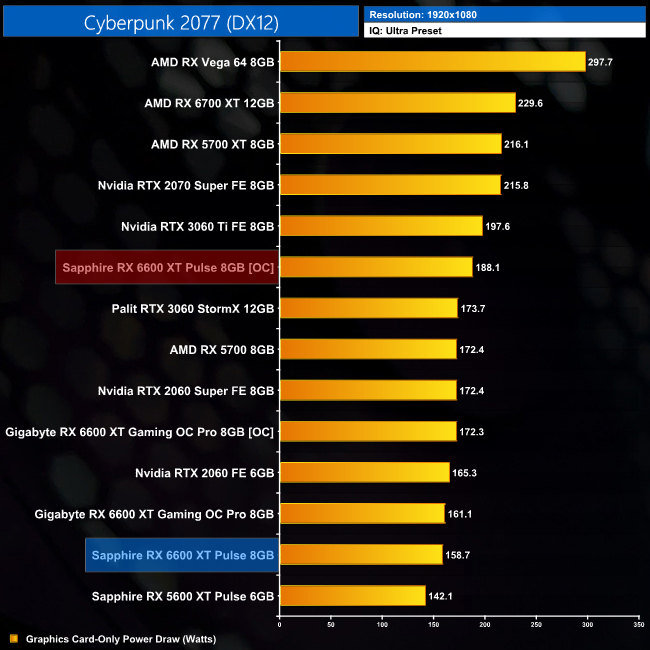
Power draw rose a fair amount when overclocked, up to 188.1W at 1080p. That's a 19% increase over stock.
After getting our first look at AMD's new RX 6600 XT GPU yesterday, today we have followed that up with a review of the Sapphire RX 6600 XT Pulse.
Having put this card through its paces, it is certainly an impressive custom card from one of AMD's biggest partners. I think it's important to stress this card isn't trying to do anything flashy, but it's designed to do the basics and do them very well indeed.
We can see that by looking at the thermal and acoustic results – the GPU peaked at 72C, while maintaining a fan speed of just over 1200rpm, which is slow enough to make this one of the quietest graphics cards we have ever tested. No, it can't quite compete with the Gigabyte Gaming OC Pro in terms of noise-normalised thermals, but the Pulse acquits itself well considering it is the smaller card, with three fewer heatpipes.
In terms of gaming performance, it won't surprise you to learn that there is basically no difference between the Pulse and the Gaming Pro OC. At most, we saw just a 1.7FPS differential between these two cards, due to both cards delivering almost identical operating clock speeds.
Our Pulse sample did overclock slightly better though, with the GPU proving stable at over 2900MHz – not bad at all! That brought gains of between 9-11% compared to our stock testing, though power draw did also increase by 19%.
Overall, the Sapphire RX 6600 XT Pulse is a very solid card, designed to offer a ‘no frills' experience, and it is safe to say Sapphire has achieved that aim. The company does have a Nitro+ 6600 XT if you like a few extra features including ARGB lighting, dual-BIOS and extra on-board fan headers. Those cards are great when you're already spending significant sums of money on the likes of a RX 6800 XT or 6900 XT, but a for a product in this market segment, I think Pulse makes more sense.
Sapphire has also done well to keep the price as close to AMD's MSRP as possible, with the Pulse's SEP set at $399, so it comes with just a $20 premium. Still, we do have to discuss the elephant in the room which is the RTX 3060 Ti – also at an MSRP of $399, as we discussed in yesterday's review, it is a better all-round product than the 6600 XT.
That means the Pulse is worth considering and it would serve you very well if 3060 Tis are unavailable or priced significantly higher than 6600 XTs. If both are available and priced similarly, as good as the Pulse is, you would have to say getting a 3060 Ti instead just makes the most sense.

We found the Sapphire RX 6600 XT Pulse listed on Overclockers UK HERE.
Pros
- Good looking, stealthy design.
- Solid cooling performance.
- Extremely quiet under load.
- As fast as the Gaming OC Pro.
- Our sample overclocked well.
- ‘Back to basics' design makes sense at this price point.
Cons
- RTX 3060 Ti is a better buy than the RX 6600 XT overall.
- Complete lack of RGB lighting may deter some users.
KitGuru says: It's a fantastic graphics card, just let down by AMD's pricing strategy for the 6600 XT GPU.