KitGuru KitGuru.net – Tech News | Hardware News | Hardware Reviews | IOS | Mobile | Gaming | Graphics Cards


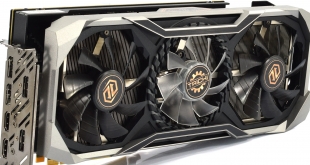
While we are waiting for further news on AMD's RX 5500 GPU for desktop, our attention turns back to the RX 5700 XT which launched in July. We've reviewed a number of partner cards since then, and today we are looking at ASRock's flagship offering – the RX 5700 XT Taichi X OC+. With an eye-catching design, triple-fan cooler and heavily overclocked core, the Taichi aims to rival the likes of the PowerColor Red Devil and Sapphire Nitro+. Can it come out on top?
While the cooler design and snazzy RGB lighting are undoubtedly eye-catching features for the ASRock RX 5700 XT Taichi X, arguably the most interesting area for this card is its pricing. Currently selling at £469.99 from Overclockers UK, this is the most expensive RX 5700 XT card I have reviewed so far, with a £90 price premium over AMD's MSRP. That puts this card very close to RTX 2070 SUPER territory, so can the Taichi justify its price? We find out today.
| RX 5700 | RX 5700 XT | RX Vega 56 | RX Vega 64 | Radeon VII | |
| Architecture | Navi | Navi | Vega 10 | Vega 10 | Vega 20 |
| Manufacturing Process | 7nm | 7nm | 14nm | 14nm | 7nm |
| Transistor Count | 10.3 billion | 10.3 billion | 12.5 billion | 12.5 billion | 13.2 billion |
| Die Size | 251mm² | 251mm² | 486mm² | 495mm² | 331mm² |
| Compute Units | 36 | 40 | 56 | 64 | 60 |
| Stream Processors | 2304 | 2560 | 3584 | 4096 | 3840 |
| Base GPU Clock | Up to 1465MHz | Up to 1605MHz | 1156 MHz | 1274 MHz | 1400 MHz |
| Game GPU Clock | Up to 1625MHz | Up to 1755MHz | n/a | n/a | n/a |
| Boost GPU Clock | Up to 1725MHz | Up to 1905MHz | 1471 MHz | 1546 MHz | 1750 MHz |
| Peak Engine Clock | n/a | n/a | 1590 MHz | 1630 MHz | 1800 MHz |
| Peak SP Performance | Up to 7.95 TFLOPS | Up to 9.75 TFLOPS | Up to 10.5 TFLOPS | Up to 12.7 TFLOPS | Up to 14.2 TFLOPS |
| Peak Half Precision Performance | Up to 15.9 TFLOPS | Up to 19.5 TFLOPS | Up to 21.0 TFLOPS | Up to 25.3 TFLOPS | Up to 28.1 TFLOPS |
| Peak Texture Fill-Rate | Up to 248.4 GT/s | Up to 304.8 GT/s | Up to 330.0 GT/s | Up to 395.8 GT/s | 432.24 GT/s |
| ROPs | 64 | 64 | 64 | 64 | 64 |
| Peak Pixel Fill-Rate | Up to 110.4 GP/s | Up to 121.9 GP/s | Up to 94.0 GP/s | Up to 98.9 GP/s | 115.26 GP/s |
| Memory | 8GB GDDR6 | 8GB GDDR6 | 8GB HBM | 8GB HBM | 16GB HBM2 |
| Memory Bandwidth | 448 GB/s | 448 GB/s | 410 GB/s | 483.8 GB/s | 1 TB/s |
| Memory Interface | 256-bit | 256-bit | 2048-bit | 2048-bit | 4096-bit |
| Board Power | 185W | 225W | 210W | 295W | 300W |
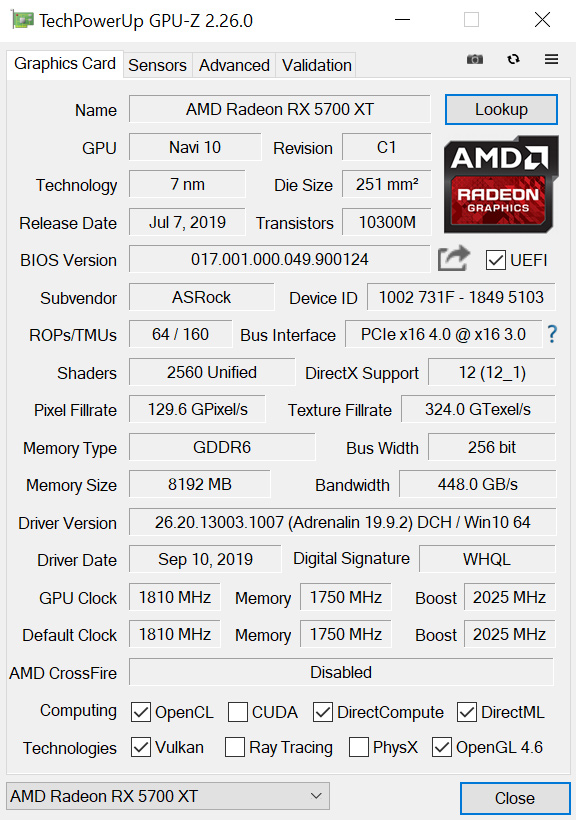
Core spec of the RX 5700 XT is well-known at this point – the GPU is based on TSMC's 7nm process and is made up of 40 Compute Units, each housing 64 Stream Processors for a total of 2560 shaders. Alongside that, the card is outfitted with 8GB of GDDR6 memory, operating over a 256-bit bus for 448GB/s total memory bandwidth.
Where things differ versus the reference card is with clock speed. The Taichi X has a rated game clock of 1935MHz, almost 200MHz higher than the reference card. For further comparison, both the PowerColor Red Devil and Sapphire Nitro+ have game clocks of 1905MHz, so we should see the Taichi run slightly faster – but we look at actual clock speeds later in the review.
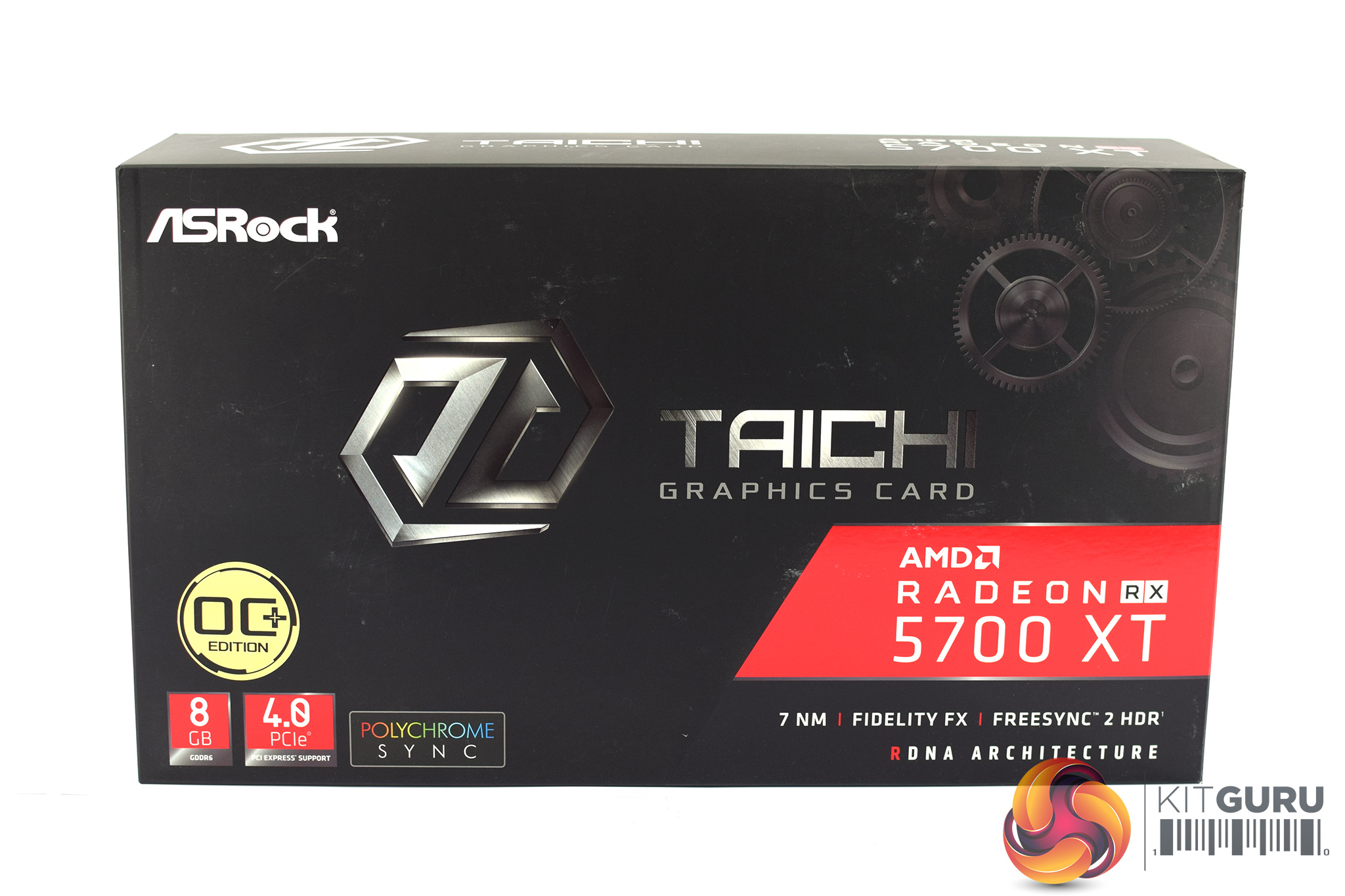
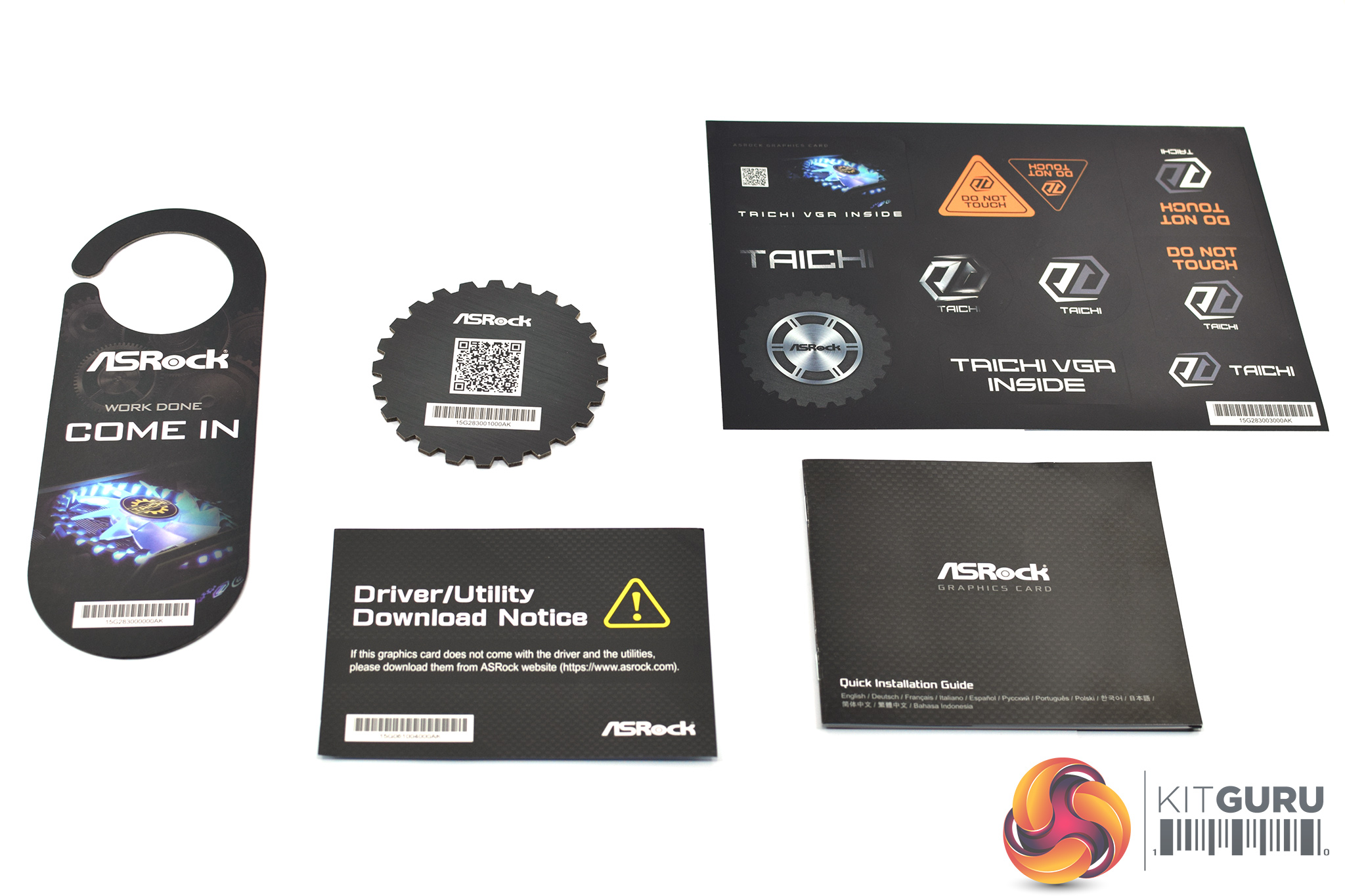
The ASRock RX 5700 XT Taichi X OC+ ships in a black box, with the Taichi logo and cog and gear styling visible on the front, but there's no image of the card itself.
Inside, there are a number of accessories, including: a door hanger, quick start guide, a selection of stickers, a reminder to download the latest drivers, plus a coaster with a QR code on it which takes you to asrock.com.
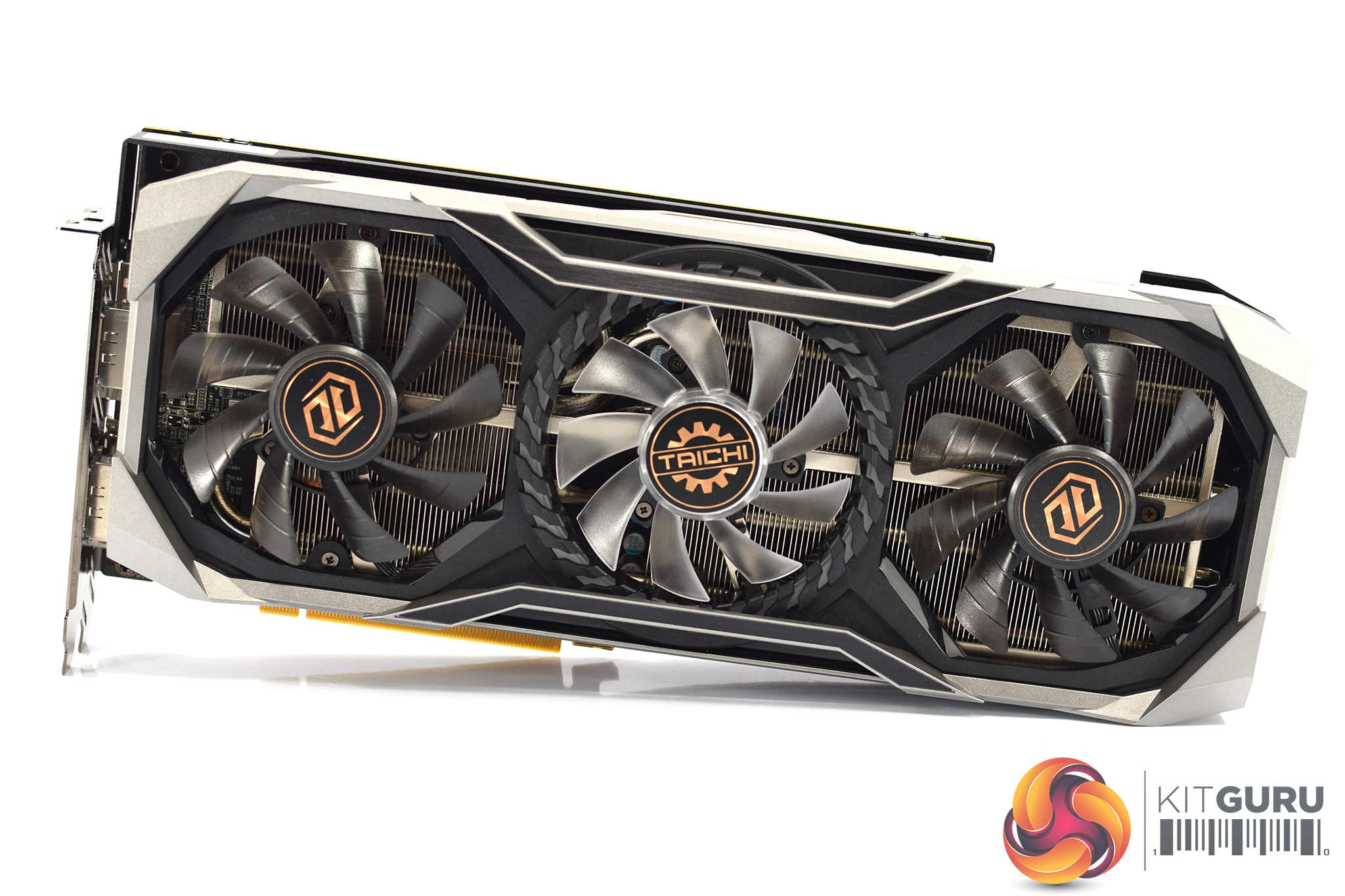
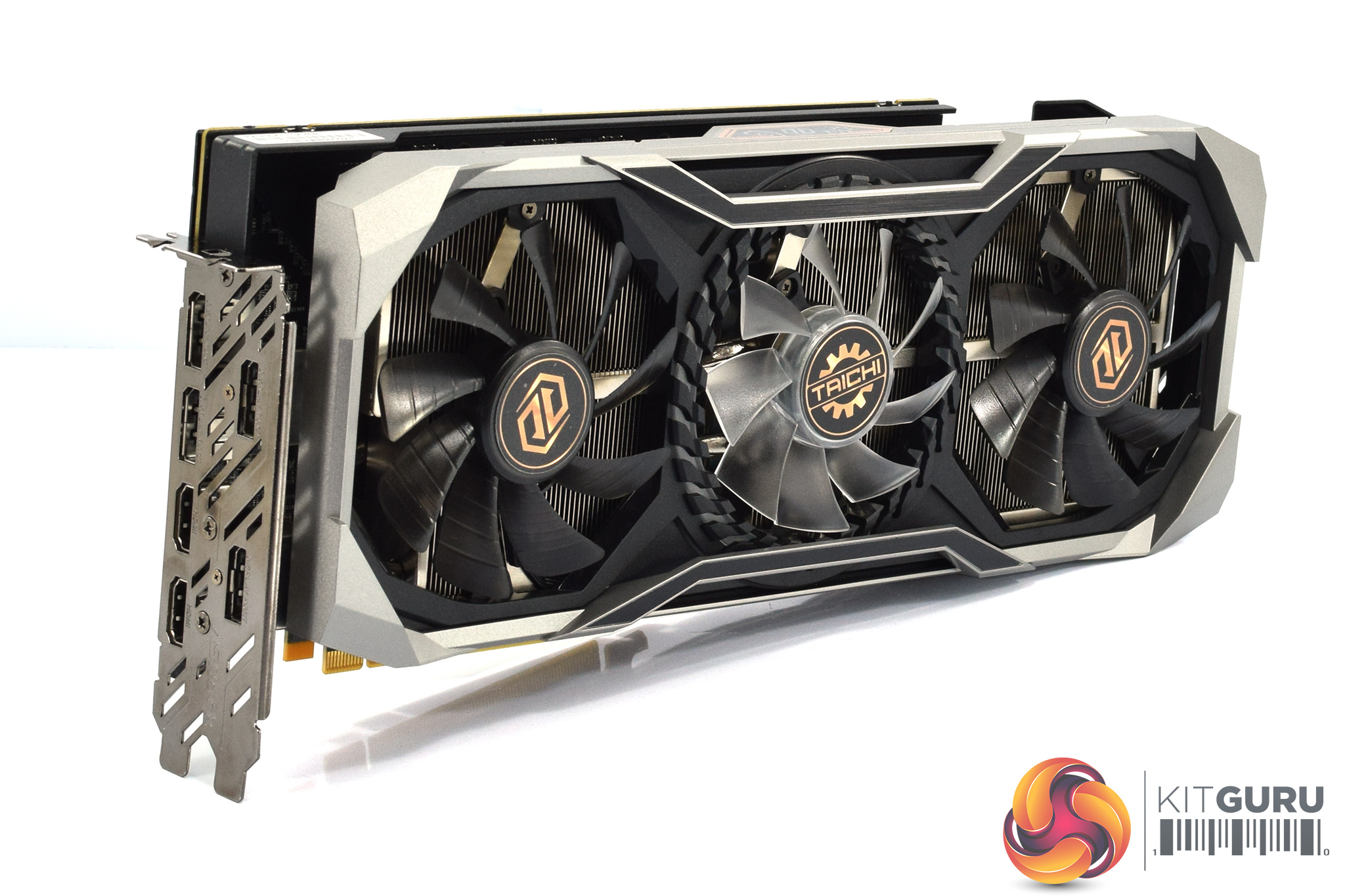
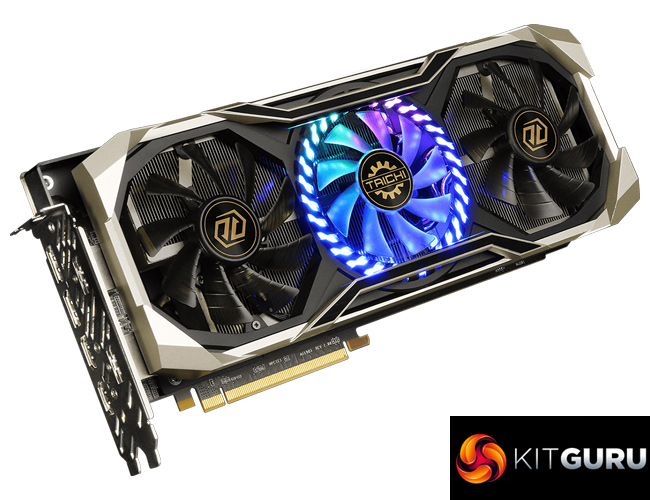
Now, as for the card itself, I have to say this is probably the most unique-looking RX 5700 XT partner card that I have seen so far. The shroud is a mix of black and silver/grey plastic, but it has a prominent, angular design which gives it a fairly aggressive appearance. Some parts of the shroud are also raised above the fans, giving it more of a ‘3D' look.
The three fans also contribute to the overall aesthetic. The two outer fans measure 90mm and have dark, translucent fan blades. The central fan, however, has clear fan blades and measures 80mm across. This is surrounded by an LED strip, with the clear fan blades acting as diffusers for the LEDs. We can also note the gold Taichi stickers on the fans' central hubs.
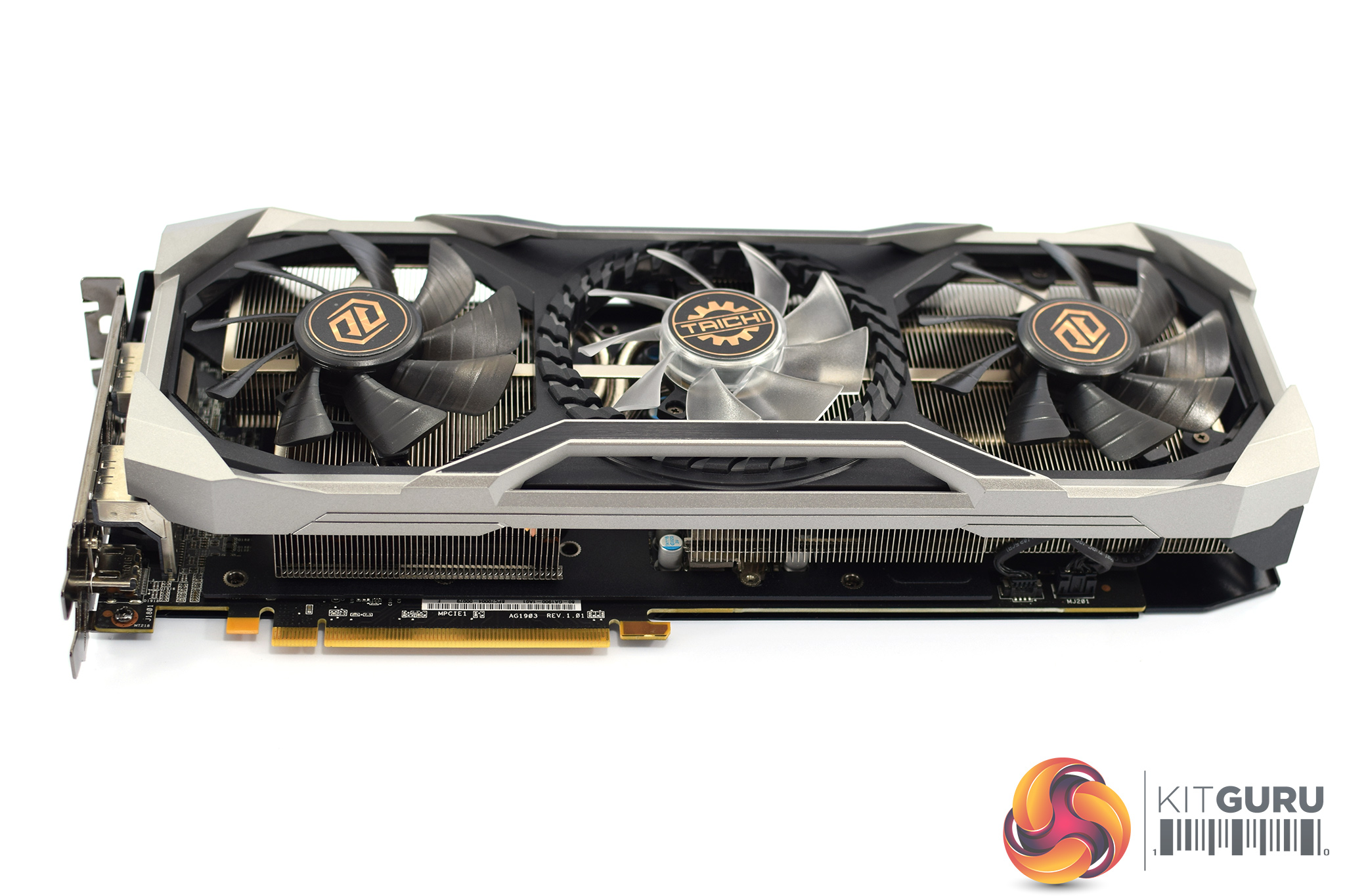
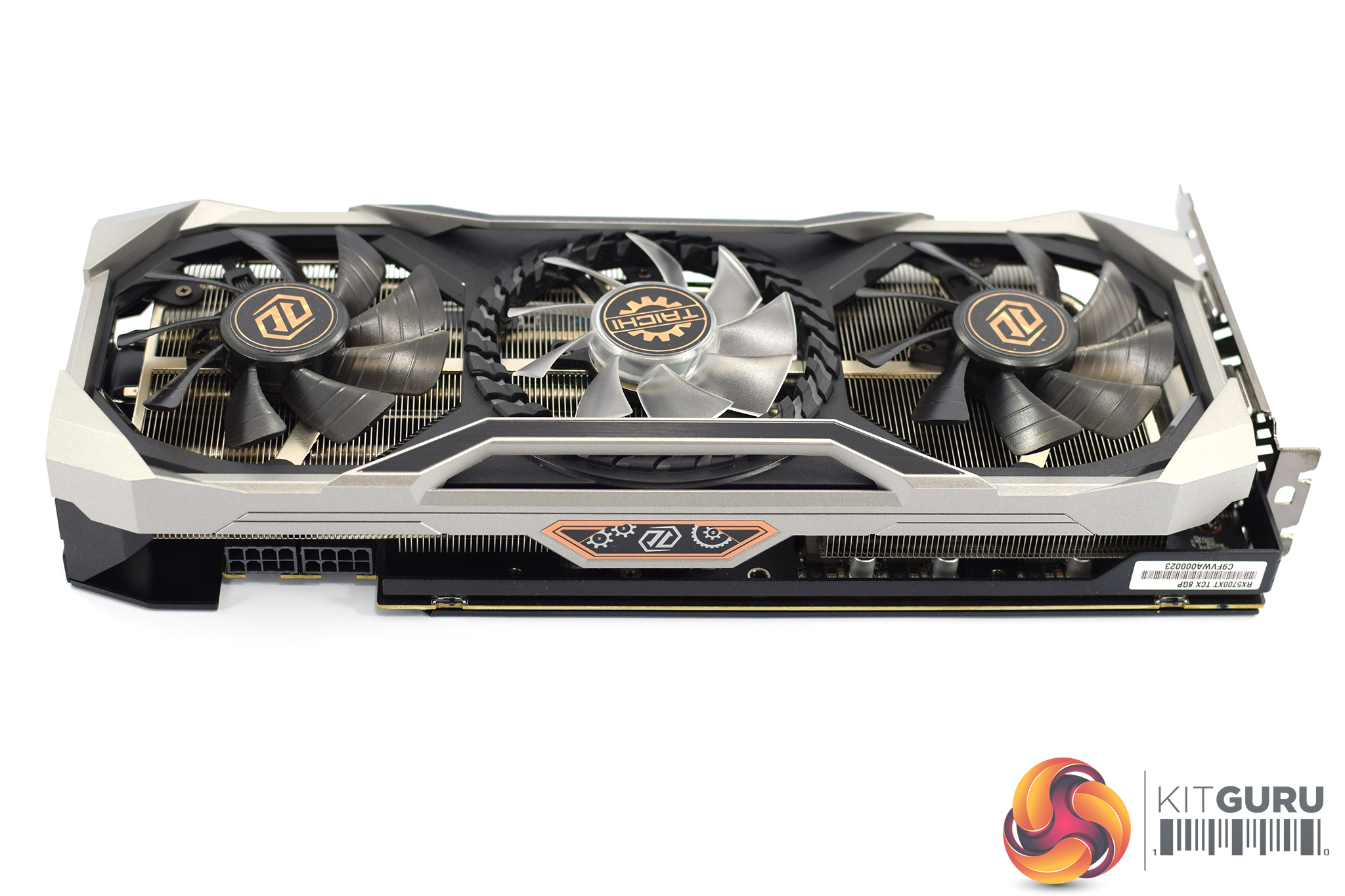
There's also no getting away from the fact that this is a big card – it measures 324.35 x 145.39 x 53.18mm, making it both the longest and the tallest RX 5700 XT we have reviewed so far. It's also a 2.5-slot thickness, so definitely make sure this will fit in your case.
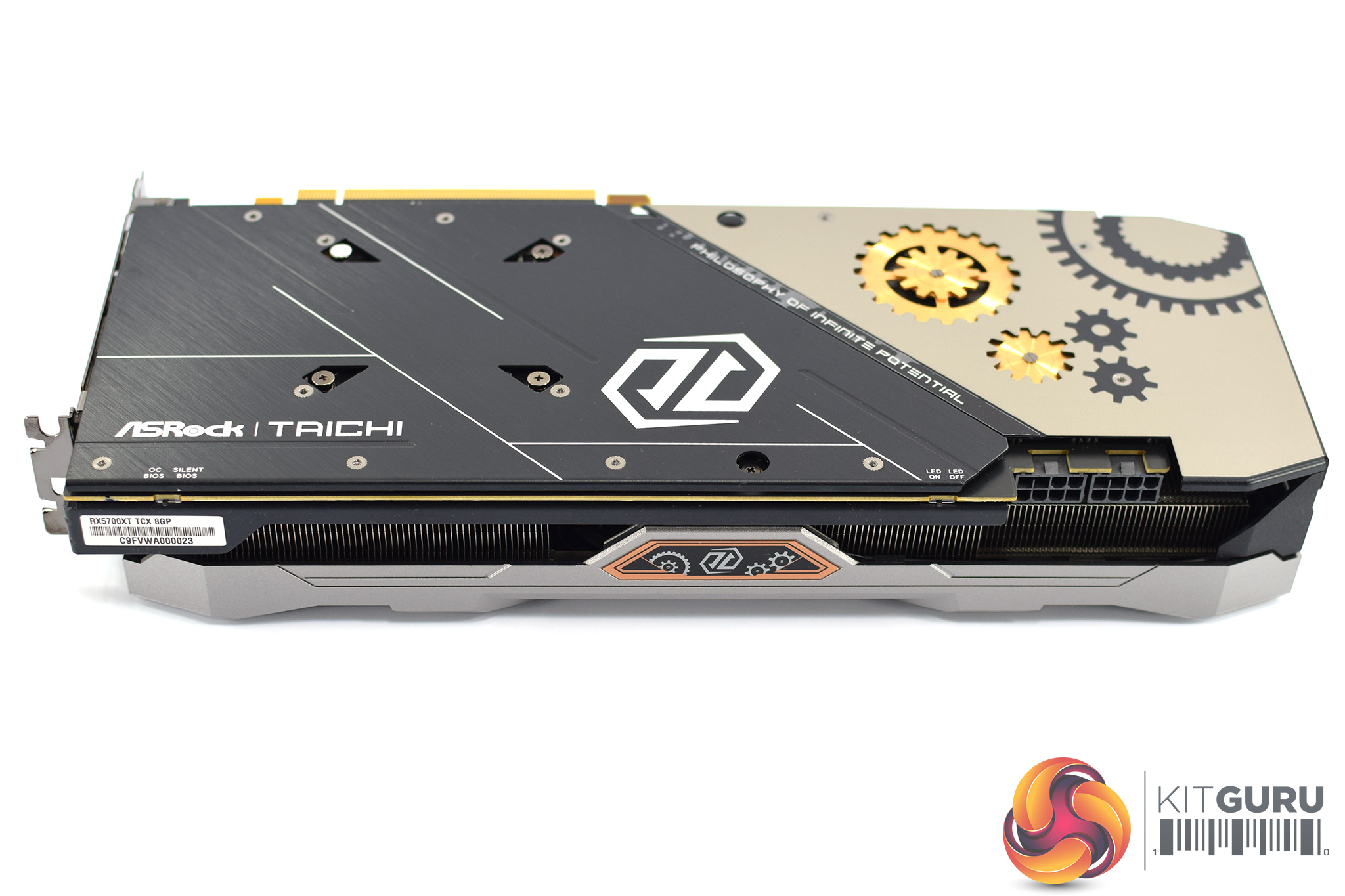
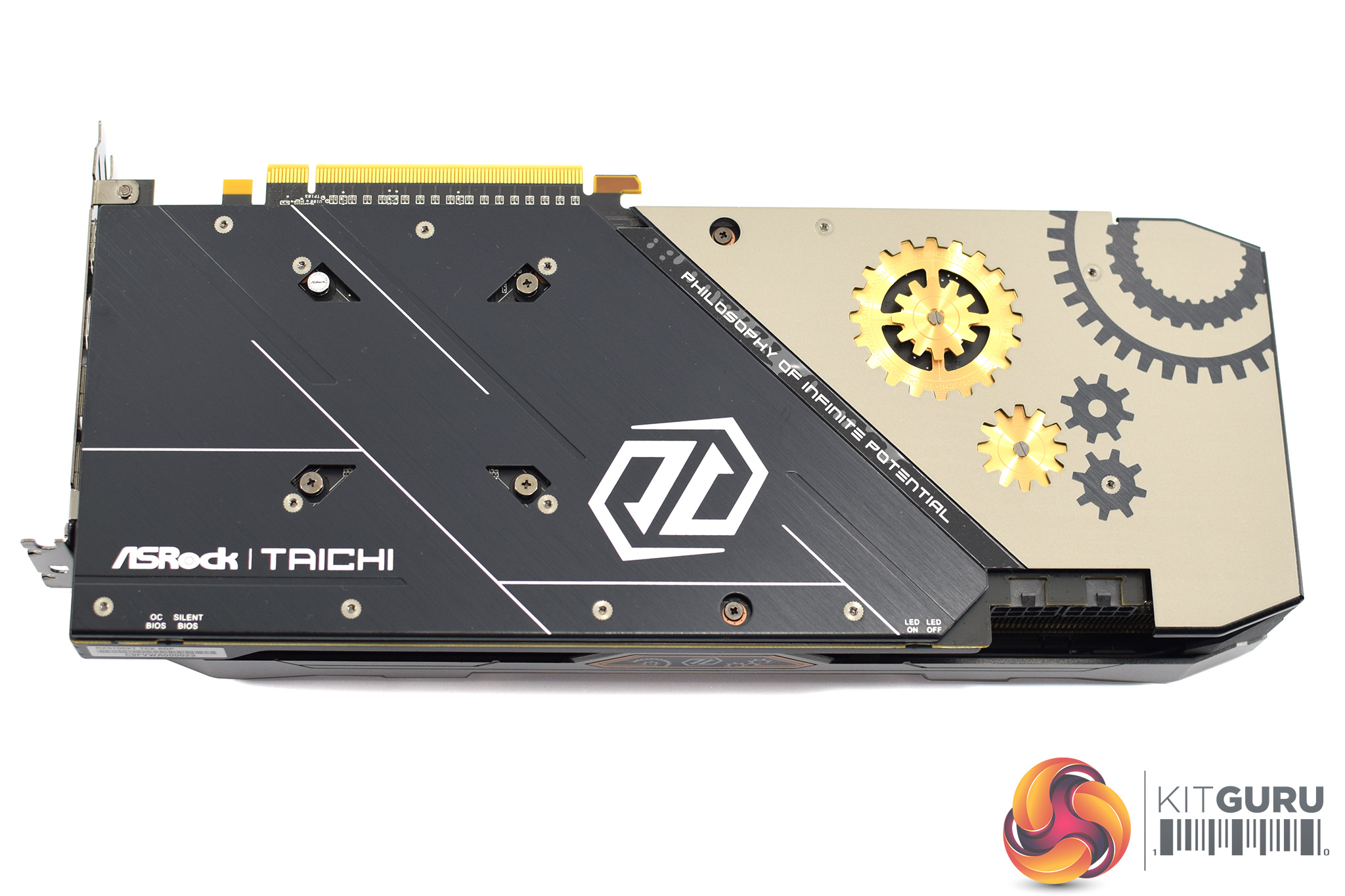
On the front side of the card, there are three things worth mentioning. The first is the dual-BIOS switch, which sits on the left-hand edge of the card. By default, the switch is positioned to use the ‘OC BIOS', but you can engage the ‘Silent BIOS' if you prefer. Secondly, we can also see the Taichi logo, with more cog and gear styling, positioned in the middle of the card – this is another RGB zone. Lastly, if you don't want any RGB lighting, there is a second switch on the side of the card, which will turn the LEDs on or off – this acts as a master switch.
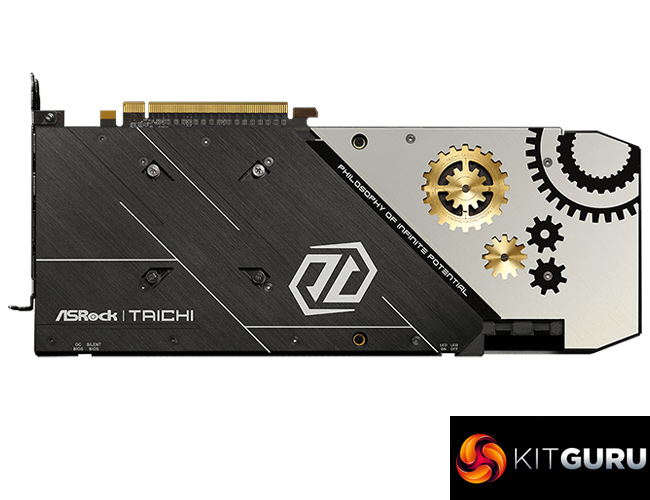
Additionally, we can also get a look at the Taichi's backplate. This is a full-length metal design, and it is quite visually appealing. It has a two-tone appearance, with about two thirds of backplate being black, brushed metal – with the other third a grey/beige sort of colour. This section also sports two metal cogs, which sit below the backplate itself, which ASRock calls the ‘3D' backplate design.
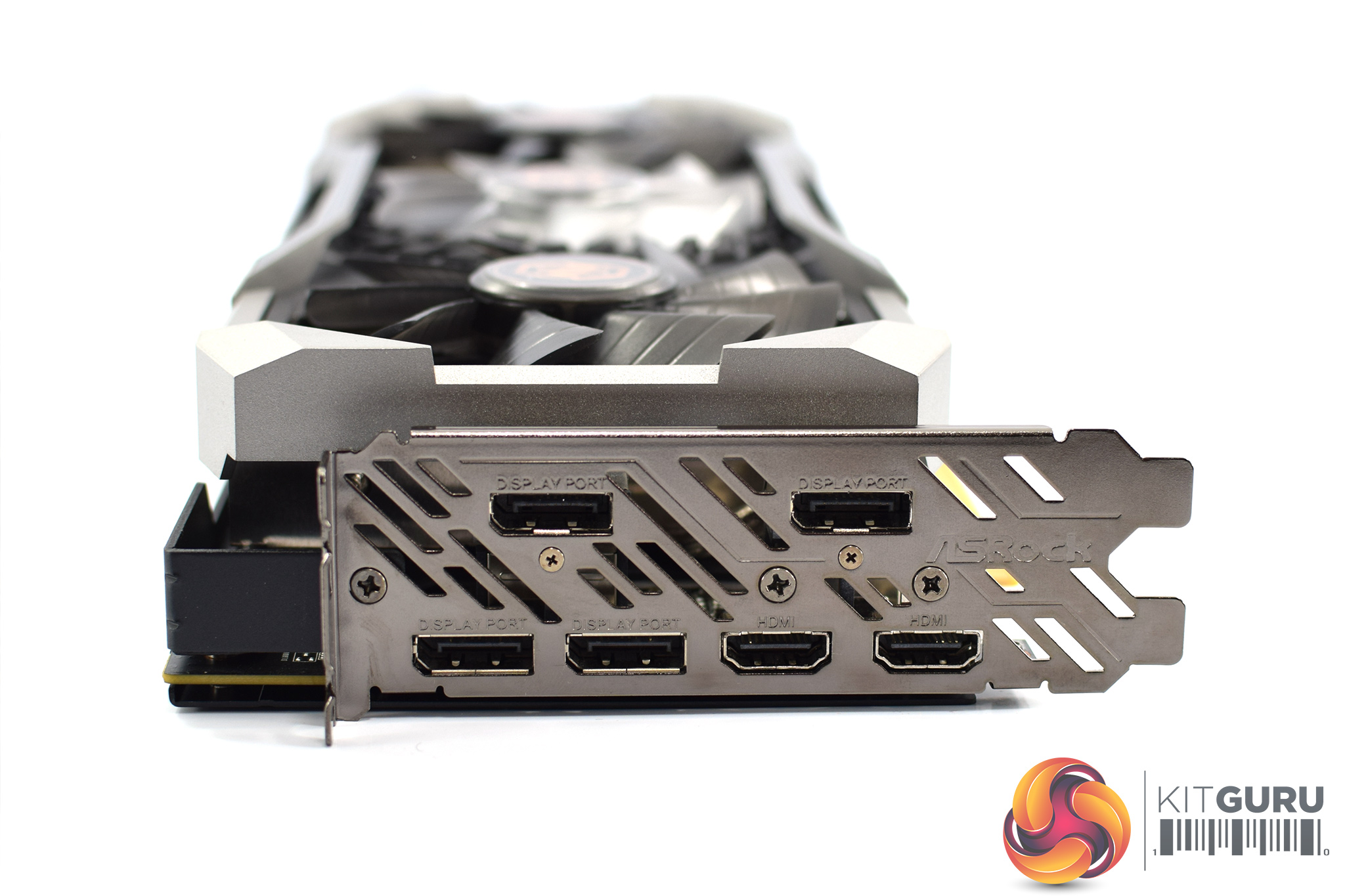
Display I/O is another interesting area, as there are a total of six video outputs – 4x DisplayPort, and 2x HDMI, so that's two more ports than we usually see.
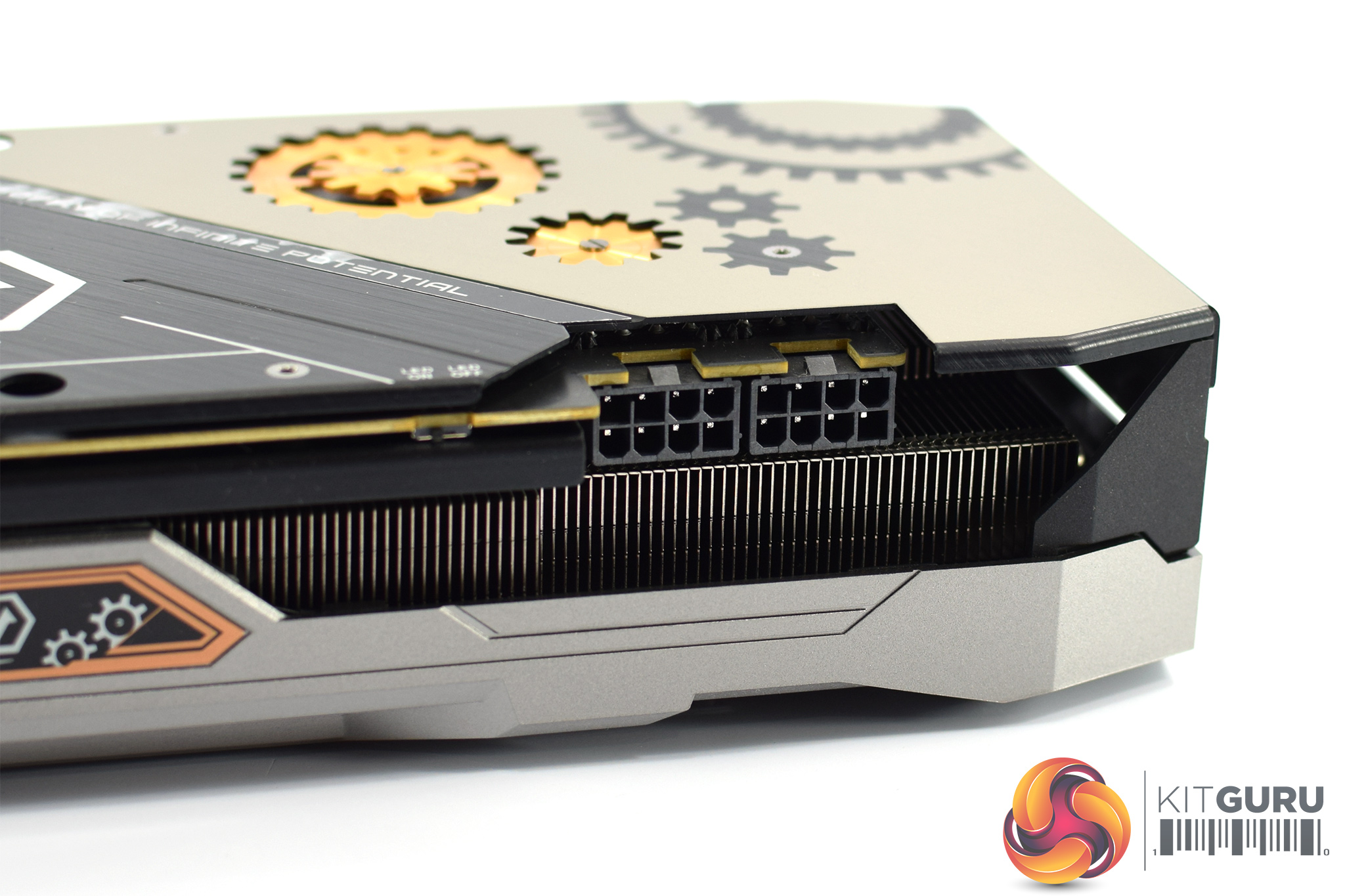
As for power requirements, the card needs 2x 8-pin PCIe power connectors.
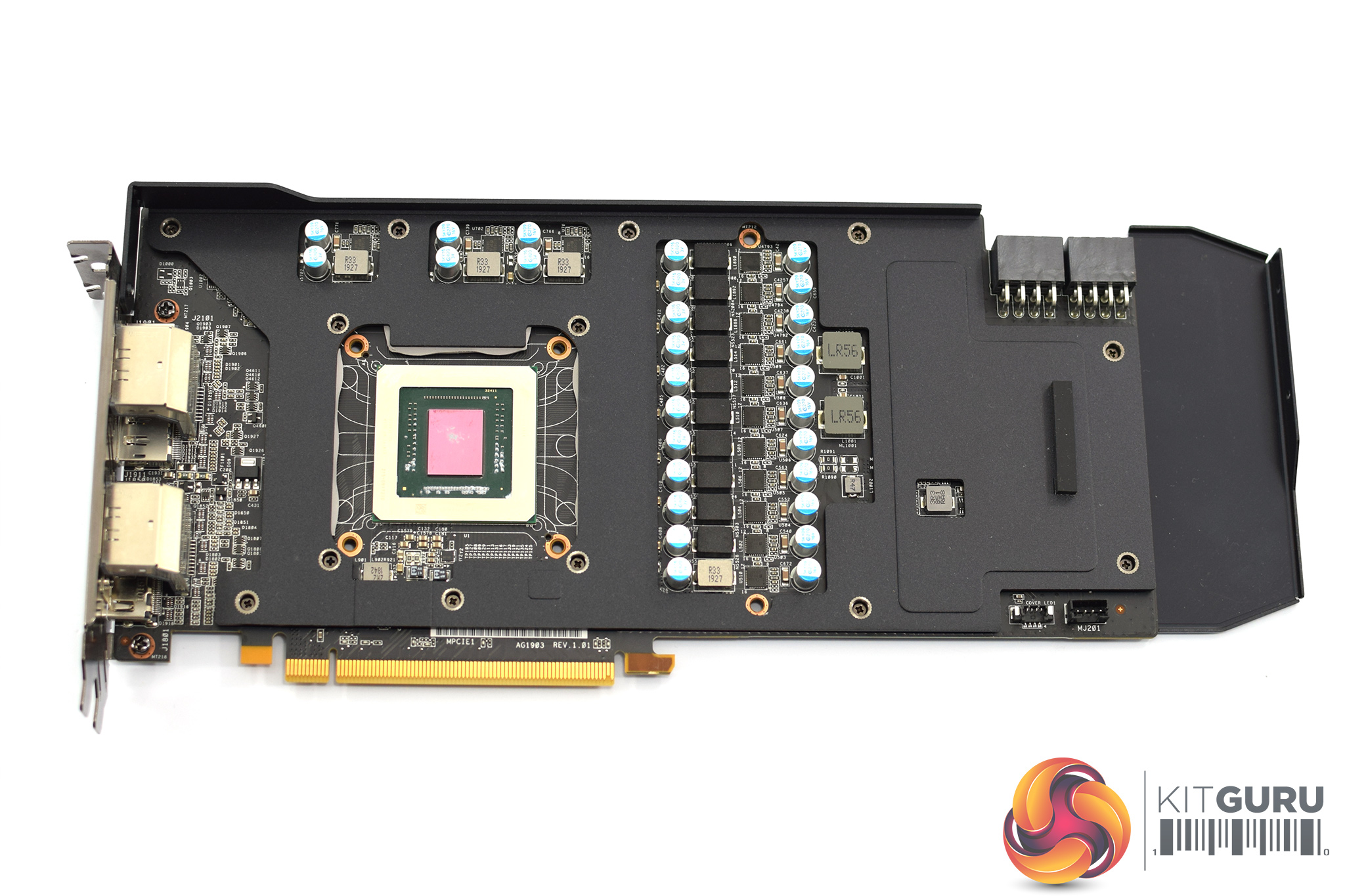
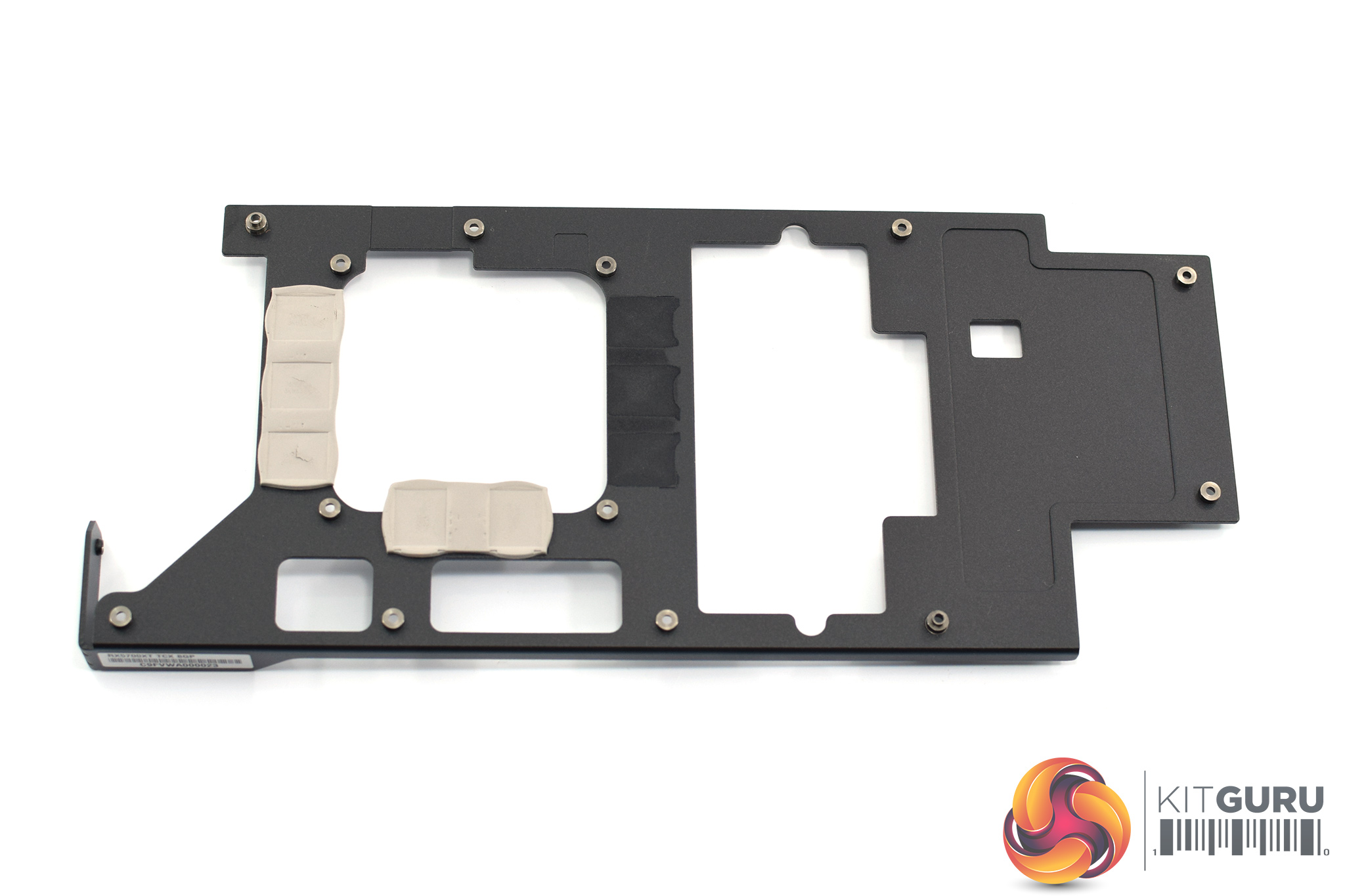
Once we remove the heatsink from the card, we can get a look at the PCB, though most of it is obscured by a large metal frame that acts as a secondary heatsink for the memory chips.
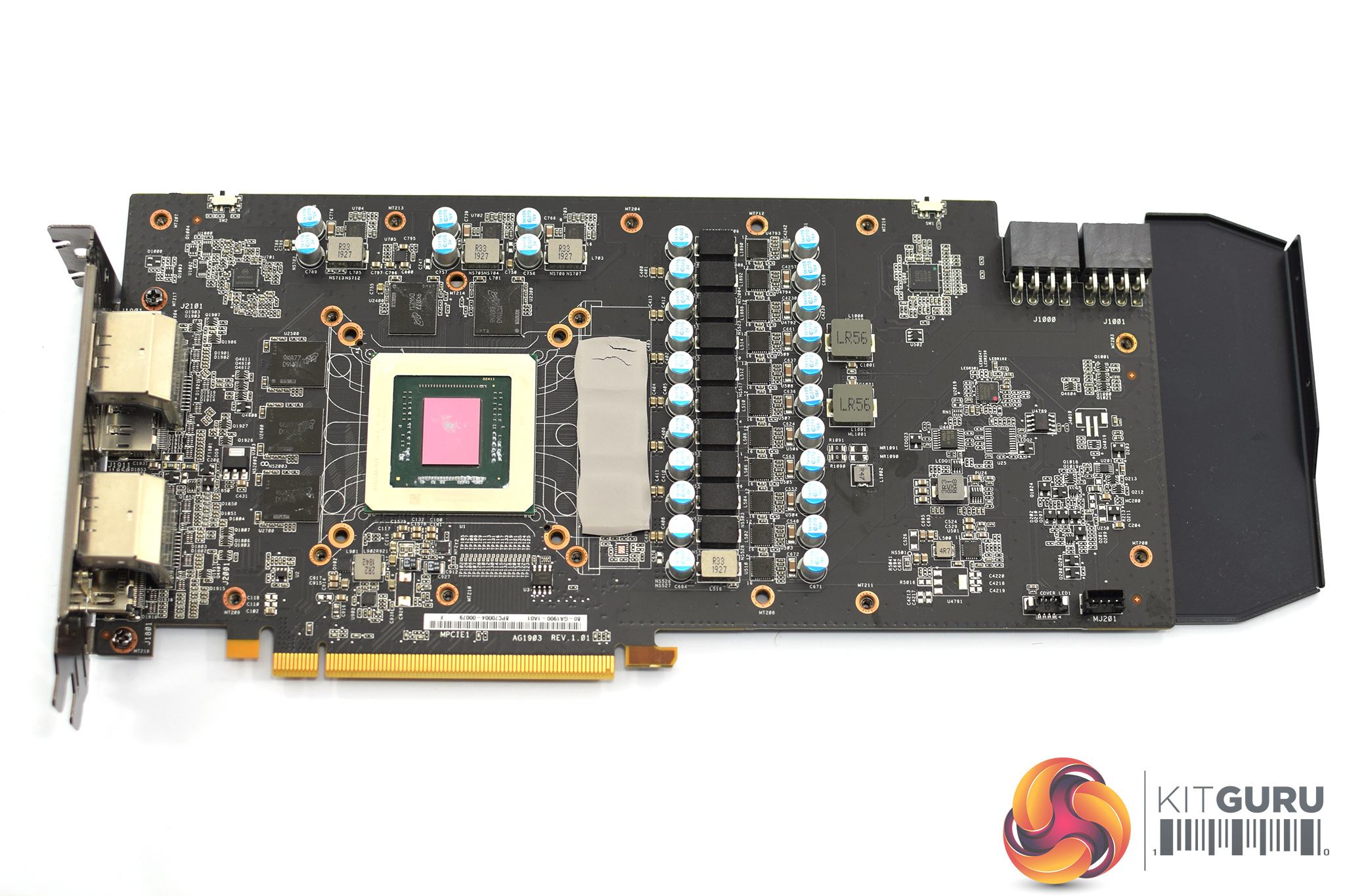
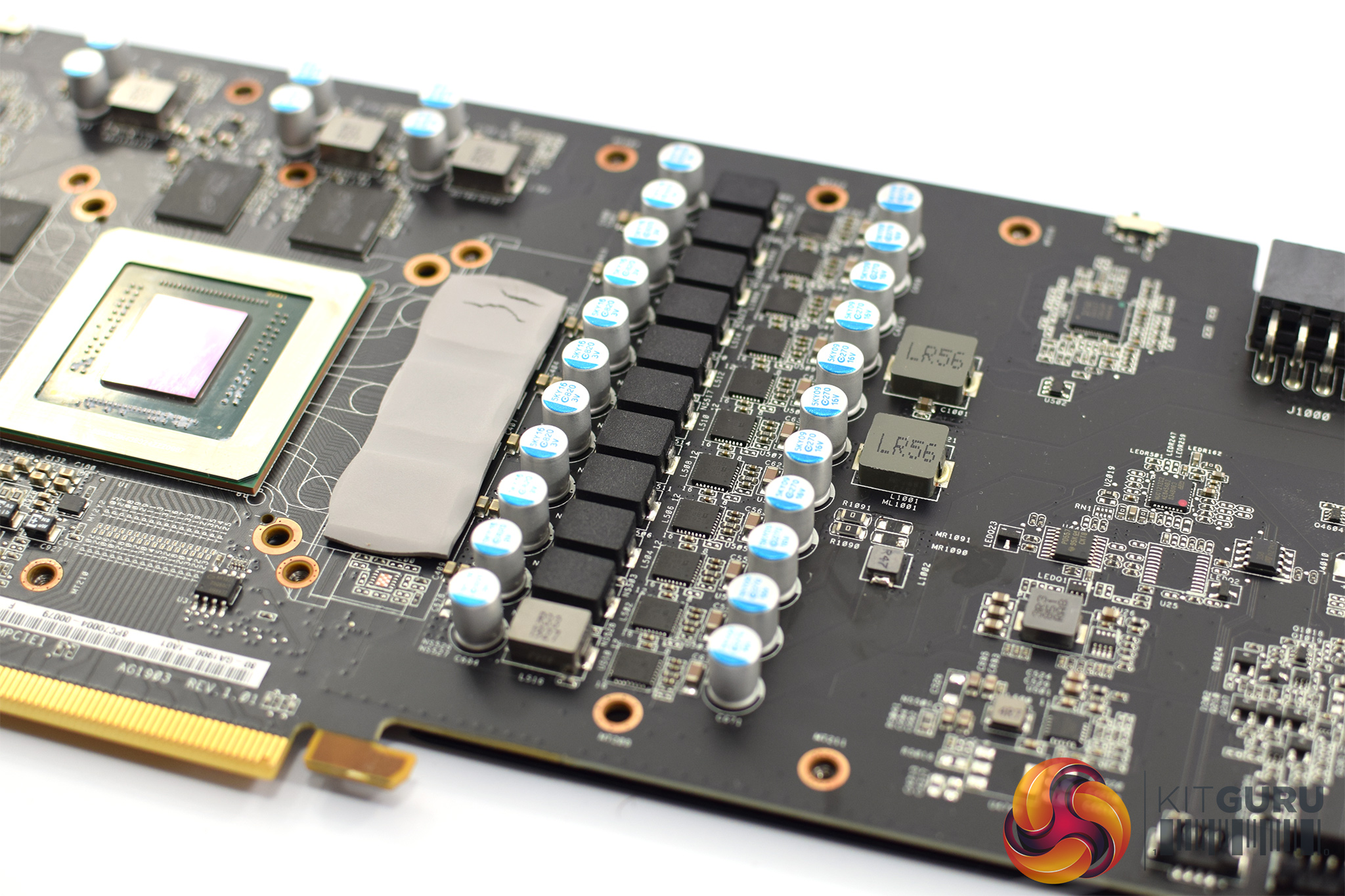
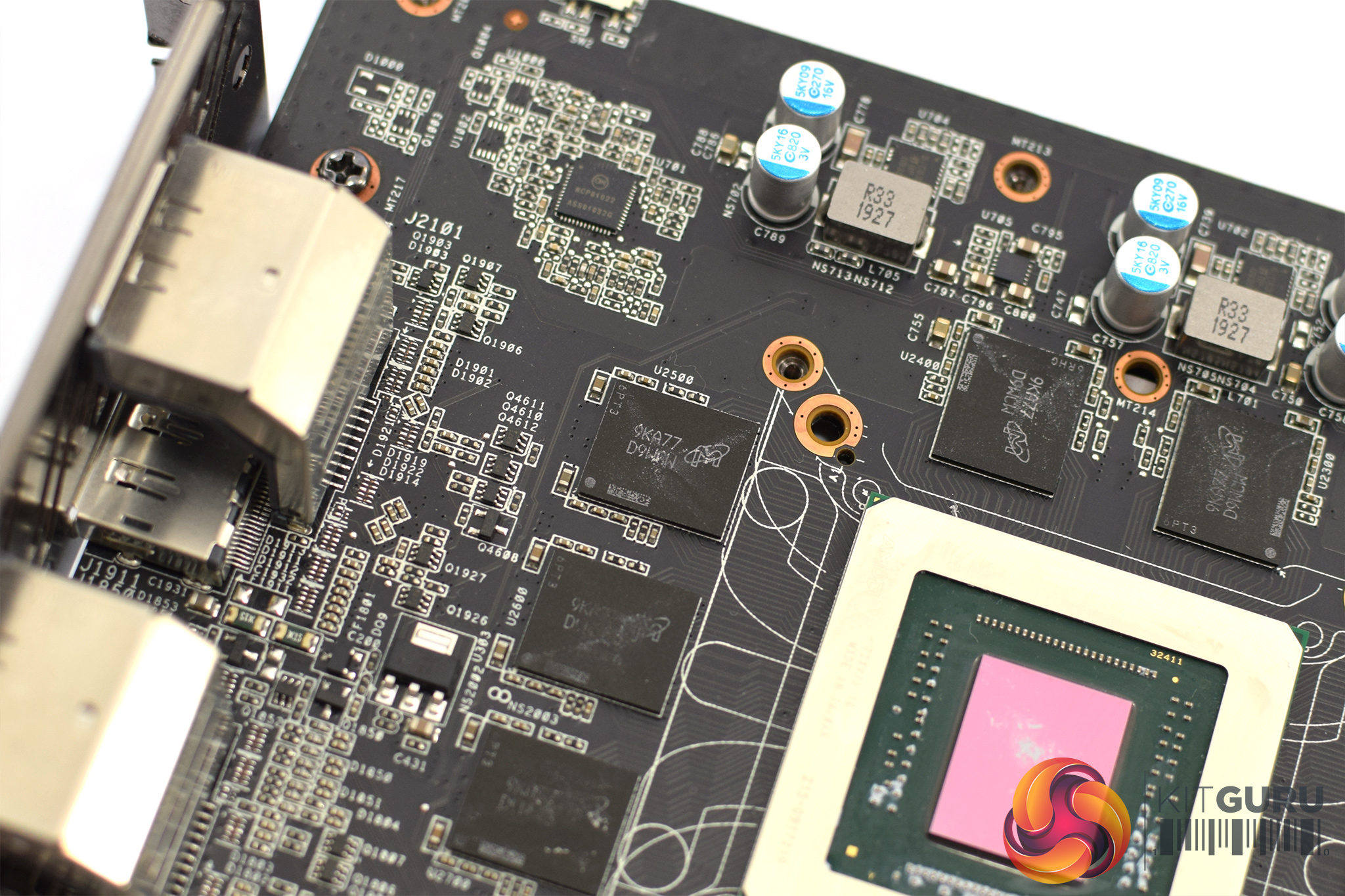
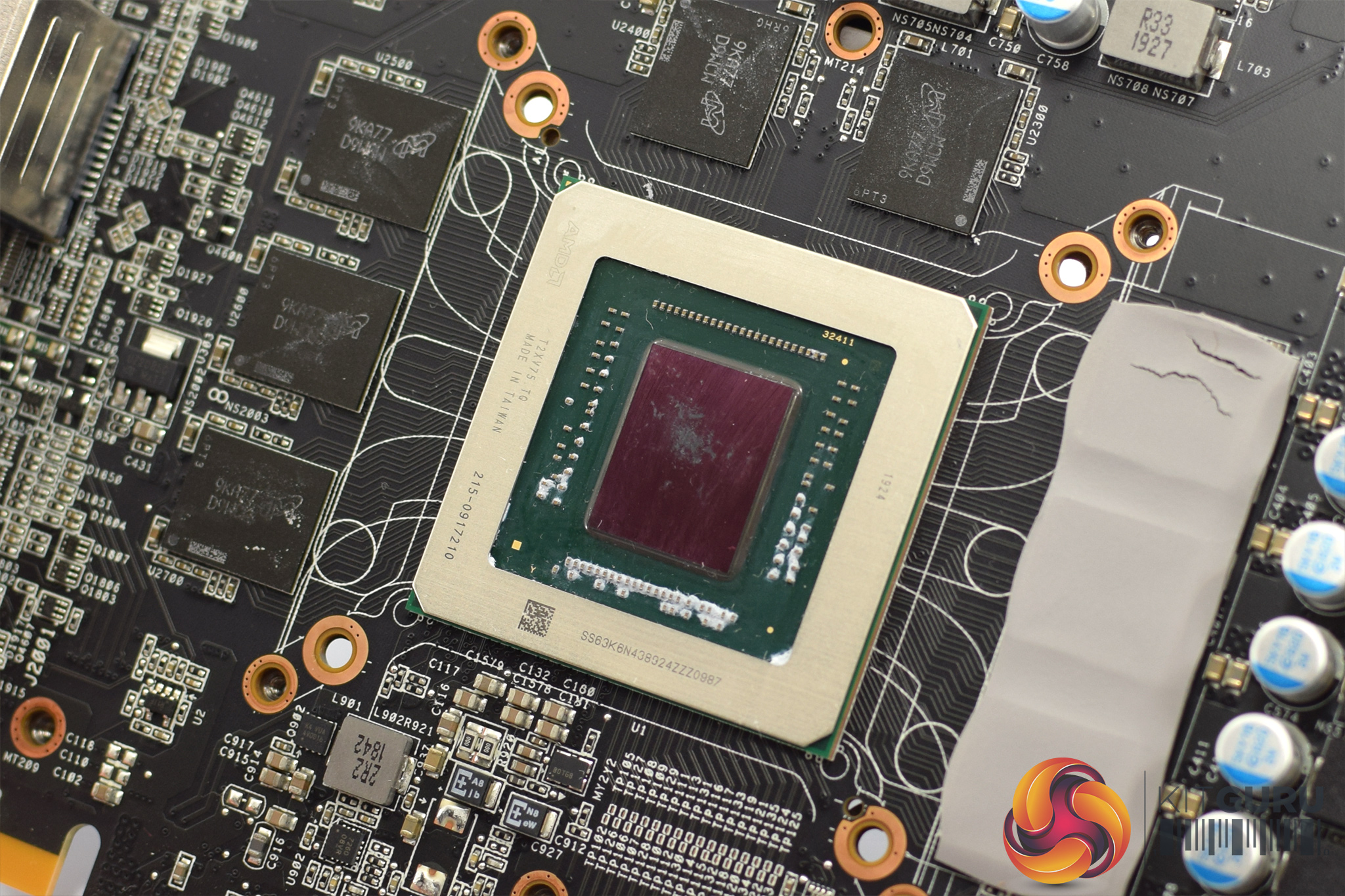
Once that frame is removed, the bare PCB is exposed and we can see ASRock has opted for a 10+1 phase VRM for the GPU, and a 2-phase VRM for the memory. The memory modules themselves are from Micron, each chip is labelled ‘9KA77D9WCW'. Lastly, we can also see the 251mm² Navi 10 GPU sitting in the middle of the PCB.
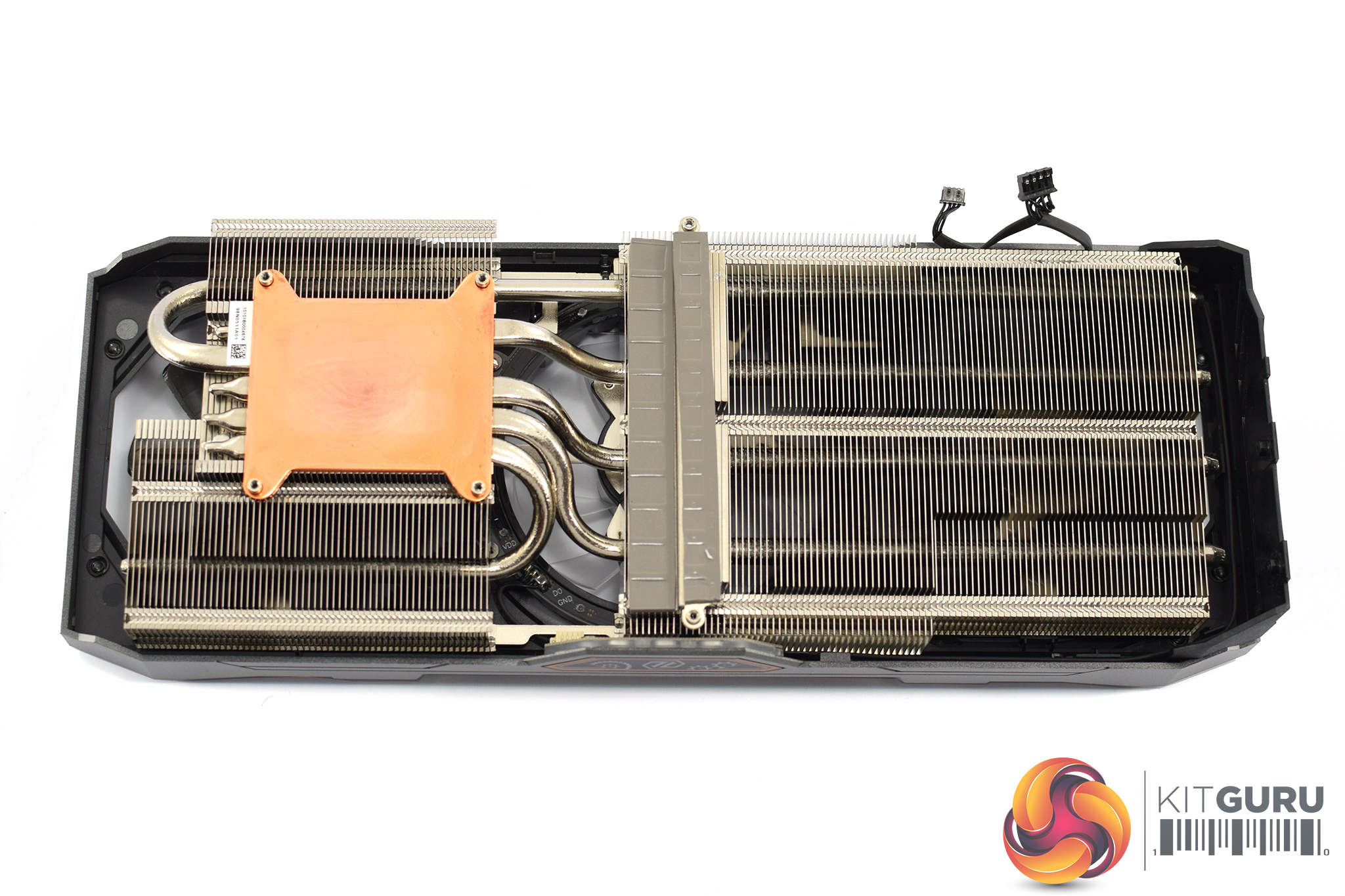
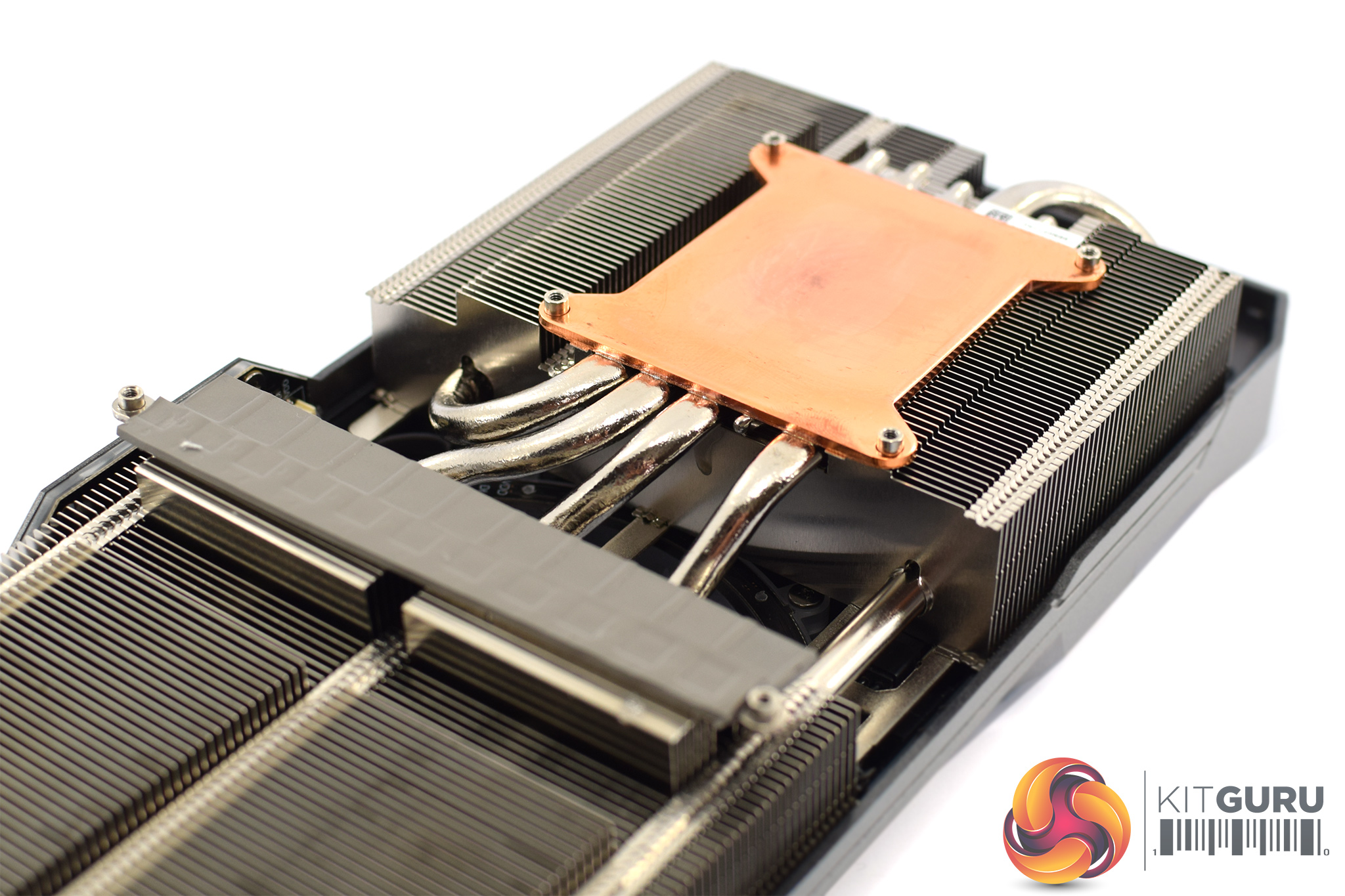
Looking now at the heatsink, this is comprised of two separate fin stacks, connected by a total of five, 6mm heatpipes. The GPU itself contacts with a copper plate which sits above the heatpipes, while there is a separate plate for the VRM circuitry as well. The memory is cooled by the black plate shown above.
Our newest GPU test procedure has been built with the intention of benchmarking high-end graphics cards. We test at 1920×1080 (1080p), 2560×1440 (1440p), and 3840×2160 (4K UHD) resolutions.
We try to test using the DX12 API if titles offer support. This gives us an interpretation into the graphics card performance hierarchy in the present time and the near future, when DX12 becomes more prevalent. After all, graphics cards of this expense may stay in a gamer’s system for a number of product generations/years before being upgraded.
We tested the RX Vega64 and Vega56 using the ‘Turbo‘ power mode in AMD’s WattMan software. This prioritises all-out performance over power efficiency, noise output, and lower thermals.
As the Taichi X has dual-BIOS functionality, we did all of our performance testing using the OC BIOS, so the results are marked with an ‘OC' denoting the BIOS used. For our thermal, acoustic, and power testing we tested both BIOS, so each result is marked ‘OC' or ‘Silent' denoting the BIOS used.
Driver Notes
- All AMD graphics cards were benchmarked with the Adrenalin 19.9.2 driver.
- All Nvidia graphics cards (except 1660 SUPER) were benchmarked with the Nvidia 436.48 driver.
- All GTX 1660 SUPER graphics cards were benchmarked with the Nvidia 441.07 driver supplied to press ahead of launch.
Test System
We test using the Overclockers UK Germanium pre-built system, though it has been re-housed into an open-air test bench. You can read more about it over HERE.
| CPU |
Intel Core i7-8700K
Overclocked to 5.0GHz |
| Motherboard |
ASUS ROG Strix Z370-F Gaming
|
| Memory |
Team Group Dark Hawk RGB
16GB (2x8GB) @ 3200MHz 16-18-18-38 |
| Graphics Card |
Varies
|
| System Drive |
Samsung 960 EVO 500GB
|
| Games Drive | Kingston UV500 960GB |
| Chassis | Streacom ST-BC1 Bench |
| CPU Cooler |
OCUK TechLabs 240mm AIO
|
| Power Supply |
Corsair AX1500i 80+ Titanium PSU
|
| Operating System |
Windows 10 1903
|
Comparison Graphics Cards List
- PNY RTX 2080 Ti XLR8 Gaming 11GB
- Nvidia RTX 2080 Ti Founders Edition (FE) 11GB
- Nvidia RTX 2080 SUPER Founders Edition (FE) 8GB
- Nvidia RTX 2070 SUPER Founders Edition (FE) 8GB
- Nvidia RTX 2060 SUPER Founders Edition (FE) 8GB
- Nvidia RTX 2060 Founders Edition (FE) 6GB
- Gigabyte GTX 1660 Ti OC 6G
- EVGA GTX 1660 SUPER SC Ultra 6GB
- Gigabyte GTX 1660 SUPER Gaming OC 6G
- Palit GTX 1660 SUPER GamingPro OC 6GB
- Gigabyte GTX 1660 Gaming OC 6G
- Palit GTX 1650 StormX OC 4GB
- Nvidia GTX 1060 Founders Edition (FE) 6GB
- AMD RX 5700 XT 8GB
- PowerColor RX 5700 XT Red Devil 8GB
- Sapphire RX 5700 XT Nitro+ 8GB
- ASUS RX 5700 TUF Gaming X3 8GB
- AMD RX 5700 8GB
- AMD Radeon VII 16GB
- AMD RX Vega 64 Air 8GB
- AMD RX Vega 56 8GB
- Sapphire RX 590 Nitro+ SE 8GB
- Sapphire RX 580 Pulse 8GB
- ASUS RX 570 ROG Strix Gaming OC 4GB
Software and Games List
- 3DMark Fire Strike & Fire Strike Ultra (DX11 Synthetic)
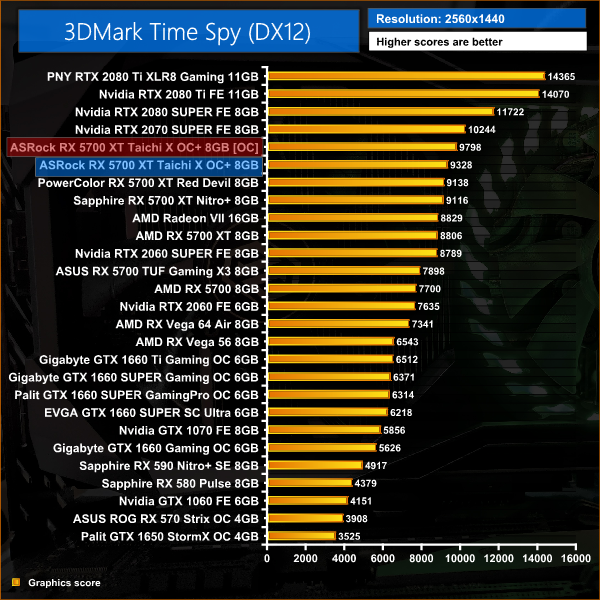
- 3DMark Time Spy (DX12 Synthetic)
- 3DMark Port Royal (DXR Synthetic)
- Battlefield V (DX12)
- The Division 2 (DX11)
- F1 2019 (DX12)
- Far Cry New Dawn (DX11)
- Gears 5 (DX12)
- Ghost Recon: Wildlands (DX11)
- Metro: Exodus (DX12)
- Middle Earth: Shadow of War (DX11)
- Shadow of the Tomb Raider (DX12)
- Total War: Three Kingdoms (DX11)
We run each benchmark/game three times, and present averages in our graphs.
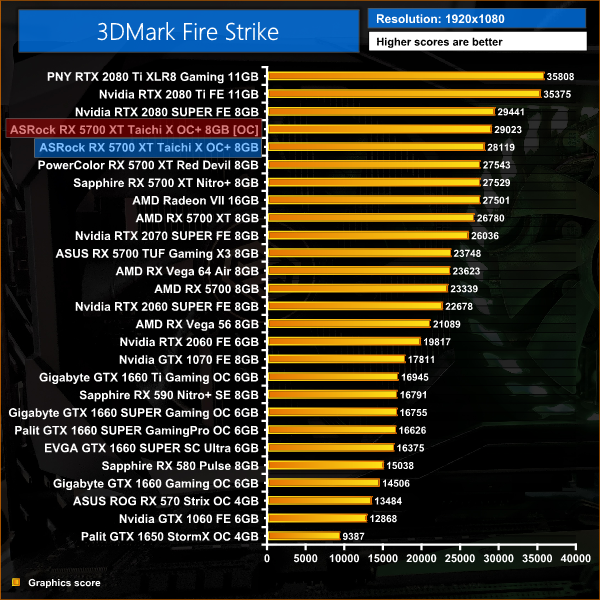
3DMark Fire Strike is a showcase DirectX 11 benchmark designed for today’s high-performance gaming PCs. It is our [FutureMark’s] most ambitious and technical benchmark ever, featuring real-time graphics rendered with detail and complexity far beyond what is found in other benchmarks and games today.
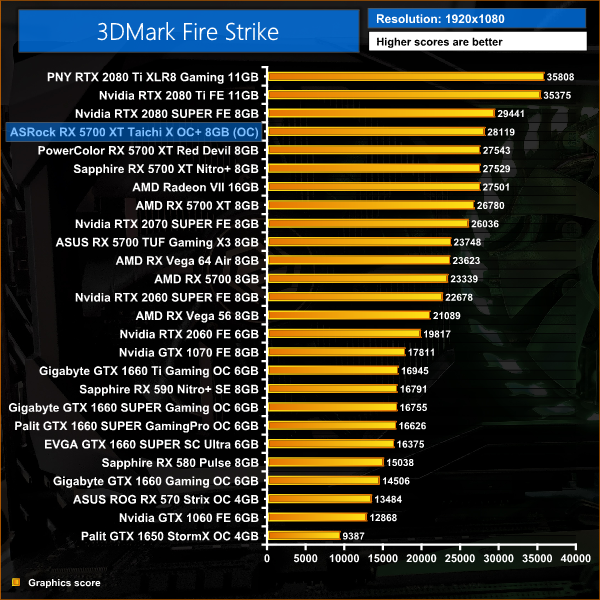
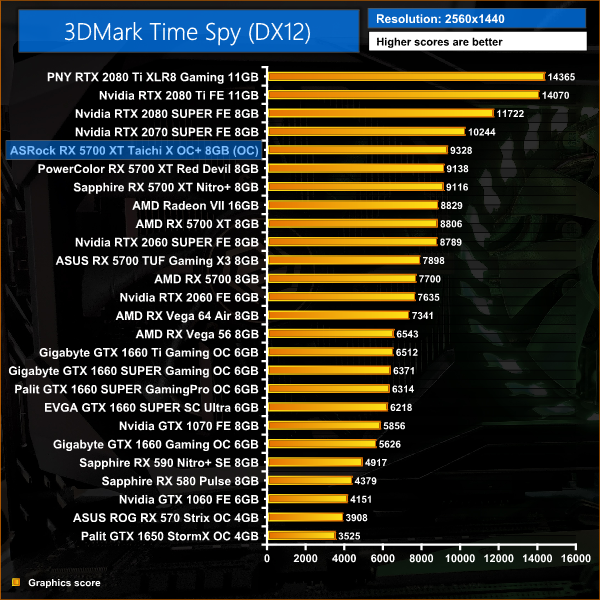
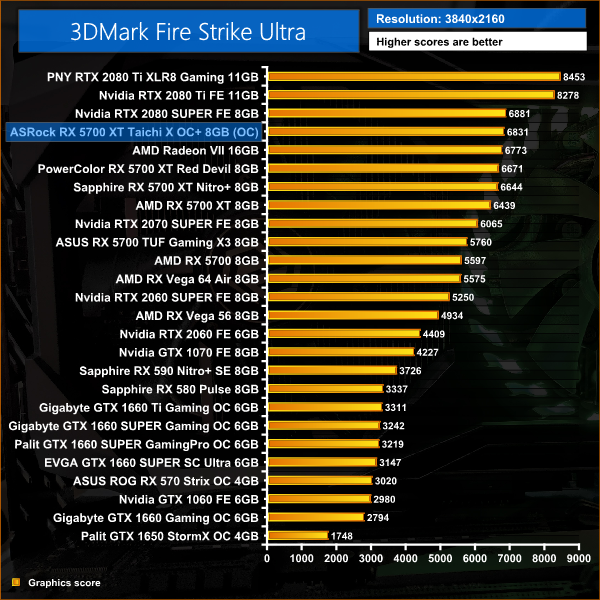
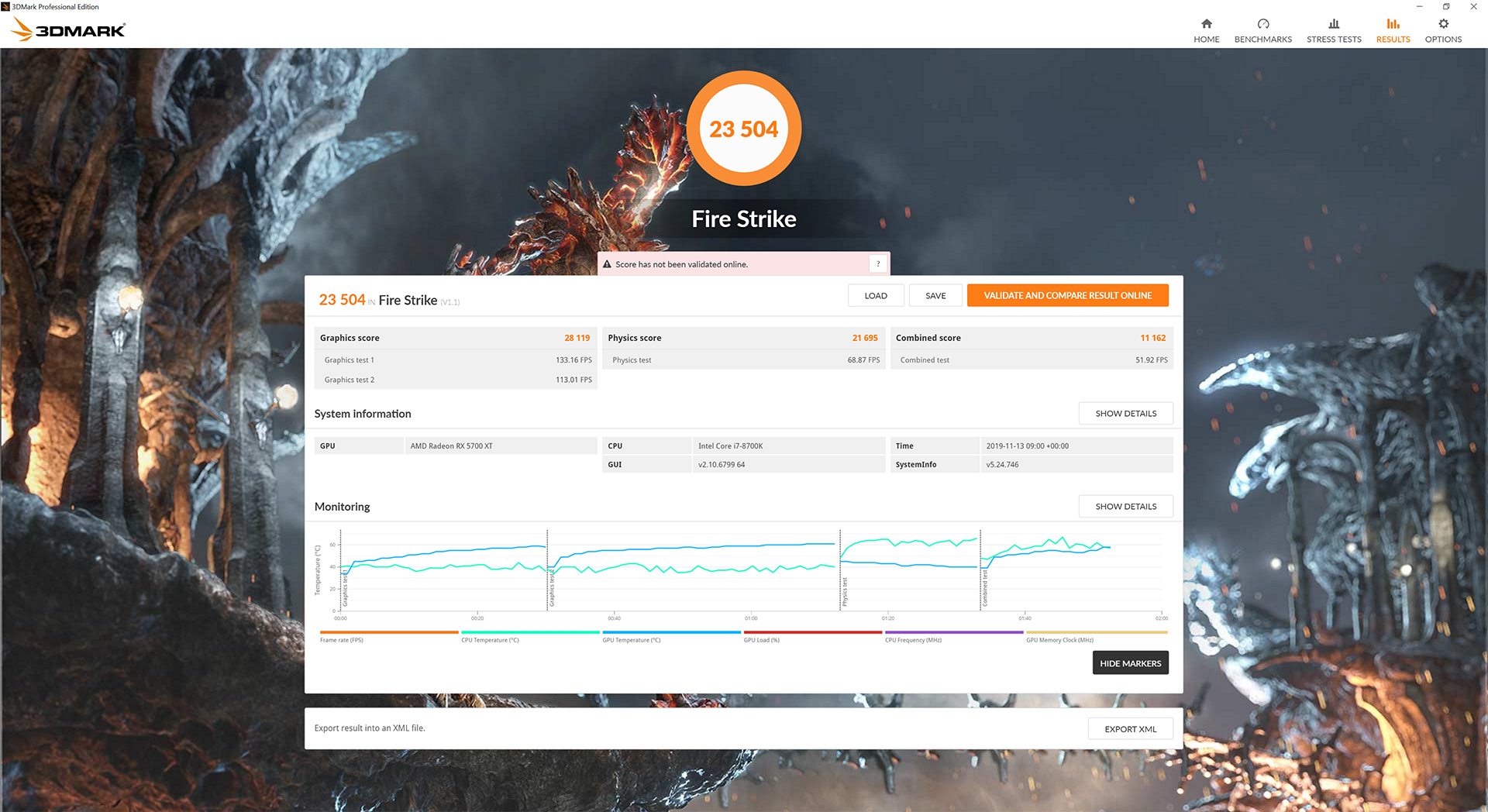
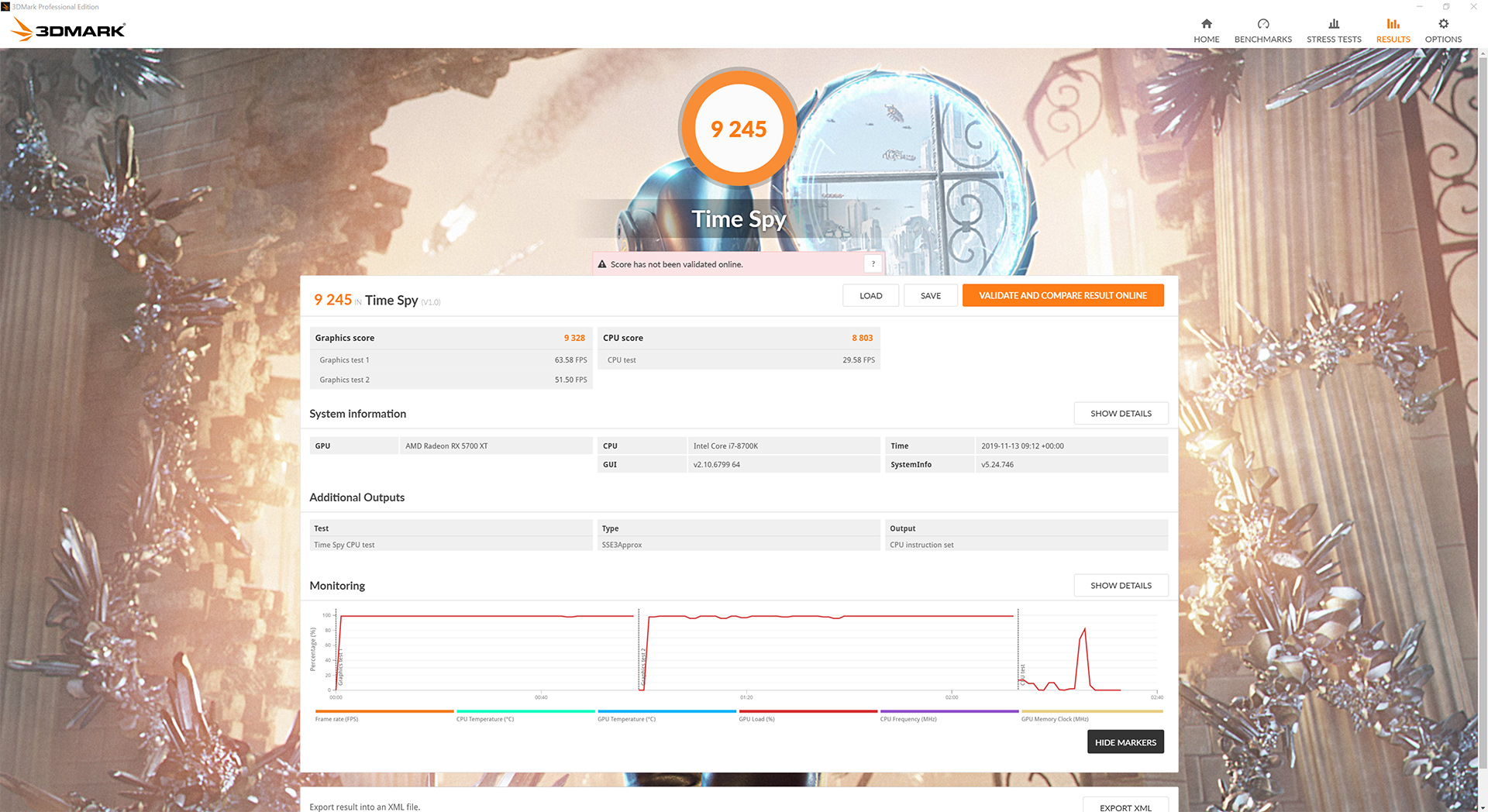
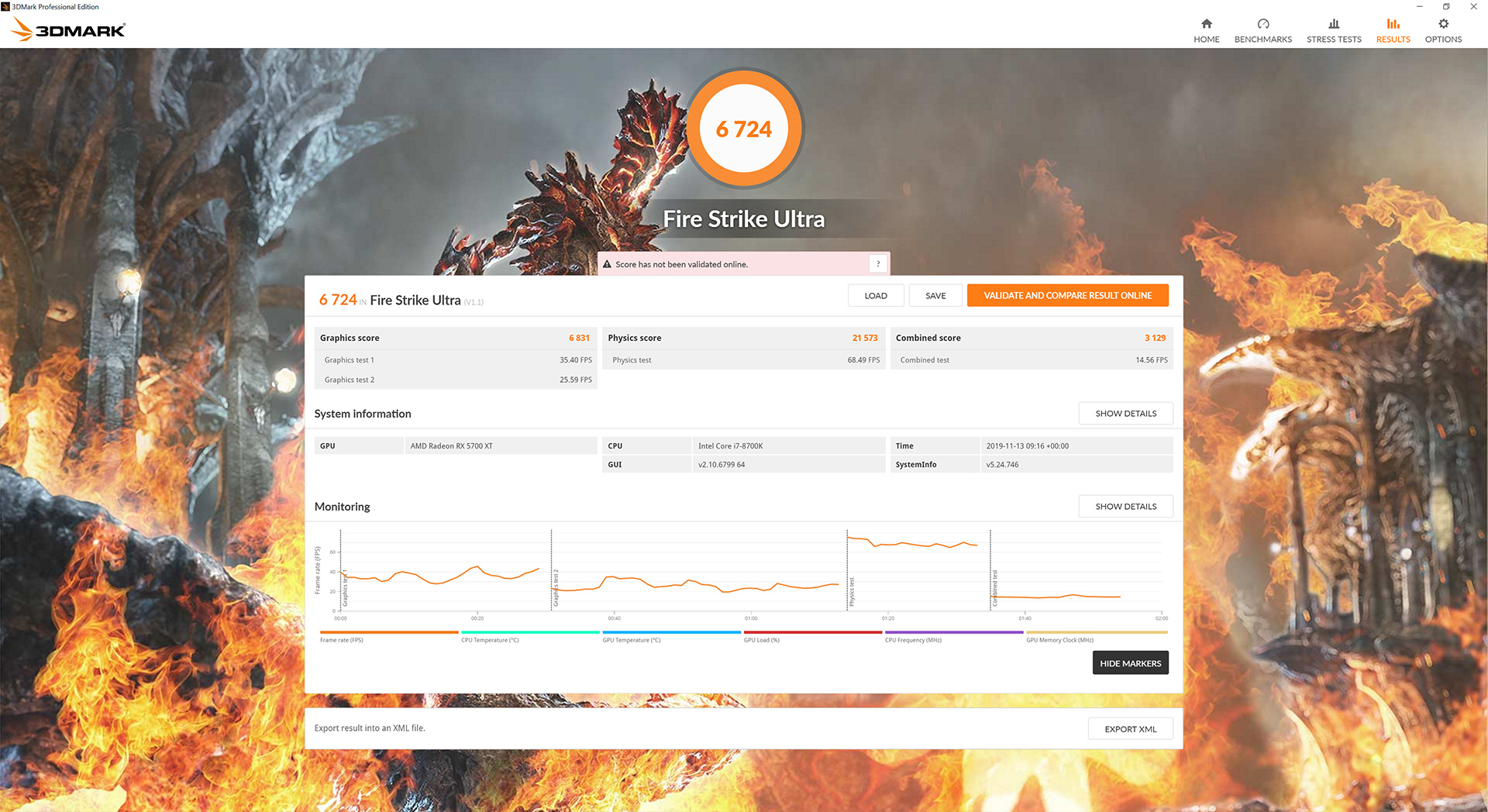
It's a strong start for the Taichi in our 3DMark test, the card out-points all of the other RX 5700 XTs we have tested and is only behind the 2080 SUPER and 2080 Ti in the Fire Strike and Fire Strike Ultra benchmarks. 2070 SUPER does score higher in Time Spy, however.
Battlefield V is a first-person shooter video game developed by EA DICE and published by Electronic Arts. Battlefield V is the sixteenth instalment in the Battlefield series. It was released worldwide for Microsoft Windows, PlayStation 4, and Xbox One on November 20, 2018. (Wikipedia).
We test using the Ultra preset, DX12 API.

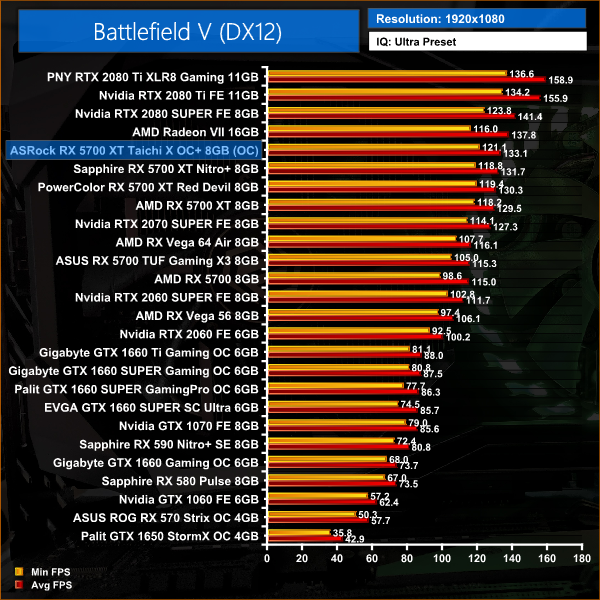
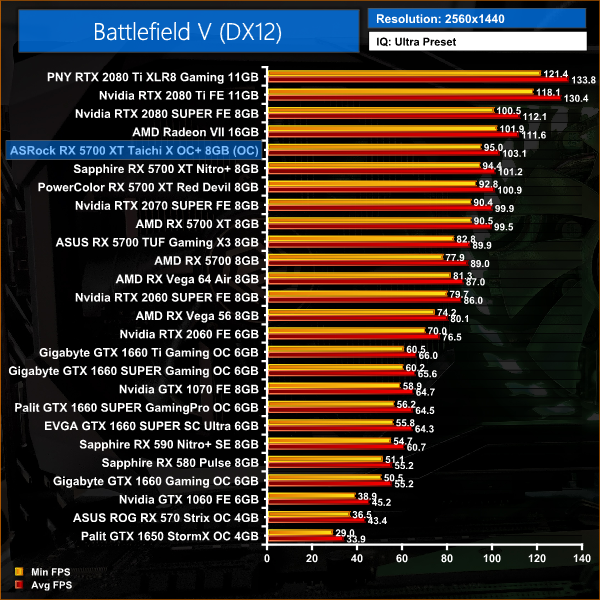
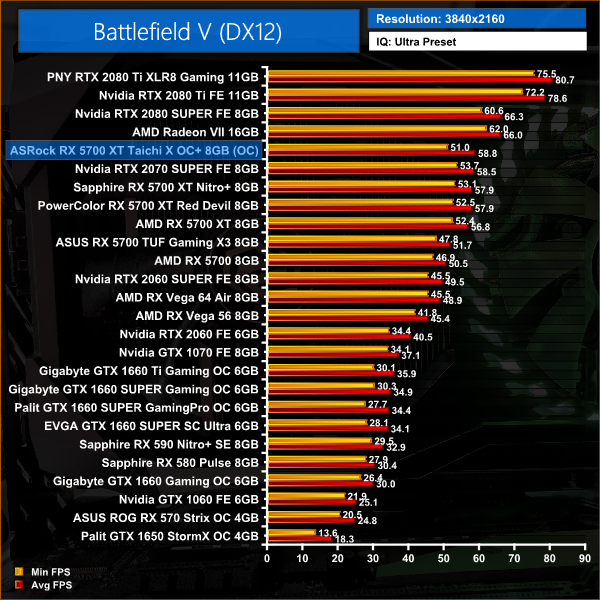
Battlefield V is our first game of the day, and here we can see the Taichi sitting top of the pile in terms of the other RX 5700 XTs we have reviewed. At 1440p its 4% faster than the reference card, and 2% faster than the PowerColor Red Devil.
Tom Clancy's The Division 2 is an online action role-playing video game developed by Massive Entertainment and published by Ubisoft. The sequel to Tom Clancy's The Division (2016), it is set in a near-future Washington, D.C. in the aftermath of a smallpox pandemic, and follows an agent of the Strategic Homeland Division as they try to rebuild the city. (Wikipedia).
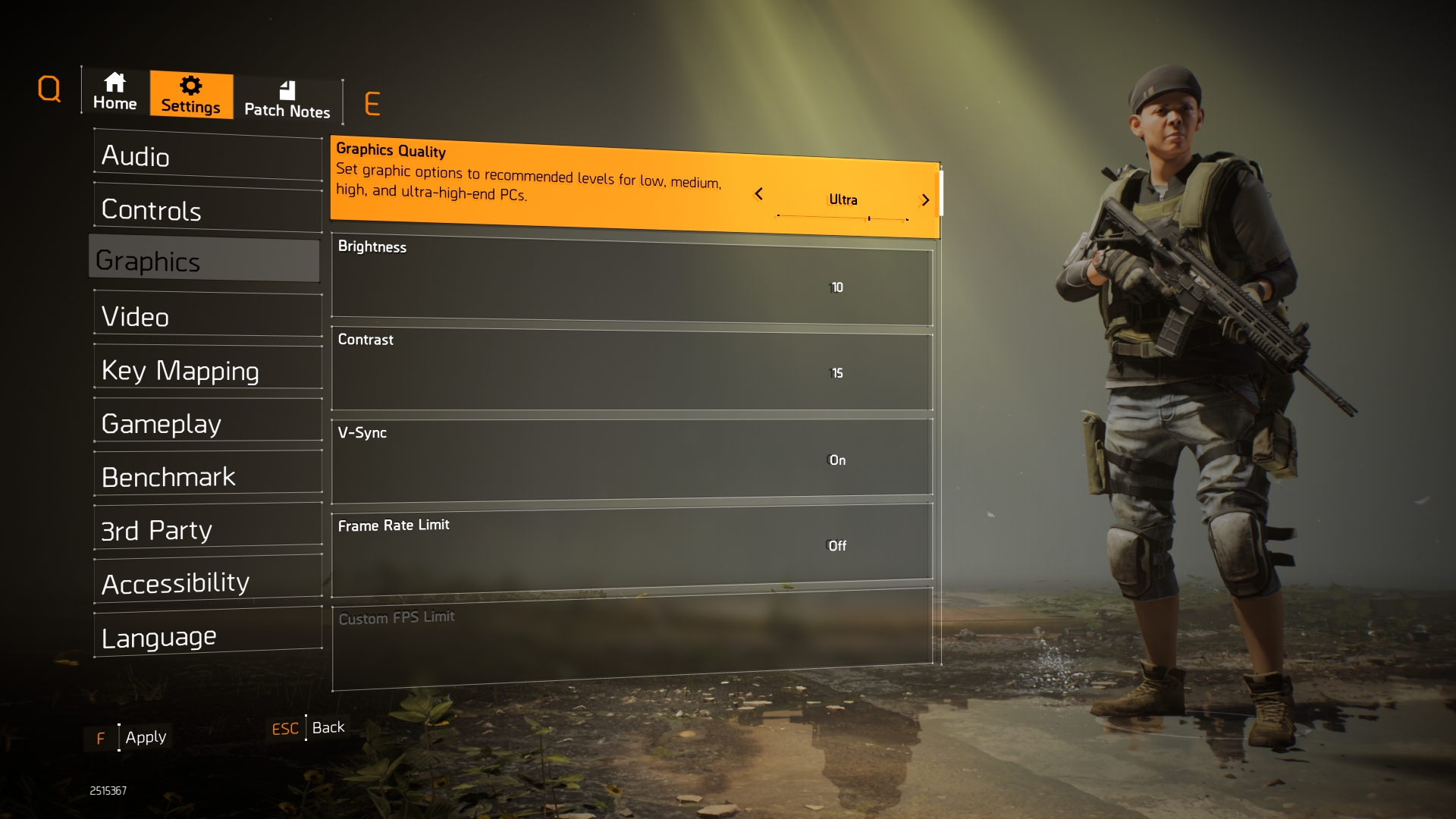
We test using the Ultra preset, but with V-Sync disabled, DX11 API.
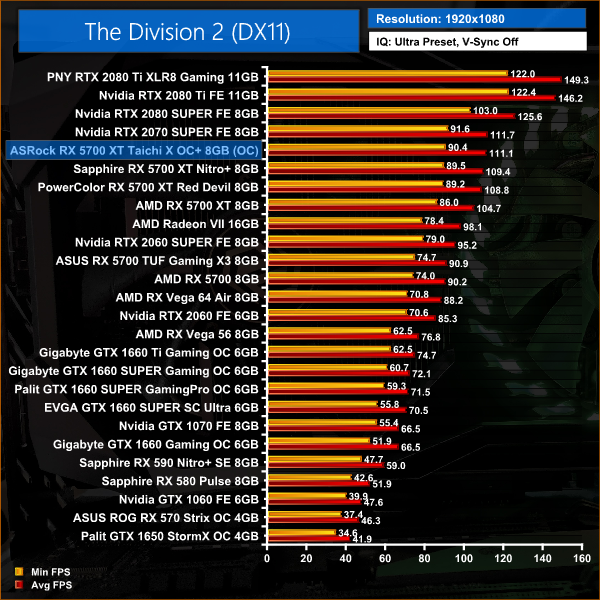
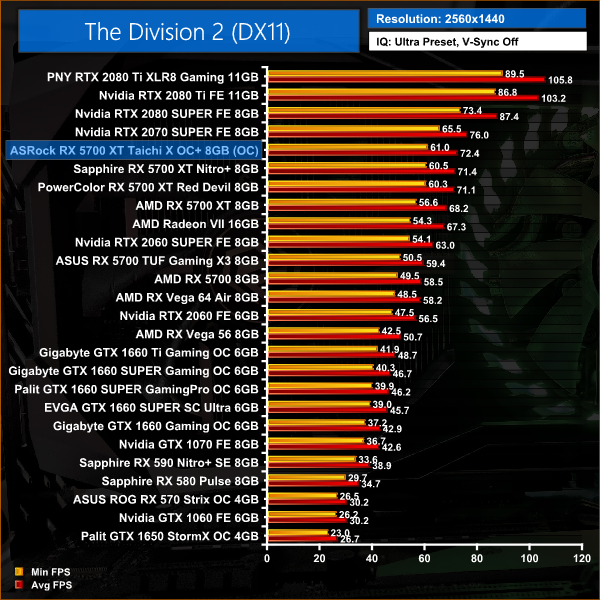
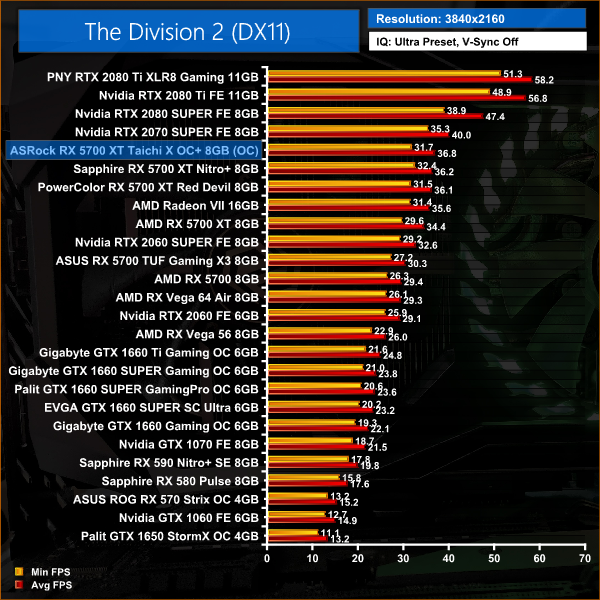
The Division 2 shows an even bigger improvement for the ASRock Taichi over the reference card, with a 6% performance difference between the two cards. Up against the Red Devil and Nitro+, its another 2% lead for the Taichi.
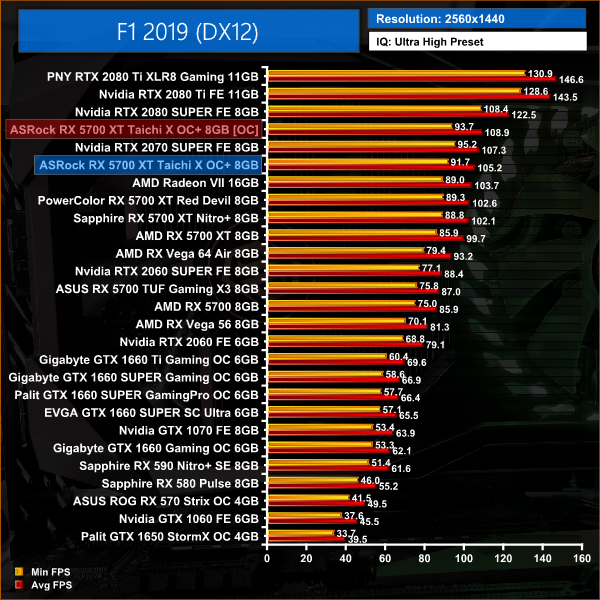
F1 2019 is a racing video game based on the 2019 Formula One and Formula 2 Championships. The game is developed and published by Codemasters and is the twelfth title in the Formula One series developed by the studio. The game was announced by Codemasters on 28 March 2019. (Wikipedia).
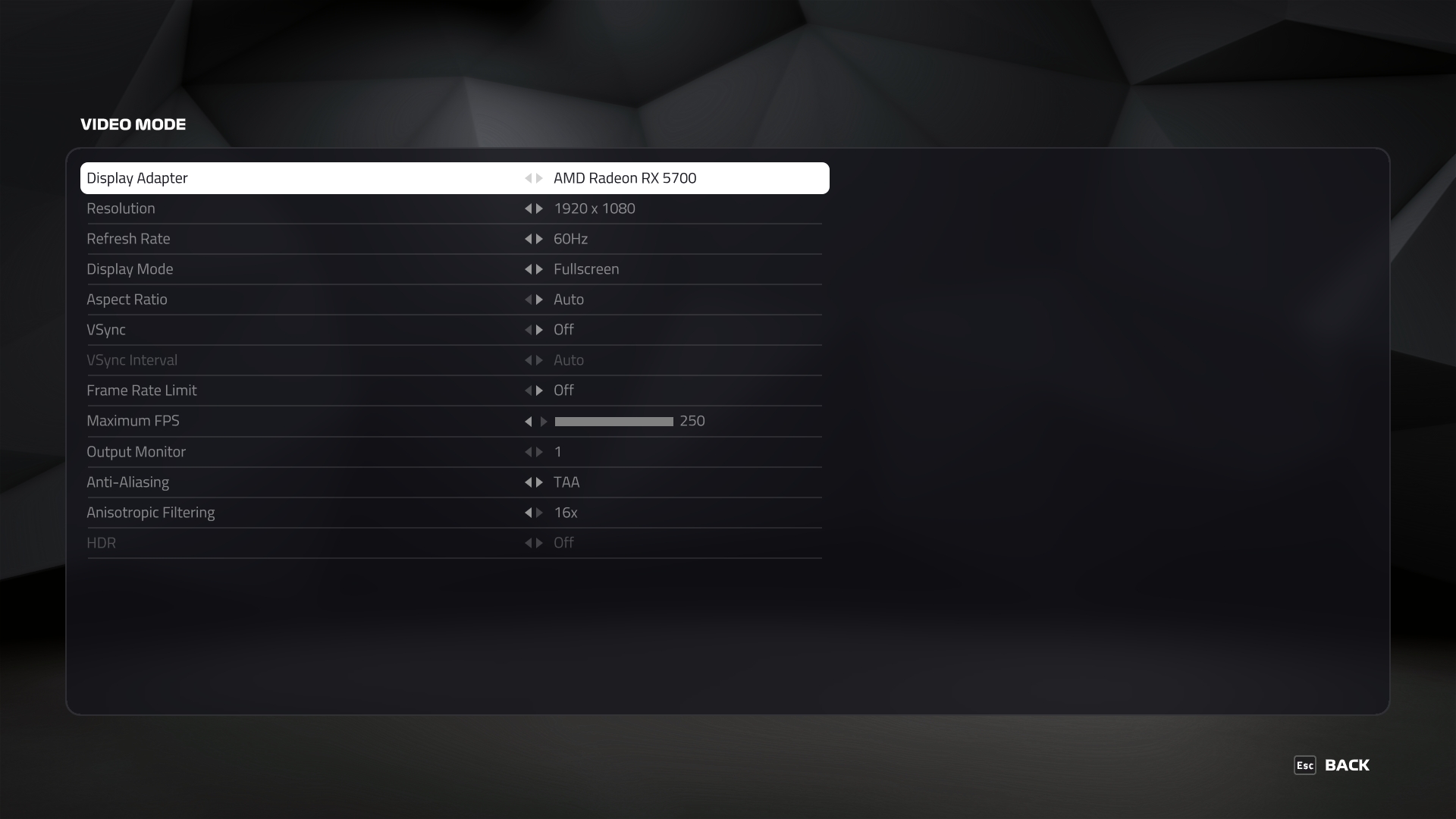
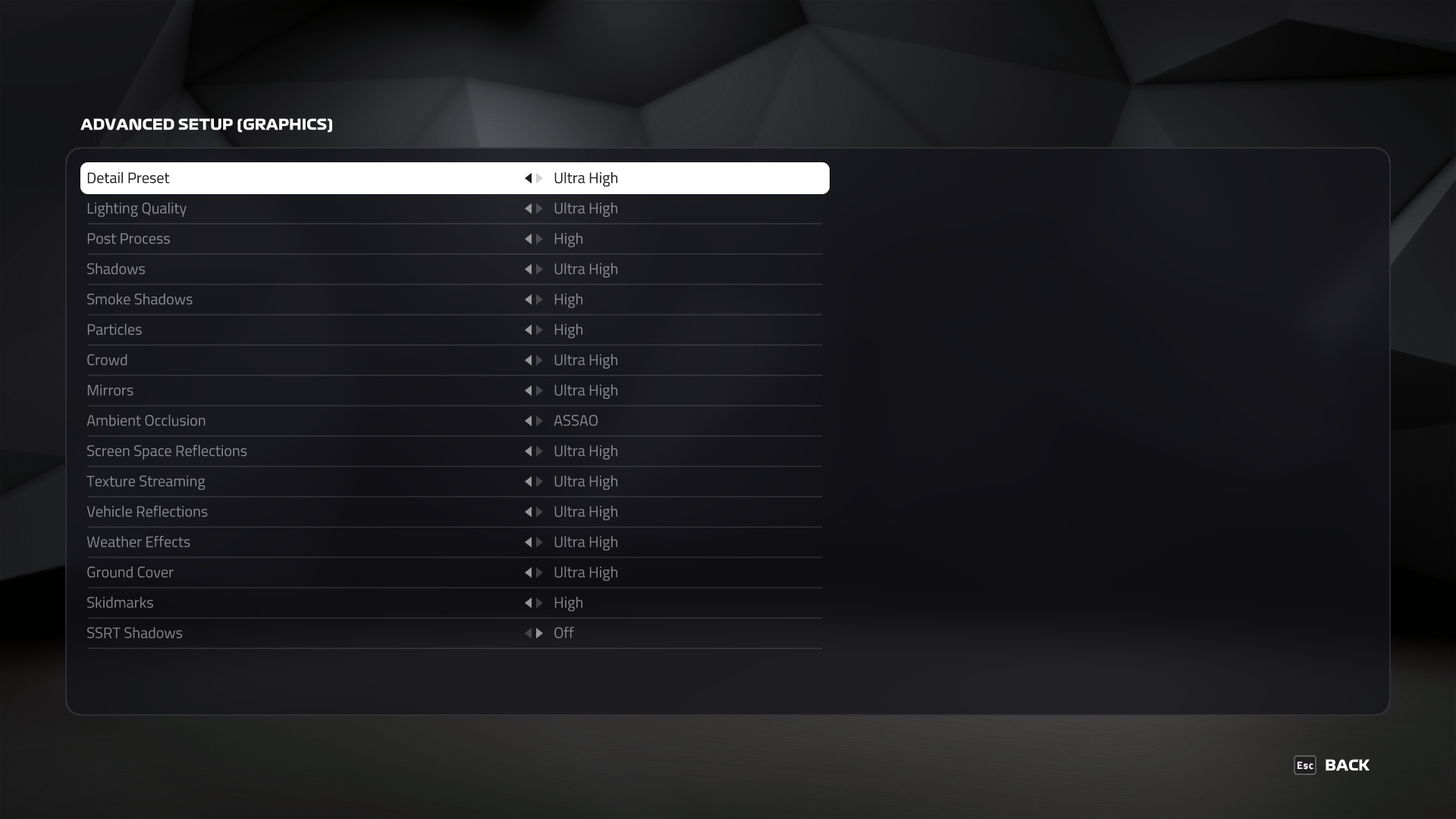
We test using the Ultra High preset, with TAA and 16x Anisotropic Filtering, DX12 API.
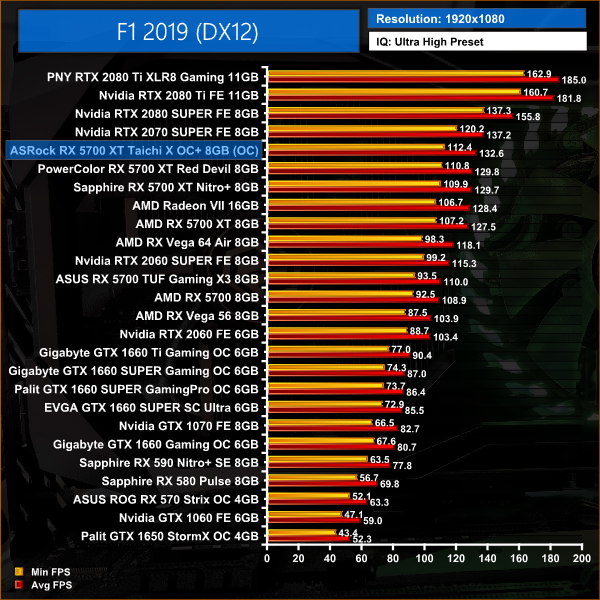
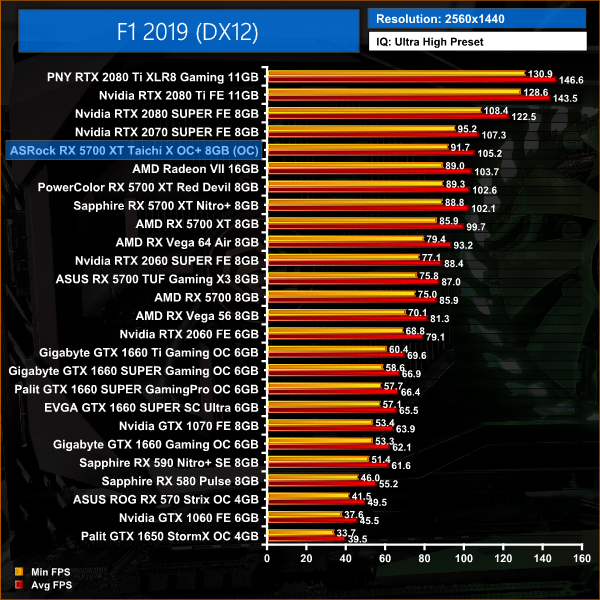
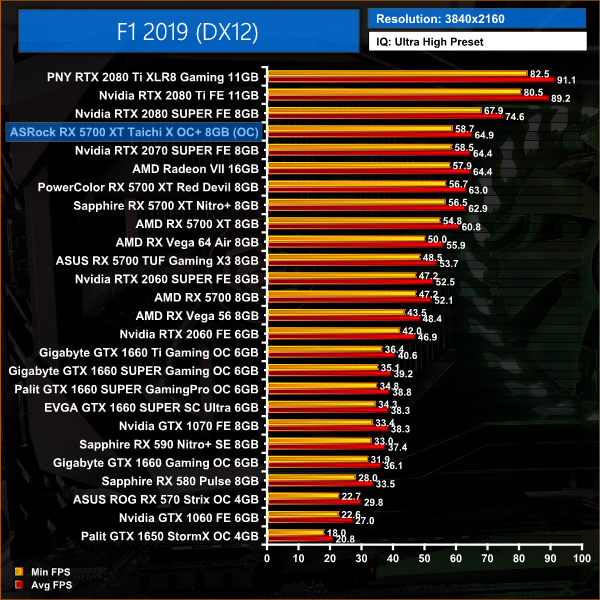
F1 2019 is another title where we see decent gains with the Taichi X versus the reference card, with a 6% performance difference at 1440p. At the same resolution, the Taichi outperforms the Nitro+ by 3%.
Far Cry New Dawn is an action-adventure first-person shooter developed by Ubisoft Montreal and published by Ubisoft. The game is a spin-off of the Far Cry series and a narrative sequel to Far Cry 5. It was released for Microsoft Windows, PlayStation 4 and Xbox One on February 15, 2019. (Wikipedia).
We test using the Ultra preset, with the HD Textures pack, DX11 API.
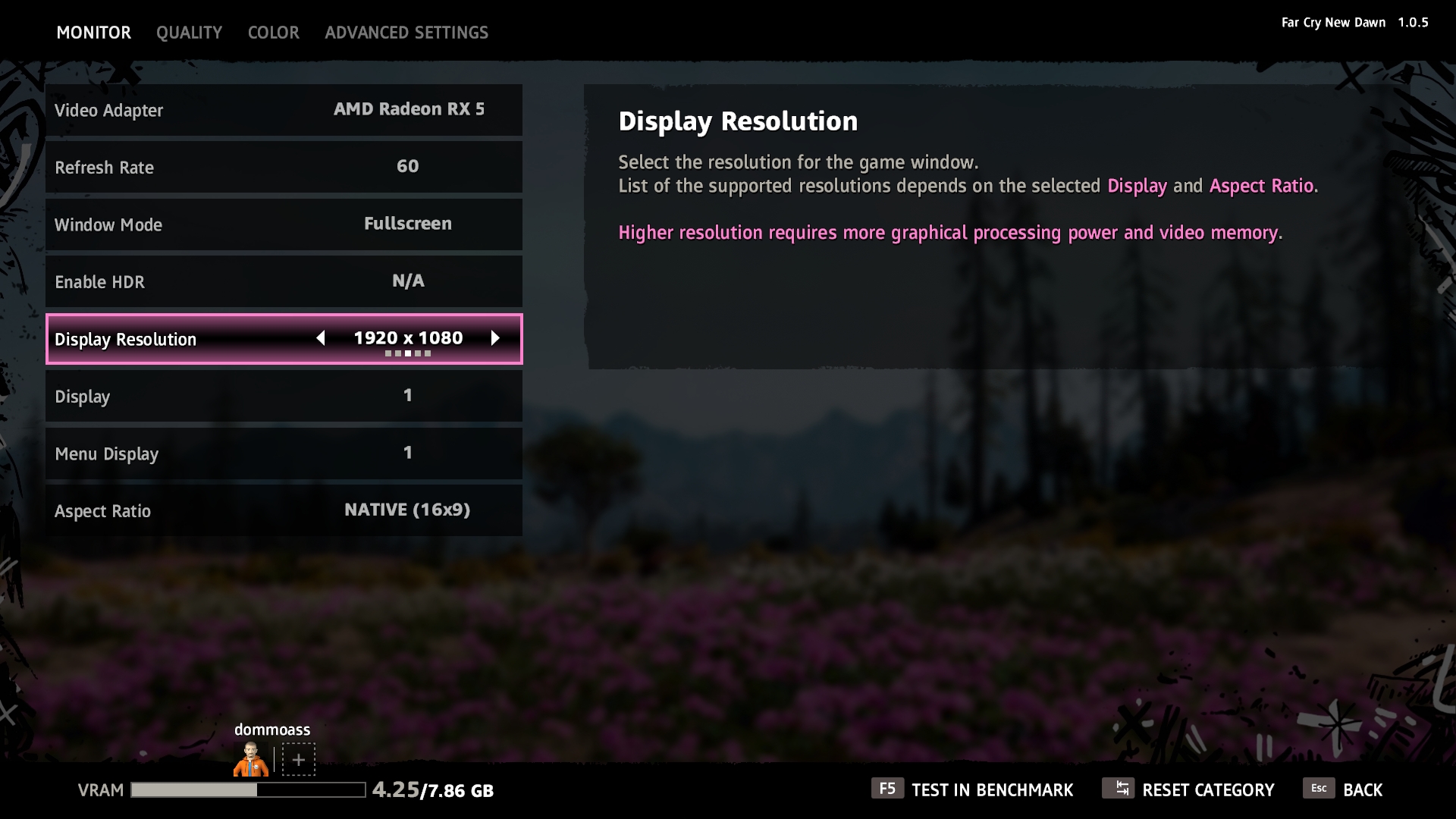
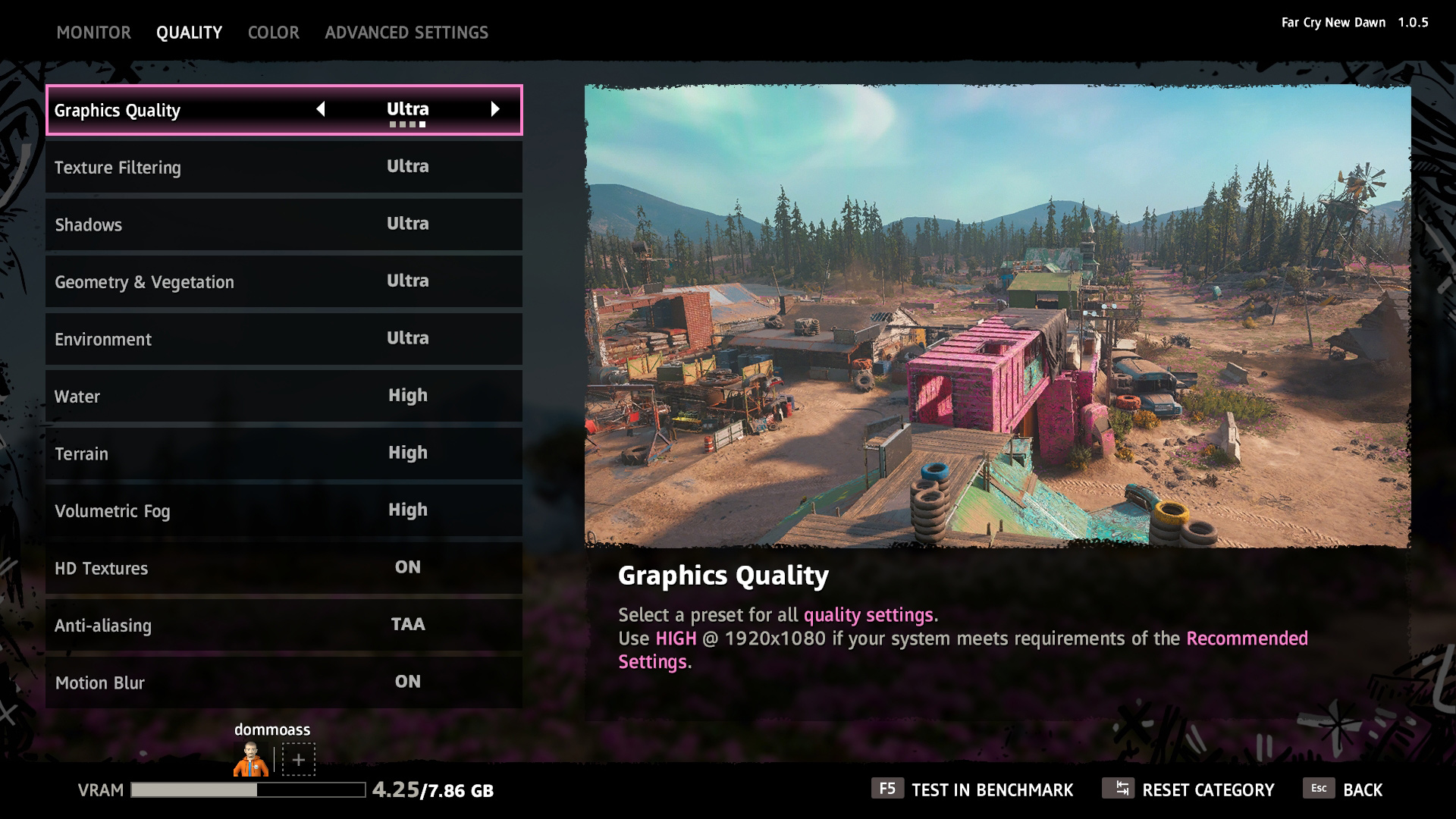
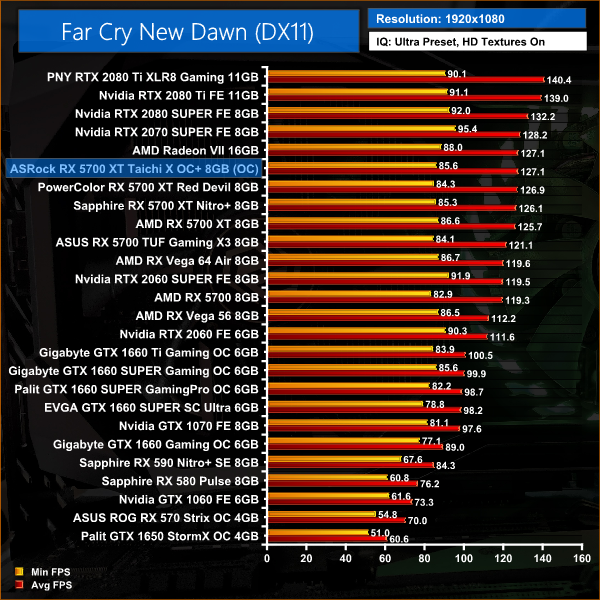
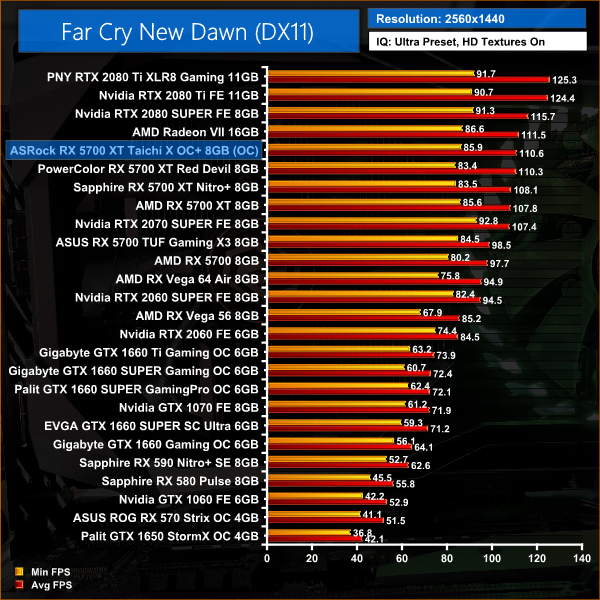
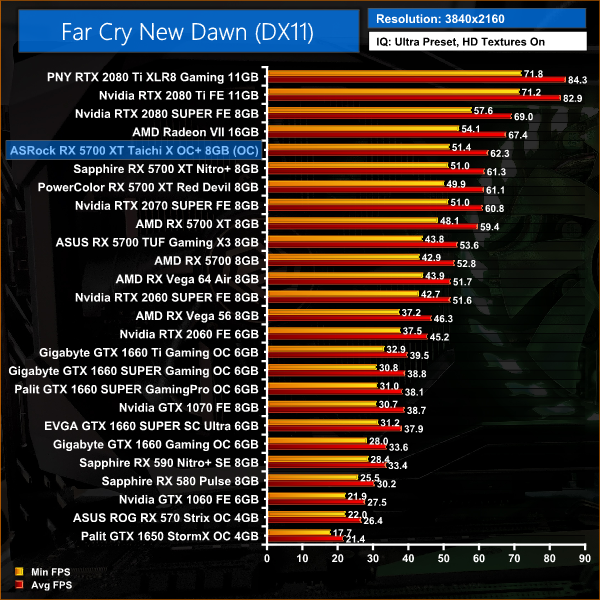
There's a noticeable CPU bottleneck in Far Cry New Dawn when testing at 1080p, so the results are somewhat condensed at that resolution. At 4K, however, the Taichi averages over 60FPS which marks a 5% improvement over the reference card.
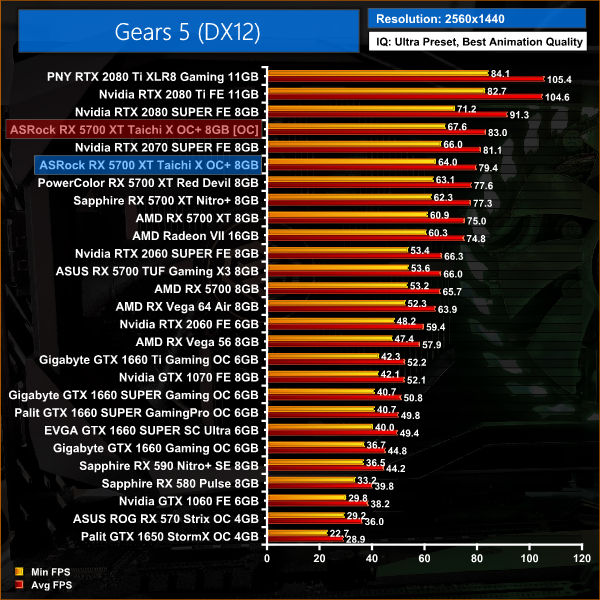
Gears 5 is a third-person shooter video game developed by The Coalition and published by Xbox Game Studios for Microsoft Windows and Xbox One. It is the sixth instalment of the Gears of War series, and is the second Gears of War game not to be developed by Epic Games. (Wikipedia).
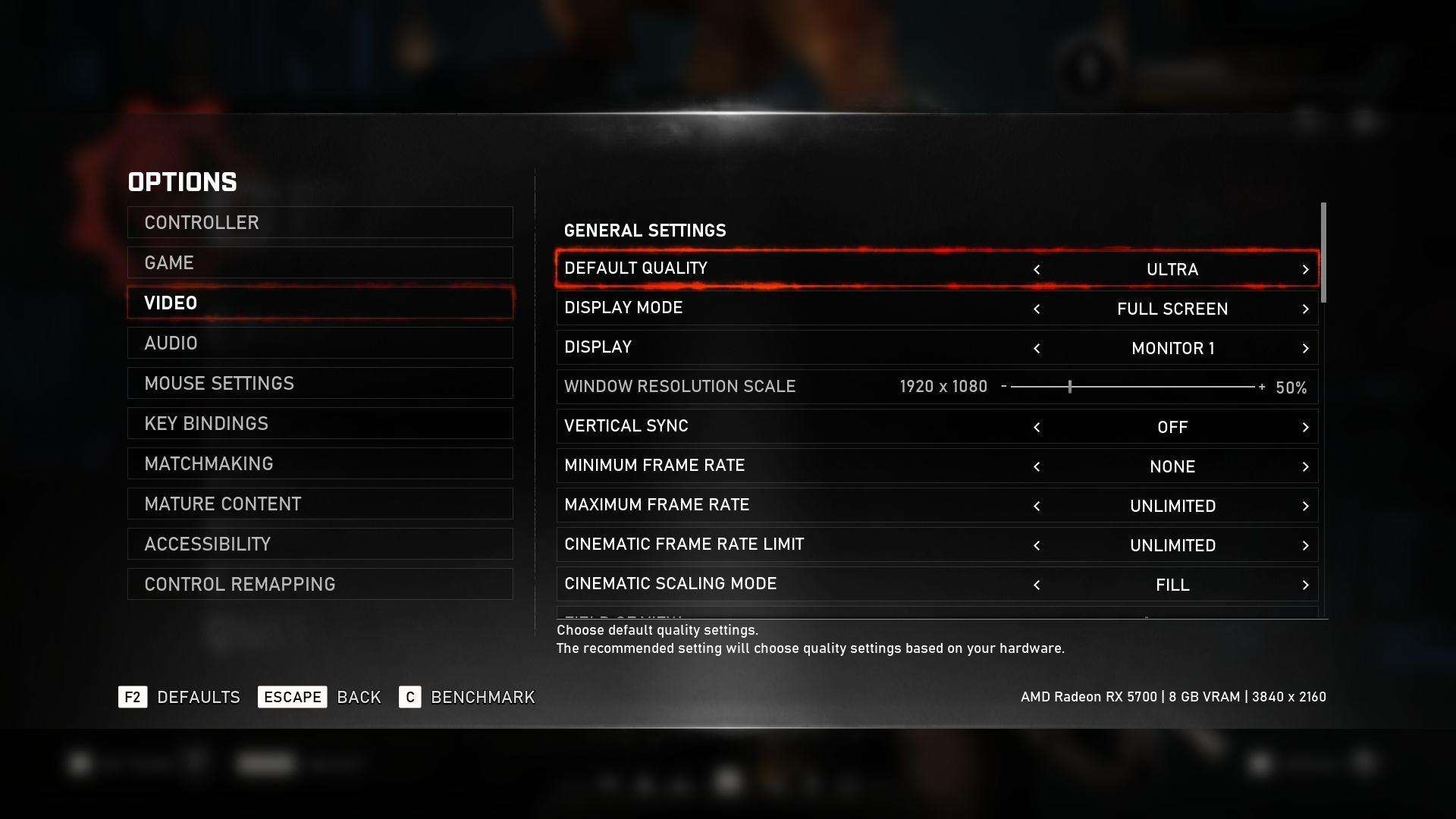
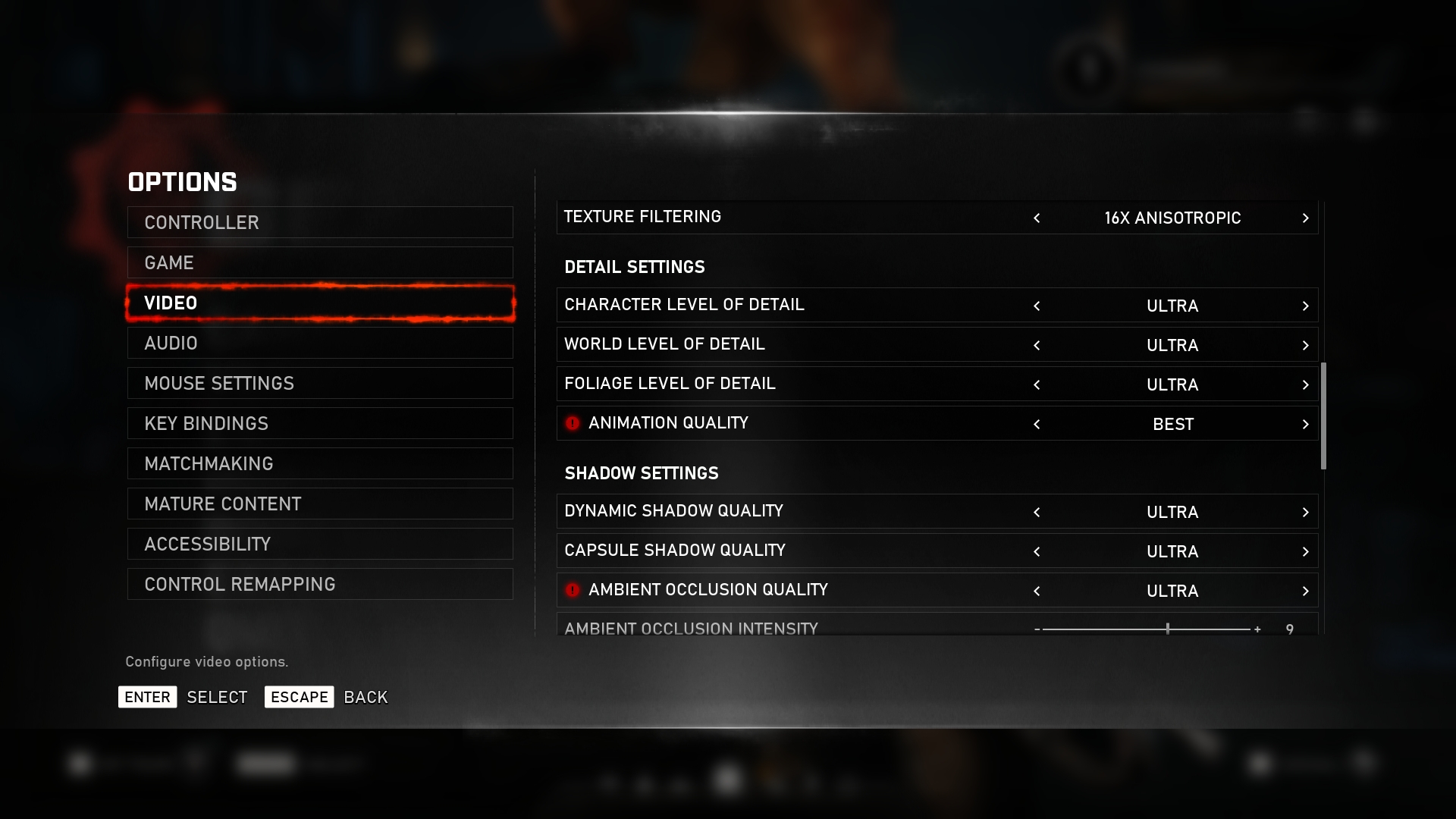
We test using the Ultra preset, with Best Animation Quality (instead of Auto), DX12 API.
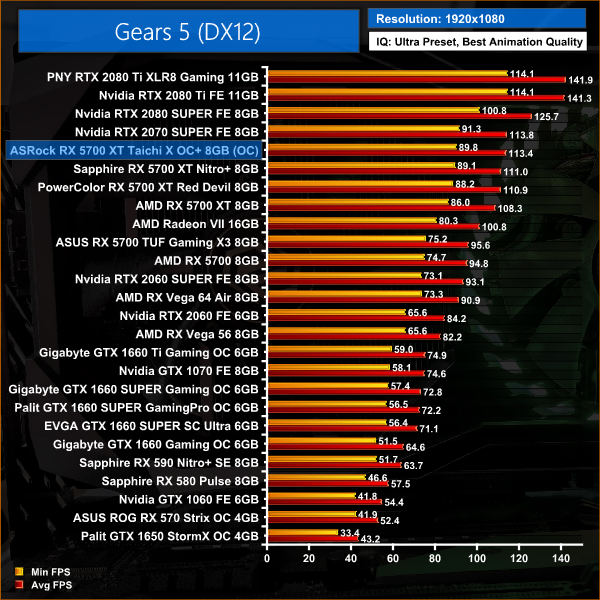
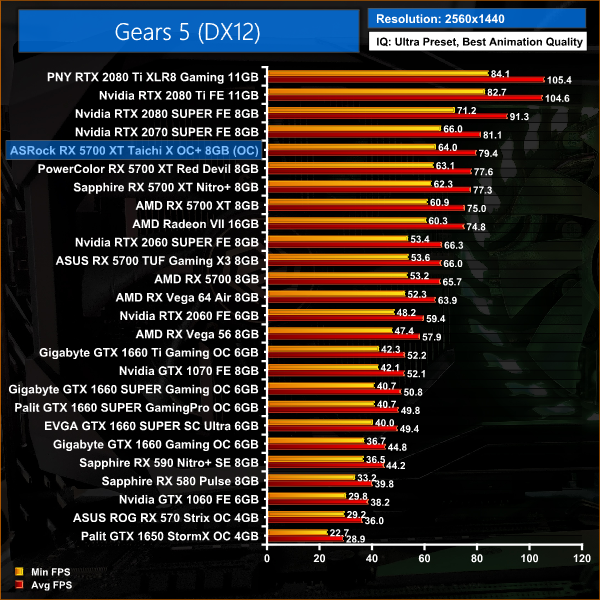
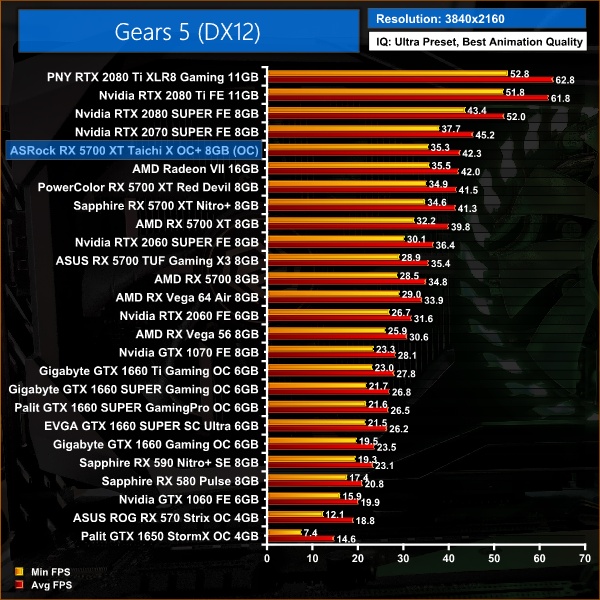
Gears 5 is a fairly demanding title when using Ultra settings, but we see another 6% performance improvement for the Taichi when compared to the reference card. At 1440p, this is a difference of 4.4FPS.
Tom Clancy’s Ghost Recon Wildlands is a tactical shooter video game developed by Ubisoft Paris and published by Ubisoft. It was released worldwide on March 7, 2017, for Microsoft Windows, PlayStation 4 and Xbox One, as the tenth instalment in the Tom Clancy’s Ghost Recon franchise and is the first game in the Ghost Recon series to feature an open world environment. (Wikipedia).
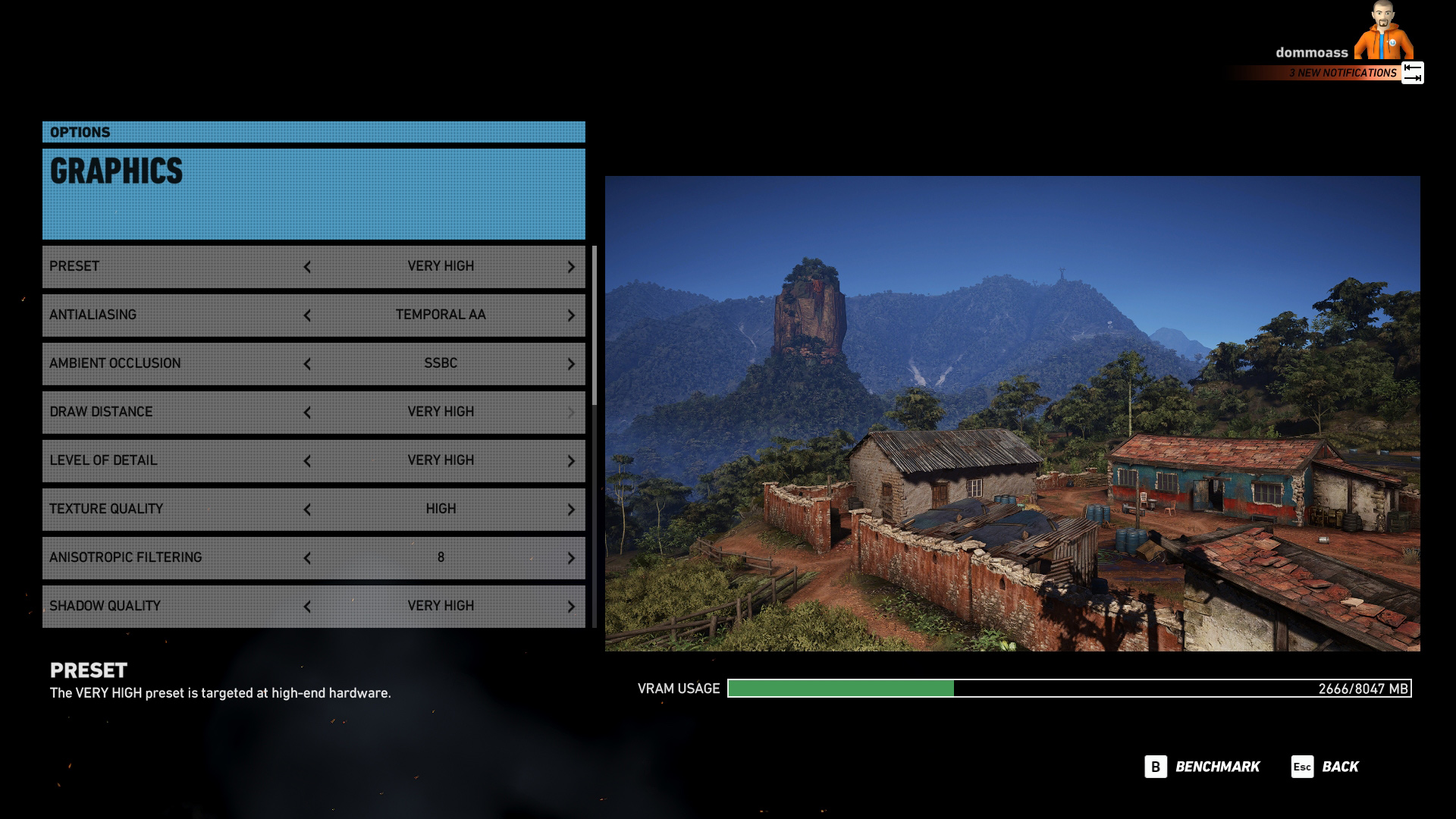
We test using the Very High preset, DX11 API.
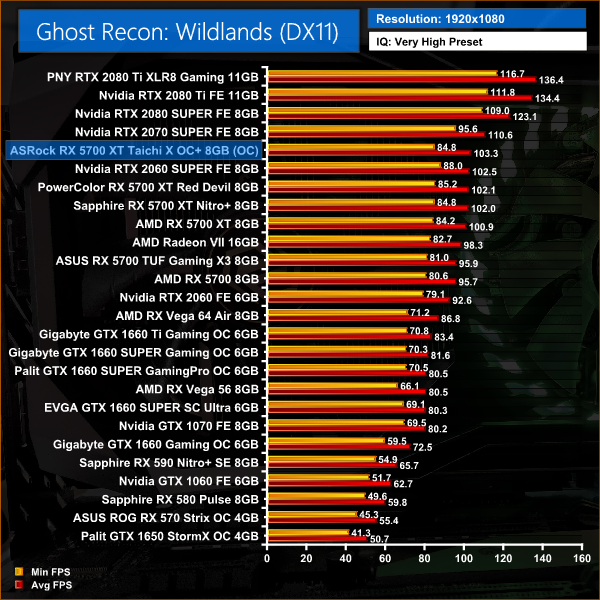
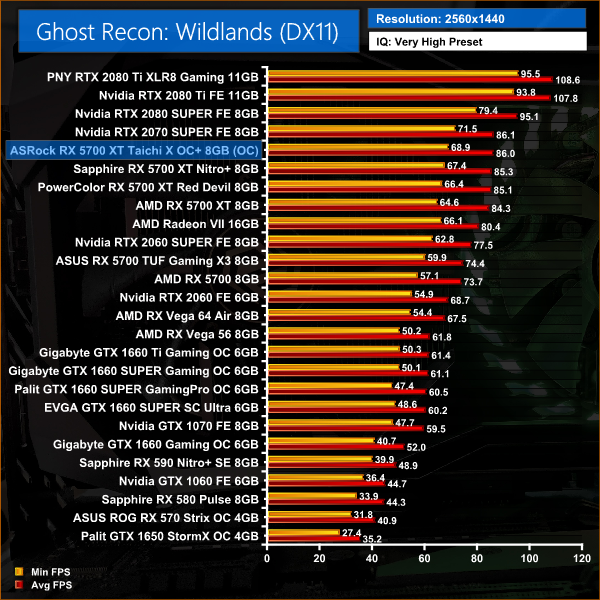
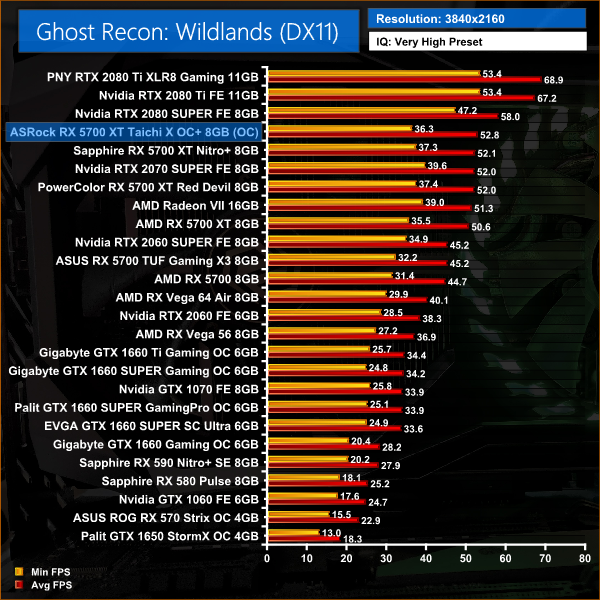
There's a smaller gap between our RX 5700 XT cards when testing Ghost Recon Wildlands, with 1.7FPS separating all of the cards at 1440p.
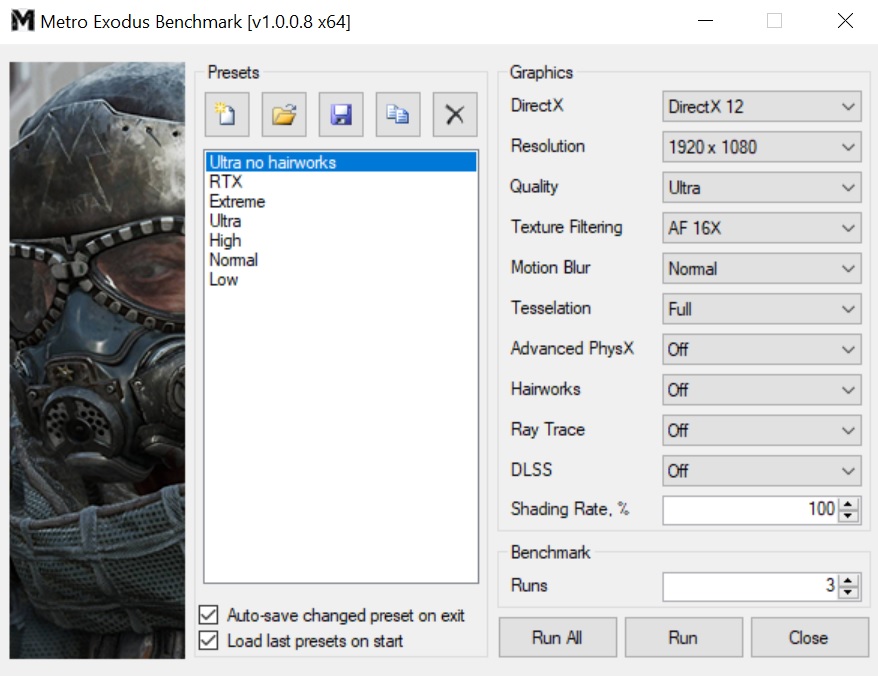
Metro Exodus is a first-person shooter video game developed by 4A Games and published by Deep Silver in 2019. It is the third instalment in the Metro video game series based on Dmitry Glukhovsky's novels, following the events of Metro 2033 and Metro: Last Light. (Wikipedia).
We test using the Ultra preset, but with Hairworks and Advanced PhysX turned off, DX12 API.
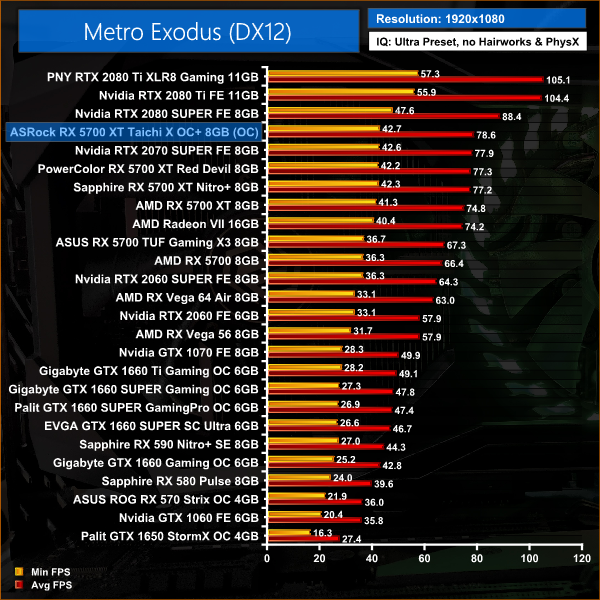
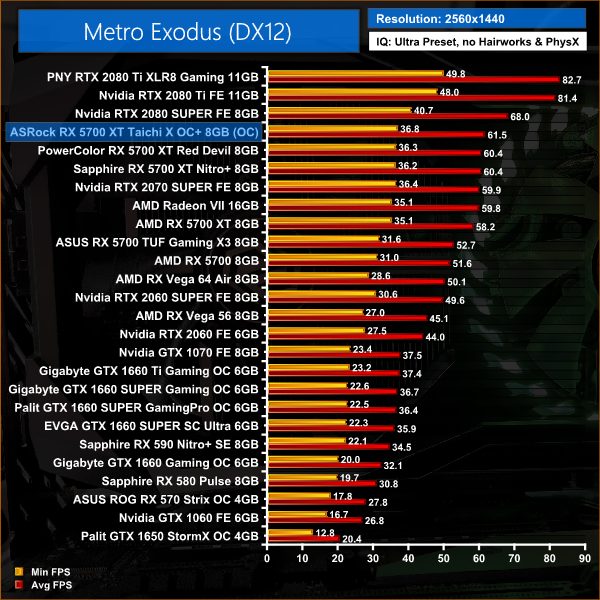
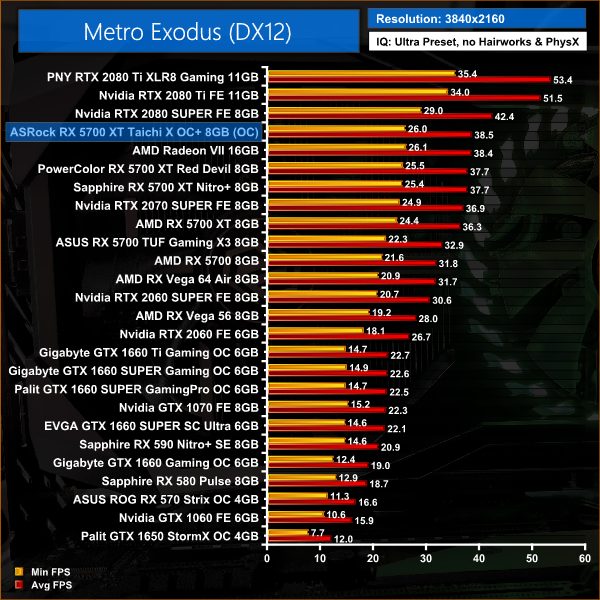
Metro Exodus produces similar results to Gears 5, with the Taichi 6% faster than the reference 5700 XT, and then 2% faster than both the Nitro+ and Red Devil.
Middle-earth: Shadow of War is an action role-playing video game developed by Monolith Productions and published by Warner Bros. Interactive Entertainment. It is the sequel to 2014’s Middle-earth: Shadow of Mordor, and was released worldwide for Microsoft Windows, PlayStation 4, and Xbox One on October 10, 2017. (Wikipedia).
We test using the Very High preset, DX11 API.
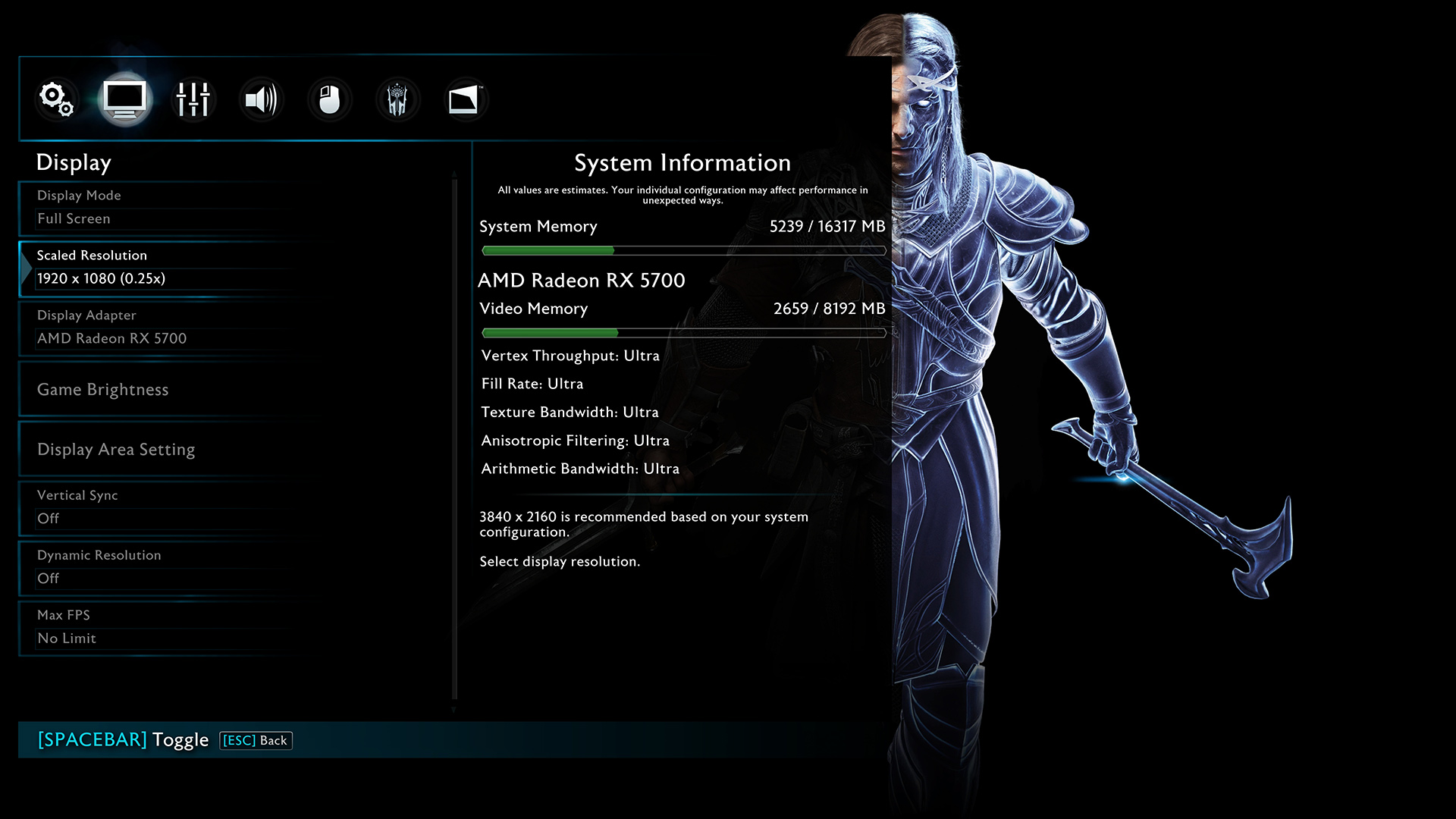
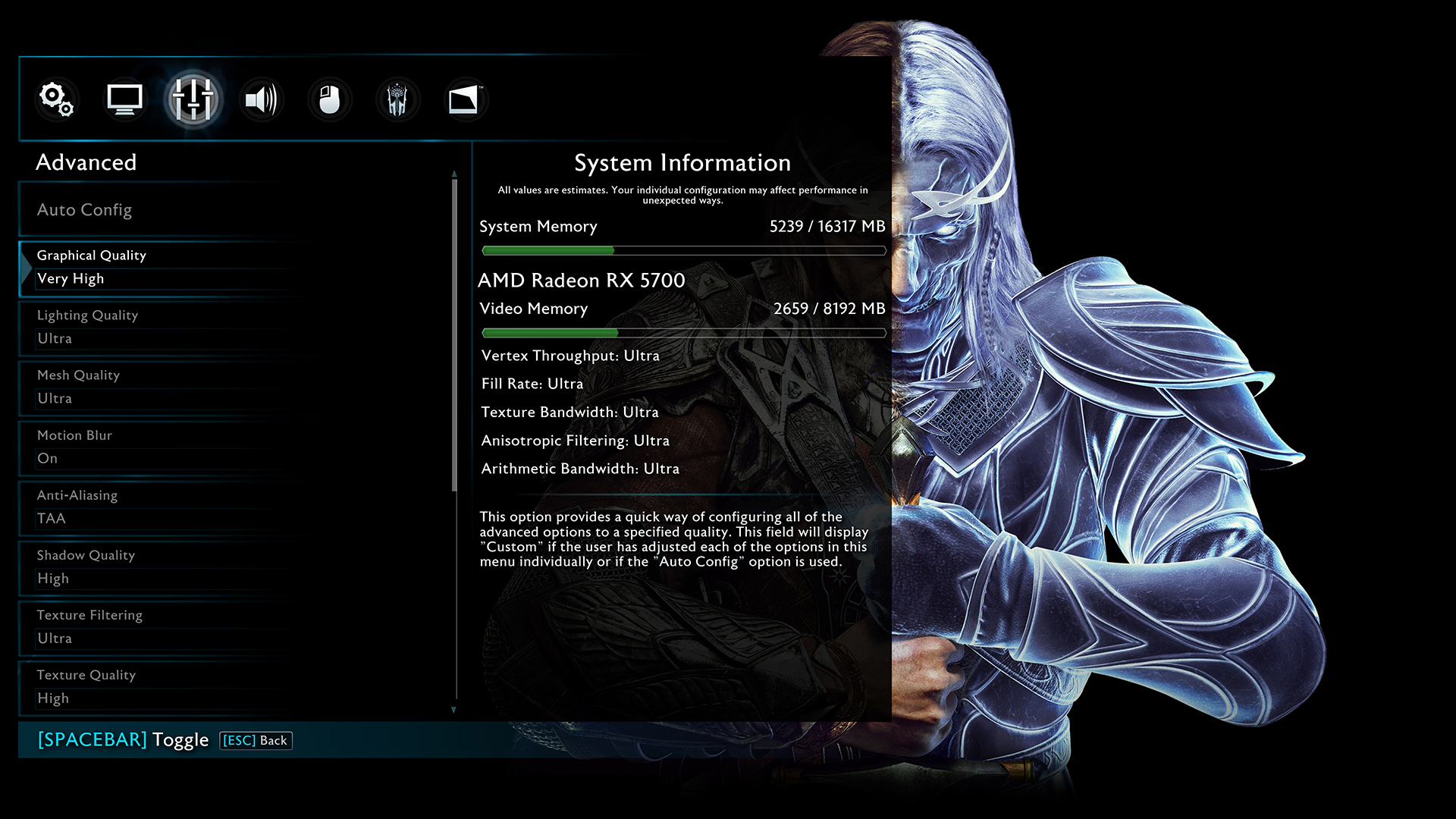
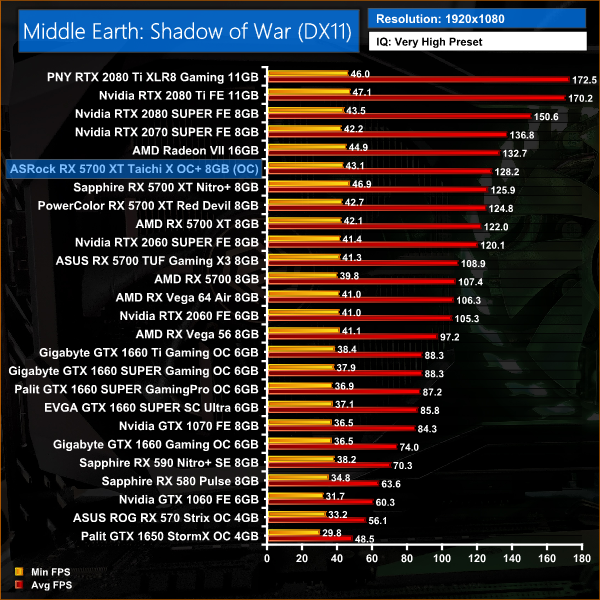
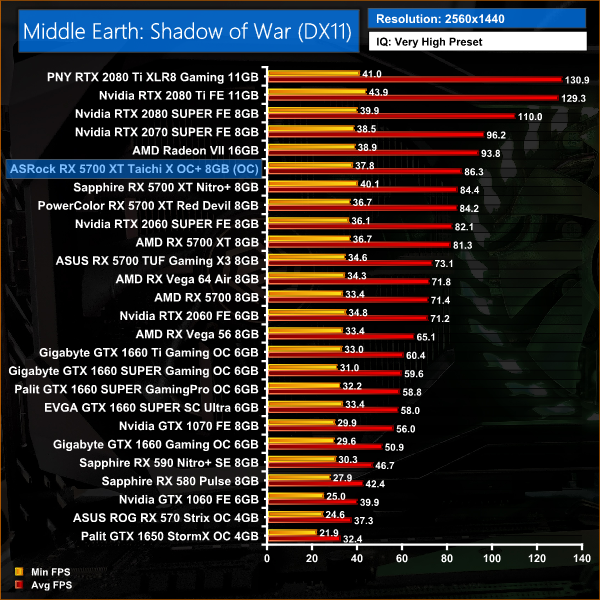
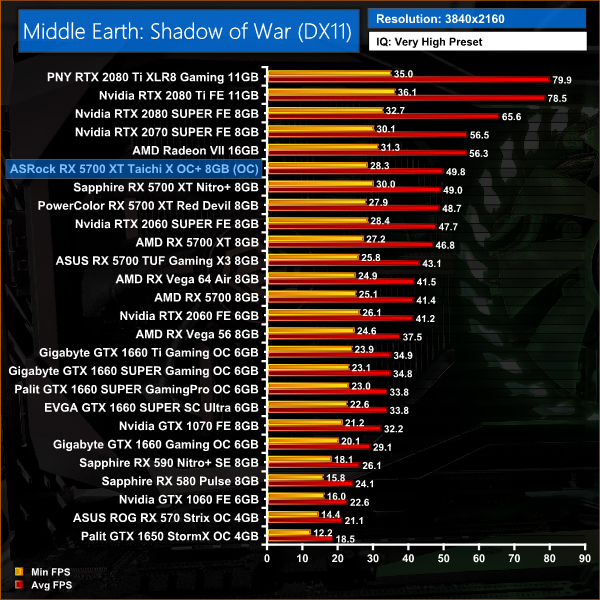
It's more of the same in Shadow of War, with the Taichi X again pulling ahead of the Nitro+ and Red Devil. At 1440p, this card is 5FPS faster than AMD's reference card.
Shadow of the Tomb Raider is an action-adventure video game developed by Eidos Montréal in conjunction with Crystal Dynamics and published by Square Enix. It continues the narrative from the 2013 game Tomb Raider and its sequel Rise of the Tomb Raider, and is the twelfth mainline entry in the Tomb Raider series. The game released worldwide on 14 September 2018 for Microsoft Windows, PlayStation 4 and Xbox One. (Wikipedia).
We test using the Highest preset, with AA disabled, DX12 API.
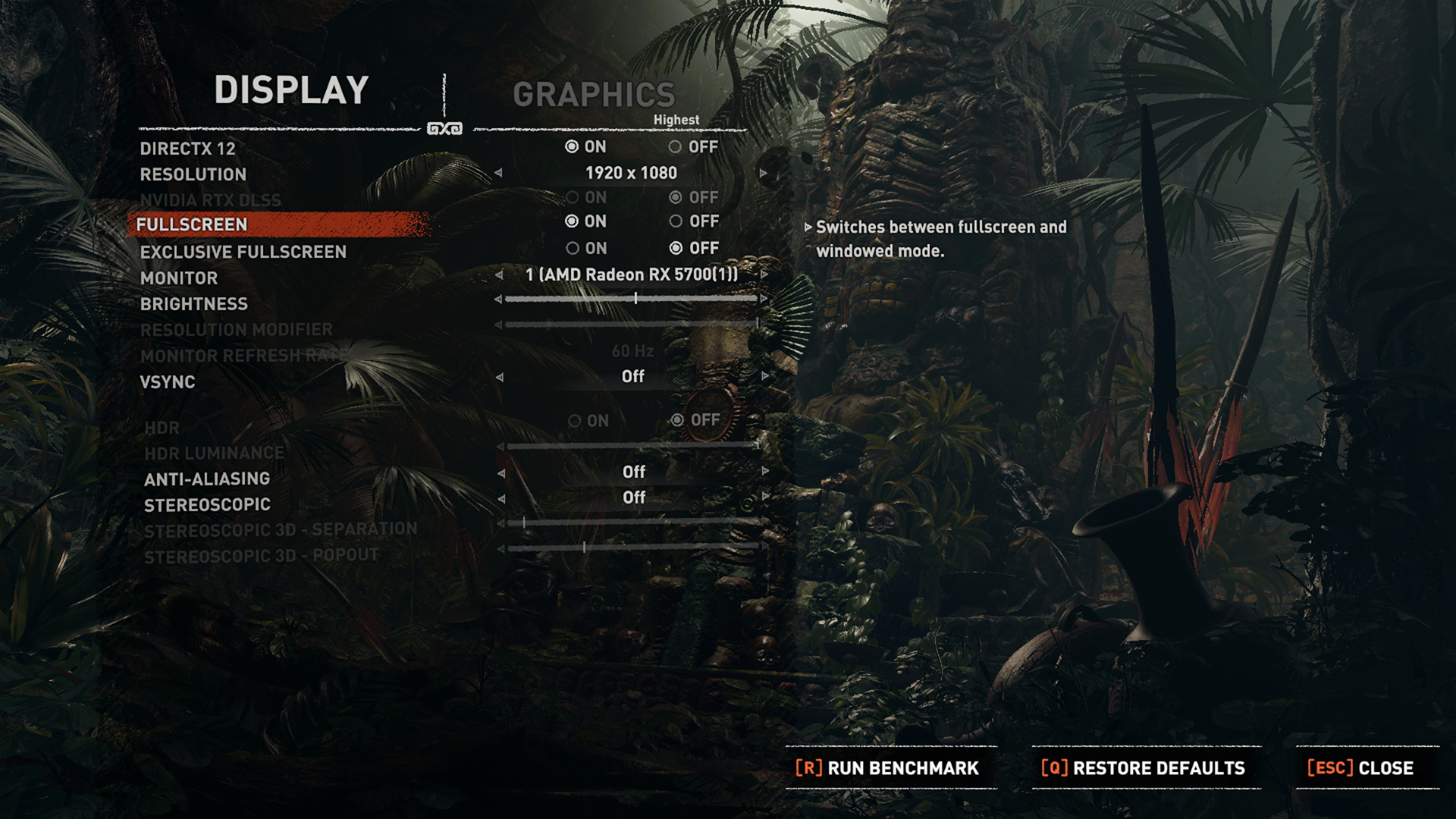
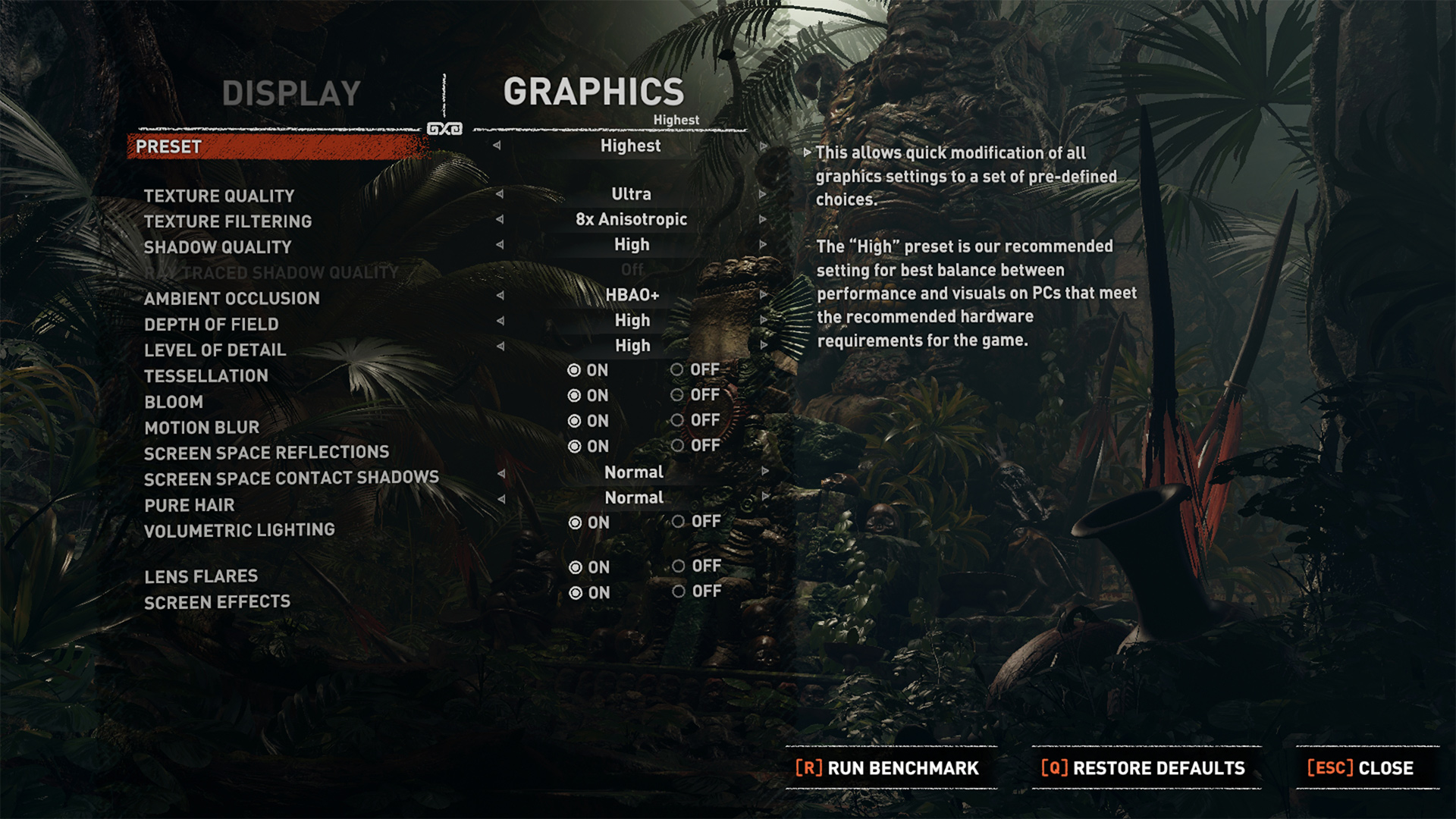
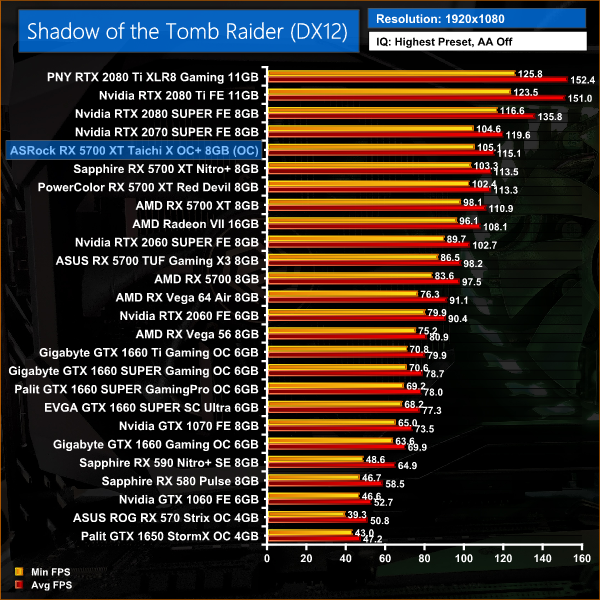
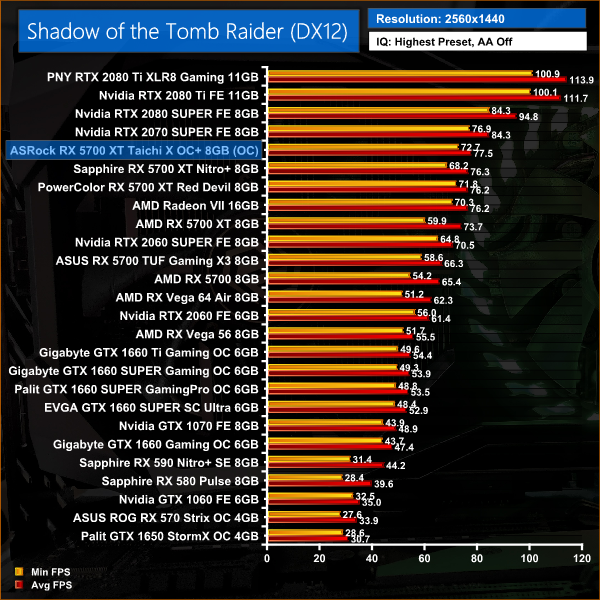
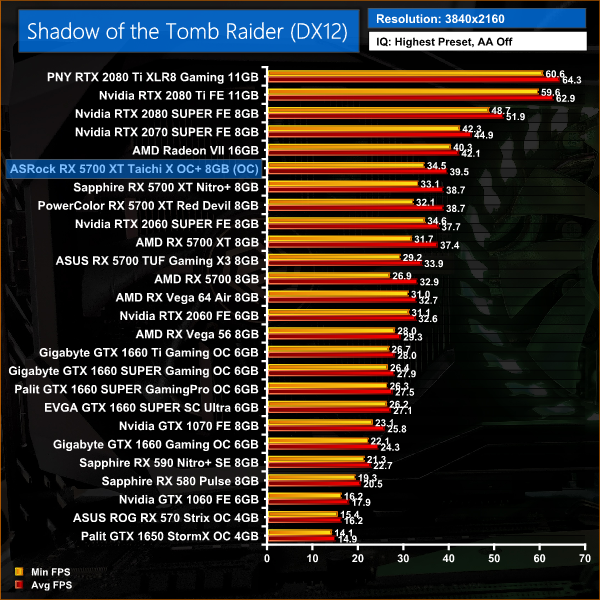
Shadow of the Tomb Raider sees the Taichi outperform the reference card by 5% on average, with a difference of 4.2FPS at 1080p. It's also 2% faster than the Red Devil here.
Total War: Three Kingdoms is a turn-based strategy real-time tactics video game developed by Creative Assembly and published by Sega. As the 12th mainline entry (the 13th entry) in the Total War series, the game was released for Microsoft Windows on May 23, 2019.
We test using the Ultra preset, DX11 API.
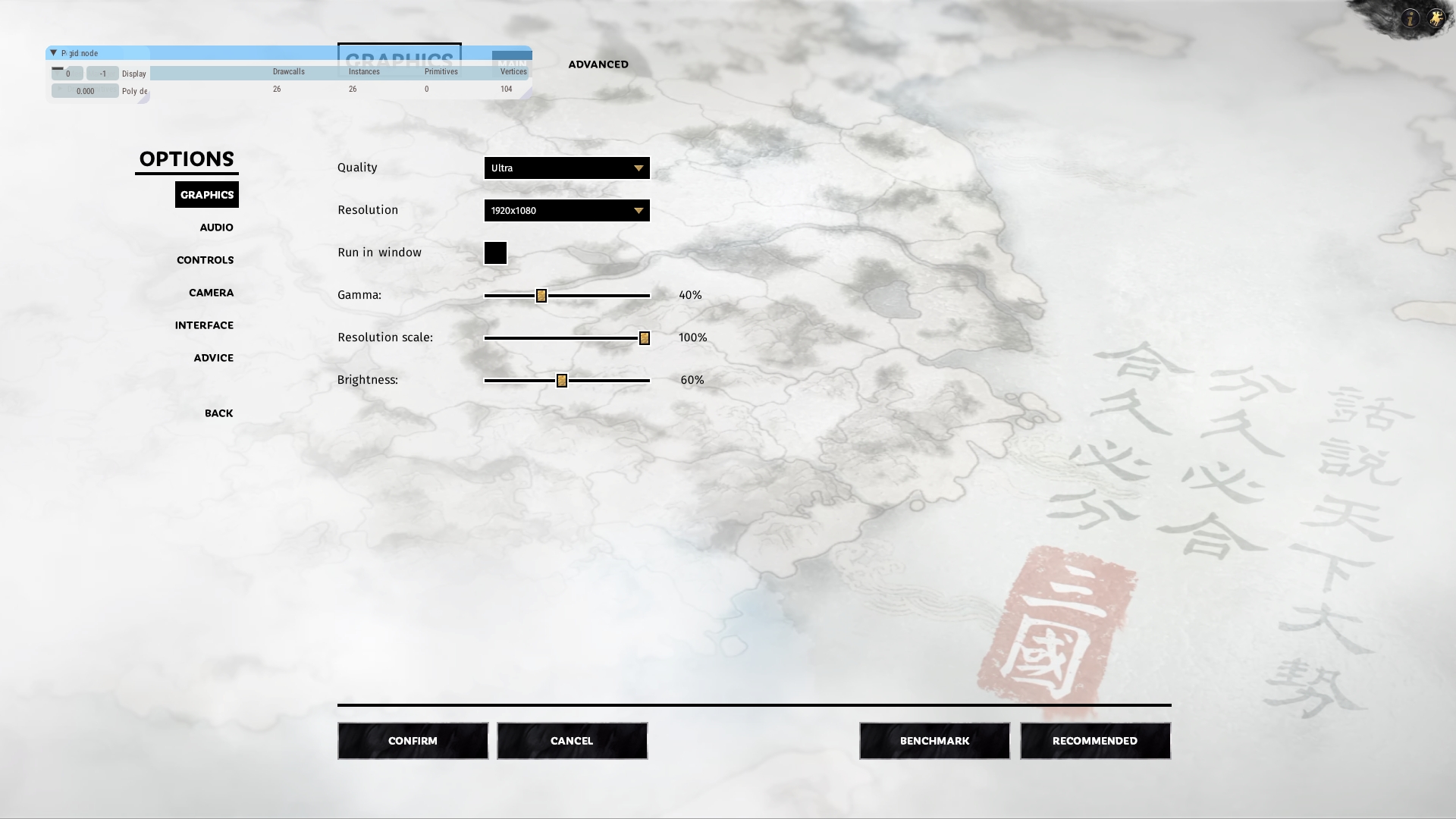
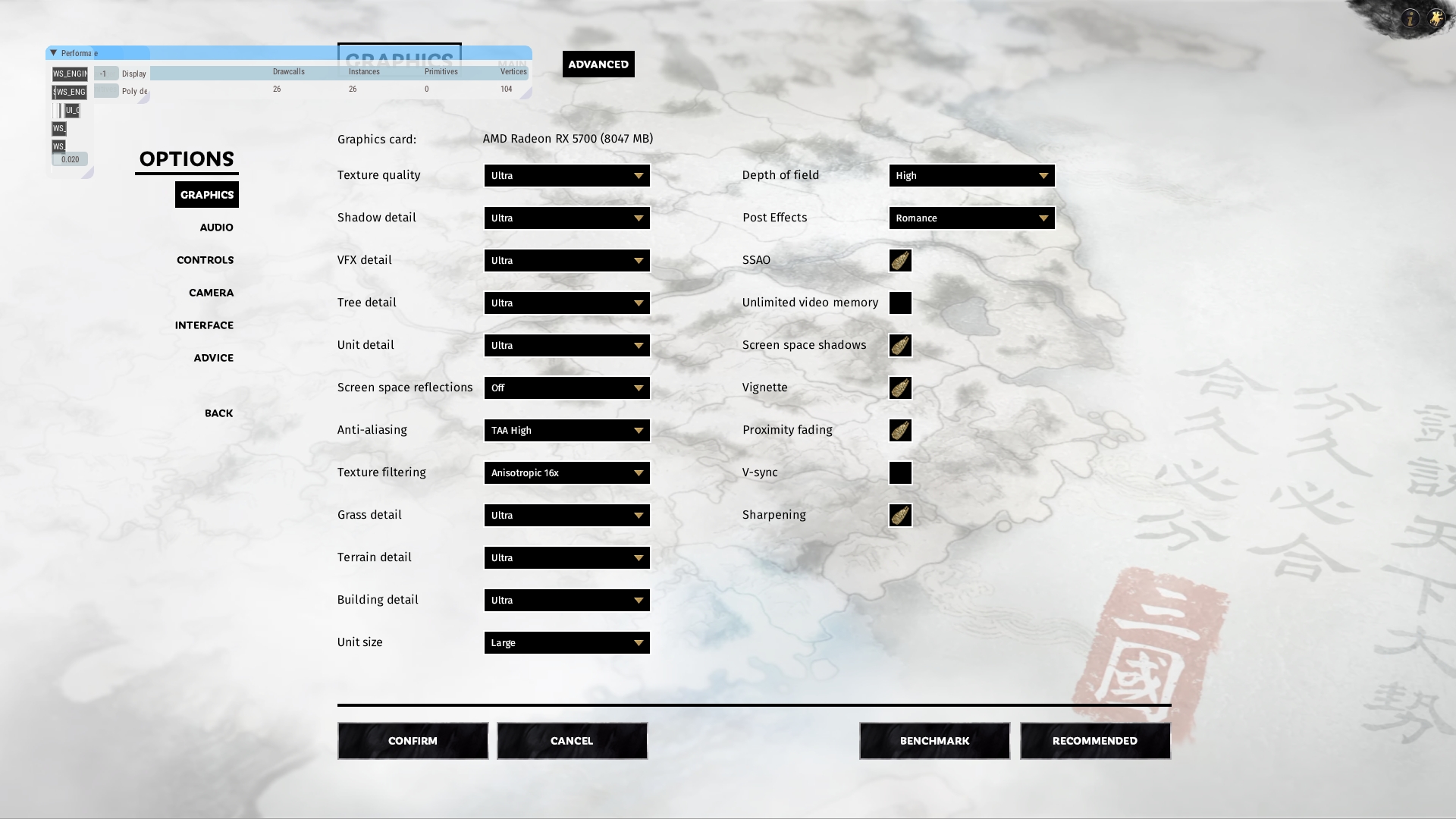
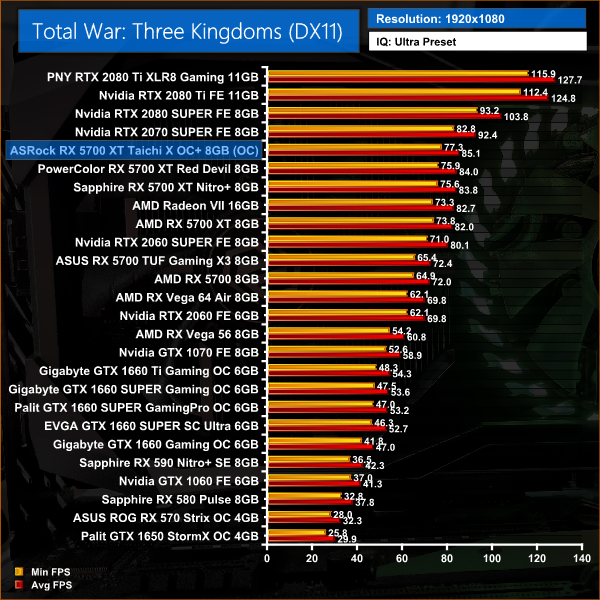
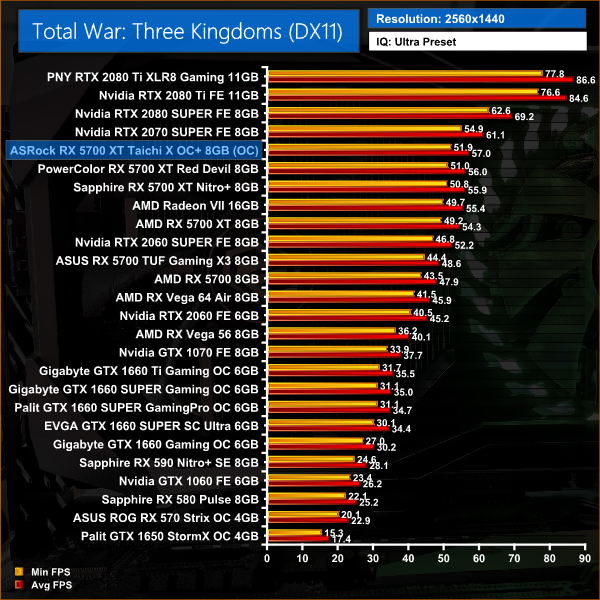
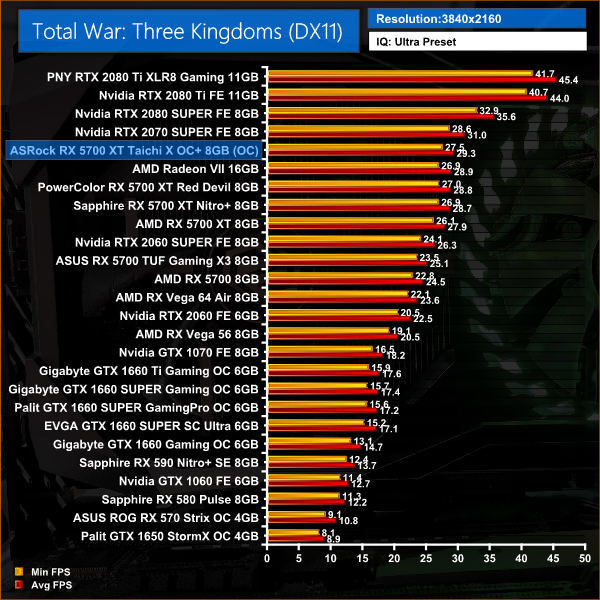
Total War: Three Kingdoms rounds off our game testing for today, and we can see another 5% performance uplift for the Taichi versus the reference RX 5700 XT. That means the Taichi is 2% ahead of the Red Devil and Nitro+.
Here we present the average clock speed for each graphics card while running the 3DMark Fire Strike Ultra stress test for 30 minutes. We use GPU-Z to record the GPU core frequency during the Fire Strike Ultra runs. We calculate the average core frequency during the 30 minute run to present here.
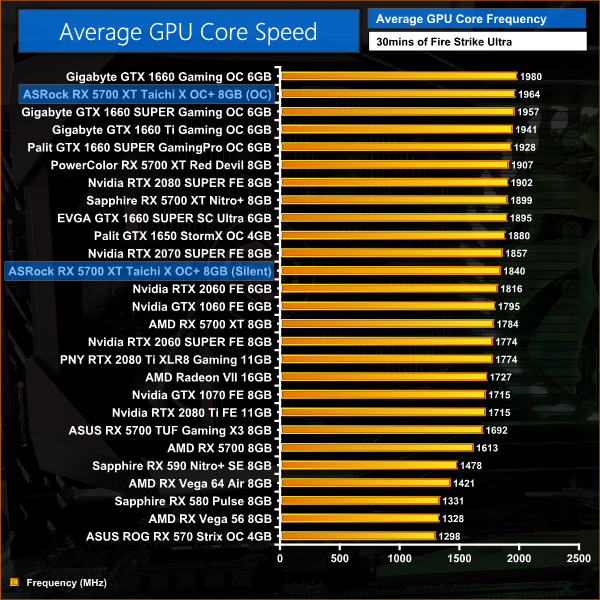
Starting first with the clock speed result from the Taichi's OC BIOS, we can see why this card was out-performing the other RX 5700 XTs – on average, it ran at 1964MHz, giving it an 180MHz advantage over the reference card. This is also over 50MHz faster than the PowerColor Red Devil, and 65MHz faster than the Nitro+.
When assessing the Silent BIOS, we see very difference behaviour – the card drops it clock speed significantly, averaging 1840MHz under load. This is still over 50MHz faster than the reference card, but marks a 6% reduction in frequency versus the OC BIOS.
For our temperature testing, we measure the peak GPU core temperature under load, as well as the GPU temperature with the card idling on the desktop. A reading under load comes from running the 3DMark Fire Strike Ultra stress test for 30 minutes. An idle reading comes after leaving the system on the Windows desktop for 30 minutes.
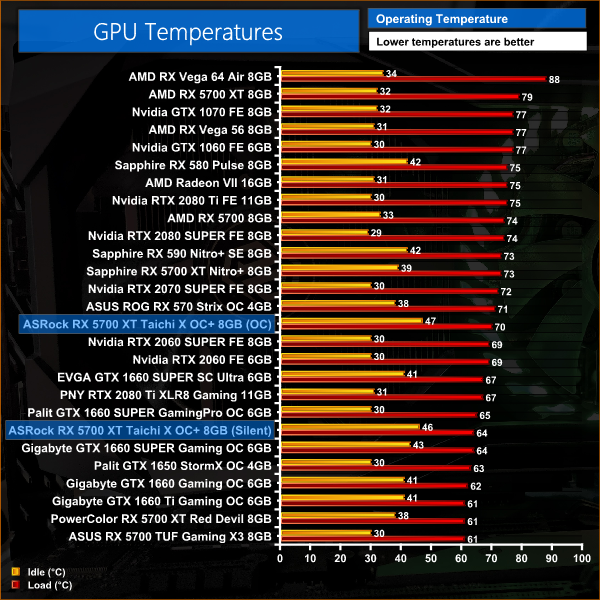
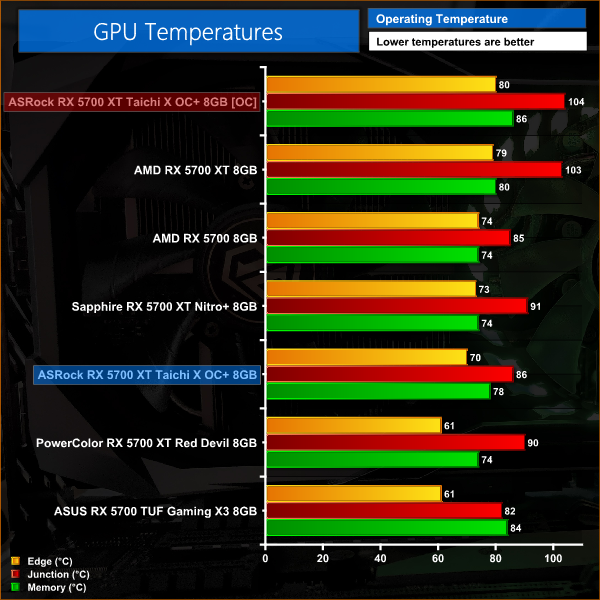
For our temperature testing, the first chart looks at edge temperature – the traditional ‘GPU temperature' metric as we have known it over the years. In this regard, the Taichi does well enough, with a peak of 70C using the OC BIOS, but more impressive is the 64C temperature that is achieved with the Silent BIOS. If it seems counterintuitive for the Silent BIOS to run cooler, remember it is also running the core a fair amount slower, too.
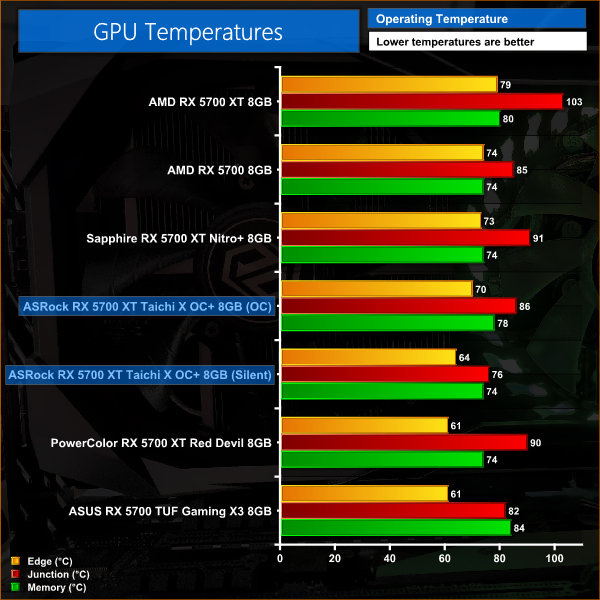
As for our second chart, here we look at junction and memory temperature, two metrics made available by AMD for its Navi cards. Both sets of results are good, with a particularly low junction temperature seen when using the Silent BIOS. The memory modules do run a little hotter when using the OC BIOS – 4C higher than the Nitro+ and Red Devil – but this is still well within spec.
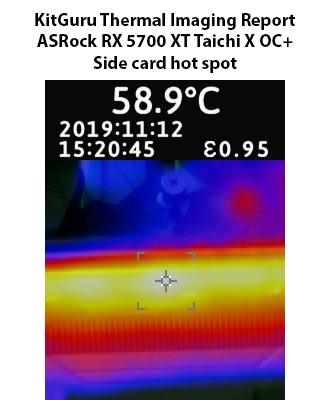
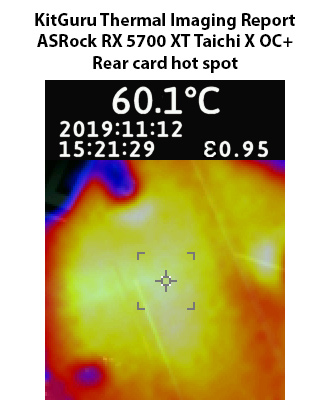
As for our thermal gun images, there's nothing to worry about here with hotspots around 60C observed on the back and side of the card.
We take our noise measurements with the sound meter positioned 1 foot from the graphics card. I measured the noise floor to be 32 dBA, thus anything above this level can be attributed to the graphics cards. The power supply is passive for the entire power output range we tested all graphics cards in, while all CPU and system fans were disabled.
A reading under load comes from running the 3DMark Fire Strike Ultra stress test for 30 minutes. An idle reading comes after leaving the system on the Windows desktop for 30 minutes.
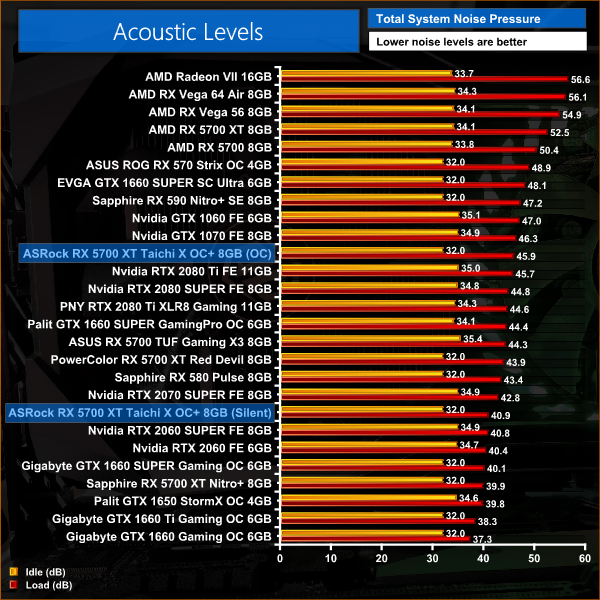
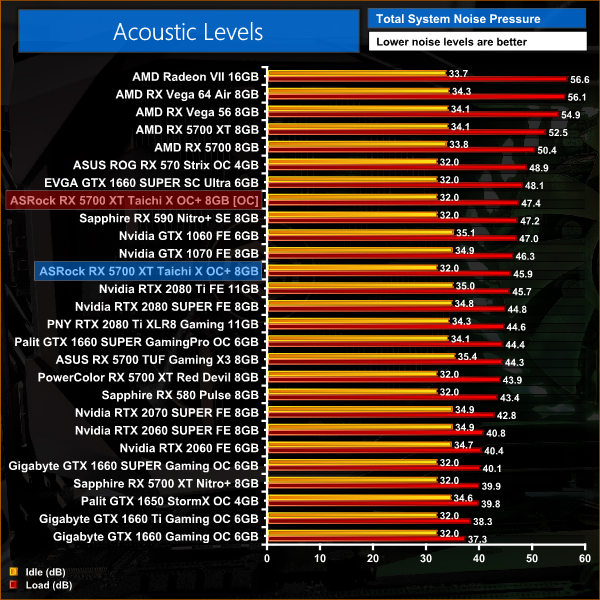
When we get to noise levels, we can see one of the main downsides to using the OC BIOS – it is a fair bit louder than the other partner cards we have reviewed so far. With noise levels peaking at 46dB, the card is certainly audible and is getting to what I would call ‘loud' territory. It's nowhere near Radeon VII or Vega 64 levels of noise, but it's an audible card that you will hear when it is under load.
The Silent BIOS does much better here, with noise levels reaching just under 41dB, which is a very noticeable difference versus the OC BIOS. To achieve the lower noise levels, the Silent BIOS runs the fans at around 1700rpm, or 48%, when the OC BIOS runs the fans at 2030rpm, or 58%.
We measure system-wide power draw from the wall while the card is sat idling at the Windows 10 desktop for 30 minutes. A reading under load comes from running the 3DMark Fire Strike Ultra stress test for 30 minutes.
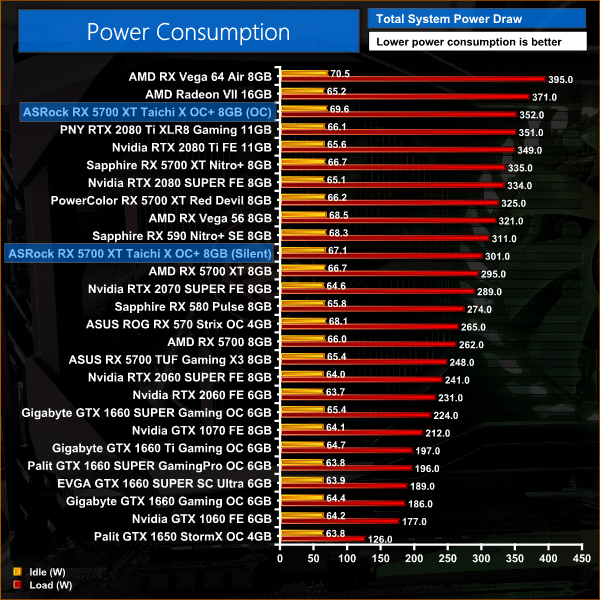
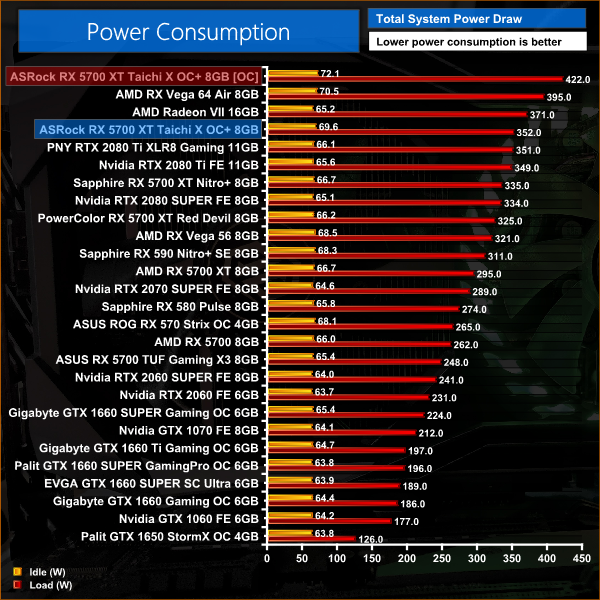
At first glance, I couldn't quite believe the power draw when using the OC BIOS – but after triple-checking, these are the correct figures, with total system power draw matching that of the RTX 2080 Ti. Clearly, ASRock pushing the clock speed as high as they did has a very detrimental effect on power draw, resulting in significantly worse efficiency for this Navi card.
Again, the Silent BIOS is much improved, with a 50W reduction in power draw versus the OC BIOS. This means the Silent BIOS barely pulls more power than the reference card.
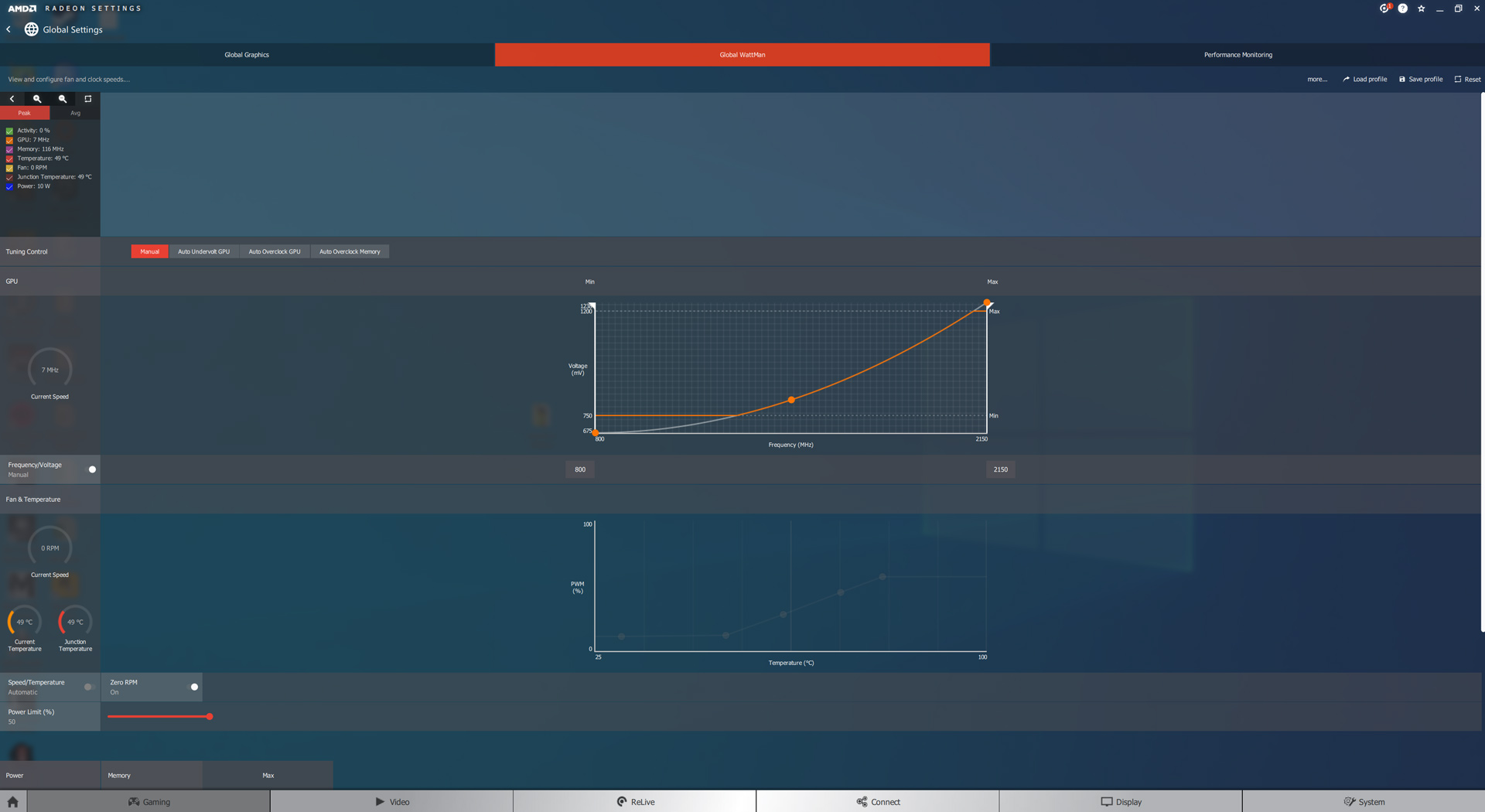
For our overclocking testing, we used AMD Wattman. We maximised the frequency curve, along with the power limit slider, and were also able to set the memory at its maximum frequency of 950MHz. We did all of our manual overclocking testing using the OC BIOS.
Average clock speed under load
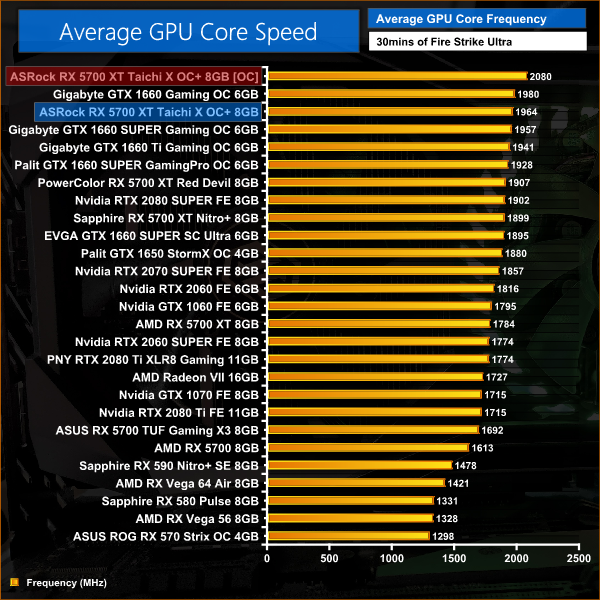
This saw our average clock speed rise to 2080MHz, a 6% increase over stock behaviour with the OC BIOS.
Games
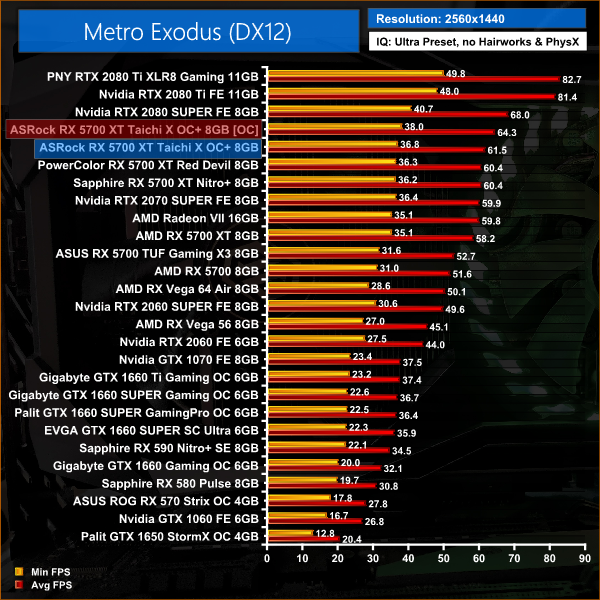
As expected, this didn't result in huge gains – Navi doesn't manually overclock too well as we know by now. Still, our 3DMark scores and real-game tests saw improvements between 4-6%, so it's not terrible – it's just not that great either.
Here, we take a further look at the impact of our overclock, looking at the increased temperatures, acoustics and power draw.
Temperatures
Acoustics
Power consumption
Overview
The card did not handle this overclock well. In terms of temperatures, GPU edge temperature rose by 10C, GPU junction temperature rose by 18C, and memory temperature also rose by 8C. This meant the fans spun up to 2130rpm, resulting in noise levels rising by 1.5dB. Lastly, power draw also increased to frankly ludicrous levels, with the system pulling over 420W at the wall. Considering we gained just 4-6% performance from this overclock, I really don't think it is worth the increased noise, power and temperatures.
After the launch of GTX 1660 SUPER, today our attention has turned back to AMD, and the RX 5700 XT. The card in question is from ASRock, and we have assessed the flagship RX 5700 XT Taichi X OC+.
We've seen a fair number of aftermarket Navi cards since the launch in July, but I have to say the Taichi is the most visually striking card I have seen. That's not necessarily a good or a bad thing, but I would expect opinion to be split on the design of this card due to its fairly aggressive and angular styling. Most users will install the card horizontally, though, so I've never been too concerned about the look of a card.
More important is just how the card performs, and the Taichi proved the fastest-running RX 5700 XT I've tested so far, with the highest out of the box clock speeds of any other partner card we've reviewed. This meant, averaged across all of our testing, the Taichi runs 5% faster than the AMD reference card, while it is 2% faster than both the Sapphire Nitro+ and the PowerColor Red Devil.
The Taichi's extra frequency also closes the gap on the RTX 2070 SUPER Founders Edition, as the ASRock card is just 3% slower. Versus the 2060 SUPER Founders Edition, the Taichi holds an 18% performance advantage, but as expected the 2080 SUPER Founders Edition is 16% faster.
That's all well and good, but it is clear ASRock has made some compromises to achieve the higher clock speeds with the Taichi. Primarily, power draw is through the roof for a RX 5700 XT, as we saw this card draw the same amount of power as a RTX 2080 Ti, despite being significantly slower. Put it another way, the Taichi draws 19% more power than the reference design, for only a 5% performance increase. It is simply much less efficient at these higher clock speeds.
The extra power also has a negative affect on the card in terms of noise levels. While the temperatures were fairly good, the Taichi does have to spin its fans fairly fast – around 2030rpm – to keep thermals down, resulting in a card that is certainly one of the louder custom RX 5700 XTs we have tested.
The saving grace for the Taichi is that is does come equipped with a Silent BIOS, which not only runs quieter, but it is much more power efficient too. The downside to this mode is that it also drops clock speed by around 120MHz, so you lose out on some performance, but to my mind it gives a much better balance of thermals, noise levels and power consumption.
For me, that means the Taichi would still be a decent buy, as long as the price was right. At the moment, though, the card is priced at £469.99 which I think is just too high for a RX 5700 XT – no matter how good it is. With both the Sapphire Nitro+ and the PowerColor Red Devil costing less than the Taichi, but offering a better balance of all around performance, I think the Taichi needs to be priced closer to £420 to be worth considering.
On top of that, cheaper custom RTX 2070 SUPER cards are available from £475, so for just £5 more that does make a lot more sense than a RX 5700 XT at £470. The RX 5700 XT Taichi X OC+ isn't a bad card, but it does need a decent price cut to stay competitive.

If you are interested in this card, it is currently available for £469.99 from Overclockers UK HERE.
Discuss on our Facebook page HERE.
Pros
- Fastest RX 5700 XT yet.
- Unique aesthetic.
- Decent temperatures.
- Bling-tastic RGB (for those who like that sort of thing.)
- Silent BIOS offers a good balance of noise, thermals and performance.
- Six video outputs.
Cons
- OC BIOS draws far too much power.
- Noise levels are relatively high for a RX 5700 XT using the OC BIOS.
- Current pricing is too high for a 5700 XT.
KitGuru says: Priced closer to £420, the Taichi X would be a good buy. At £470, it is priced too close to RTX 2070 SUPER.